

Table of Content
- Instagram Name vs. Username: Key Differences
- What Your Instagram Name Controls
- Why Your Username Matters More
- Instagram Naming Rules and Limits
- How to Change Your Instagram Display Name
- How to Change Your Instagram Username
- What Happens After a Username Change?
- How Names and Usernames Affect Instagram Search
- Why Instagram Won't Accept Your New Name
- What to Check Before Saving
- Verdict: Which One Should You Change?
Your Instagram name and username serve different purposes, even though both appear on your profile. Changing one affects how people recognize you, while changing the other can affect how they find, mention, and link to your account.
Both can be edited, but Instagram applies different rules to each. Understanding those differences helps you update your profile without creating confusion for followers or losing track of important links.
Instagram Name vs. Username: Key Differences
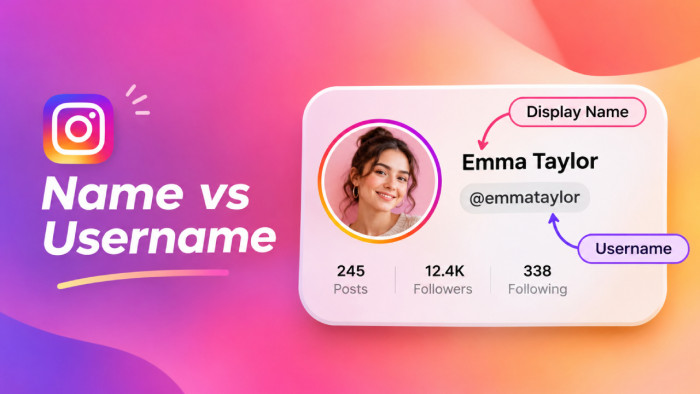
Instagram provides two identity fields: a display name and a username. Your display name explains who you are, while your username acts as your account's unique identifier.
Consider a food creator whose display name is Emma | Food Blogger and whose username is @emmabites. The name communicates what she creates, while the username determines her profile address: instagram.com/emmabites.
| Feature | Instagram Name | Instagram Username |
| Also known as | Display name | Handle |
| Must be unique | No | Yes |
| Character limit | 30 | 30 |
| Spaces allowed | Yes | No |
| Emojis allowed | Generally yes | No |
| Used in profile URL | No | Yes |
| Used for @mentions | No | Yes |
| Appears in search | Yes | Yes |
| Change restrictions | Usually twice in 14 days | Availability and account restrictions |
The distinction matters because a display-name change adjusts your profile's presentation, while a username change affects its public address.
What Your Instagram Name Controls
Your Instagram display name appears beneath your profile picture and above your bio. Unlike a username, it does not need to be unique, meaning multiple accounts can use the same name.
This field is useful for communicating your profession, niche, location, or brand category. A photographer might choose "Aman | Wedding Photographer," while a business could use "Bloom Studio | Home Decor."
Adding relevant information makes the profile easier to understand, particularly for visitors who discover it through search.
However, a name containing too many keywords or decorative characters can become difficult to read. The goal is to describe your identity clearly, not fill every available character.
Why Your Username Matters More
Your username is the unique handle associated with your Instagram account. It appears at the top of your profile, alongside posts, and in mentions and tags.
It also determines your profile URL. Someone using @thecoffeediary has the address instagram.com/thecoffeediary.
Unlike a display name, this identifier often appears outside Instagram on websites, business cards, packaging, email signatures, and other social media platforms.
Changing it can therefore affect existing references to your account. Although your followers and posts remain associated with the same profile, people using an outdated handle or link may struggle to find you.
For established creator and business accounts, usernames are best treated as long-term identifiers rather than temporary profile descriptions.
Instagram Naming Rules and Limits
Both Instagram names and usernames generally have a maximum of 30 characters, but their formatting rules differ.
Username requirements include:
● Usernames can contain letters, numbers, periods, and underscores, but they cannot include spaces, emojis, or hyphens.
● Each username must be unique, meaning an existing handle cannot be used by another account.
● Consecutive periods and usernames ending with a period are not accepted.
● Names that impersonate individuals or organizations can violate Instagram's policies, even if their formatting is technically valid.
For instance, @emma.bakes and @emma_bakes follow acceptable formats, while @emma bakes and @emma-bakes contain unsupported characters.
Display names are more flexible and can include spaces, capital letters, and many special characters. However, Instagram may still reject names that violate its policies.
How to Change Your Instagram Display Name
Updating your display name does not require finding an unused name because multiple accounts can share identical display names.
Follow these steps:
1. Open Instagram and tap your profile picture in the bottom-right corner.
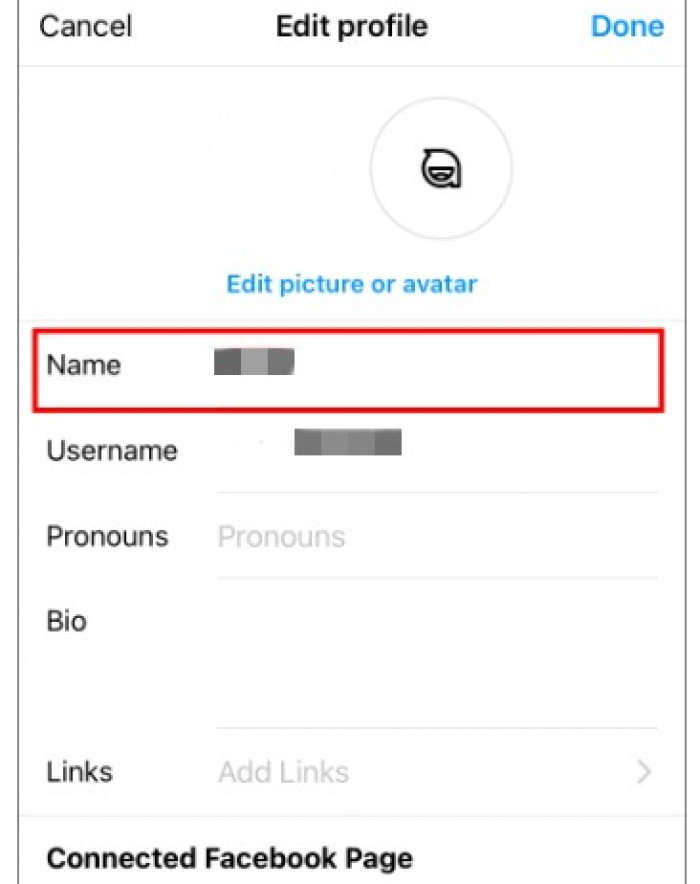
2. Select Edit profile and open the Name field.
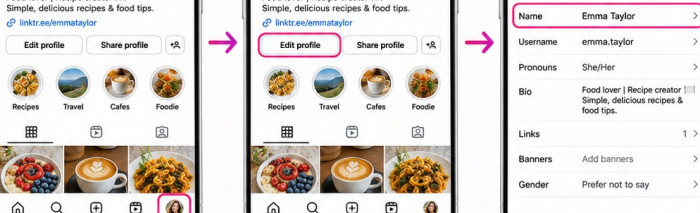
3. Replace your existing name with the preferred text.
4. Tap Done or the available save option.
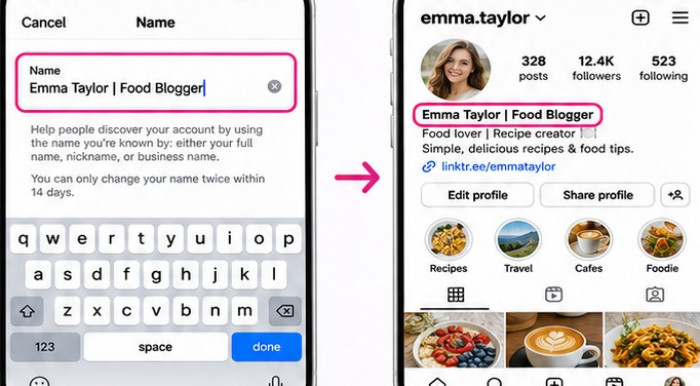
5. Return to your profile to confirm the updated name appears correctly.
The exact interface may differ depending on the app version or whether profile information is managed through Accounts Center. Changing your display name does not modify your username, profile address, followers, or published content. However, Instagram generally limits display-name changes to twice within 14 days, so check the spelling before saving.
How to Change Your Instagram Username
Changing a username requires an additional check because the new handle must be available. The process is straightforward:
1. Open your Instagram profile and select Edit profile.
2. Tap the Username field.
3. Remove the existing handle and enter your preferred username.
4. Check whether Instagram accepts the new handle.
5. Save the change and confirm your updated profile address.
If Instagram rejects the username, check whether it is already taken or contains unsupported characters. Some accounts may also require additional review before a username change becomes effective.
Once the change is approved, your profile URL reflects the new handle. Existing followers and published content remain associated with your account.
Instagram's 14-Day Name Change Rules
Instagram's naming restrictions are frequently misunderstood because the same 14-day period is discussed for different situations. For display names, Instagram generally allows two changes within 14 days. Once that limit is reached, further edits may be temporarily unavailable.
Username changes follow different conditions. There is no equivalent universal two-change limit, but availability checks, security restrictions, and account reviews can affect the process.
Instagram has also supported a limited opportunity to revert to a previous username. However, the ability to recover an old handle should never be assumed.
For businesses and creators, this distinction is important. Changing an established username without planning could leave you unable to reclaim it later, especially if Instagram no longer makes it available to your account.
What Happens After a Username Change?
Changing your username does not reset your Instagram account. Your existing followers, posts, Reels, messages, and account history remain connected to your profile.
The more significant consequences involve links and recognition. Your previous profile address may stop working reliably, while old references to your handle can become outdated.
Consider a business changing from @bloomstudio to @bloomhomedecor. Its followers remain, but a website button or printed QR code using the original address may no longer direct visitors correctly.
After changing your username, review:
● Website links, landing pages, and contact sections containing your previous Instagram address.
● Business cards, packaging, email signatures, and promotional graphics displaying your old handle.
● QR codes and social media profile links that direct users to your account.
● Connected marketing tools and scheduled content containing outdated account references.
For established accounts, a short announcement can also help followers recognize the new username.
How Names and Usernames Affect Instagram Search
Instagram considers multiple signals when displaying search results, including the words entered by users, profile information, account activity, and popularity. Both your display name and username can contribute to how easily people discover your profile.
Compare these two examples:
| Profile element | Generic identity | Descriptive identity |
| Name | Riya | Riya | Makeup Artist |
| Username | @riya_274 | @makeupbyriya |
| Immediate context | Limited | Clearly identifies the niche |
The descriptive profile communicates its purpose more effectively, particularly to someone searching for makeup-related accounts. However, adding keywords does not guarantee higher search rankings. Instagram evaluates several signals, and keyword repetition alone cannot ensure greater visibility.
A practical approach is to keep the username recognizable while using the display name to communicate your profession, content category, or relevant location.
Why Instagram Won't Accept Your New Name
Instagram may reject a name or username change for several reasons. The correct solution depends on the restriction displayed.
Common problems include:
● Username already taken: Choose a meaningful variation using a relevant word, period, or underscore instead of adding random numbers.
● Unsupported characters: Remove spaces, emojis, hyphens, and other symbols that Instagram does not permit in usernames.
● Display-name limit reached: Wait until the restriction period ends rather than repeatedly attempting to save changes.
● Account review required: Follow Instagram's instructions if the change requires additional verification or approval.
● Temporary technical problems: Update Instagram, check your connection, and retry after confirming the proposed name meets its requirements.
An inactive account holding your preferred username does not automatically make that handle available. Instagram generally does not release usernames simply because they appear unused.
Avoid services promising guaranteed access to taken usernames, particularly those requesting account credentials.
Choosing a Name That Works Long Term
A recognizable Instagram identity should remain useful as your account grows. This is particularly important for creators and businesses expanding into additional content categories or social platforms. Choosing a username that fits your niche can help maintain that consistency without requiring frequent changes.
Three principles are worth following:
● Keep the username readable: A handle such as @riya.designs is easier to communicate than @riya_designs_8472, especially when the additional numbers have no clear meaning.
● Avoid overly restrictive wording: A creator using @riyaonlyreels may later expand into photography, tutorials, or longer videos. A broader identity leaves room for those changes.
● Maintain brand consistency: Using similar usernames across Instagram, TikTok, YouTube, and other platforms makes your accounts easier to recognize.
The display name can provide additional context without complicating the handle. For instance, @studioamira can remain the username while "Amira | Brand Designer" appears as the display name.
This combination keeps the account recognizable while clearly communicating its purpose.
What to Check Before Saving
Before updating an established Instagram identity, consider whether the change is necessary and what it might affect. A display-name adjustment is usually sufficient when the goal is to explain your profession, content, or brand more clearly.
If you are changing your username, review the following details:
● Confirm the new handle is readable, memorable, and appropriate for your long-term identity.
● Check whether it matches your business name or usernames on other social platforms.
● Identify website links, QR codes, and promotional materials requiring updates.
● Consider informing existing followers when the change is substantial.
● Verify that the new username follows Instagram's formatting requirements and is available.
These checks are particularly valuable when your existing account already attracts customers, website visitors, or regular followers through external links.
Verdict: Which One Should You Change?
Your Instagram name and username serve different purposes, so the right choice depends on what you want to update.
Change your display name when you want to clarify your profession, add a relevant keyword, or update how your identity appears without affecting your account's address.
Change your username when your existing handle is outdated, difficult to remember, or no longer aligned with your personal or business identity.
For most users, keeping a consistent username while adjusting the display name is the more practical approach. It allows the profile to evolve without repeatedly changing the identifier people use to find and mention the account. A well-chosen Instagram identity should be recognizable, easy to communicate, and relevant beyond the next profile update.