

Table of Content
- How Instagram Search Works
- Searchable vs Non-Searchable Bio Fields
- The Name Field: Your Primary Keyword Slot
- Choosing Keywords People Actually Search
- Username Strategy
- Writing a Keyword-Rich Bio in 150 Characters
- Category Label and Account Type
- Mistakes That Hurt Search Visibility
- Bio Makeovers by Niche
- Final Word
Your Instagram bio is 150 characters long, and Instagram treats every one of them as searchable text. The name field above it carries even more weight. Together they’re the closest thing your account has to a page title and description, and they decide whether you appear when someone types your service or niche into the search bar.
Hashtags used to carry that job. Keyword search now does most of it, and since Instagram opened public profiles to Google, the words on your profile count outside the app too. This guide works through every part of the profile that search can read, what to put there, and how to tell if it’s working.
How Instagram Search Works
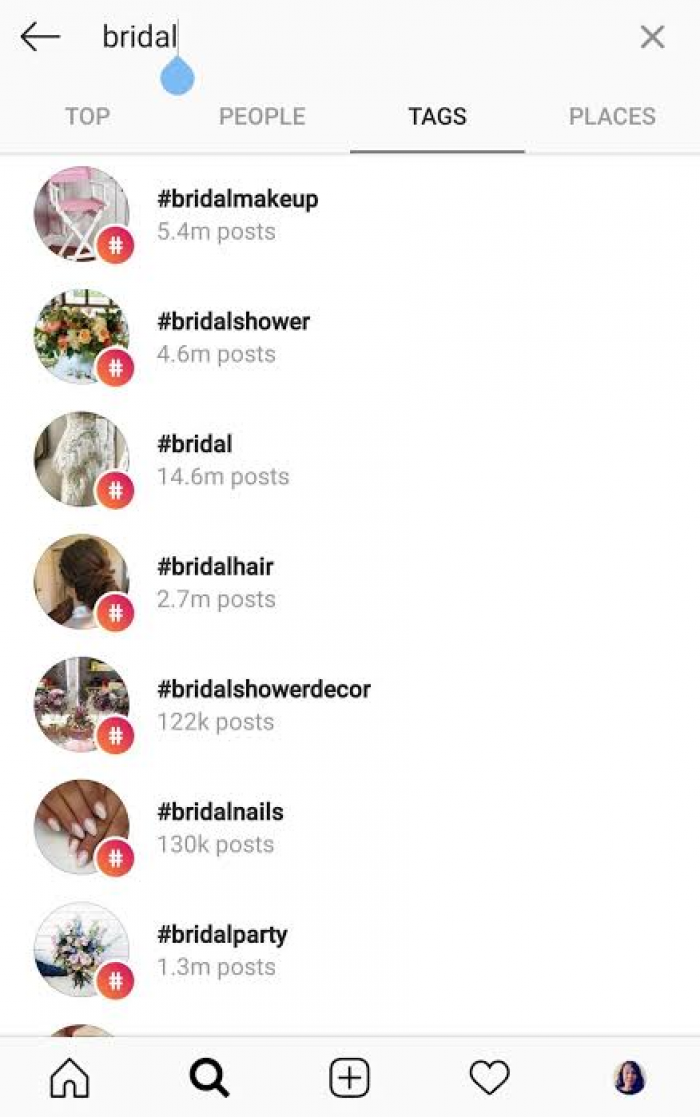
Instagram has publicly described three factors behind search ranking: how closely your text matches what was typed, what the searcher has done before (who they follow, what they tap on), and how popular your account or post is. Only the first one is fully in your hands. The other two are earned over time, which is why a brand-new account with a perfect bio still won’t outrank an established one for a broad term.
Text matching is broader than people assume. Instagram checks the query against usernames, name fields, bios, captions, hashtags and places. Results aren’t limited to accounts either. A search for “vegan skincare” returns profiles, posts and Reels in separate tabs, so your profile competes for the Accounts tab while your content competes elsewhere.
The second engine arrived more recently. Since July 2025, Instagram SEO also covers Google, because public posts and profiles can now be indexed there. That applies to public professional accounts, and it means a vague bio costs you in two places at once.
Searchable vs Non-Searchable Bio Fields
Not every part of the profile sends a search signal. Here’s what Instagram actually reads, with the limits you have to work inside.
| Field | Instagram search | Google indexing | Limit | Worth knowing |
| Username (@handle) | Yes | Yes | 30 characters | Hard to change later without losing recognition |
| Name field (bold line) | Yes, weighted | Yes | About 64 characters | Can only be edited twice every 14 days |
| Bio text | Yes | Yes | 150 characters | Keywords here support the name field, not replace it |
| Category label | Yes | Yes | Picked from a list | Only on professional accounts |
| Link | No | No | Up to 5 links | Affects conversion, not ranking |
| Pronouns | No | No | — | Display only |
One thing the table hides: location is a search signal, but only when it’s written as text in the name field or bio. Setting a business address helps people find you on the map, not in keyword search.
The Name Field: Your Primary Keyword Slot
Of everything on the profile, the name field pulls the most weight in account search. It’s the bold text, not the @handle, and most people waste it on their own name alone. If your handle is @sarahkmakes and your name field says “Sarah K,” you’ve told Instagram nothing it didn’t already know.
The working formula is simple: your name or brand, then a separator, then the one phrase you most want to be found for. “Sarah K | Ceramic Jewellery” or “Beanstalk | Toronto Coffee Roasters”. The keyword goes after the name for most accounts, but if you’re unknown and your service is what people search for, flip it: “Wedding Photographer | Priya Nair”. A perfect Instagram bio should support that positioning rather than repeat the same keywords.
There’s a trade-off here that nobody mentions. Loading the name field with a keyword makes your profile look like a listing rather than a person. That’s fine for a service business; it’s a harder call for a personal brand. Treat it like a decision, not a default. And because the name field can only be changed twice every 14 days, settle on a phrase before you start editing.
Choosing Keywords People Actually Search
The mistake most guides make is sending you to Google keyword tools. Instagram search intent is different. People on Google type “best running shoes for flat feet”. People on Instagram type “running coach” or “marathon training” because they’re looking for a person, an account, a feed to follow. Your keywords need to describe a role or a style, not a product spec.
The best research tool is the Instagram search bar itself. Instagram gives you the answer directly from its own search suggestions as you type. Start with your category (“nutritionist”) and watch what autocomplete adds: “nutritionist for athletes”, “nutritionist London”, “nutritionist PCOS”. Those suffixes are real queries from real users.
Three more sources worth twenty minutes each:
● Open the top ten accounts that already rank for your main term and copy their name fields into a spreadsheet. Patterns show up fast, and so do gaps nobody has claimed.
● Read your own DMs and comments for the words people use to describe you. If clients keep writing “I need someone who does small-space interiors,” that phrase belongs in your bio, not “spatial design solutions”.
● Check the Accounts tab for a term you’re considering. If the first results are all celebrities or brands with millions of followers, pick a narrower phrase you can realistically rank for.
Aim for one primary phrase and two or three supporting ones. More than that and you’re writing for the algorithm instead of the person reading.
Username Strategy
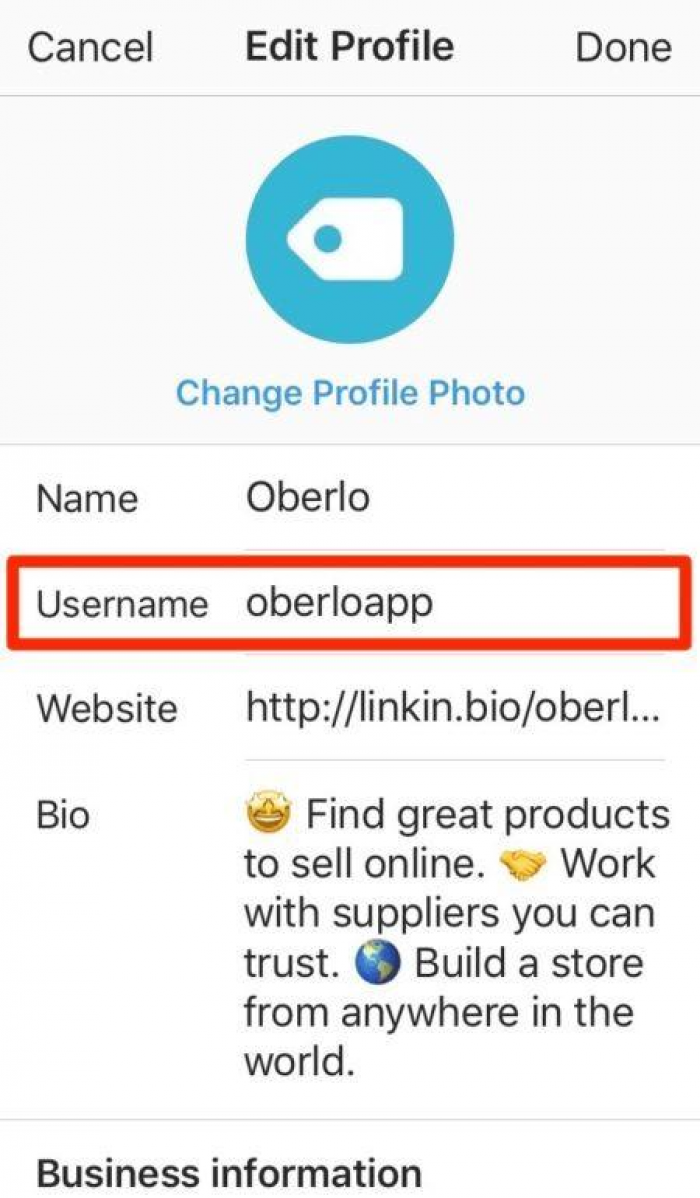
The username is searchable, and if you’re trying to rank for a specific keyword, putting it in either the username or name field gives you a direct advantage. But the username has a cost the name field doesn’t: it’s your handle in every tag, mention and collab, and changing it later breaks links and confuses anyone who knew the old one.
The practical rule is to put the keyword in the username only if you’re starting fresh or your brand name is the keyword. A bakery called “Crumb” is better off as @crumbbakery than @crumb. An established personal account should leave the handle alone and do the work in the name field, where you don’t need to repeat what’s already in the username, since Instagram already reads that.
Writing a Keyword-Rich Bio in 150 Characters
You get 150 characters, which is about three short lines. The structure that fits keywords without sounding stuffed is: what you do and for whom, one proof point, one call to action. Each line carries a different job, and the keywords sit naturally in the first.
Here’s an annotated example for a fitness account:
Strength coach for women over 40 ← primary keyword plus audience
300+ clients, 12 yrs certified ← proof, no keyword needed
Free 4-week plan below ↓ ← CTA pointing at the link
The first line does the search work. “Strength coach” and “women over 40” are both terms people type. The second line earns trust without wasting characters on SEO. The third line turns a visit into a click.
Two rules keep this readable. Write it as sentences or clean fragments, not a comma-separated keyword dump; Instagram matches phrases inside sentences perfectly well. To fit more value into your bio, prioritise clear wording over decorative filler. And resist emojis as replacements for words. A dumbbell icon isn’t indexed, “strength coach” is. Emojis work as separators or line decoration, not as nouns.
If you’re torn between two keyword phrases for the first line, pick the one that describes who you’re for rather than what you offer. Audience terms (“for first-time founders”, “for new parents”) are searched more often than most people expect and face less competition.
Category Label and Account Type
Switching to a professional account (Business or Creator) unlocks the category label, the small grey text under your name. It’s picked from Instagram’s list rather than typed freely, but it is a search signal and it’s visible to Google.
Choose the most specific option that still fits. “Personal Trainer” beats “Health/Beauty”; “Florist” beats “Local Business”. A vague category tells the system nothing, and a mismatched one (a photographer listed as “Artist”) sends a contradictory signal. You can hide the label from display while keeping it set, though showing it is usually better, since it reinforces the keyword in your name field for anyone skimming.
Bio Link and Call-to-Action Alignment
The link has no effect on where you rank. It has a large effect on whether ranking does anything for you. Someone who found you by searching “cake decorating classes” and landed on a link reading “Shop my favourites” will leave; the keyword that brought them and the action you ask for have nothing to do with each other.
Match them. If your name field targets a service, the link should go to that service. If you run multiple links, the first one should correspond to your primary keyword, and the CTA line in the bio should use similar wording to the search term. Think of it as a small landing page: the search query, the bio, and the link should read like one continuous sentence.
Keyword Signals Beyond the Bio
A profile with the right words and a feed that never repeats them is a weak signal. Instagram infers what an account is about from everything it can read, and in 2025–2026 that includes captions, on-screen text, spoken audio via auto-captions, alt text, bio and name field. Consistency across these is what makes a keyword stick.
The places that matter most, in rough order of impact:
● Captions, especially the first line. Put the topic phrase in the opening sentence rather than burying it after three paragraphs of story.
● Text overlays and spoken words in Reels. Instagram transcribes audio, so saying “today’s strength session” counts.
● Alt text on posts. Describe what’s in the image in plain language and include the topic naturally, but don’t stuff it with keywords, since that undermines accessibility.
● Highlight titles and pinned posts. “Client Results” and “Classes” are more useful than “✨” and “Us”.
None of these substitute for the bio. They confirm it.
Mistakes That Hurt Search Visibility
Most of these look harmless on their own. Together they quietly make an account unfindable.
● Using the name field to repeat the username, so two of your three strongest fields say the same thing.
● Describing yourself with personality words (“dreamer, maker, coffee addict”) that nobody has ever typed into a search bar.
● Changing keywords every week, which prevents any single term from building history against your account.
● Keeping a personal account for a business, which blocks the category label and keeps you out of Google.
● Setting the account to private. Private profiles still appear in account search, but their content doesn’t, and Google can’t see them at all.
● Writing the bio entirely in emojis or stylised Unicode fonts, which search can’t parse.
Testing and Measuring Results
Instagram Insights gives you two numbers worth watching: profile visits, and accounts broken down by source, where “search” appears as its own line for reach on content. Note both before you change anything.
Then change one thing at a time. If you edit the name field, bio and category on the same day, you won’t know which one moved the needle. Make one change, leave it three to four weeks (search history takes time to accumulate), and compare. Expect a lag; ranking rarely shifts the same week you edit.
A simple manual check works alongside the data. Log out or use a second account, search your target phrase, and note where you appear in the Accounts tab. Do it fortnightly and keep a log. Position changes are more telling than a single reach number.
Bio Makeovers by Niche
Theory is easier to see through examples. Each pair below keeps the person’s voice but gives search something to match.
| Niche | Before | After |
| Fitness coach | Name: Dan Reyes. Bio: “Lifting heavy, living light. Online coaching 💪 DM me” | Name: Dan Reyes · Online Strength Coach. Bio: “Online strength coaching for busy dads. 200+ transformations. Free starter plan ↓” |
| Local bakery | Name: Flour & Co. Bio: “Good things baked daily ☕🥐” | Name: Flour & Co · Leeds Sourdough Bakery. Bio: “Sourdough, pastries and wedding cakes in Leeds. Open Tue–Sun. Order for collection ↓” |
| B2B consultant | Name: Meera S. Bio: “Helping teams do their best work” | Name: Meera S · Fractional CMO for SaaS. Bio: “Fractional CMO for early-stage SaaS. Ex-HubSpot. Book a strategy call ↓” |
In every case the change is the same: the name field gains a role or service, the bio gains a location or audience, and the CTA points at something concrete. Nothing clever was added. Vagueness was removed.
Optimization Checklist
Run your own profile against these before you touch anything.
● Does the name field contain a keyword that isn’t already in the username?
● Does the bio’s first line say what you do and who it’s for, in words a stranger would search?
● Is there a location in text if you serve a local area?
● Is the account professional, with the most specific category available?
● Does the link match the keyword in the name field?
● Are emojis decorating words rather than replacing them?
● Have you left the current version alone long enough to measure it?
Final Word
Instagram search doesn’t reward wit. It rewards accounts that describe themselves the way strangers would describe them. The profile that says “Brooklyn tattoo artist, fine line and botanical” will outrank “ink and intention ✨” every time, not because the algorithm is crude, but because it’s doing what any search engine does: matching words to words.
The uncomfortable part is that optimizing for search means giving up some of the mystique people enjoy writing into their bios. The useful part is that it takes about an hour, costs nothing, and keeps working every day after.