

Table of Content
Creating a convincing AI image or video often starts with finding the right prompt. A well-written instruction can control lighting, composition, camera movement, visual style, and small details that would otherwise require several attempts to correct.
Dedicated prompt libraries make it easier to discover and adapt existing instructions. Some offer free collections with visual previews, while others sell specialized prompts designed for particular AI models. Here are eight platforms worth exploring for AI image and video prompts, including their strengths, limitations, and pricing.
Best Prompt Platforms at a Glance
Not every prompt library serves the same purpose. Some are better for visual experimentation, while others focus on commercial content, model-specific instructions, or ready-made creative templates.
| Platform | Best for | Pricing |
| PromptBase | Premium, reusable visual prompts | Free browsing; paid prompts from $2.99 |
| PromptHero | Community-generated image inspiration | Free; paid from $16/month, annual billing |
| Fulhar | Free image and video prompt discovery | Free prompt library |
| PromptPat | Exploring reusable creative prompts | Free |
| AIPromptary | Finding prompts for specific AI models | Free public prompts |
| PromptDawn | Detailed prompts with settings and captions | Free |
| DesignerBox | Commercial and model-specific prompt packs | Free library; generation from $6/month, annual billing |
| Promptaholics | Structured prompts across AI tools | Free |
1. PromptBase
Best for: Purchasing specialized image and video prompts
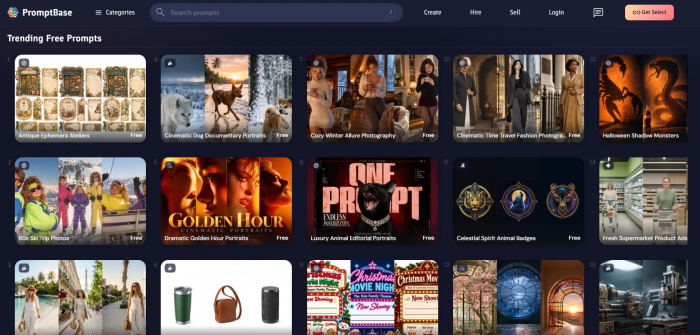
PromptBase is an AI prompt marketplace where creators list and sell reusable instructions for different generative AI models. Its main appeal is the ability to find prompts built around a specific output rather than searching through general examples.
The marketplace includes prompts for image generation, video creation, graphic design, product photography, and other creative tasks. Each listing typically includes a preview of the expected result, making it easier to judge whether the prompt matches the intended direction before purchasing.
Available prompt categories
| Category | Typical applications |
| AI photography | Portraits, product images, editorial photography |
| Graphic design | Logos, posters, brand visuals, illustrations |
| AI video | Cinematic scenes, animations, creative video concepts |
| Artistic styles | Character designs, 3D artwork, stylized compositions |
What makes PromptBase useful?
● Specialized prompt listings: Creators can find prompts intended for narrowly defined visual styles, such as luxury product photography or consistent 3D character designs.
● Model-specific browsing: Listings identify the intended AI model, helping buyers avoid purchasing instructions that require extensive adaptation.
● Reusable creative templates: Many products accommodate changes in subjects, colors, settings, or other details while preserving the core style.
Where it falls short
PromptBase is less appealing to users who want an entirely free collection. Buying several prompts individually can become expensive, and the quality depends on the seller. A polished preview does not guarantee identical results with every generation.
Pricing: Free marketplace browsing and selected free prompts. Paid prompts are available from around $2.99, with many individual listings priced between $3.99 and $9.99. PromptBase Select starts at $14/month with annual billing or $19/month with monthly billing.
2. PromptHero
Best for: Discovering prompts through AI-generated artwork
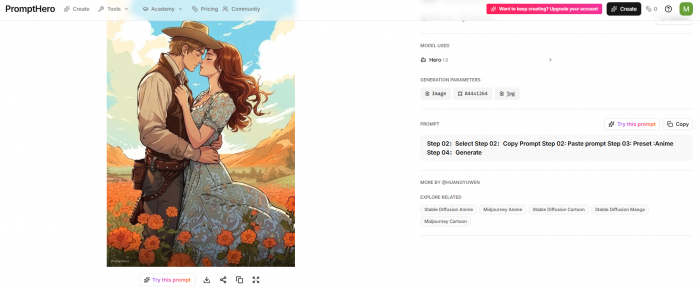
PromptHero approaches prompt discovery through visual examples. Instead of beginning with a long list of written instructions, users can explore AI-generated images and inspect available prompt information associated with the results. This makes the platform particularly useful for understanding how different combinations of subjects, lighting, artistic styles, and compositions influence an image.
Its searchable gallery can also help creators identify styles that are difficult to describe from scratch, including cinematic portraits, surreal artwork, architectural scenes, and detailed illustrations.
What creators can explore
● Visual prompt examples: Browse generated images and examine the wording used to describe subjects, textures, environments, and artistic effects.
● Model-oriented collections: Discover examples associated with different AI generation systems and study how their prompting approaches differ.
● Style exploration: Compare photographic realism, illustration, fantasy, digital art, and other visual approaches before developing original prompts.
A practical way to use it
Someone creating a cinematic nighttime photograph could begin by searching for rainy streets or nighttime portraits. Rather than copying every detail, they could examine how different prompts describe reflections, light sources, camera framing, and atmospheric effects.
This makes PromptHero particularly useful for learning how descriptive language translates into visual choices.
Limitations: Not every community submission contains complete generation details. Model updates, hidden settings, and reference images can also make published results difficult to reproduce.
Pricing: Free access with limited generation features. Paid Starter plans begin at $16/month with annual billing. Paid tiers primarily expand generation capabilities rather than simply unlocking prompt browsing.
3. Fulhar
Best for: Finding free, ready-to-copy image and video prompts
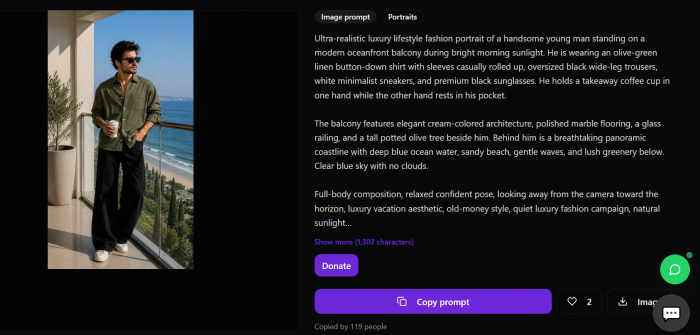
Fulhar offers a searchable library of AI image and video prompts, pairing written instructions with examples of the results they produced. The library is free to browse and does not require an account simply to copy prompts.
One advantage is its coverage of both still images and moving visuals. Users can explore photographic compositions, commercial advertisements, illustrations, posters, storyboards, and video concepts without switching between separate prompt collections.
Prompt categories worth exploring
| Prompt collection | Creative use |
| Product photography | Ecommerce images, studio scenes, advertisements |
| Portraits and photography | Fashion, lifestyle, editorial compositions |
| Posters and illustrations | Marketing graphics, artwork, creative designs |
| Storyboards and videos | Cinematic sequences, shot concepts, visual narratives |
Why Fulhar is practical
● Searchable prompt text: Users can search for specific visual details such as camera lenses, lighting techniques, color palettes, or artistic styles rather than relying entirely on category names.
● Prompt-to-result comparison: Each example helps users understand the relationship between written instructions and generated visuals.
● Cross-platform use: The prompts are plain text and can be adapted for compatible image or video generators without requiring generation through Fulhar itself.
What to consider
Fulhar is most valuable as a source of starting points. Copying the same prompt into two different AI models may produce noticeably different results, especially when the original instructions depend on a particular model's interpretation. The platform also offers its own credit-based generation features, which are separate from the free prompt library.
Pricing: Free to browse, search, and copy prompts without registration. AI generation through Fulhar uses a separate credit system.
4. PromptPat
Best for: Exploring creative prompts for AI-generated content
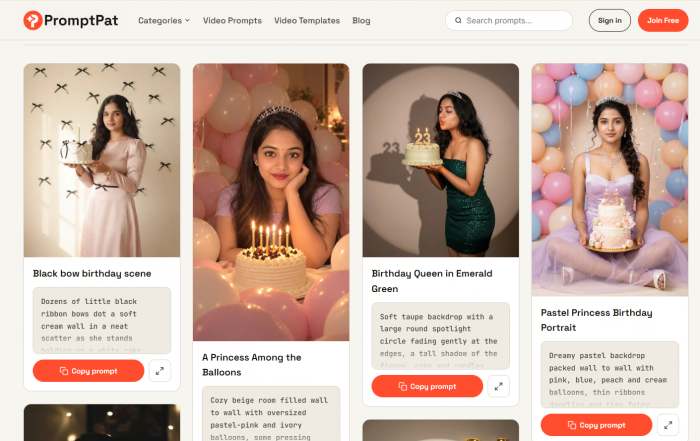
PromptPat is a prompt-focused website for people looking for ideas and written instructions to develop AI-generated content. It is worth exploring alongside established prompt marketplaces and community galleries, particularly for creators who prefer to begin with an existing prompt rather than write every instruction from scratch.
The main consideration with any prompt collection is whether its instructions can be adapted to the image or video generator being used. A useful prompt should communicate more than a general subject. It should provide enough direction to control the intended composition, style, atmosphere, or movement.
What to look for in its prompts
| Prompt element | Creative application |
| Subject descriptions | Defining characters, objects and environments |
| Visual direction | Establishing composition, lighting and artistic style |
| Customizable details | Adapting prompts for different projects |
| Motion instructions | Describing camera movement and scene progression for video |
How creators can make use of PromptPat
● Developing visual concepts: An existing prompt can provide a starting point for working out a subject, setting, composition, or creative direction before generating an image.
● Adapting instructions: Creators can modify descriptive elements to suit a different product, character, environment, or artistic style rather than relying on an unchanged template.
● Building reusable prompts: Successful instructions can be refined and saved with relevant model settings, making them more practical for repeated creative work.
What to consider
The usefulness of any PromptPat entry will depend on the amount of detail it provides and its compatibility with the chosen model. People should check the full instructions and any available previews rather than assuming that copying a prompt will reproduce a particular result.
Pricing: Free to browse, search, and copy prompts without registration.
5. AIPromptary
Best for: Finding prompts tailored to specific image and video generators
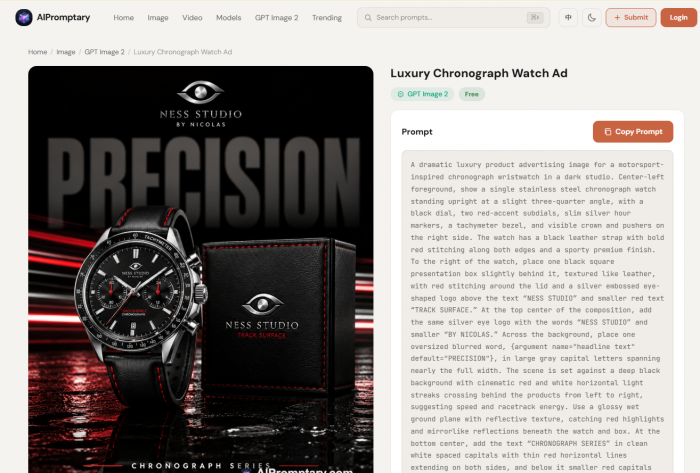
AIPromptary is a free prompt discovery platform organized around AI models, creative subjects, and visual styles. Its library covers both image and video instructions, with examples intended for generators such as Midjourney, FLUX, Gemini Image, Sora, Veo, Kling, and Runway.
The main benefit is its model-focused organization. Rather than treating all prompts as interchangeable, it allows users to explore instructions relevant to their chosen tool, especially since AI video generators can differ in how they interpret prompts and produce results.
What the library covers
| Image prompts | Video prompts |
| Portraits and editorial photography | Cinematic movement and camera direction |
| Product imagery and advertisements | Product reveals and short sequences |
| Illustrations, posters and 3D artwork | Atmospheric scenes and transitions |
| Logos and abstract compositions | Storyboards and narrative shots |
Useful features for creators
● Generated output previews: Prompts are presented alongside example visuals, helping users evaluate the intended result before copying the instructions.
● Model-based discovery: Separate collections make it easier to find instructions designed for a particular generator rather than manually filtering irrelevant examples.
● Creative customization: Users can take an existing prompt and adjust its composition, atmosphere, subject, or motion instructions to fit a different project.
An important distinction
AIPromptary is useful for comparing creative approaches, but its prompts should not be treated as universally compatible. An image prompt designed for a photographic model may not translate directly into a video generator, where timing and movement require additional descriptions.
The size and variety of collections also differ between supported models.
Pricing: Free public prompt browsing and copying. Some account-based community activities require registration. Any fees charged by external AI generators are separate.
6. PromptDawn
Best for: Detailed prompts with recommended settings and publishing material
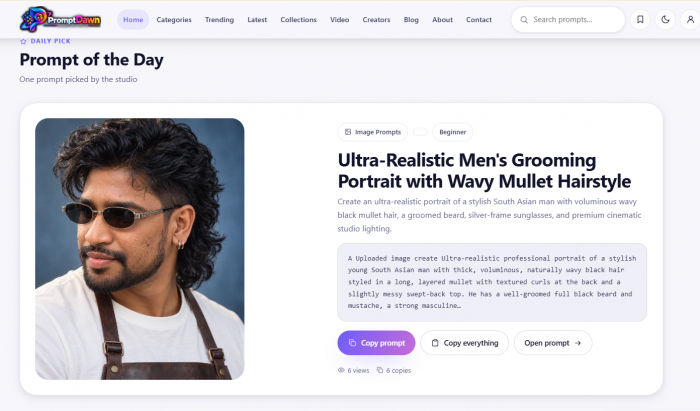
PromptDawn is built around complete creative instructions rather than short descriptive phrases. Its searchable library covers AI image and video generation, with entries that include additional information to help creators understand and adapt each prompt.
A notable feature is the inclusion of supporting material such as negative prompts, model recommendations, captions, and hashtags. These additions are especially useful for people creating visuals for social media or marketing content.
What a prompt may include
| Element | Why it matters |
| Main prompt | Defines the subject, setting, composition and visual style |
| Negative prompt | Identifies unwanted visual elements where supported |
| Model settings | Provides generation guidance for compatible tools |
| Captions and hashtags | Supplies accompanying text for publishing workflows |
Where PromptDawn stands out
● More complete instructions: Prompts are written as creative briefs containing details about lighting, composition, mood, and visual presentation.
● Model compatibility information: Entries identify the generators they have been tested against, helping users choose a more suitable starting point.
● Separate copying options: Users can copy the main prompt, negative prompt, captions, hashtags, or a combined set depending on what they need.
What to keep in mind
Not every model uses negative prompts in the same way. Some diffusion-based generators support explicit negative-prompt controls, while conversational image generators may interpret exclusions through ordinary instructions.
The added captions and hashtags are convenient, but they should still be reviewed for relevance before publishing.
Pricing: Completely free to browse, preview, and copy prompts. No account or paid subscription is required for the public library.
7. DesignerBox
Best for: Commercial image and video prompt collections
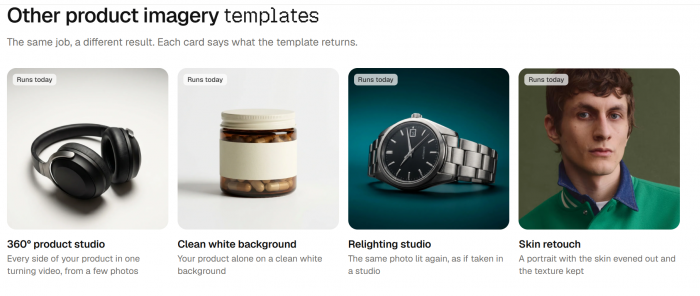
DesignerBox combines an AI creative workspace with a dedicated prompt library. Its public collection contains ready-to-copy prompts arranged into model-specific and use-case-based packs.
The platform is particularly relevant to marketers, ecommerce businesses, and designers who create product visuals, advertisements, lifestyle photography, and branded video content. Unlike larger community galleries, DesignerBox places more emphasis on explaining how prompts are constructed for particular production tasks.
Featured prompt collections
| Collection | Common application |
| Product photography | Studio lighting, product displays, commercial imagery |
| UGC advertisements | Creator-style promotional visuals and video concepts |
| Cinematic video | Camera movement, shot direction and atmospheric scenes |
| Model-specific packs | Instructions optimized for different image and video generators |
What makes DesignerBox useful?
● Prompt construction guidance: Collections include explanations of the prompt patterns used for particular models, helping users learn how to write their own variations.
● Commercial applications: Examples focus on actual content requirements such as advertising, product imagery, brand visuals, and promotional videos.
● Model-specific instructions: Prompt packs distinguish between models that respond better to descriptive photography language and those that require shot-based video direction.
What limits its appeal?
The public collection is smaller than some of the broader prompt libraries. That can be useful for focused commercial work, but less suitable for users seeking a large assortment of experimental artistic styles. DesignerBox also promotes its own generation workspace. Users only interested in copying prompts do not need a paid generation subscription.
Pricing: Free prompt library and a free generation plan. Paid generation starts at $6/month with annual billing or $15/month with monthly billing. AI video generation requires the higher Premium tier, starting at $30/month with annual billing or $75/month monthly.
8. Promptaholics
Best for: Free structured prompts across different AI tools
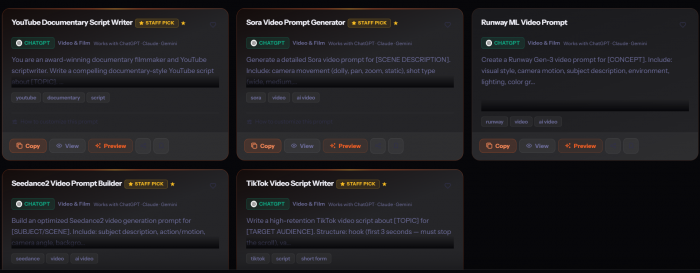
Promptaholics is a broad AI prompt library covering writing, marketing, business, images, videos, and other tasks. Although it is not exclusively dedicated to visual generation, its model-specific collections make it relevant to creators looking for reusable image and video instructions.
The platform organizes prompts through categories and AI-tool filters, allowing users to narrow their searches rather than browsing one enormous collection of unrelated instructions. Its emphasis is on structured prompts that clearly communicate what a model should produce.
Relevant collections
● Image generation: Prompts for creating digital art, illustrations, photographs, and other visual assets using compatible models.
● Video creation: Instructions associated with video-generation tools, including prompts intended for cinematic scenes and moving visuals.
● Creative and marketing content: Prompts supporting advertisements, campaign ideas, social media visuals, and related creative tasks.
Why it deserves consideration
Promptaholics offers free access to its prompt library without requiring visitors to create an account. Its tool-based organization is convenient for people who already know which generator they intend to use.
It can also help users compare how instructions are structured across different AI applications. That matters because a prompt containing detailed artistic descriptions may work well for image generation but require a different structure for motion or narrative tasks.
Where it falls short: Since the library covers many subjects beyond visual content, it is less specialized than dedicated image and video collections. Users may need to filter carefully to find prompts suited to their creative work.
Pricing: Free prompt library with no subscription or signup required for public prompt access.
Free vs Paid Prompts
A paid prompt is not automatically better than a free one. The difference usually comes down to how much work is involved in understanding, adapting, and reproducing the intended result.
Free libraries are particularly helpful when exploring different styles or learning how image and video generators interpret instructions. Paid marketplaces can become worthwhile when a prompt delivers a specific, repeatable result that would otherwise require substantial experimentation.
| Factor | Free prompt libraries | Paid prompt marketplaces |
| Access | Usually available without payment | Individual purchases or subscriptions |
| Customization | Depends on prompt quality and detail | Often includes reusable templates |
| Previews | Common in visual prompt galleries | Usually included in product listings |
| Best use | Learning, experimentation, inspiration | Specialized and recurring production needs |
| Main concern | Inconsistent detail or compatibility | Cost and uncertain reproducibility |
Before purchasing a prompt, examine whether it depends on particular model settings, reference images, or proprietary features. Paying for descriptive text alone provides limited value if the same result can be achieved through a few adjustments to a free example.
Image Prompts vs Video Prompts
Image and video prompts share important elements, including subjects, environments, lighting, composition, and visual style. However, video generation introduces another challenge: describing what changes over time.
An image prompt describes a finished visual. A video prompt must also account for movement, camera behavior, scene progression, and sometimes audio.
Consider a simple product advertisement.
Image prompt example:
A premium black perfume bottle on a dark marble surface, soft golden rim lighting, delicate reflections, luxury commercial photography, centered composition, realistic glass texture.
This description concentrates on appearance, lighting, materials, and framing.
Video prompt example:
A premium black perfume bottle rests on dark marble. The camera slowly moves closer as warm golden light travels across the glass. A soft mist drifts behind the product while the bottle remains stationary. Smooth cinematic motion, realistic reflections, no abrupt camera changes.
The second prompt preserves the visual setting but adds actions and camera instructions that help define the sequence.
What to include in each
| Image generation | Video generation |
| Subject and visual details | Subject and movement |
| Framing and composition | Camera direction and movement |
| Lighting and atmosphere | Lighting changes over time |
| Artistic or photographic style | Scene progression and pacing |
| Background and textures | Continuity and motion constraints |
For image-to-video generation, the starting image may already establish the subject, environment, and composition. In that case, the written prompt often works better when it concentrates on what should move and what should remain unchanged.
Trying to describe several conflicting camera movements in a short clip can create unstable results. A clearly defined action with a consistent visual direction is often easier to control.
How to Choose a Prompt Platform
The best prompt library depends less on its total number of prompts and more on how easily its examples can be adapted to a specific creative goal.
A platform with thousands of random images may be less useful than a smaller collection that explains model settings, prompt structure, and the relationship between instructions and results.
Prioritize these factors
● Prompt visibility: Choose libraries that display enough of the actual instruction to evaluate its usefulness. An impressive preview without supporting prompt details has limited educational value.
● Model compatibility: Look for prompts designed for the generator being used. Parameters, wording conventions, and supported features can differ considerably between models.
● Visual references: Example images or clips help establish reasonable expectations about style, composition, and motion, even when exact reproduction is impossible.
● Customization potential: A reusable prompt should allow subjects, environments, colors, camera angles, or actions to be modified without losing its intended structure.
● Clear pricing and rights: Check whether copying is free, whether a template requires payment, and which commercial-use conditions apply to both the prompt and the chosen generator.
Creators working on several different projects may benefit from keeping a small personal collection of tested prompts rather than repeatedly searching public galleries.
Recording the model version, relevant settings, prompt adjustments, and resulting output makes those instructions considerably more useful over time.
Final Verdict
The most useful AI prompt platform is not necessarily the one with the largest collection. It is the one that helps users understand what a prompt does and adapt it to the result they actually need.
PromptBase is a practical choice for specialized paid templates, while PromptHero is useful for exploring visual styles through community examples. Fulhar, AIPromptary, and PromptDawn offer more direct options for accessing free image and video prompts, with PromptDawn providing particularly detailed supporting information.
PromptPat is another prompt-focused option to explore for creative instructions and reusable ideas. For commercial production, DesignerBox stands out for its task-focused prompt packs, while Promptaholics offers a broader free collection for users working across multiple AI tools.
For most creators, starting with free prompt libraries makes sense. Understanding how subjects, camera directions, lighting, and model settings affect outputs provides more lasting value than collecting large numbers of prompts without knowing how to modify them.