

Table of Content
- Where Each One Sits on the Profile
- What the Bio Field Can and Cannot Do
- What the Intro Section Actually Holds
- Who Can See What: The Privacy Angle
- Limits, Formatting and How Emojis Behave
- How Each Shapes Search and First Impressions
- How It Looks on Mobile Versus Desktop
- How the Terms Change on Pages Versus Personal Profiles
- Writing a Bio That Earns Its 101 Characters
- Building an Intro Section That Works as a Set
- The Mistakes People Keep Making
- Final Perspective
If you have ever gone to edit your Facebook profile and found yourself unsure whether you were changing your "bio" or your "intro," you are not the only one. Facebook puts both near the top of the profile, both describe who you are, and the app itself uses the words loosely depending on where you tap.
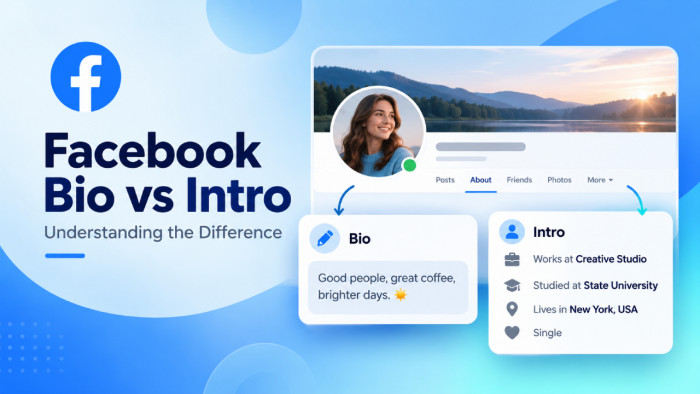
Here is the distinction in one line, and the rest of this article is really just an unpacking of it: the Bio is a single short text field, while the Intro is the whole section that holds that field plus your work, education, location, and links. One is a sentence. The other is a container. Once that clicks, the confusion tends to disappear.
Where Each One Sits on the Profile
The quickest way to tell the two apart is to stop reading definitions and just look at where they land on the page. They occupy different real estate, and that physical separation is the clearest proof that they are different things.
The Bio sits right under your name and profile picture, in the band at the very top of your profile. It is the first line of text a visitor reads after seeing your face and your name. The Intro, by contrast, is the bordered box further down, in the left-hand column on desktop and below your profile photo on mobile. That box is labelled "Intro," and inside it you will usually find your bio line repeated at the top, followed by rows for work, city, and so on.
So the bio actually appears in two places at once: once in the top band on its own, and once again as the opening line inside the Intro box. That double appearance is a big reason people assume they are editing two separate things when they are often editing the same field twice.
What the Bio Field Can and Cannot Do
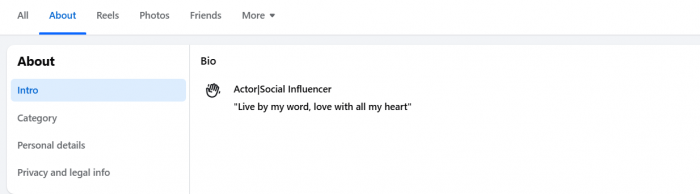
The Bio is deliberately small. On a personal profile it caps out at 101 characters, which is roughly a short sentence or two very tight ones. It is plain text, meant to be read in a single glance, and Facebook treats it as part of the always-visible top of your profile rather than something a visitor has to dig for.
What trips people up is what the Bio cannot do:
● It will not hold a clickable link in the way an Instagram bio does. If you paste a URL into the bio field, it sits there as flat text rather than a tappable link, so it is a poor place to send people to a website.
● It does not expand. Unlike a long post that hides behind "See more," the bio has no overflow to reveal, because you physically cannot type past the limit.
● It is not a résumé line. Work title, employer, and city each have their own dedicated fields inside the Intro, so repeating them in the bio just burns characters you could spend on personality.
The cleanest way to think about the Bio is as a headline for you as a person. It answers "who am I in one breath," and nothing more.
What the Intro Section Actually Holds
The Intro is not a field at all. It is a frame that gathers several separate pieces of profile information into one tidy block, and the bio just happens to be the first thing inside it. This is the single most important idea in the whole comparison, so it is worth slowing down on.
Inside the Intro, Facebook lets you switch on or off a range of rows, which typically include:
● Your bio line, sitting at the top of the box as a short personal statement.
● Work, meaning your job title and the employer you choose to show.
● Education, such as the school or university you attended.
● Current city and hometown, which are two distinct rows, not one.
● A Website row, which on a personal profile is where a genuinely clickable link lives, unlike the bio.
● Smaller touches like pronouns, relationship status, and featured details you want surfaced.
Because the Intro bundles all of this, calling it a "bio" is a bit like calling a whole business card a "name." The name is on the card, but the card is doing far more. The Intro is the card; the bio is just the name line at the top.
Who Can See What: The Privacy Angle
This is where the two stop being a matter of vocabulary and start to matter for your actual privacy, and it is the part most explainers skip entirely.
The Bio is effectively public-facing. Because it lives in the top band that anyone landing on your profile can read, it is not the place for anything you would not say to a stranger. Treat every character of it as visible to the whole world.
The Intro is more interesting, because each row inside it carries its own separate audience setting. Your workplace can be set to Public while your hometown is limited to Friends and your relationship status is set to Only Me, all within the same box. In other words, the Intro is not one privacy decision but a stack of them. That granularity is genuinely useful: it lets you look complete to strangers on the dimensions you want to share, while keeping the more personal rows for people you actually know. The mistake is assuming the whole Intro inherits one setting the way the bio does. It does not, and checking each row individually is worth the two minutes it takes.
Limits, Formatting and How Emojis Behave
Numbers make this concrete. The personal profile bio is capped at 101 characters, and an emoji counts as a single character on Facebook's compose surface, whether it is a plain smiley or a more complex flag or skin-tone variant. That means one or two well-placed emojis cost you almost nothing and can add warmth, but a row of them quietly eats space you need for words.
Formatting is minimal by design. The bio does not support bold, italics, or line breaks that render as neat multi-line text, so trying to "design" it is wasted effort. The Intro rows are structured fields rather than free text, so there is nothing to format there either; you are choosing from your own profile data, not writing prose.
It also helps to know where Facebook cuts text off elsewhere, so you do not confuse those limits with the bio's:
| Element | Limit | What it is for |
| Personal profile bio | 101 characters | A one-line personal headline |
| Post before "See more" | ~477 characters on desktop | Where the feed truncates a long post |
| Full post ceiling | 63,206 characters | Effectively never reached in practice |
The takeaway is simple: the bio is the tightest writing space on your profile, so it rewards editing more than any other field.
How Each Shapes Search and First Impressions
The bio and the Intro pull their weight at different moments, and knowing which does what helps you decide where to spend effort.
The bio does the work of the first three seconds. When someone opens your profile, or sees a trimmed preview of it in search results, the bio line is often the only descriptive text they read before deciding whether you are the person they were looking for. A vague or empty bio forces them to guess; a specific one answers their question instantly. For that reason the bio carries more weight per character than anything else on the page.
The Intro does the work of the second look. Once someone is already on your profile and mildly curious, the Intro rows let them confirm the details: where you work, which city you are in, which school you share with them. These are the facts that turn a vague "I think I know them" into a confident "yes, that is the right person." So the bio earns the click or the pause, and the Intro closes the gap from recognition to certainty.
How It Looks on Mobile Versus Desktop
The same profile is not laid out the same way on a phone and a computer, and this is another quiet source of the bio-versus-intro muddle. People read profiles on their phones but tend to edit them on a desktop, so the version they picture and the version they are changing do not always match.
On desktop, the Intro lives in a narrow card down the left side of the profile, sitting alongside your posts rather than above them. The bio appears up in the top band near your name, and again as the first line of that left-hand Intro card. On mobile, everything stacks into a single column: your photo and name first, the bio directly beneath them, and the Intro box a little further down as you scroll.
The practical lesson is to edit on whichever device you also use to check the result, or at least to glance at both after making changes. A bio that reads perfectly on a wide desktop line can feel cramped on a phone, and the Intro rows sit in a different visual order depending on where you are looking.
How the Terms Change on Pages Versus Personal Profiles
There is a second layer of confusion that almost nobody addresses, and it is the reason two people can argue about what a "Facebook bio" is and both be right. The words behave differently on a personal profile than on a Page.
On a personal profile, the bio is that 101-character line, and the Intro is the box holding it along with your work, city, and the rest. On a Facebook Page, which is what businesses, creators, and public figures use, the bio is a longer descriptive line that shows beneath the Page name, and the equivalent of the "intro" information is handled through the Page's About tab rather than a box called Intro. Links behave differently too: a Page can list multiple website and contact links in its About area, while a personal profile keeps a single Website row inside the Intro.
So before you follow any advice about "the Facebook bio," it is worth checking which kind of account it is describing. Guidance written for a creator Page will not line up with what you see on your personal account, and vice versa. If the character counts or the field names in an article do not match your screen, this mismatch is very often why.
Writing a Bio That Earns Its 101 Characters
With so little room, the bio rewards a clear decision about what it is for. The best ones pick a single angle rather than trying to cram your whole identity into one line. The trick is to say something only you would say, and short Facebook bio ideas can offer useful inspiration without repeating the factual details already covered in your Intro.
Compare these two:
● Weak: "I love my family, travelling, coffee, music and making memories with friends." It is warm but says nothing specific, and it could belong to almost anyone.
● Stronger: "Nurse by day, bad guitarist by night. Ask me about tide pools." It is concrete, it hints at personality, and it gives a stranger an actual opening line.
A few principles hold up well across almost any bio:
● Lead with the most specific true thing about you, not the most general.
● Skip facts that already have their own Intro row, such as your employer or city, unless they are the whole point of your identity.
● Give the reader a hook, a small detail they could ask you about, rather than a list of nouns.
You are writing a headline, not a summary. If every word could be deleted without losing meaning, it probably should be.
Building an Intro Section That Works as a Set
The Intro is best treated as something you curate, not a form to fill in top to bottom. Every row you switch on is a small decision about what matters and who gets to see it, and the rows should complement the bio rather than echo it.
The guiding idea is that the Intro and the bio are a team. If your bio already says you are a teacher, you do not need the Work row to repeat the word "teacher"; use it to name the school instead, so the two together say more than either alone. Think about the order a stranger reads them in: bio first for the flavour, then the rows that back it up with facts.
A sensible way to decide what to include:
● Switch on the rows that help the right people recognise or find you, such as current city or a shared school.
● Add the Website row if you actually have somewhere worth sending people, since this is the one genuinely clickable link on a personal profile.
● Leave off anything that is either private or simply noise, because a shorter, sharper Intro reads as more intentional than a fully stuffed one.
An Intro that has clearly been chosen, rather than filled in by reflex, quietly signals that there is a real person paying attention behind the profile.
The Mistakes People Keep Making
Most profile problems are not about writing skill; they are about not understanding the split between the field and the section. A handful of errors show up again and again:
● Repeating the Intro inside the bio. Spending precious bio characters on your job title and city, when both already have their own rows below, wastes the one space on the profile that can show personality.
● Leaving the bio blank. An empty bio hands the visitor nothing to go on in the exact moment they are deciding whether you are the right person, which is the costliest silence on the page.
● Treating the whole Intro as one privacy setting. Because each row has its own audience control, people often share more than they meant to, assuming one Friends-only choice covered everything in the box.
● Dropping a link in the bio and expecting it to work. Since the bio does not make URLs clickable, a link belongs in the Intro's Website row instead, where it actually functions.
● Setting it once and forgetting it. Jobs, cities, and interests change, and an Intro that still lists a job you left three years ago quietly undercuts everything else on the profile. Avoiding these Facebook bio mistakes helps keep your profile accurate and relevant.
None of these is dramatic on its own, but together they are the difference between a profile that looks cared-for and one that looks abandoned.
Bio and Intro at a Glance
For a quick reference you can come back to, here is the whole distinction laid side by side.
| Metric | Bio | Intro |
| What it is | A single text field | A section that holds several fields |
| Contains | One short line about you | Bio, work, education, city, website, more |
| Length | 101 characters | Varies by field; mostly structured data |
| Links | Not clickable | Website row is clickable |
| Privacy | Effectively public | Each row has its own audience setting |
| Where it shows | Top band, under your name | Boxed section lower down |
| Best used for | Personality and a hook | Facts that confirm who you are |
If you remember nothing else, remember the shape of the relationship: the bio is one line inside the Intro, and the Intro is the box around it.
Final Perspective
The bio and the Intro are not rivals, and asking which is "better" misreads the whole thing. They do different jobs at different moments. The bio is the line that makes someone pause; the Intro is the box that confirms what they suspected. One carries your voice, the other carries your facts, and a good profile uses both on purpose.
So the practical move is not to choose between them but to stop letting them overlap. Put personality in the bio, put verifiable detail in the Intro rows, check the privacy on each row, and make sure the single clickable link lives where links actually work. Do that, and the question that started all the confusion answers itself: the bio is a line, the Intro is a layout, and once you see them that way you will never mix them up again.
One closing note worth keeping in mind: Facebook adjusts these features fairly often, so if a field name, a character count, or a privacy option on your screen differs from what you read here, trust your screen and treat the principles rather than the exact numbers as the lasting part.