


Table of Content
I have built social media calendars in almost everything that can hold a grid. A whiteboard. A shared spreadsheet named FINAL_v7. A Trello board that quietly died in 2023. One Notion workspace that outlived three clients. So when I rebuilt my planning stack this spring, I used it as an excuse to properly test the templates everyone keeps recommending.
My test was simple and a little cruel. Every template got the same job: one month of content for two brands, five platforms, two approval rounds, and one product launch dropped in halfway. Fourteen went in. Eight came out worth your time. The rest fell apart in launch week or paywalled the one view a calendar needs.
Prices were checked in August 2026 against official pricing pages, the limits are ones I hit, and the cons are specific because vague cons help nobody.

How each template was judged
• Setup time. Minutes from duplicate to a working calendar.
• Multi-platform handling. One post, five platforms, without five duplicate entries.
• Approval flow. Could a client review and sign off without a training call.
• Free plan ceilings. The exact point where the tool asks for a card.
• Launch week stress. Did it stay readable when 40 posts hit in 6 days.
• Handoff. How fast a freelancer could pick it up cold.
Quick picks if you're in a hurry
• Best overall: Notion. One database, three views, free for solo use.
• Best for agencies: Airtable. Filtered views per client, intake forms.
• Best free: Google Sheets. Hootsuite and HubSpot templates cost nothing.
• Best for design teams: Canva Planner. The only one here that also publishes.

All 8 templates compared
Content calendar templates at a glance (annual billing, per person).
| TEMPLATE | BEST FOR | FREE PLAN | PAID FROM | CALENDAR VIEW FREE? |
|---|---|---|---|---|
| Notion | Solo managers, small teams | Yes, generous for one person | $10/mo | Yes |
| Airtable | Agencies, multi-client work | 5 editors, 1,000 records per base | $20/mo | Yes |
| Google Sheets | Zero budget, spreadsheet people | Fully free | n/a | Grid only |
| Trello | Visual pipeline thinkers | 10 boards, unlimited cards | $5/mo | No, Premium ($10) |
| ClickUp | Small teams on a budget | Unlimited members and tasks | $7/mo | Yes |
| Asana | Approval-heavy teams | Yes, feature-gated | $10.99/mo | Yes |
| monday.com | Cross-team visibility | 2 seats, 3 boards | $9/mo, 3-seat min | No, Standard ($12) |
| Canva Content Planner | Design-first workflows | No, Pro feature | $15/mo | Included in Pro |
PICK 01 Notion Social Media Calendar
BEST OVERALL | Price: Free for solo, Plus at $10 per person monthly (annual billing) | Setup: About 20 minutes
Notion won for one boring, decisive reason: the same database shows up as a calendar, a kanban board, and a table, with every edit flowing through all three. I plan in calendar view, run production on the board, and hand the table to whoever thinks in rows. Nothing else does it this cleanly for free.
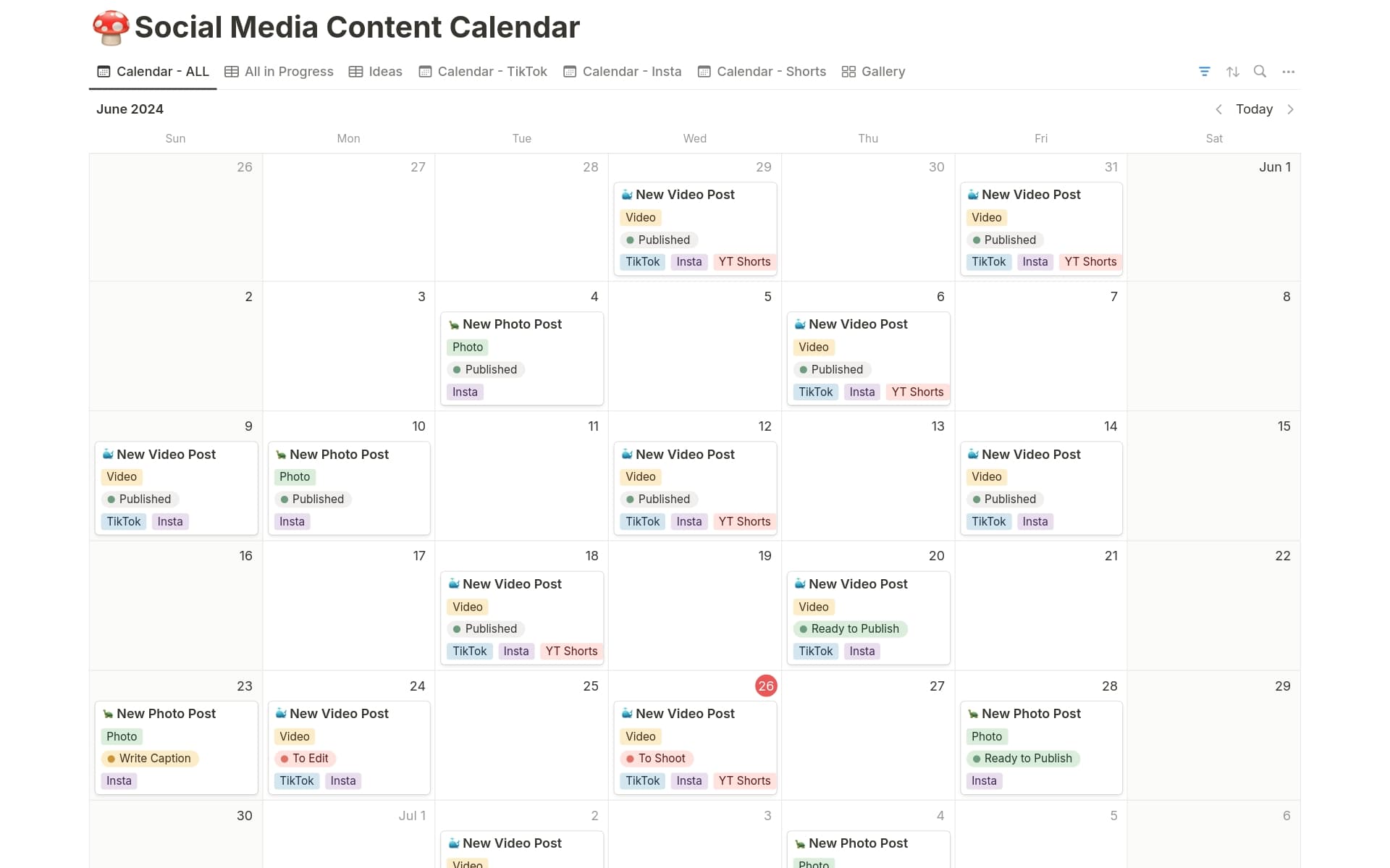
Notion's template gallery has dozens of free social media calendars, most with the same sane structure: one database with properties for platform, format, publish date, status, and owner, plus a page body holding the caption and asset links. Drafting captions inside the post's own page quietly fixed a copy-paste error problem I didn't know I had.
WHERE IT EARNED ITS RANK • Calendar, board, and table views of the same posts, free • Captions, briefs, and asset links live inside each post's page • Templates duplicate into your workspace in one click | WHAT TO WATCH FOR • It publishes nothing, so you still need a scheduler • The mobile app loads big databases slowly • Recurring posts need manual duplication unless you build automations |
PICK 02 Airtable Content Calendar
BEST FOR AGENCIES | Price: Free tier, Team at $20 per person monthly (annual billing) | Setup: Plan a full afternoon
Airtable is where my client work moved and stayed. The content calendar template is really a small relational database: a Posts table linked to Campaigns, Channels, and Assets. That sounds like overkill until you run three clients through it: each client sees only their own filtered view while you see everything on one master calendar.

Two features justified the price. Intake forms turn content requests into calendar records automatically, killing the "can you post this tomorrow" emails, and attachment previews put the actual creative on the record, so approvals happen against the real graphic, not a filename.
The free plan is honest but tight: 5 editors, 1,000 records per base, 1GB of attachments. Log every story frame and the record cap arrives within a quarter. One more thing before you commit: Airtable agreed to be acquired by Bending Spoons in August 2026, a firm known for raising prices after acquisitions, so sign annual deals with open eyes.
WHERE IT EARNED ITS RANK • Filtered views give each client a private window into one base • Intake forms create calendar entries without any copy-paste • Creative previews attach directly to each post record | WHAT TO WATCH FOR • The 1,000 record cap on free arrives faster than you expect • Per-editor billing at $20 adds up quickly across a team • Pending acquisition makes long-term pricing uncertain |
PICK 03 Hootsuite and HubSpot Google Sheets Templates
BEST FREE OPTION | Price: Free, both ask for an email address | Setup: Under 10 minutes
If the budget is zero, these two spreadsheet templates beat building your own. Hootsuite's version is the more thoughtful one. It opens with a strategy tab for goals and pillars, then monthly and weekly planning views, and my favorite touch, an evergreen content library tab where past winners get parked for slow weeks. I stole that tab everywhere else.

HubSpot's template comes in Google Sheets, Excel, and Google Calendar formats, with dropdowns and per-platform color coding already wired in. It reads well when a client opens it cold, which matters more than it sounds. The trade for both: your email address, and newsletters until you unsubscribe.
WHERE IT EARNED ITS RANK • Genuinely free with no usage caps or expiring licenses • Everyone can edit a spreadsheet without training • Hootsuite's evergreen library tab is worth copying anywhere | WHAT TO WATCH FOR • No reminders or notifications, the sheet never taps your shoulder • Version sprawl once three people start editing copies • Status tracking is manual, launch weeks get messy fast |
PICK 04 Trello Content Calendar Board
FASTEST TO LEARN | Price: Free tier, Standard $5, Premium $10 per person monthly (annual billing) | Setup: 15 minutes
Trello is the template I hand to people who hate project management tools. Columns become pipeline stages, Ideas through Drafting, Approved, Scheduled, Posted, and dragging a card across is the entire workflow. My freelance designer understood it in the time it took to send the invite link. The free plan is more generous than it used to be: 10 boards per workspace, unlimited cards, and unlimited Power-Ups.

The catch stings for this exact use case: calendar view lives on Premium at $10 per person monthly, so the free version of a content calendar tool cannot show you a calendar. Workarounds exist, but it feels like buying a car and paying extra for the steering wheel.
WHERE IT EARNED ITS RANK • Zero training required, drag and drop is the whole system • Unlimited Power-Ups on the free plan, including calendar add-ons • Checklists per card handle multi-platform variants neatly | WHAT TO WATCH FOR • Native calendar view is paywalled behind Premium • 10MB attachment cap on free blocks most video files • Boards turn chaotic past two brands or 60 active cards |
PICK 05 ClickUp Social Media Calendar
BEST FREE PLAN FOR TEAMS | Price: Free Forever, Unlimited at $7 per person monthly (annual billing) | Setup: 30 to 45 minutes
ClickUp's free plan is the outlier on this list: unlimited tasks and unlimited members, with calendar view included. For a team that cannot pay anything yet, that is hard to argue with, and the template library has prebuilt social calendars with statuses like In Review and Ready to Publish preconfigured.

The trade is weight. ClickUp ships with spaces, folders, lists, and a settings panel seven layers deep, so setup took three times longer than Trello's, and I turned off half the features to make the calendar breathable. The other ceiling is the 60MB total storage cap on free: a handful of videos, then you are linking to Drive for every asset.
WHERE IT EARNED ITS RANK • Unlimited members on the free plan, rare at this quality level • Custom statuses map exactly to a content production pipeline • $7 Unlimited tier undercuts most direct competitors | WHAT TO WATCH FOR • 60MB total free storage forces external asset hosting immediately • Feature density buries the calendar under options you won't use • Slowest initial setup of anything I tested |
PICK 06 Asana Content Calendar Template
BEST FOR APPROVALS | Price: Free Personal plan, Starter at $10.99 per person monthly (annual billing) | Setup: 25 minutes
Asana ran the calmest approval process of anything I tested. Each post is a task, feedback lives in its comment thread instead of a group chat, and marking a task for approval creates a clear yes or no moment. In my launch week test, no revision got lost, because every note was pinned to its post.
![Free Content Calendar Template - AppLovin [2026] • Asana](https://assets.asana.biz/transform/3d20dd82-f67c-47be-a595-0d0019ee7e98/Social-media-calendar-m)
The free Personal plan includes calendar view, more than Trello or monday.com can say. The squeeze is feature gates: custom fields and timeline view sit on Starter, and Starter has a two-seat minimum with seats sold in bundles of five past five people. Budget for the bundle you will grow into, not the sticker price.
WHERE IT EARNED ITS RANK • Approval workflow that clients understand without a walkthrough • Calendar view included on the free plan • Feedback stays attached to the exact post it concerns | WHAT TO WATCH FOR • Custom fields, the backbone of a good calendar, require Starter • Seat minimums and 5-seat bundles inflate small-team costs • One post targeting five platforms means duplicate tasks or messy tags |

PICK 07 monday.com Social Media Planner
BEST FOR VISIBILITY | Price: Free for 2 seats, paid from $9 per seat monthly with a 3-seat minimum (annual billing) | Setup: 30 minutes
monday.com produces the calendar that looks best in a screen share. The color-coded status columns read from across the room; when I presented the month to stakeholders, nobody asked me to explain the board. When marketing, design, and leadership all peek at the same plan, that legibility is the actual product.
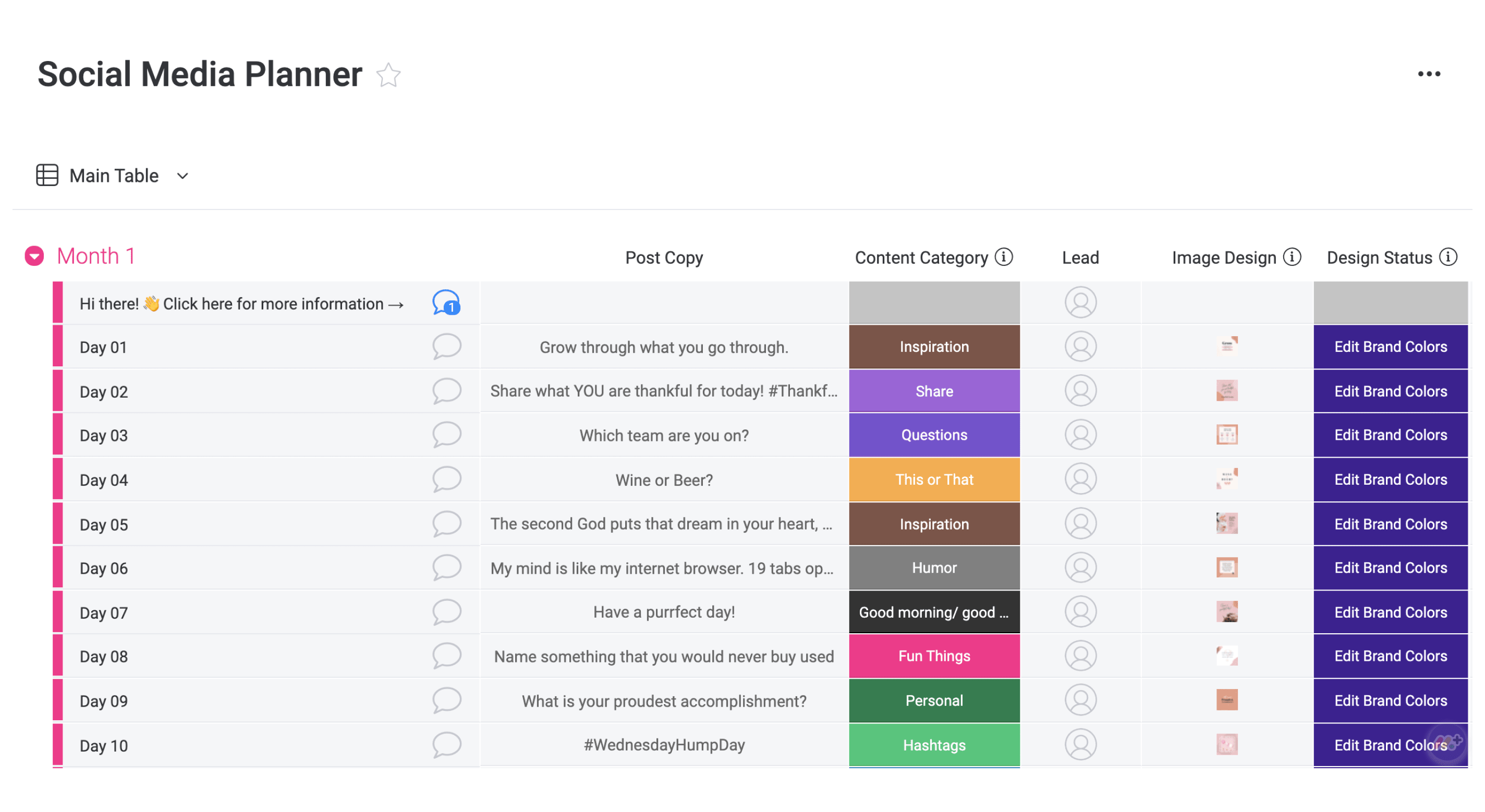
Pricing needs a careful read. The free plan caps at 2 seats and 3 boards, and paid plans carry a 3-seat minimum, so the $9 Basic tier really starts at $27 a month, without calendar view or automations. The realistic entry point is Standard at $12 per seat, which adds calendar view, timeline, and 250 automation actions a month. Busy teams hit that cap, and the next stop is Pro at $19.
WHERE IT EARNED ITS RANK • The most legible board for non-marketers and stakeholders • 200+ template gallery includes ready social media planners • Dashboards turn the calendar into reporting for free | WHAT TO WATCH FOR • 3-seat minimum makes the advertised price fictional for duos • Calendar view starts at Standard, not Basic • 250 monthly automation actions run out mid-month on busy accounts |

PICK 08 Canva Content Planner
ONLY ONE THAT PUBLISHES | Price: Included with Canva Pro at $15 monthly | Setup: 10 minutes if you already use Canva
Everything else here plans content. Canva's Content Planner also posts it. Finish a design, hit Share, then Schedule, write the caption, pick the slot, and the post appears on a drag-to-reschedule calendar. Pro connects up to 8 accounts across Facebook Pages and Groups, Instagram Business, LinkedIn, X, Pinterest, and Tumblr, with basic performance insights on published posts. If your whole visual pipeline already lives in Canva, cutting the export-download-reupload loop saves genuine time daily.

The limits are sharp. The planner cannot schedule Instagram Reels, Stories, or carousels, only single-image feed posts, and there is no TikTok publishing. One caption goes to every platform, even though X wants 40 words and LinkedIn rewards 200. I use it for image-led brands and nothing else.
WHERE IT EARNED ITS RANK • Design, schedule, and publish without leaving one tool • No extra cost if you already pay for Canva Pro • Post insights live right on the calendar entry | WHAT TO WATCH FOR • No Reels, Stories, or carousel scheduling for Instagram • No TikTok publishing at all • Single caption across all platforms flattens your voice |
How to actually choose
After eight weeks, the deciding factor was rarely features but who touches the calendar and how often.
• Solo, one brand: Notion free plan or the Hootsuite sheet. Anything more is procrastination dressed as research.
• Freelancer with 3+ clients: Airtable. Filtered client views alone repay the $20.
• Small in-house team, no budget: ClickUp free, and host assets in Drive from day one.
• Client approvals rule your life: Asana Starter, for comment threads that never lose feedback.
• Leadership wants to see the plan: monday.com Standard, and accept the 3-seat floor.
• Everything is designed in Canva anyway: Content Planner for feed posts, a scheduler for Reels and TikTok.
FINAL VERDICT
The template matters less than the Friday review
Here is where I landed once testing ended. My own brand runs on Notion, because three views of one free database is the best deal in this category. Client work stayed in Airtable, where filtered views and intake forms have saved me from a dozen "quick favor" disasters. And when a new client arrives with no budget, I hand them the Hootsuite sheet and copy its evergreen tab into whatever comes next.
The uncomfortable truth: all eight work if you show up to them. The calendars that collapsed on me over the years didn't fail because the tool was wrong, but because nobody opened them on Friday to review the coming week. Pick the one that fits the people who touch it, set a recurring 20-minute review, and protect that meeting like a launch date. The template is scaffolding. The habit is the building.