

Table of Content
- How I Selected These Fancy Text Generators
- 1. IGFonts.io
- 2. YayText
- 3. SmartPostly Fancy Text Generator
- 4. LingoJam
- 5. Meta Tags Font Generator
- 6. Messletters
- 7. Hopper HQ Instagram Font Generator
- Which Fancy Text Generator Should You Choose?
- How to Put Your Instagram Bio in Fancy Text
- Final Verdict
A plain Instagram bio can look completely different with just a few styled words. Bold text makes a profession stand out, cursive adds personality, and small caps give a simple introduction a cleaner appearance. The challenge is finding a fancy text generator that produces readable styles rather than hundreds of decorative characters you would never put in a bio.
I compared seven popular generators based on their available styles, editing options, and usefulness for different Instagram bios. Some are better for professional profiles, while others offer more freedom for aesthetic and personal bios. Here are the tools worth considering, along with practical styling examples and the limitations to know before copying.
How I Selected These Fancy Text Generators
I focused on how useful each tool is for formatting an actual Instagram bio, rather than ranking generators by the number of styles they advertise. The comparison is based on the tools' publicly available interfaces, documented features, and supported Unicode styles. The bio examples below are editorial illustrations, not claimed results from independently recorded hands-on tests.
Four factors guided the selection:
● Bio readability: Whether the available lettering is suitable for short introductions, professions, interests, and personal statements without making the text difficult to understand.
● Style selection: Whether users can find suitable bold, cursive, minimal, or decorative styles without spending too much time browsing variations.
● Copy-and-paste convenience: How easily users can select text, compare variations, and transfer the finished wording into their Instagram profile.
● Practical limitations: Whether decorative symbols, unusual letterforms, or excessive formatting could reduce readability or create compatibility issues.
I also considered how well each tool fits different profile types, including creator, business, lifestyle, aesthetic, and personal accounts.
1. IGFonts.io
Best for: Quick styling of personal Instagram bios
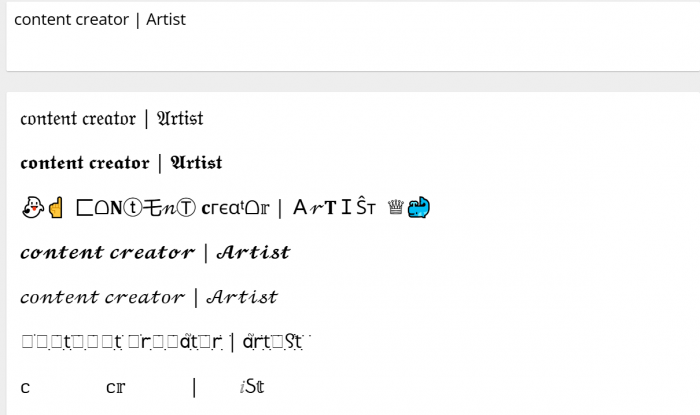
IGFonts.io is designed around Instagram text styling. Enter a phrase, and the generator displays different Unicode variations that can be copied into a bio. Its Show More Fonts option lets users explore additional styles beyond the initial selection.
The tool is particularly suited to short profile introductions and personality-driven taglines. Cursive and decorative styles work well for emphasizing a name or personal statement, especially when creating aesthetic Instagram bios without changing the entire description.
How It Fits Different Bio Elements
| Bio element | Suggested styling |
| Personal introduction | 𝓗𝓮𝓵𝓵𝓸, 𝓘'𝓶 𝓐𝓵𝓮𝔁 |
| Lifestyle tagline | 𝓛𝓲𝓿𝓲𝓷𝓰 𝓶𝔂 𝓼𝓽𝓸𝓻𝔂 |
| Interests | ᴛʀᴀᴠᴇʟ • ᴄᴏꜰꜰᴇᴇ • ʟɪꜰᴇ |
| Short statement | ✦ Stay curious ✦ |
What stands out: IGFonts.io keeps the process simple. It is useful when the bio is already written and only a few words need visual emphasis. However, the additional variations can become repetitive, and some unusual character combinations are less suitable for complete bio descriptions.
Pricing: Free | Signup: Not required
2. YayText
Best for: Clean and professional Instagram bio headings
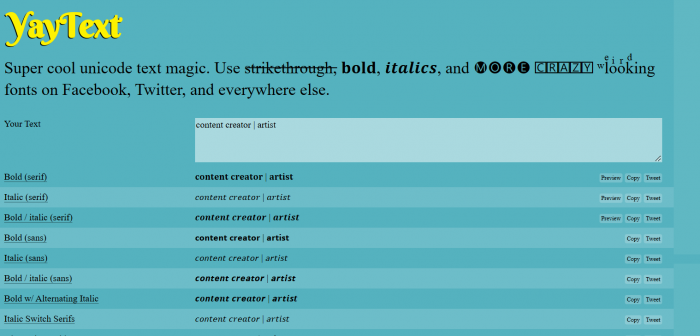
YayText provides Unicode styles including serif bold, sans-serif bold, italic, script, and double-struck lettering. Its clearly labeled variations help users identify familiar formatting styles rather than searching through decorative combinations.
For professional Instagram profiles, the most useful approach is to emphasize a job title or business identity while leaving the supporting description in ordinary text. Keeping the Instagram name readable also helps visitors recognize the account, while styled bio text adds visual distinction.
How It Fits Different Bio Elements
| Bio element | Suggested styling |
| Professional title | 𝗠𝗮𝗿𝗸𝗲𝘁𝗶𝗻𝗴 𝗖𝗼𝗻𝘀𝘂𝗹𝘁𝗮𝗻𝘁 |
| Business identity | 𝐂𝐫𝐞𝐚𝐭𝐢𝐯𝐞 𝐒𝐭𝐮𝐝𝐢𝐨 |
| Short introduction | 𝘋𝘦𝘴𝘪𝘨𝘯𝘦𝘳 & 𝘊𝘳𝘦𝘢𝘵𝘰𝘳 |
| Service heading | 𝗕𝗿𝗮𝗻𝗱 𝗦𝘁𝗿𝗮𝘁𝗲𝗴𝘆 |
What stands out: YayText makes it easy to distinguish between bold, italic, and decorative alternatives. It works best for bios where readability matters more than visual decoration. The limitation is that it focuses on converting text rather than arranging complete Instagram bios or combining multiple elements into a finished layout.
Pricing: Free | Signup: Not required
3. SmartPostly Fancy Text Generator
Best for: Mixing different font styles in Instagram bios
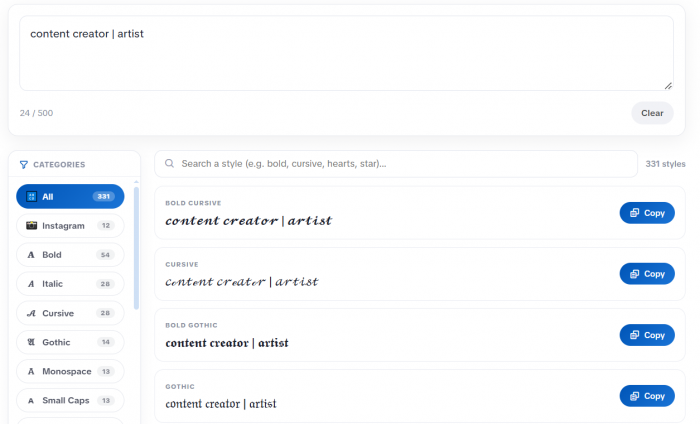
An Instagram bio usually contains three important parts: a short introduction, a description, and a personal tagline. SmartPostly fancy text generator makes it easier to style these separately because its fancy text generator organizes lettering into categories such as bold, cursive, gothic, and small caps.
The generator offers more than 300 styles, including decorative options with hearts, stars, brackets, and symbols. Its category filters and style search help narrow down the selection, while real-time previews and copy controls make comparing variations straightforward.
How It Fits Different Bio Elements
| Bio element | Suggested styling |
| Profession or identity | 𝗗𝗶𝗴𝗶𝘁𝗮𝗹 𝗖𝗿𝗲𝗮𝘁𝗼𝗿 |
| Personal tagline | 𝓒𝓻𝓮𝓪𝓽𝓲𝓷𝓰 𝓶𝔂 𝓼𝓽𝓸𝓻𝔂 |
| Interests | ᴛʀᴀᴠᴇʟ • ᴀʀᴛ • ʟɪꜰᴇ |
| Short statement | ✦ Dream. Create. Repeat. |
What stands out: The category-based selection is useful for maintaining a consistent bio appearance. Bold or small caps can highlight the first line, while cursive styles work better for short personal statements. However, highly decorated lettering can reduce readability and occupy additional character space.
Pricing: Free | Signup: Not required
4. LingoJam
Best for: Attitude bios and unusual text styles
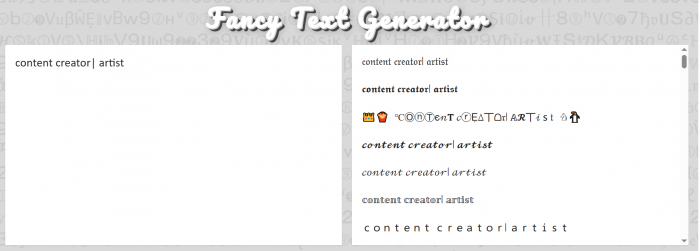
LingoJam's Special Text Generator converts ordinary text into decorative Unicode variations using a simple input-and-output layout. It offers unconventional letterforms alongside more recognizable styles, making it an option for people who want their Instagram bio to look different from standard profile descriptions.
The tool suits gaming profiles, music pages, attitude bios, and short personal statements. Gothic lettering and unusual character shapes can give a short phrase a stronger visual identity, although they are less appropriate for detailed descriptions.
How It Fits Different Bio Elements
| Bio element | Suggested styling |
| Attitude statement | 𝕭𝖔𝖗𝖓 𝖙𝖔 𝖘𝖙𝖆𝖓𝖉 𝖔𝖚𝖙 |
| Gaming identity | 𝕲𝖆𝖒𝖊𝖗 |
| Personal motto | 𝕹𝖔 𝕷𝖎𝖒𝖎𝖙𝖘 |
| Bold introduction | 𝐌𝐚𝐤𝐢𝐧𝐠 𝐌𝐲 𝐎𝐰𝐧 𝐑𝐮𝐥𝐞𝐬 |
What stands out: LingoJam is worth considering for experimenting with text that looks less conventional. Its simple layout makes conversion straightforward, but some generated styles mix character shapes or include symbols that may not display consistently. Short statements are a better fit than lengthy bios.
Pricing: Free | Signup: Not required
5. Meta Tags Font Generator
Best for: Stylish Instagram bios with a polished appearance
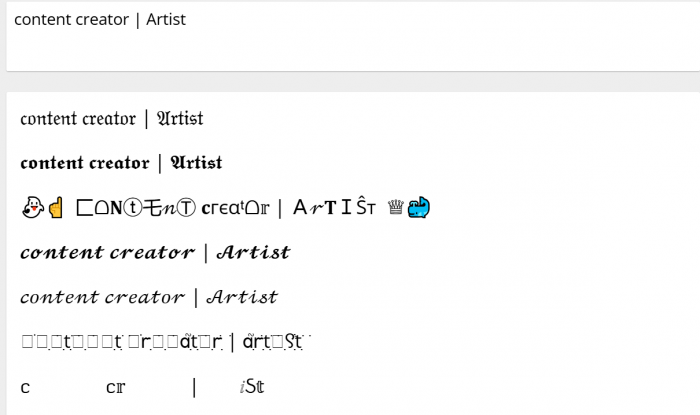
Meta Tags provides Unicode lettering styles such as script, bold italic, typewriter, outlined, and decorative text. Its font generator also includes a social-profile preview, which is useful for assessing how styled wording looks alongside other profile information.
This makes it relevant for photographers, designers, freelancers, and personal brands that want a distinctive bio without relying on elaborate decorations. Instead of styling every sentence, users can apply emphasis to their profession or creative identity.
How It Fits Different Bio Elements
| Bio element | Suggested styling |
| Creative profession | 𝑷𝒉𝒐𝒕𝒐𝒈𝒓𝒂𝒑𝒉𝒆𝒓 |
| Personal identity | 𝒱𝒾𝓈𝓊𝒶𝓁 𝒮𝓉ℴ𝓇𝓎𝓉ℯ𝓁𝓁ℯ𝓇 |
| Minimal heading | 𝙲𝚛𝚎𝚊𝚝𝚒𝚟𝚎 𝚂𝚝𝚞𝚍𝚒𝚘 |
| Short tagline | 𝘊𝘳𝘦𝘢𝘵𝘪𝘯𝘨 𝘸𝘪𝘵𝘩 𝘱𝘶𝘳𝘱𝘰𝘴𝘦 |
What stands out: The profile-style preview is useful for judging whether a chosen font works beyond the generator's text list. Some highly experimental styles are visually interesting but unsuitable for everyday profile descriptions. The tool is most useful for comparing a few restrained styles before copying.
Pricing: Free | Signup: Not required for the generator
6. Messletters
Best for: Aesthetic Instagram bios with symbols and decorations
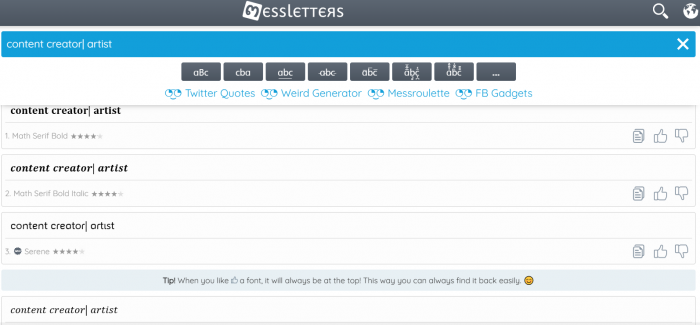
Messletters combines a fancy text generator with separate collections of symbols, emoticons, decorative characters, and text art. Unlike tools that focus mainly on changing letter shapes, it also helps users build themed bio lines with visual accents.
Its symbol collections include hearts, stars, flowers, arrows, and other decorative characters. These are useful for personal diaries, lifestyle accounts, fan pages, and aesthetic profiles where the presentation is part of the account's identity.
How It Fits Different Bio Elements
| Bio element | Suggested styling |
| Aesthetic introduction | ✧ 𝓢𝓸𝓯𝓽 𝓢𝓸𝓾𝓵 ✧ |
| Personal interests | ♡ Books • Coffee • Art |
| Lifestyle statement | ☾ collecting little moments |
| Decorative tagline | ❀ Growing at my own pace ❀ |
What stands out: Messletters offers more freedom to combine lettering with visual symbols. It is especially useful for creating decorative opening lines and separators. However, combining too many symbols can make the bio crowded, while complex text art may consume valuable character space.
Pricing: Free | Signup: Not required for basic use
7. Hopper HQ Instagram Font Generator
Best for: Simple and readable Instagram bio formatting
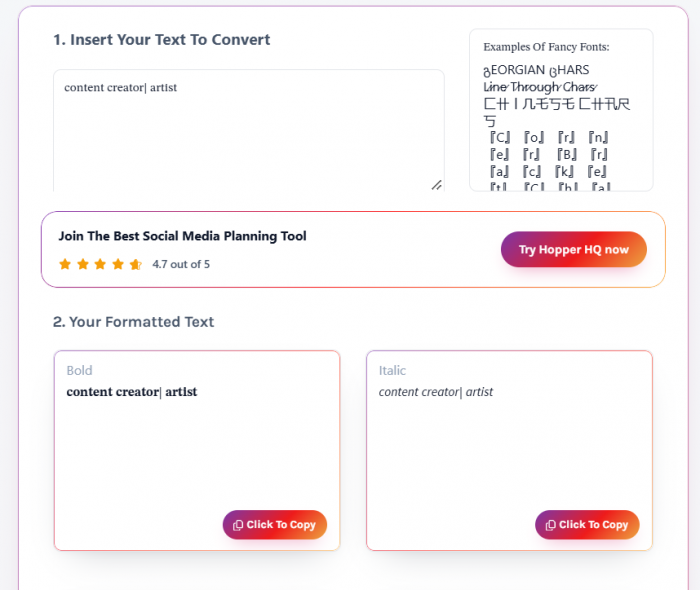
Hopper HQ provides a dedicated Instagram font generator with more than 35 styles, including bold, cursive, bubble, gothic, italic, and small caps. Users can enter their text, compare generated variations, and copy the one they prefer.
The tool is particularly suitable for creators and small businesses that already have a complete bio and want to highlight one important line. Its familiar formatting options make it easier to maintain readability.
How It Fits Different Bio Elements
| Bio element | Suggested styling |
| Fitness profession | 𝗙𝗶𝘁𝗻𝗲𝘀𝘀 𝗖𝗼𝗮𝗰𝗵 |
| Creator identity | 𝘊𝘰𝘯𝘵𝘦𝘯𝘵 𝘊𝘳𝘦𝘢𝘵𝘰𝘳 |
| Minimal tagline | ᴍᴏᴠᴇ • ɢʀᴏᴡ • ʀᴇᴘᴇᴀᴛ |
| Creative heading | 𝙳𝚎𝚜𝚒𝚐𝚗 & 𝙸𝚍𝚎𝚊𝚜 |
What stands out: Hopper HQ keeps font selection manageable and provides clear variations for straightforward bio formatting. Its collection is smaller than those of generators offering hundreds of styles, but this is not necessarily a disadvantage for users who prefer clean headings over decorative combinations.
Pricing: Free | Signup: Not required
Which Fancy Text Generator Should You Choose?
After comparing the available styles and controls, I found that the most useful distinction is not the total number of fonts. It is how easily each generator helps you create a bio that matches your profile.
| Tool | Best bio type | Main advantage |
| IGFonts.io | Personal and lifestyle | Quick font variations |
| YayText | Professional and business | Clear bold and italic styles |
| SmartPostly | Creator and aesthetic | 300+ organized styles |
| LingoJam | Attitude and gaming | Unusual character designs |
| Meta Tags | Creative and personal brand | Profile-style preview |
| Messletters | Decorative and aesthetic | Symbols and text art |
| Hopper HQ | Business and creator | Simple, readable font options |
For professional bios, YayText and Hopper HQ offer practical formatting choices. SmartPostly is useful when you want to compare multiple font categories, while Messletters provides more flexibility for decorative profiles.
IGFonts.io and LingoJam suit people exploring unconventional text, and Meta Tags is a good option when the overall profile appearance matters more than the number of styles available.
How to Put Your Instagram Bio in Fancy Text
Instagram does not have a built-in font picker for bios, but you can paste compatible Unicode text into the Bio field.
The process is straightforward:
1. Prepare your bio in regular text. Write your introduction, profession, interests, and call to action before applying any styling.
2. Choose the text you want to highlight. A profession, name, or short tagline is usually a better choice than converting the entire description.
3. Open a fancy text generator. Enter the selected phrase and browse styles that match your profile's tone.
4. Copy the preferred variation. Make sure the lettering is readable and does not contain unnecessary decorative characters.
5. Paste it into Instagram. Open your profile, select Edit profile, paste the styled text into Bio, and save the changes.
Check the final appearance on your phone rather than relying entirely on the generator's preview. Some characters display differently depending on the device and available fonts.
Final Verdict
After examining the seven generators, I would choose based on the part of the Instagram bio that needs styling rather than the largest advertised font collection.
For a professional heading, YayText or Hopper HQ offers enough readable options without unnecessary decoration. For a more creative profile, SmartPostly provides a broader selection organized by style, while Messletters is more useful for adding symbols and aesthetic details.
IGFonts.io is convenient for quick variations, LingoJam suits unconventional lettering, and Meta Tags is worth considering when you want to judge how the text fits a social profile.
My preference is to keep the main description readable and style only the opening line or a short tagline. A fancy font should help visitors notice the important information, not make them work harder to read it.