

Table of Content
- GenYouTube at a Glance
- I Checked GenYouTube, but It Wasn't Working
- How GenYouTube Originally Worked
- What Made GenYouTube Different?
- Where the Downloading Experience Failed
- What Happened to GenYouTube's Websites?
- Is GenYouTube Safe to Use?
- Downloading Permissions and Copyright
- Better GenYouTube Alternatives
- Who Is GenYouTube Relevant For?
- Final Verdict: Is GenYouTube Worth Using?
GenYouTube was once a popular option for downloading YouTube videos without installing additional software. Its simple interface, multiple file formats, and URL shortcut made it convenient for users who wanted to save videos directly to their devices.
I recently checked GenYouTube to see whether it still worked and tried downloading a video. Unfortunately, I couldn't complete the download. The original websites no longer provide the familiar service, and the related downloader isn't working reliably either. This review covers what I found, what happened to GenYouTube, and whether it is still worth using in 2026.
GenYouTube at a Glance
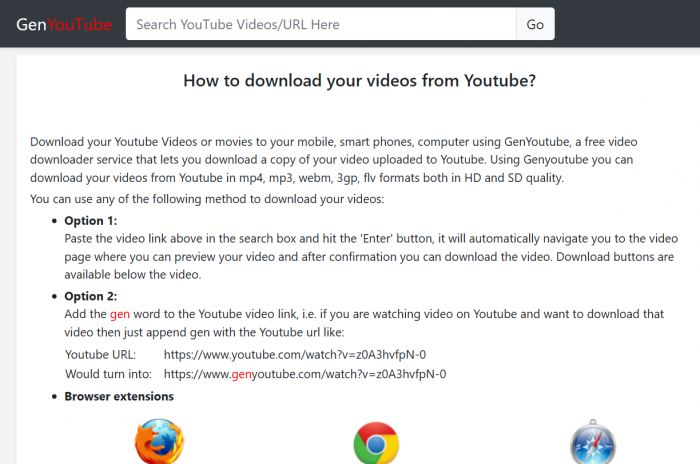
GenYouTube was a third-party online downloader that allowed users to save YouTube videos and extract audio in different formats. It operated through a browser without requiring account registration for basic downloading.
Unlike YouTube Premium, which keeps offline videos within YouTube's supported playback environment, GenYouTube aimed to provide independent media files.
| Details | GenYouTube |
| Category | Online YouTube downloader |
| Original domains | genyoutube.com, genyoutube.net |
| Related website | genyt.net |
| Pricing | Historically free |
| Account required | No, for basic use |
| Advertised formats | MP4, WebM, MP3 |
| Current condition | Original downloader unavailable |
Its main appeal was convenience. Users did not need technical knowledge or dedicated downloading applications. However, GenYouTube was never an official YouTube service, and its functionality depended on third-party systems.
I Checked GenYouTube, but It Wasn't Working
The first thing I wanted to establish was whether GenYouTube could still download a YouTube video. I tried using the service, but I couldn't obtain a downloadable file. The straightforward process described in older tutorials was no longer available.
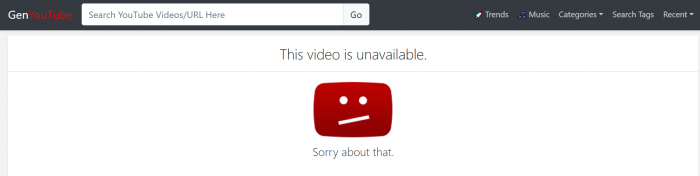
The original genyoutube.com and genyoutube.net websites no longer provide their former downloading interfaces. The related genyt.net website remains accessible, but independent checks in September and October 2026 also encountered a Cloudflare verification screen during video processing.
| Website | Current finding |
| genyoutube.com | Original downloader unavailable |
| genyoutube.net | Former downloading service unavailable |
| genyt.net | Accessible, but downloading unsuccessful in reported tests |
| genyoutube.online | Separately branded service identifying itself as YTGet |
What stood out to me was the difference between a website loading and its main feature working. GenYouTube's purpose was to deliver video files, and I couldn't complete that process. For a downloading tool, that is a fundamental problem rather than a minor inconvenience.
How GenYouTube Originally Worked
GenYouTube became popular because downloading required only a few steps. Users could access its features directly through a browser without installing separate software.
The original process involved:
1. Copying the video URL: Users opened YouTube and copied the link to the video.
2. Submitting the link: The URL was pasted into GenYouTube's search field for processing.
3. Selecting a format: The service displayed available video or audio formats and quality options.
4. Saving the file: Users selected a download option to store the processed media.
Another distinctive feature was its URL shortcut. Adding gen before youtube.com in a video address directed users toward the downloading service.
This reduced the number of steps and made GenYouTube particularly convenient for occasional downloading. However, the shortcut is now obsolete because the original domain no longer operates as the former downloader.
What Made GenYouTube Different?
GenYouTube's original features were relatively straightforward, but bringing them together in one interface made the service useful.
1. Multiple file formats: The downloader advertised MP4 and WebM video formats alongside MP3 audio conversion. This allowed users to choose between video files and audio-only downloads.
2. Resolution selection: Users could select from available quality options depending on the source video. This helped balance playback quality and file size.
3. Browser-based access: Basic downloading did not require separate desktop software, making the process accessible through ordinary browsers.
4. No mandatory registration: Users could access the original downloading workflow without creating an account or sharing personal YouTube login credentials.
One technical distinction is worth understanding. MP4 and WebM are media containers, while resolutions such as 720p and 1080p describe picture quality.
GenYouTube attempted to simplify these technical decisions through its interface. However, these historical capabilities no longer provide practical value without a functioning downloader.
Where the Downloading Experience Failed
The biggest issue I encountered was not an outdated design or confusing settings. I simply couldn't download the video successfully.
A functioning downloader needs to recognize the submitted video, process the available media streams, and deliver a playable file. GenYouTube did not complete that sequence during my attempt.
This also makes its advertised formats and resolution options difficult to judge as current features. A list of download formats is not particularly useful when the service cannot produce the resulting file.
I also found the different GenYouTube-related domains confusing. The original websites are unavailable as downloaders, while similarly named services exist separately.
For me, a dependable downloader should offer a clear process and a usable final file. GenYouTube failed to meet that basic expectation.
What Happened to GenYouTube's Websites?
After finding that GenYouTube wasn't working, I looked into what happened to its original websites. An important development occurred on August 19, 2021, when a domain dispute panel ordered genyoutube.com to be transferred to Google LLC.
The case involved Google's YouTube trademark. The panel found that the domain was confusingly similar to the trademark, that its registrant lacked legitimate rights to the name, and that the domain had been registered and used in bad faith.
More recent domain records also identify Google LLC as the registrant of genyoutube.net. However, the 2021 decision specifically concerned genyoutube.com.
This legal history helps explain the change involving the original domain, although it does not establish a complete timeline for the wider downloading service's disappearance.
What is clear today is that the original websites no longer provide the downloading experience GenYouTube was known for.
Is GenYouTube Safe to Use?
Security is another concern, particularly because the original downloading domains are no longer operating normally. GenYouTube historically allowed users to download videos without registration, but that convenience did not automatically establish that the service was secure.
Several risks deserve attention:
● Misleading download buttons: Advertisements on unofficial downloading websites can resemble genuine download controls and redirect users elsewhere.
● Browser extensions: Extensions and scripts requesting access to browsing activity require careful examination before installation.
● Unofficial APK files: Android applications distributed through unfamiliar websites should not automatically be trusted because they use the GenYouTube name.
● Notification permissions: Allowing unnecessary browser notifications can expose users to unwanted messages and promotional alerts.
Independent analysis of genyt.net identified browser helper scripts and notification-related functionality. These findings do not prove malicious behavior, but they make additional browser permissions worth examining.
Since I couldn't get the downloading process working, I wouldn't recommend installing unfamiliar extensions or applications simply to restore it.
Downloading Permissions and Copyright
GenYouTube's original functionality also raises copyright and platform-policy considerations. YouTube's Terms of Service generally restrict downloading content unless the platform authorizes it or the necessary permissions have been obtained.
A publicly accessible video is not automatically available for unrestricted downloading, redistribution, or commercial reuse. The same principle applies to audio conversion. Extracting an MP3 from copyrighted video content does not remove the underlying copyright restrictions.
Creators retrieving their own uploads have official options through YouTube Studio and Google Takeout. This distinction matters because the technical ability to download a file and the permission to use that file are separate issues.
Is a Free Downloader Still Worth Using?
GenYouTube's free access was one of its strongest selling points. Users could download supported media without paying a subscription or installing dedicated software. However, after failing to complete a download, I found that free access was no longer a meaningful advantage.
A useful downloader needs to deliver consistent results, provide understandable controls, and handle files securely.
GenYouTube's former convenience depended on its ability to perform those basic tasks. Without reliable downloading functionality, its earlier benefits no longer justify relying on the service.
The alternatives also serve different purposes. YouTube Premium focuses on offline playback, YouTube Studio helps creators retrieve personal uploads, and third-party tools offer additional options for authorized downloads.
Better GenYouTube Alternatives
Since GenYouTube is no longer dependable, the appropriate replacement depends on whether the goal is offline viewing, retrieving personal videos, or downloading authorized media files.
| Alternative | Best for | Main features | Limitations |
| YouTube Premium | Offline video viewing | Official downloads through supported YouTube apps and browsers | Videos remain within YouTube's playback environment |
| YouTube Studio | Downloading personal uploads | Retrieve uploaded videos as MP4 files; Google Takeout export support | Limited to content associated with your channel |
| yt-dlp | Advanced authorized downloads | Open-source tool with format selection, subtitles, and media-processing controls | Requires technical knowledge; compatibility varies |
YouTube Premium is the most straightforward option for ordinary offline viewing. YouTube Studio is more suitable for creators who need copies of their published content, while yt-dlp offers greater technical control for users handling media they are authorized to download.
These options serve clearer purposes than GenYouTube's currently unreliable downloading service.
How to Evaluate a Video Downloader
My experience with GenYouTube highlighted an important point: a downloader should be judged by the file it actually delivers, not simply by the features displayed on its homepage.
A reliable downloading process needs to work from beginning to end.
| Evaluation area | What matters |
| Website access | The correct service opens without misleading redirects |
| Video processing | The submitted URL produces valid media information |
| Format selection | Available options match the source content |
| File delivery | The download completes successfully |
| Playback | The saved file opens with working audio and video |
| Security | Unnecessary permissions and installations are avoided |
Successful downloading involves more than reaching a progress bar or seeing a download button. The resulting file also needs to open correctly and provide the expected playback quality.
GenYouTube did not reach that final stage during my attempt, which is why I cannot recommend it based on its former features.
Who Is GenYouTube Relevant For?
GenYouTube remains relevant to readers researching older YouTube downloaders and how browser-based media tools have changed.
Its original interface, format options, and URL shortcut explain why it attracted users who wanted a simpler downloading process. However, I wouldn't recommend it to someone who needs a functioning downloader today.
YouTube Premium is more appropriate for ordinary offline viewing. Creators can retrieve personal uploads through YouTube Studio, while technically experienced users can explore yt-dlp for authorized media downloads.
GenYouTube's recognizable name is not enough to compensate for its uncertain functionality and unavailable original service.
Final Verdict: Is GenYouTube Worth Using?
I checked GenYouTube expecting to find out whether its familiar downloading process still worked. Instead, I couldn't complete a video download, and that became the deciding factor in my review.
Its original features were genuinely convenient. The browser-based interface, multiple file formats, and URL shortcut made it accessible without requiring much technical knowledge.
However, those advantages belong to an earlier version of the service. The original websites no longer provide the downloader, and the related website has unresolved functionality problems.
My verdict is that GenYouTube is not worth recommending as a video downloader in 2026. I tried using it for its main purpose and couldn't get a successful result. Its history is interesting, but I would choose an alternative with clearer functionality rather than continue relying on a downloading service that no longer delivers the experience it was known for.