


Table of Content
- Quick Comparison of the Best AI Carousel Generators
- 1. aiCarousels: Best for Turning Ideas Into Visual Stories
- 2. PostNitro: Best for Branded AI Carousels
- 3. Contentdrips: Best for Repurposing Existing Content
- 4. Canva: Best for Custom Carousel Design
- 5. Predis.ai: Best for Marketing and Promotional Carousels
- 6. Gamma: Best for Information-Heavy Carousels
- 7. Taplio: Best for Professional LinkedIn Carousels
- Instagram vs. LinkedIn Carousels: What Changes?
- What Makes an AI Carousel Worth Reading?
- How to Choose the Right AI Carousel Generator
- Conclusion
A good carousel can turn one idea into several slides worth reading. The difficult part is deciding what belongs on each slide, keeping the design consistent, and making sure the content remains interesting until the end.
AI carousel generators can handle much of that work, but their approaches differ. Some turn articles into slide sequences, others focus on branded layouts, and a few support the entire process from content generation to publishing. Here are seven AI carousel generators worth considering for Instagram and LinkedIn, including their features, practical uses, limitations, and pricing.
Quick Comparison of the Best AI Carousel Generators
| Tool | Best for | Starting paid price |
| aiCarousels | Turning ideas into visual stories | $10/month |
| PostNitro | AI-generated branded carousels | $15/month |
| Contentdrips | Repurposing existing content | $15/month |
| Canva | Custom carousel design | $12/month |
| Predis.ai | Social media marketing content | $19/month |
| Gamma | Information-heavy carousels | Approx. $9/month |
| Taplio | LinkedIn professional content | $32/month |
*Note : Prices are in USD, based on available November 2026 pricing information. Annual-billing equivalents are shown where applicable. Pricing may vary by region.
1. aiCarousels: Best for Turning Ideas Into Visual Stories
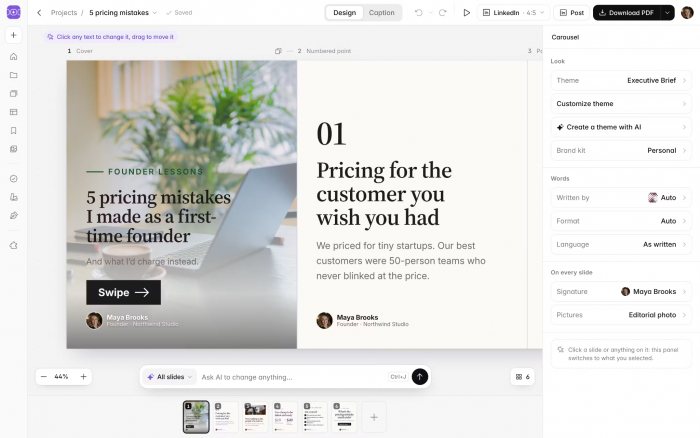
aiCarousels helps creators transform written ideas, articles, PDFs, and notes into structured Instagram and LinkedIn carousels. It offers AI writing styles, editable layouts, and branding options, making it useful for educational posts and professional content that needs a clear visual flow.
What Can You Create?
For example, a LinkedIn creator preparing a carousel about Why Good Content Gets Ignored could organize the topic into the following sequence:
| Slide | Example content | Purpose |
| Opening | Good Content. Poor Results. Here's Why. | Build curiosity |
| Explanation | Your Main Idea Is Buried Under Too Much Information | Identify the problem |
| Takeaway | Lead With Value, Then Build the Context | Offer a practical solution |
This illustrative sequence demonstrates how one topic can become a connected slide story rather than several unrelated graphics.
What Makes It Useful?
● AI-assisted writing: Converts ideas, article links, PDFs, and existing text into slide-ready copy, reducing the need to manually organize longer material.
● Design customization: Provides editable themes, individual slide layouts, and brand kits for maintaining a recognizable visual identity.
● Flexible exports: Supports PDF and PNG downloads, with additional video export capabilities for creators repurposing carousels into short-form content.
Limitations
Complex articles can lose important context when condensed into short slides, particularly if they contain detailed research or statistics. Creators need to review AI-generated summaries before publishing. The one-time free preview also cannot be downloaded until a free account is created.
Pricing
aiCarousels offers free-account access with limited generation and watermarked downloads. Pro starts at $10/month billed annually, or $15 monthly, and includes 60 AI carousels per month with up to 20 slides each.
Best suited for: LinkedIn professionals, educators, and creators who regularly turn written information into visually organized posts.
2. PostNitro: Best for Branded AI Carousels
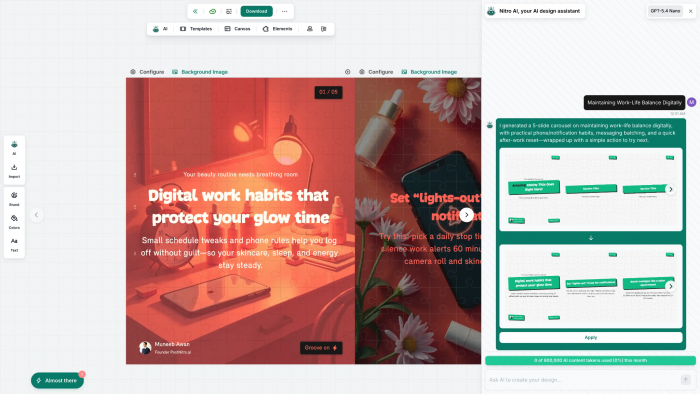
PostNitro focuses on creating multi-slide social posts using AI-generated copy, customizable templates, and brand settings. Its conversational design assistant, Nitro, allows creators to describe a carousel, request revisions, and adjust the output through written instructions instead of working entirely inside a traditional design editor.
What Can You Create?
Consider an Instagram creator developing a carousel titled How to Build a Recognizable Personal Brand. PostNitro can turn that topic into a series covering brand positioning, visual identity, content consistency, and a final action step.
Creators can ask Nitro to shorten a slide, change the tone, or adapt the content for a professional LinkedIn audience. The same concept can also be presented using different visual themes without rewriting every slide manually.
What Makes It Useful?
● Conversational creation: Nitro can respond to requests about slide structure, tone, layout, and design changes, making revisions more direct.
● Brand-based layouts: Fonts, logos, colors, and custom templates can be saved so recurring posts follow a consistent visual direction.
● Content publishing: Higher-tier plans support scheduling and publishing to platforms including Instagram, LinkedIn, TikTok, and Threads.
Limitations
The free plan restricts AI-generated carousels to five slides and five downloads per month. The Starter plan increases the limit to eight AI-generated slides but does not include social scheduling. Creators needing longer carousels and direct publishing must consider higher tiers.
Pricing
PostNitro has a free plan. Starter begins at $15/month, with Creator at $25/month for additional generation capacity, branding options, and scheduling. Annual billing discounts are available.
Best suited for: Personal brands, freelancers, and social media managers who want AI-generated carousels that follow a consistent design style.
3. Contentdrips: Best for Repurposing Existing Content
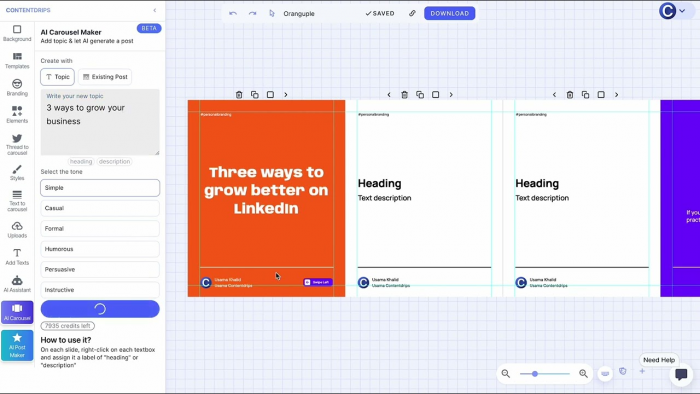
Contentdrips is particularly useful for creators who already have blogs, YouTube videos, newsletters, or long-form posts and want to turn them into social content. Rather than starting with a completely new topic, its AI tools help extract useful material from existing content and present it through editable carousel templates.
What Can You Create?
Suppose a creator has published an article titled Common LinkedIn Profile Mistakes. Instead of rewriting the article into a separate post, the important points can become a shorter carousel.
| Original material | Carousel adaptation |
| An article explaining several profile mistakes | A cover highlighting the most common mistakes |
| Detailed paragraphs on headlines and experience | Individual slides explaining specific corrections |
| A concluding checklist | A final slide with practical profile improvements |
The example illustrates a repurposing approach. Contentdrips provides both template-based carousel generation and a separate AI Design Agent for more customized visual drafts.
What Makes It Useful?
● Content repurposing: Transforms blogs, YouTube material, and written content into social posts without requiring creators to start their research again.
● Template-based production: Existing carousel layouts can be reused for recurring posts, reducing unnecessary design changes.
● Bulk content creation: CSV-based automation supports generating multiple carousels from prepared slide copy, which is useful for scheduled content campaigns.
Limitations
AI usage is credit-based, and different creation methods have different costs. The standard AI Carousel Maker uses 10 credits, while the AI Design Agent uses 25 credits per generation step. Several design revisions can therefore consume credits quickly, especially when experimenting with custom layouts.
Pricing
Contentdrips offers a free plan with 50 AI credits. Its Starter plan costs $15/month with 500 monthly credits, while Pro costs $26/month and provides a larger allowance. Annual billing discounts are also available.
Best suited for: Bloggers, newsletter writers, and content marketers who want to turn existing material into Instagram and LinkedIn posts.
4. Canva: Best for Custom Carousel Design
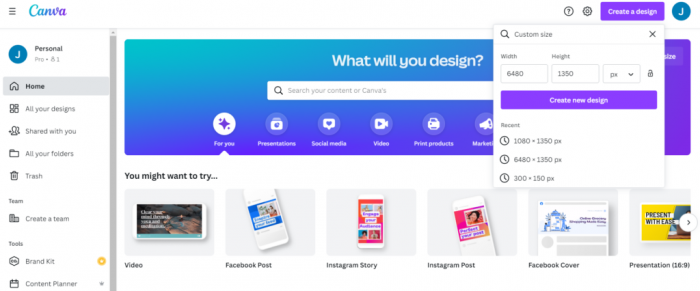
Canva is more of an AI-assisted design platform than a dedicated automatic carousel writer. Its strength lies in providing direct control over every slide through editable templates, graphics, typography, and AI-generated visual elements. Creators can build distinct layouts while maintaining consistent design standards throughout the carousel.
What Can You Create?
An Instagram creator sharing A Week in the Life of a Freelance Designer could use a photographic opening slide, daily activity highlights, screenshots of completed projects, and a closing summary.
Instead of repeating one layout across the entire post, Canva allows creators to combine photo-based slides, simple text layouts, and visual comparisons within a single design. This is especially useful for lifestyle content, portfolios, educational posts, and product showcases.
What Makes It Useful?
● Extensive template library: Provides editable multi-page carousel designs for educational content, photography, business marketing, and personal storytelling.
● Detailed visual editing: Creators can modify individual text elements, graphics, photographs, and slide backgrounds without depending on an AI-generated layout.
● AI design assistance: Image generation, background removal, and other AI tools help produce supporting visuals for custom carousel designs.
Limitations
Canva requires more manual involvement than dedicated prompt-to-carousel generators. Creators may need to write slide content separately, distribute it across pages, and check spacing themselves. Complex designs can also become inconsistent if individual slides are modified without using a shared template.
Pricing
Canva offers a free plan with templates and limited AI access. Canva Pro starts at 144/year) in the US, with expanded creative assets, AI tools, and brand management features.
Best suited for: Instagram creators, designers, small businesses, and brands that want detailed control over the appearance of their carousels.
5. Predis.ai: Best for Marketing and Promotional Carousels
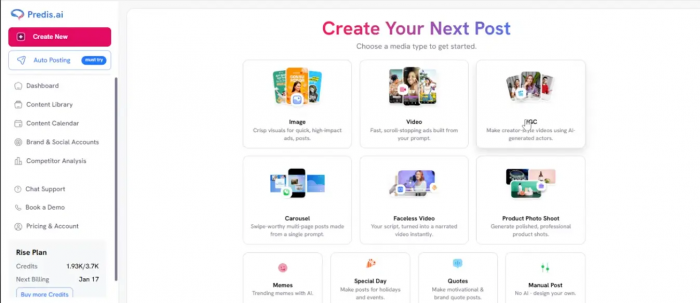
Predis.ai combines social media content generation with design, captions, competitor research, and publishing tools. It is particularly relevant for businesses that create carousels around product features, promotional campaigns, customer education, and social media marketing rather than standalone editorial content.
What Can You Create?
For example, an online skincare brand preparing an Instagram carousel about How to Build a Simple Morning Skincare Routine could use Predis.ai to develop a sequence introducing the routine, explaining individual steps, and ending with a product-related message.
The platform can generate both copy and accompanying visuals. Creators can then adjust the output to reflect the brand's products, audience, and preferred presentation style.
What Makes It Useful?
● Text-to-carousel generation: Creates social media slides from brief descriptions, reducing the work of preparing the initial copy and design.
● Marketing content tools: Provides caption generation, hashtags, competitor research, and other functions useful for planning promotional posts.
● Content scheduling: Supports managing generated posts through a publishing calendar, with channel allowances determined by the subscription.
Limitations
Predis.ai works through monthly AI credits, making frequent regeneration a cost consideration. Its output can also require substantial editing when promoting specific products because AI-generated imagery, claims, and descriptions must match the actual offering. The entry-level Core plan does not include automatic posting.
Pricing
Predis.ai offers a three-day free trial requiring payment-card details, rather than a permanent free plan. Core starts at approximately $19/month billed annually, with 1,300 credits per month. Monthly billing is available at a higher rate.
Best suited for: E-commerce brands, marketers, and small businesses creating promotional carousels alongside other social media content.
6. Gamma: Best for Information-Heavy Carousels
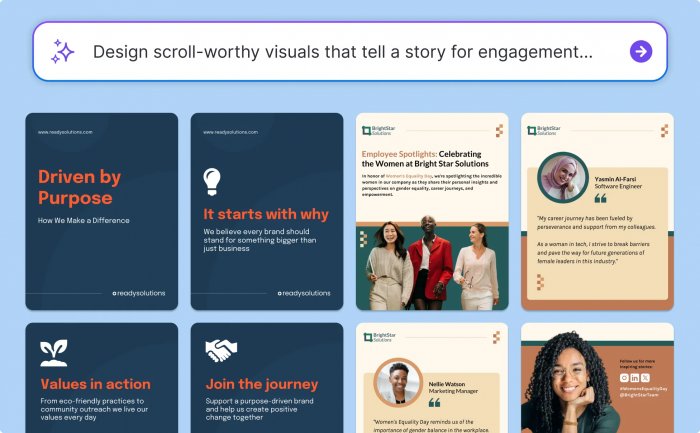
Gamma is primarily an AI presentation and document creation platform, but its ability to organize information into visual slides makes it useful for professional carousels. It is especially relevant for creators who produce research summaries, educational frameworks, industry reports, or detailed explanations that benefit from a structured presentation.
What Can You Create?
A LinkedIn creator could transform a topic such as How AI Is Changing Customer Support into a visual document.
| Slide focus | Information presented |
| Introduction | The central change in customer support |
| Key developments | Automation, intelligent routing, and AI assistants |
| Practical impact | Changes in response handling and human responsibilities |
| Conclusion | What businesses should consider before implementation |
Gamma can help organize this information into connected presentation cards, including text blocks, images, diagrams, and supporting visual elements. The finished document can be exported as a PDF for a LinkedIn document post.
What Makes It Useful?
● Information structuring: Converts prompts, outlines, and imported material into organized presentations with distinct sections.
● Visual explanation: Supports diagrams, charts, images, and structured layouts that can make complicated topics easier to understand.
● Document exports: Provides PDF and PNG options, allowing creators to adapt presentation content into carousel-style posts.
Limitations
Gamma's layouts are designed primarily for presentations, so generated cards may contain more text than a typical Instagram carousel should display. Creators must review mobile readability, adjust page proportions, and simplify dense material. Free-plan PDF exports also include Gamma branding.
Pricing
Gamma has a free plan with 400 initial AI credits and up to 10 slides per prompt. Plus starts at approximately $9 per user/month billed annually, or $12 monthly, with additional AI capabilities and branding removal. Prices can be localized by region.
Best suited for: Educators, consultants, analysts, and LinkedIn professionals who create research-based or information-heavy posts.
7. Taplio: Best for Professional LinkedIn Carousels
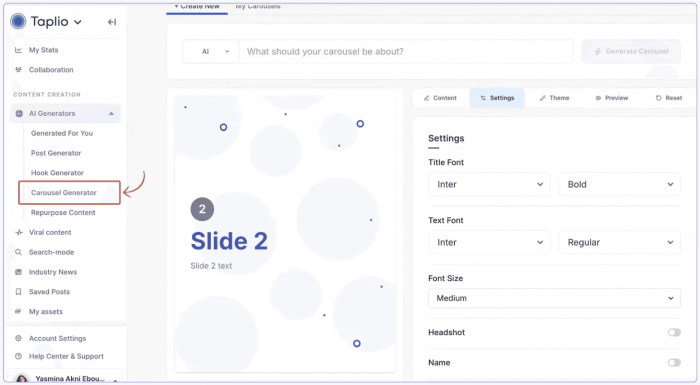
Taplio focuses on LinkedIn content creation and audience growth. Its carousel tools help professionals transform written posts, articles, and ideas into document-style content suited to LinkedIn's professional audience. The platform places greater emphasis on message structure and personal branding than on decorative graphic design.
What Can You Create?
A consultant who has written a LinkedIn post about Lessons From Managing a Remote Team could turn it into a carousel presenting individual management lessons, examples of common challenges, and a closing recommendation.
Taplio can help divide an existing post into sequential slides and suggest an opening hook. Creators can also adjust the design theme and add personal branding before downloading the PDF or using eligible scheduling features.
What Makes It Useful?
● Post-to-carousel conversion: Restructures existing LinkedIn content into shorter slides with a logical reading order.
● Professional branding: Supports consistent colors, fonts, profile details, and templates suited to personal-brand content.
● LinkedIn workflow integration: Combines carousel creation with content scheduling, analytics, and other professional publishing features.
Limitations
Taplio is built around LinkedIn, making it less suitable for creators who primarily publish visual carousels on Instagram. Its broader subscription plans can also be expensive for users who only need occasional carousel generation. The free standalone carousel tool includes a watermark unless the creator has an eligible subscription.
Pricing
Taplio provides a free standalone carousel generator and a seven-day trial of its broader platform. Starter begins at $32/month billed annually, or $39 monthly. AI writing capabilities in the main platform start with the Growth plan at $49/month billed annually, or $69 monthly.
Best suited for: LinkedIn consultants, founders, coaches, and professionals who want carousel publishing to become part of their ongoing content strategy.
Instagram vs. LinkedIn Carousels: What Changes?
Instagram and LinkedIn both support swipeable content, but their publishing formats and audience expectations are different. A carousel designed for one platform may need adjustments before appearing on the other.
| Element | ||
| Main format | Multiple images or videos | Multi-page PDF document |
| Practical dimensions | 1080 × 1350 px | 1080 × 1350 px PDF pages |
| Content approach | Visual storytelling, tutorials, product education | Professional insights, frameworks, reports |
| Text density | Short text with a strong visual focus | Can accommodate more explanation |
| Export | PNG or JPG slides | One multi-page PDF |
| Typical closing slide | Save, share, or follow | Practical takeaway or discussion prompt |
Instagram supports up to 20 photos or videos in a carousel published through the app, although third-party publishing integrations may impose lower limits. LinkedIn document posts use a different upload system, so a PDF is generally the most practical way to publish a multi-page carousel.
The distinction matters when selecting an AI carousel generator. Instagram creators often need greater control over photographs, illustrations, and visual transitions. LinkedIn creators may benefit more from tools that can organize detailed ideas into readable, professional slides.
For a brand publishing to both platforms, creating a common content outline and then adapting its visual presentation is generally more effective than using exactly the same design everywhere.
What Makes an AI Carousel Worth Reading?
The first slide may attract attention, but the remaining slides determine whether readers continue. Many AI-generated carousels look consistent yet fail to develop a meaningful idea. This usually happens when information is divided by slide count instead of by the progression of the argument.
A useful carousel should follow a deliberate sequence:
● Open with a specific idea: The first slide should establish a problem, question, or insight relevant to the audience. Broad headlines such as "Marketing Tips You Need" offer little reason to continue.
● Develop one point at a time: Each supporting slide should contribute a new explanation, example, or piece of evidence instead of repeating the opening statement.
● Keep the text readable: Short paragraphs, meaningful headings, and sufficient spacing are especially important because many readers view carousels on mobile screens.
● Use visuals with a purpose: Charts, screenshots, diagrams, and photographs should clarify the information rather than simply fill empty space.
● Finish with a useful takeaway: The final slide should complete the topic through a summary, recommendation, or practical next step.
The number of slides should reflect the amount of material, not an arbitrary target. A focused five-slide carousel can communicate more effectively than a ten-slide design padded with repetitive explanations.
AI-generated writing also deserves editorial attention. Statistics, quotations, technical claims, and recommendations should be checked before publishing, particularly when a carousel summarizes an external article.
How to Choose the Right AI Carousel Generator
The most suitable platform depends on where the creator spends the most time during production.
For someone struggling to turn ideas into structured slides, aiCarousels or PostNitro may provide the most immediate benefit. Both focus on creating complete carousel sequences rather than requiring the user to design every slide manually.
Creators with existing libraries of articles, newsletters, or videos should look more closely at Contentdrips. Its repurposing tools reduce the need to reconstruct previously researched material. Canva is more appropriate when visual customization and brand consistency matter more than automatic writing.
Predis.ai makes sense for marketing campaigns involving multiple social formats, while Gamma is useful for converting detailed information into visual documents. Taplio is a more specialized choice for professionals who are primarily concerned with LinkedIn content creation and publishing.
Before subscribing, creators should also examine download restrictions, watermarks, monthly AI allowances, available export formats, and whether the pricing includes publishing tools. A cheaper subscription may be less economical if it cannot support the number of carousels produced each month.
Conclusion
There is no single AI carousel generator that suits every Instagram and LinkedIn creator. The difference comes down to whether the main challenge is writing, visual design, repurposing content, or managing publication.
aiCarousels is a strong starting point for turning written ideas into structured slides, while PostNitro offers a more conversational approach to generating branded content. Contentdrips stands out for repurposing material, and Canva remains a flexible option for creators who prefer direct control over their designs.
For specialized needs, Gamma is worth considering for detailed educational content, Predis.ai for marketing campaigns, and Taplio for LinkedIn-focused professional publishing.
The most useful approach is to treat AI-generated carousels as editable drafts rather than finished posts. The software can suggest a structure, divide the text, and prepare the graphics, but the creator still needs to decide whether each slide adds something meaningful. That final editorial judgment often makes the difference between a carousel that merely looks polished and one that people actually want to read.