

Table of Content
- 1. HeyGen: Best for Creating a Consistent AI Presenter
- 2. Captions: Best for Short-Form AI Talking Videos
- 3. Hedra: Best for Expressive Talking Characters
- 4. D-ID: Best for Turning Portraits Into Talking Videos
- 5. VEED: Best for Editing Complete Avatar Videos
- 6. Argil: Best for Creating a Personal AI Twin
- 7. Synthesia: Best for Professional Explainer Videos
- Which AI Avatar Generator Fits Your Content?
- What Makes an AI Talking Avatar Look Realistic?
- Creating Better AI Avatar Videos for Social Media
- Final Verdict
Recording yourself for every Instagram Reel, TikTok, or YouTube Short is no longer the only way to build a recognizable video presence. AI talking avatar generators can turn scripts, photographs, and recorded footage into videos featuring digital presenters, animated characters, or realistic versions of the creator.
The challenge is finding a tool that produces believable speech, natural expressions, and videos suitable for social media. These seven AI avatar generators offer different approaches to creating presenter-led content, from personal digital twins to fictional characters and professional explainers.
1. HeyGen: Best for Creating a Consistent AI Presenter
HeyGen is designed for creators who want a recognizable digital presenter across their videos without repeatedly filming themselves. It allows users to create custom AI avatars, generate videos from written scripts, and produce multilingual content using synchronized speech and facial movements.
Its Avatar IV and other avatar models support different levels of facial expression and motion, while voice cloning allows creators to maintain a consistent speaking identity. HeyGen also offers a large library of ready-made presenters, making it practical for creators who do not want to use their own appearance.
Creator Capability Scorecard
| Capability | Rating |
| Presenter consistency | 4.8/5 |
| Multilingual content | 4.9/5 |
| Facial expressions and delivery | 4.3/5 |
| Editing flexibility | 4.2/5 |
| Ease of video creation | 4.5/5 |
A Video You Could Create
A technology creator could produce a 45-second Instagram Reel introducing a newly launched app. The video could open with the AI presenter explaining the app's purpose, transition into screen recordings demonstrating its features, and return to the avatar for a brief conclusion.
The same digital presenter could appear in future videos, helping establish a recognizable identity without requiring daily filming.
The creative catch: HeyGen performs well with structured scripts, but spontaneous reactions, humor, and emotionally complex delivery may still appear artificial. The final output benefits from reviewing gestures, pronunciation, and the placement of visual transitions.
Starting price: Free plan with three videos per month; Creator from $29/month.
Best suited for: Educational creators, faceless channels, social media marketers, and recurring presenter-led videos.
2. Captions: Best for Short-Form AI Talking Videos
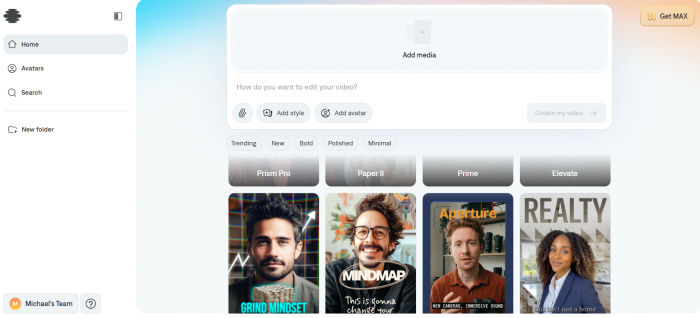
Captions focuses on the kind of video production common among Instagram and TikTok creators. Its AI actor and digital-twin features can generate presenter-led footage, while its editing tools help turn that footage into more complete social media videos.
The platform combines AI-generated presenters with automatic captions, editing styles, and conversational editing controls. Its Max plan also includes tools for creating digital twins and custom AI actors, giving creators options beyond standard talking-head recordings.
Captions is particularly relevant for creators producing frequent short videos because it addresses both avatar generation and the editing work that follows.
Creator Capability Scorecard
| Capability | Rating |
| Short-form content suitability | 4.8/5 |
| AI actor creation | 4.4/5 |
| Caption and editing tools | 4.8/5 |
| Presenter personalization | 4.2/5 |
| Ease of social video production | 4.5/5 |
A Video You Could Create
A skincare creator could produce a 30-second Reel explaining the difference between two commonly confused ingredients. An AI actor could deliver the opening explanation, followed by product close-ups, on-screen ingredient names, and captions emphasizing the main differences.
The video would combine a recognizable speaking character with supporting visuals, rather than keeping the avatar on screen for the entire duration.
The creative catch: Captions offers a useful collection of creation and editing tools, but its advanced AI video features depend on credits. Creators generating several variations of a video should consider how quickly those credits may be consumed.
Starting price: Max from $24.99/month on iOS. Higher Frontier tiers provide additional credits.
Best suited for: TikTok creators, Instagram marketers, product explainers, and short-form channels.
3. Hedra: Best for Expressive Talking Characters
Hedra is particularly interesting for creators who want talking avatars that do not resemble conventional corporate presenters. Its Character models can animate images using audio, producing speaking characters with synchronized mouth movements and facial expressions.
Character 3 supports audio-driven animation, multiple aspect ratios, and videos up to ten minutes long. It can work with realistic human portraits as well as illustrated and fictional characters, offering more room for creative storytelling.
This makes Hedra relevant for entertainment channels, animated commentary, fictional personalities, and creators building unusual visual identities.
Creator Capability Scorecard
| Capability | Rating |
| Character creativity | 4.9/5 |
| Audio-driven animation | 4.5/5 |
| Stylized avatar generation | 4.8/5 |
| Character consistency | 4.0/5 |
| Social video versatility | 4.5/5 |
A Video You Could Create
A creator running an educational history account could design a fictional animated historian and use Hedra to make the character narrate short stories about historical inventions.
Each Reel could feature the character speaking directly to viewers, supported by illustrations, historical photographs, and short explanatory captions. The character could become a recurring element of the channel without requiring the creator to appear on camera.
The creative catch: Expressive animation is one of Hedra's attractions, but generation quality can vary with the source image, audio, and character design. Unusual facial movements or inconsistencies may become more visible in longer videos, so shorter segments are often easier to refine.
Starting price: Hedra offers Studio plans and usage-based API pricing. Character 3 API generation starts at approximately $0.025 per second at 540p, with higher rates for higher resolutions.
Best suited for: Storytelling channels, animated personalities, fictional presenters, and creative social media videos.
4. D-ID: Best for Turning Portraits Into Talking Videos
D-ID specializes in animating still images and generating speaking digital humans. Creators can work with portrait-based avatars and scripted dialogue to produce videos in which a previously static face appears to speak.
Its Creative Reality Studio supports AI video creation, while the platform's broader avatar technology includes expressive visual agents and interactive experiences. For ordinary social media production, however, its portrait animation remains one of the most relevant applications.
D-ID is particularly useful when a creator wants to start with an existing character illustration or an authorized portrait rather than build a completely new digital presenter.
Creator Capability Scorecard
| Capability | Rating |
| Portrait-to-video creation | 4.8/5 |
| Lip synchronization | 4.3/5 |
| Avatar customization | 4.0/5 |
| Expressive performance | 3.9/5 |
| Beginner accessibility | 4.4/5 |
A Video You Could Create
A book-review creator could design an illustrated fictional librarian and animate the portrait to introduce a weekly reading recommendation. A 25-second YouTube Short could begin with the librarian presenting the book's central theme, followed by the cover artwork and two short points about its appeal. The speaking portrait would establish a consistent visual identity while keeping the creator off camera.
This approach also suits fictional mascots, illustrated educational characters, and narrated social media announcements.
The creative catch: Animated portraits generally have less freedom of movement than fully generated avatar performances. A static composition can also become repetitive across a long video, making cutaways and supporting visuals important.
Use personal photographs or recognizable likenesses only with appropriate permission.
Starting price: A free trial is available, followed by paid Studio plans. The exact current entry price should be confirmed on D-ID's pricing page because its visible pricing information varies by plan and billing cycle.
Best suited for: Talking photographs, illustrated characters, educational shorts, and fictional social media hosts.
5. VEED: Best for Editing Complete Avatar Videos
VEED combines AI avatar creation with a broader browser-based video editing environment. Rather than treating the speaking avatar as the entire finished product, creators can build videos containing captions, background footage, music, graphics, and additional scenes.
Its AI video tools support script-based creation, talking photos, voice features, and social video editing. VEED's Gen-AI Studio can also assemble short videos using stock visuals, subtitles, music, and avatars.
This makes the platform suitable for creators who want more control over the surrounding video presentation without switching between several applications.
Creator Capability Scorecard
| Capability | Rating |
| Video editing flexibility | 4.8/5 |
| Social media formatting | 4.7/5 |
| Avatar variety | 4.0/5 |
| Captions and visual additions | 4.7/5 |
| Complete video production | 4.6/5 |
A Video You Could Create
A digital marketing creator could produce a 60-second LinkedIn or Instagram video explaining three mistakes businesses make when writing social media captions. The video could begin with an AI presenter introducing the topic, switch to examples of weak and improved captions, and finish with a short presenter-led conclusion.
VEED's editing tools would allow the creator to adjust the pacing, add text overlays, and position captions without requiring a separate video editor.
The creative catch: VEED is useful for assembling complete videos, but its avatar capabilities are part of a much larger editing platform. Creators mainly interested in advanced facial realism or personal digital twins may prefer a more specialized avatar generator.
Starting price: A free editor is available. AI generation allowances and paid-plan prices vary, with some free AI credits restricted by region.
Best suited for: Social media managers, educational creators, marketing videos, and creators who want editing tools alongside avatar generation.
6. Argil: Best for Creating a Personal AI Twin
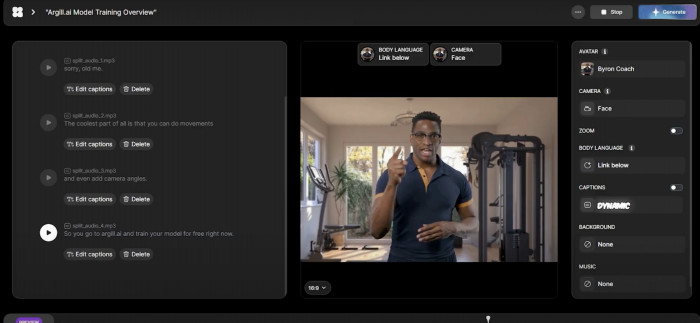
Argil focuses on creators who want a digital version of themselves rather than an unrelated stock presenter. Its AI cloning technology can reproduce a creator's appearance and speaking identity, allowing new videos to be generated from scripts without recording every presentation.
The platform has also developed broader AI production tools, including a Director-style workflow for arranging generated scenes. This distinguishes it from simpler portrait animation tools because its goal is to support more complete video production around a creator or character.
Argil is particularly relevant for personal brands where familiarity with the creator's face and voice is part of the channel's appeal.
Creator Capability Scorecard
| Capability | Rating |
| Personal avatar creation | 4.7/5 |
| Creator identity consistency | 4.5/5 |
| Short-form production potential | 4.5/5 |
| Advanced scene generation | 4.3/5 |
| Budget accessibility | 3.4/5 |
A Video You Could Create
A fitness educator who already has an established Instagram audience could create an authorized AI version of themselves for short informational videos. For example, a 40-second Reel could feature the digital twin explaining three common mistakes in exercise recovery, with supporting graphics and demonstration footage added between the talking segments.
The creator would retain a familiar on-screen identity while reducing the need to record every short explanation individually.
The creative catch: Personal AI cloning requires suitable source material and careful attention to how the likeness is used. Maintaining accurate speech, gestures, and appearance may require revisions. Argil's model-dependent credit system can also make monthly production costs less predictable.
Starting price: Paid credit-based plans; current third-party listings report entry pricing around $50/month, although Argil's public pricing page does not consistently expose a fixed amount.
Best suited for: Personal brands, coaches, educators, and creators building digital versions of themselves.
7. Synthesia: Best for Professional Explainer Videos

Synthesia specializes in presenter-led videos built from scripts, scenes, and reusable layouts. Its library of AI avatars, multilingual voices, and video templates makes it suitable for structured explanations where consistent presentation matters more than spontaneous performance.
Although Synthesia is widely associated with business training, it also has useful applications for educational social media channels. Creators can use its scene-based editor to combine an AI presenter with diagrams, screenshots, and explanatory text.
Its strength lies in producing organized videos that communicate information clearly, particularly when the same material needs to be presented in different languages.
Creator Capability Scorecard
| Capability | Rating |
| Professional presentation | 4.9/5 |
| Educational video creation | 4.8/5 |
| Multilingual delivery | 4.8/5 |
| Creative character flexibility | 3.8/5 |
| Structured scene editing | 4.7/5 |
A Video You Could Create
A career advice creator could produce a series of LinkedIn and YouTube videos explaining interview preparation techniques. One video could introduce the STAR interview method, with the AI presenter explaining each stage while supporting examples appear beside it. The same template could then be reused for future videos about resumes, workplace communication, and professional development.
This format would suit educational content because the avatar serves as a guide while the accompanying visuals carry much of the information.
The creative catch: Synthesia's presentation style can look formal compared with the casual, personality-driven videos common on TikTok and Instagram. It is more suitable for structured explanations than spontaneous reactions or entertainment-focused content.
Starting price: Free Basic plan; Starter from $14/month billed annually or $19/month on the current standard monthly offer, excluding introductory discounts.
Best suited for: Educational explainers, professional creators, LinkedIn videos, and structured informational content.
Which AI Avatar Generator Fits Your Content?
The seven tools serve different creator requirements, so selecting one based entirely on avatar realism can lead to an expensive mismatch.
A creator making humorous animated videos needs different capabilities from someone producing weekly software tutorials. Likewise, a personal brand built around a recognizable face may benefit more from a digital twin than from a library of unrelated presenters.
Here is how the tools align with common content formats:
● For a recurring digital host: HeyGen provides a practical combination of custom avatars, multilingual presentation, and reusable speaking identities. It suits creators publishing regular explanations or announcements.
● For TikTok and Instagram production: Captions combines AI actors with editing tools suited to the visual conventions of short-form content.
● For fictional characters and storytelling: Hedra offers greater creative freedom through audio-driven character animation, making it useful for entertainment and illustrated content.
● For personal-brand videos: Argil focuses on creator likenesses and digital twins, although subscription costs and generation limits deserve careful evaluation.
● For professional explainers: Synthesia works well when the video needs clearly organized scenes, consistent narration, and supporting educational visuals.
D-ID is worth considering for projects centered on an existing authorized portrait, while VEED makes more sense when the creator needs a general-purpose editor around the speaking avatar.
What Makes an AI Talking Avatar Look Realistic?
A believable avatar is not simply a face with synchronized mouth movement. Viewers notice small inconsistencies in timing, expression, posture, and voice delivery, particularly when the digital presenter remains visible for an extended period.
Several elements influence the final result.
1. Lip Synchronization : Lip synchronization determines whether mouth movements correspond to the spoken words. Even a small mismatch can become distracting in a close-up video.
Creators should check difficult sounds, longer words, and moments when the speaker changes pace. Multilingual videos deserve additional review because speech timing and pronunciation patterns vary between languages.
2. Facial Movement Real speakers do not maintain identical facial expressions throughout a sentence. Their eyebrows, eyes, and facial muscles change naturally during conversation.
An avatar with limited facial movement may look convincing in a still image but unnatural during a longer presentation. For this reason, it is useful to preview a complete sentence rather than judge a platform from a single promotional frame.
3. Voice and Emotion A natural voice needs appropriate pauses, emphasis, and pronunciation. A script containing humor, excitement, or reassurance may require different delivery from a straightforward product explanation.
Voice cloning can preserve a creator's recognizable speaking identity, but it does not guarantee accurate emotional interpretation. Important scripts should be checked for unusual emphasis and mispronounced names.
4. Movement and Framing : Small head movements and gestures can make a presenter appear more natural. However, excessive motion may distract from the message, while an entirely static avatar can feel artificial.
For social media videos, alternating between the avatar and supporting footage often creates a more balanced presentation than keeping the talking face visible continuously.
Creating Better AI Avatar Videos for Social Media
AI avatar generation addresses the presentation stage, but an effective Reel or Short still needs a clear structure. A polished digital presenter cannot compensate for a weak script, confusing visuals, or excessive information.
A practical workflow includes the following steps:
1. Choose one subject per video. A 30-second Reel should communicate one clear idea rather than attempt to cover an entire topic. For example, explain one Instagram engagement mistake instead of listing every factor affecting reach.
2. Write for spoken delivery. Use direct sentences, natural transitions, and words that sound comfortable when spoken aloud. Reading the script aloud before generation helps identify awkward phrasing.
3. Choose a suitable avatar. A professional-looking presenter may suit financial education or business tutorials, while a stylized character could work better for entertainment or storytelling. The avatar should support the content rather than become its only attraction.
4. Generate a short preview first. Test difficult names, pronunciation, gestures, and emotional emphasis before rendering the complete video. This can prevent unnecessary credit consumption.
5. Add supporting visuals. Screenshots, product demonstrations, text overlays, and short cutaways can provide evidence and visual variety. Avoid leaving the avatar on screen when viewers need to see the subject being discussed.
6. Prepare the final social format. For standard vertical Reels, Shorts, and TikTok videos, use a 9:16 layout, position captions away from interface overlays, and check that important text remains visible on smaller screens.
Creators should also review the final video for factual accuracy. A realistic-looking presenter may make an explanation appear authoritative even when the underlying script contains errors.
Final Verdict
HeyGen is the strongest all-around option for creators who want a reusable AI presenter, particularly for recurring explainers, multilingual videos, and personal-brand content. Captions is a practical choice for short-form production, while Hedra stands out for fictional characters and expressive storytelling.
D-ID is useful for portrait animation, VEED provides broader video editing controls, and Argil is worth exploring for personal digital twins. Synthesia remains a strong option for creators producing structured educational and professional videos.
The right choice ultimately depends on the kind of on-screen identity a creator wants to build. A familiar presenter, a fictional character, and a realistic personal clone serve very different purposes. Selecting the right avatar type, writing a natural script, and combining the generated performance with meaningful visuals will have a greater effect on the finished video than avatar realism alone.