

Table of Content
- What really is StoriesIG?
- Getting Started With StoriesIG
- Searching Instagram Profiles
- Viewing Instagram Stories
- Downloading Instagram Stories
- Exploring Other Features
- Is StoriesIG Free?
- Does Anonymous Viewing Work?
- What Worked and What Didn't
- Is StoriesIG Safe?
- Who Should Use StoriesIG?
- My Final Verdict
I wanted a simple way to check public Instagram Stories without signing into my account, and that's how I came across StoriesIG. What caught my attention was that it offered more than anonymous Story viewing. The website also had options for downloading Highlights, Reels, photos, and videos, all without creating an account.
The first thing I noticed was how little setup the website required. There was a search field right on the homepage, and the process looked straightforward. But the real question was how useful these features were beyond the homepage, especially for finding Stories, saving media, and accessing older content.
What really is StoriesIG?
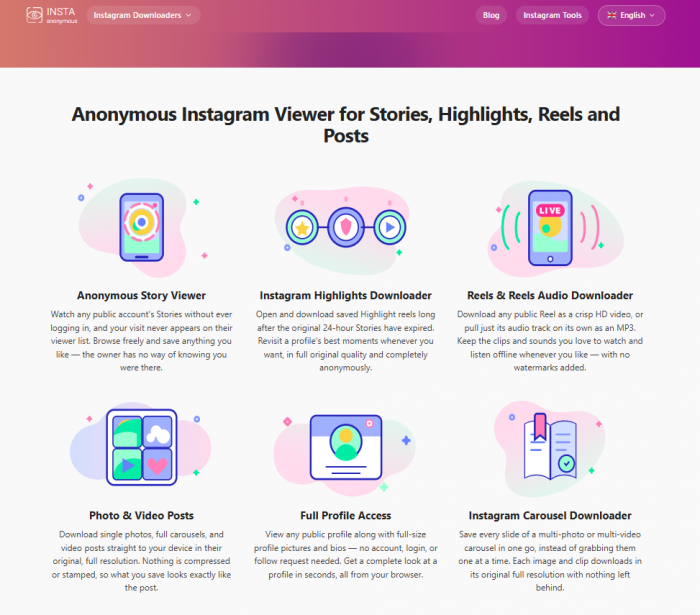
StoriesIG is a free online Instagram viewer that provides access to publicly available Stories, Highlights, Reels, videos, photos, and profile pictures without requiring an Instagram login.
It works through a web browser, so there is no application to install or account to register. A username or Instagram link is enough to start searching for supported public content.
What makes StoriesIG interesting to me is that it combines anonymous viewing with downloading. Instead of using separate websites for Stories, Reels, and profile pictures, several of these functions are available through the same platform.
However, its scope is limited to public Instagram content. Private accounts, Close Friends Stories, and content that is no longer publicly accessible remain outside its reach.
Getting Started With StoriesIG
StoriesIG has a fairly minimal homepage. The main search field sits near the top, with a Search button alongside it. There is also information about the different types of Instagram content the website supports.
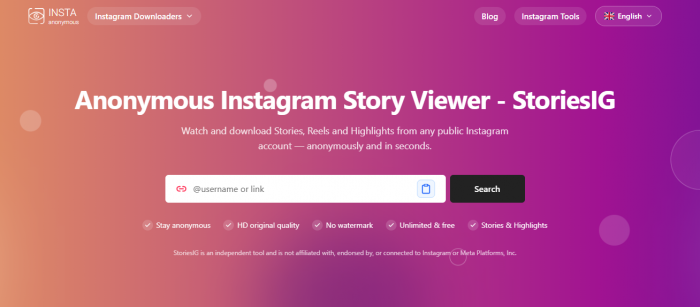
I liked that the main function wasn't buried behind menus or a registration screen. The website presents the search feature immediately, which makes it easy to understand where to begin.
The process involves three straightforward steps:
1. Open the StoriesIG website: Visit StoriesIG.com through a browser on a desktop computer or mobile device. No extension or application is needed.
2. Enter an Instagram username/link: The search field accepts a public Instagram username or profile URL, so there is no need to connect a personal account.
3. Access the available results: Press Search to request the publicly available content associated with that profile. Supported media can then be opened or downloaded if the service retrieves it successfully.
One detail I appreciate about this approach is that it doesn't involve Instagram authorization. Many third-party social media tools ask users to connect their accounts, but StoriesIG is designed around public content and independent browser access. That simplicity is useful, although it doesn't guarantee that every username will produce a complete set of results.
Searching Instagram Profiles
The username search is the main entry point into StoriesIG. It accepts a handle or full Instagram profile link, giving users two ways to locate the same public account.
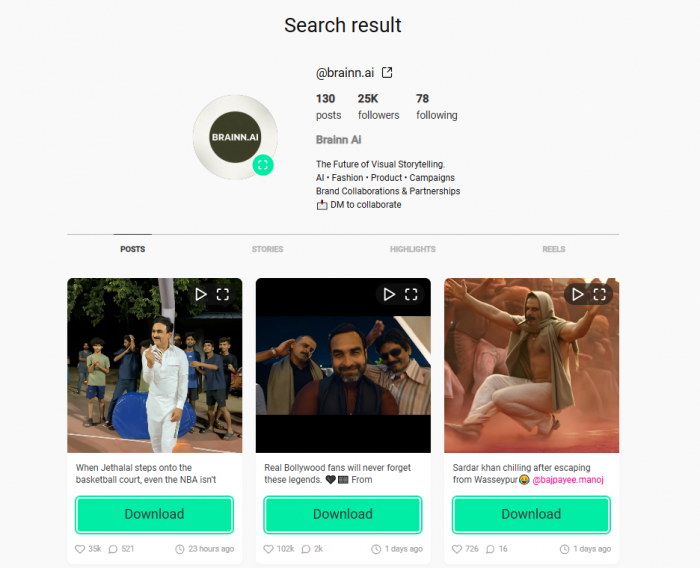
I find entering the username more convenient than copying an entire URL, especially when the account name is already known. A profile link becomes more useful when coming directly from Instagram or another website.
After the Search button is selected, StoriesIG attempts to retrieve the account's publicly available media.
What matters here is understanding what the results actually represent. An Instagram profile can be active and publicly accessible without having a Story available at that moment. Stories normally expire after 24 hours unless the account owner adds them to Highlights.
I wouldn't interpret an empty Stories section as proof that the tool is broken. There are several possible explanations:
● No currently active Stories: The account may not have published anything within the previous 24 hours.
● A private account: StoriesIG does not bypass Instagram's restrictions on private profiles.
● An incorrect or changed username: The profile may have been renamed, deleted, or entered incorrectly.
● A retrieval issue: Instagram can restrict third-party access, which may temporarily prevent content from loading.
This is an important distinction because a successful search and successful Story retrieval are not necessarily the same thing.
Viewing Instagram Stories
The anonymous Story viewer is the main reason someone would visit StoriesIG. Instagram normally records Story views against logged-in accounts, whereas StoriesIG advertises a way to access public Stories without using a personal Instagram session.
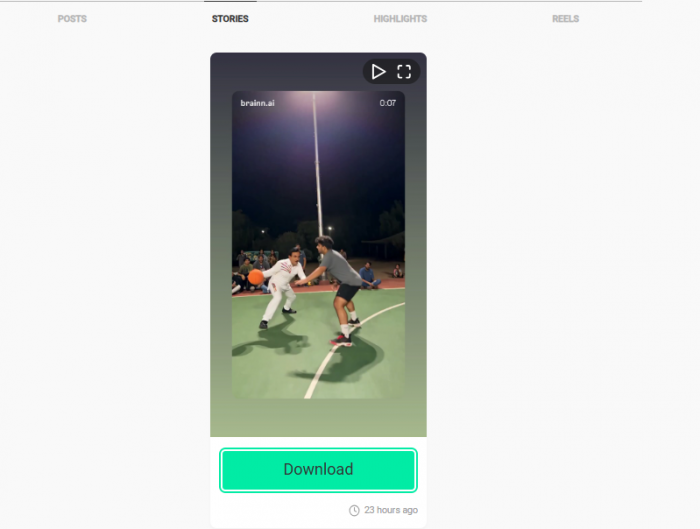
The viewing process is centered on available media rather than Instagram's usual feed, recommendations, messages, and other social features.
I prefer this focused approach for checking a particular public account because it avoids unrelated content. The experience is intended to be about locating a profile and accessing its Stories, not browsing through an entire social network.
StoriesIG supports photo and video Stories, although those formats have slightly different requirements. Photos can be displayed as static images, while videos need playback support and may include sound.
There are also limits to how closely a third-party viewer can reproduce Instagram's native Story experience. Interactive stickers, polls, reactions, and direct replies are not the purpose of this service.
The biggest practical limitation is content availability. If a Story has already expired and wasn't preserved as a Highlight, StoriesIG cannot be expected to retrieve it.
For someone who simply wants to watch publicly accessible Stories, the interface is designed around that single task. Anyone expecting the full Instagram Story experience will find it much narrower.
Downloading Instagram Stories
The downloading option is one of the more useful additions to StoriesIG. Viewing a Story is temporary, but downloading a supported photo or video allows it to be opened later without returning to the website.
StoriesIG provides download controls for available media and advertises original-quality files without adding its own watermark.
The basic process is simple:
● Locate the public Story: Search the account and open the relevant content from the available results.
● Choose the download control: Select the option associated with the photo or video rather than capturing the screen manually.
● Save the media file: The browser handles the download, allowing the file to be stored locally.
● Check the downloaded content: Open the saved image or video to confirm its format, playback, and visual quality.
What I like about direct downloads is the difference they make for video content. A screenshot only captures one frame, while a properly downloaded video can preserve movement and audio.
StoriesIG advertises video downloads in MP4 format. However, media quality ultimately depends on the original upload and the version that Instagram makes accessible.
I would also separate StoriesIG's watermark-free claim from a guarantee about quality. A file can have no added watermark and still be subject to compression or retrieval limitations.
One final consideration is content ownership. Downloading an accessible Story does not automatically provide permission to repost it, use it commercially, or claim the original work.
Exploring Other Features
StoriesIG has more tools than its name initially suggests. Alongside anonymous Story viewing, its website provides options for downloading Highlights, Reels, photos, videos, and profile pictures.
I think these additional features make the platform more interesting than a single-purpose Instagram Story viewer, particularly for someone who regularly checks different types of public content.
Instagram Highlights
Highlights are collections of Stories that account owners save to their profiles. Unlike ordinary Stories, which generally disappear after 24 hours, Highlights can remain visible until the owner removes them.

StoriesIG advertises support for viewing and downloading public Highlights. This is particularly useful for profiles that organize content into categories such as tutorials, announcements, product collections, or travel updates.
The difference between Stories and Highlights is worth understanding because an empty active Story section does not necessarily mean that older public Highlights are unavailable.
Reels and Audio
StoriesIG also includes a Reels downloader that works with publicly accessible Instagram videos.
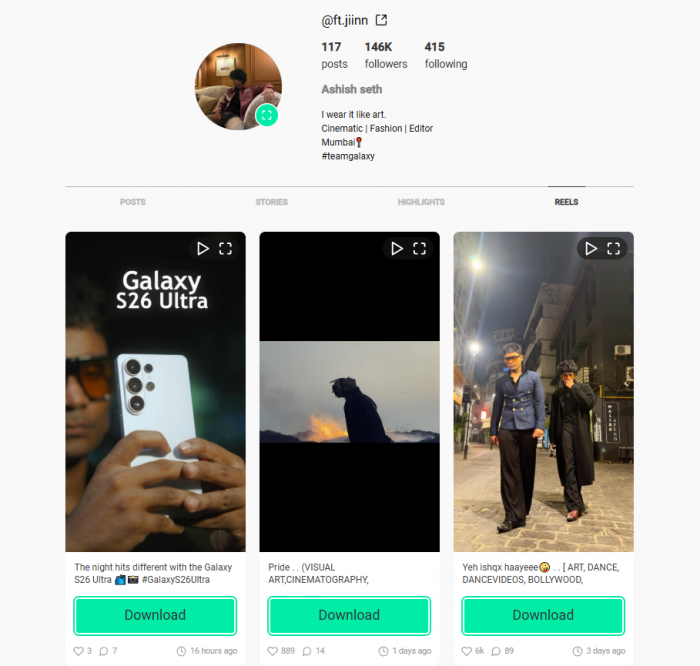
Its advertised functions include downloading Reels as MP4 files and extracting audio as MP3 files. These are separate functions, since saving a complete Reel and saving only its sound serve different purposes.
I find the audio option an interesting addition because many ordinary Instagram downloaders focus exclusively on images and videos. Still, downloaded music and sound recordings remain subject to copyright restrictions.
Photos and Carousels
The photo downloader handles publicly accessible Instagram images, while the carousel downloader is designed for posts containing multiple media items.
Carousel support is particularly relevant because one Instagram post can contain several photos or videos. Downloading the individual files is more useful than capturing screenshots when the original media quality matters.
The website advertises full-resolution downloads, but the actual output remains dependent on the source files and successful retrieval.
Profile Pictures
StoriesIG also provides access to public profile pictures, including larger versions where available. This is a fairly simple feature, but it adds another practical function to the platform. Instagram profile pictures are normally displayed as small circles, so a larger image can be easier to inspect.
The available resolution still depends on the original image. Enlarging a small source file cannot restore detail that isn't there.
Features at a Glance
| Feature | What it offers | Main limitation |
| Story viewer | Views available public Stories | Stories are time-sensitive |
| Story downloader | Saves Story photos and videos | Media must remain accessible |
| Highlights viewer | Opens saved Story collections | Public Highlights only |
| Reels downloader | Downloads public Reels | Retrieval can vary |
| Audio downloader | Saves supported Reel audio | Copyright restrictions apply |
| Carousel downloader | Saves multiple post items | Results depend on source |
| Profile picture viewer | Displays available profile pictures | Resolution varies |
The feature list is fairly comprehensive for a free browser-based tool. However, I would judge its overall value by how reliably these different functions work rather than simply counting the number of tools available.
Is StoriesIG Free?
StoriesIG advertises its viewing and downloading features as free, without requiring account registration or a paid subscription.
That makes it more accessible than services that provide only a limited preview before requesting payment.
| Pricing detail | StoriesIG |
| Basic access | Free |
| Instagram login | Not required |
| Registration | Not required |
| Story viewing | Free |
| Media downloads | Advertised as free |
| Paid plan | None advertised |
I like the simplicity of this pricing arrangement. There is no complicated feature-tier comparison to work through before understanding what the website offers. However, free access is only one part of the evaluation. A downloader still needs to retrieve the requested media consistently to be genuinely useful.
Does Anonymous Viewing Work?
Anonymous viewing is StoriesIG's main selling point, so I wanted to understand how it actually works. According to the website, it retrieves public Instagram content through its own servers without requiring users to log into their Instagram accounts.
StoriesIG claims this prevents usernames from appearing in the account owner's Story viewer list. However, this is the service's claim, and its anonymity cannot be confirmed simply because no login is required.
Another important distinction is that anonymous Story viewing doesn't mean complete online privacy. StoriesIG may still receive information such as IP addresses and browser details. For me, the login-free approach is convenient, but it's important to understand these privacy limitations.
What Worked and What Didn't
Looking at StoriesIG as a complete tool, its biggest strengths are convenience and the range of supported media. Its limitations mostly come from its dependence on publicly available Instagram content.
What I liked about its approach:
● The homepage is straightforward: The search function is immediately visible, without requiring visitors to find a specific tool or create an account first.
● No Instagram credentials are required: Public content can be requested without connecting a personal Instagram profile.
● Multiple content formats are supported: Stories, Highlights, Reels, videos, and photos are covered through the same website.
● Downloads are part of the service: The platform is designed for saving accessible media directly rather than relying on screenshots or screen recordings.
Where the experience has limitations:
● Private profiles are excluded: The service cannot display restricted posts, Close Friends Stories, or private-account media.
● Expired content cannot always be retrieved: Stories that disappear without being saved as Highlights are generally unavailable.
● Retrieval isn't completely under StoriesIG's control: Instagram-side restrictions and temporary service problems can affect results.
● Social features are missing: The service does not replace Instagram's messaging, commenting, account management, or interactive Story functions.
I see StoriesIG as a focused viewing and downloading tool rather than an Instagram replacement. That makes its limitations easier to understand because most of them relate directly to what the service is designed to do.
Is StoriesIG Safe?
One reassuring aspect of StoriesIG's design is that it does not require an Instagram password to access its core tools. That avoids the credential-sharing risk associated with services that ask users to log into Instagram through an unfamiliar third-party website.
However, I wouldn't judge website safety entirely by whether a login is required.
StoriesIG's privacy policy describes collecting technical information necessary to operate its service, including request details and device-related information. That is different from accessing a personal Instagram account, but it still means the website handles some visitor data.
A few basic precautions make sense:
● Check the domain before using it: Similar StoriesIG websites may have different operators, policies, and download experiences.
● Avoid unexpected login requests: The advertised service does not require an Instagram password, so a sudden credential prompt should raise concerns.
● Inspect downloaded files: Expected image, video, and audio downloads should not require installing unrelated software.
● Respect content permissions: Public Instagram media is still subject to copyright and other applicable rights.
StoriesIG is an independent third-party service and is not officially associated with Instagram or Meta. I would treat that independence as an important consideration when deciding what information to share with the website.
Who Should Use StoriesIG?
StoriesIG makes the most sense for people who occasionally need to view or download content from public Instagram profiles without signing into Instagram.
For example, someone checking a public business account's announcements may find the Story viewer convenient. Creators and researchers working with permitted public reference material may also find its media-saving features useful.
Its broader selection of tools makes it relevant to people who want more than temporary Story viewing, particularly when public Reels, carousel posts, or Highlights are involved.
On the other hand, StoriesIG is not suitable for accessing private accounts, recovering deleted content, managing Instagram profiles, or analyzing social media performance. Those tasks require different tools and, in some cases, permissions that a public Instagram viewer cannot provide.
My Final Verdict
What I like most about StoriesIG is the simplicity of its approach. It brings public Instagram Story viewing and several media download functions together without requiring account creation or an Instagram login. The homepage makes the intended process easy to understand, and the additional tools extend its usefulness beyond temporary Stories.
My main reservation is reliability. StoriesIG depends on what Instagram makes publicly accessible, which means unavailable media, expired Stories, and retrieval restrictions can affect the experience. Its anonymity claims should also be understood in terms of how the service says it retrieves content, rather than treated as a guarantee of complete online privacy.
StoriesIG looks useful for occasional public Instagram viewing and downloading, especially for someone who prefers a simple browser-based option. I wouldn't treat it as a replacement for Instagram or a dependable archive of every public post, but its focused feature set makes it a reasonable option to consider.