

Table of Content
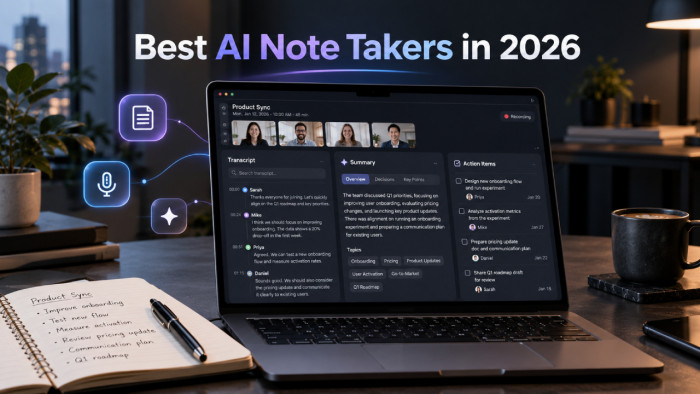
Meetings can generate plenty of information but leave surprisingly little behind that people actually use. A transcript might capture every word, yet still fail to identify who agreed to what, which decisions were made, or what needs attention next.
AI note takers promise to solve this by turning conversations into searchable notes, summaries, and action items. But the difference between them goes beyond transcription quality. Some prioritize live notes, others focus on team collaboration, and a few work without joining meetings as visible bots.
Here are eight AI note-taking tools worth considering in 2026, including their strengths, pricing, and limitations.
What Makes a Good AI Note Taker?
A useful AI note taker should do more than convert speech into text. Its real value comes from preserving important information in a format that people can understand and act on later.
Several capabilities deserve attention before choosing a platform:
● Reliable transcription: The software should distinguish speakers, recognize relevant terminology, and handle natural interruptions without losing important context.
● Useful meeting summaries: Strong summaries separate confirmed decisions from suggestions, questions, and unresolved discussions.
● Action item tracking: A useful assistant identifies tasks, responsible people, and deadlines when these details are actually mentioned.
● Meeting compatibility: Some tools join Zoom, Google Meet, or Microsoft Teams as bots, while others capture audio locally through an application.
● Search and integrations: Notes become more valuable when previous discussions can be searched and relevant information can move into project management or CRM platforms.
Privacy also matters. Recording notifications, consent, storage policies, and access permissions deserve as much attention as the AI features.
Best AI Note Takers at a Glance
The following table compares each tool's main strength and advertised entry-level pricing. Paid prices are in USD per user unless otherwise stated.
| AI note taker | Main strength | Free plan | Paid plans from |
| Fireflies.ai | Meeting search and integrations | Yes | $10/month |
| Otter.ai | Live transcription | Yes | $8.33/month* |
| Fathom | Free meeting recordings | Yes | $16/month |
| Granola | Bot-free meeting notes | Yes | $14/month |
| tl;dv | Meeting clips and summaries | Yes | $18/month |
| Notta | Multilingual transcription | Yes | $8.17/month |
| Fellow | Team agendas and action items | Yes | $7/month |
| Read AI | Meeting intelligence | Yes | $15/month |
8 Best Note taking Tools
1. Fireflies.ai : Turning Meetings Into Searchable Knowledge
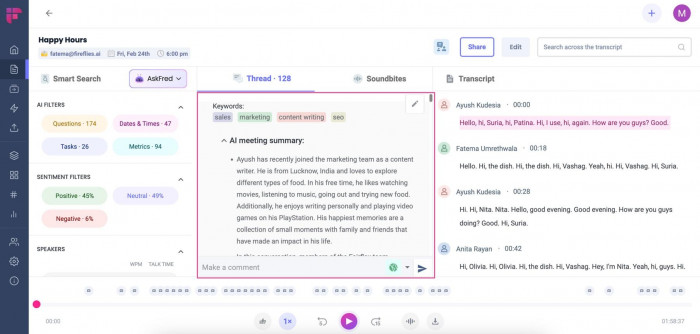
Fireflies.ai is built for people who need meeting information to remain useful long after a call ends. It records and transcribes conversations, prepares summaries, and organizes discussion points into a searchable meeting history.
Its appeal is the connection between note-taking and everyday business tools. Instead of copying meeting outcomes into separate applications, teams can use integrations and automations to move relevant information into their existing workflows.
What makes it useful:
● AskFred assistant: Allows users to ask questions about recorded discussions and locate details without reading full transcripts.
● Automated summaries: Organizes meeting highlights, decisions, and action items into structured recaps.
● Connected workflows: Integrates with platforms including Slack, Notion, and popular CRM systems.
● Conversation search: Helps retrieve references to specific topics across recorded meetings.
Where it gets restrictive: The free plan provides a useful starting point, but storage and advanced AI capabilities have limits. Teams wanting extensive automation or unrestricted access to features may need higher subscriptions.
Pricing: Free plan available. Pro starts at $10/user/month billed annually, or $18 with monthly billing.
Ideal fit: Teams that want meeting notes connected to project management, communication, and customer records.
2. Otter.ai : Following Conversations in Real Time
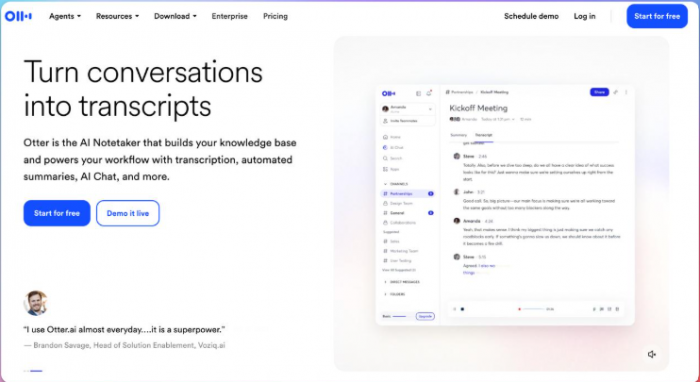
Otter.ai concentrates on making conversations readable while they happen. Its live transcription lets participants follow discussions, revisit recent remarks, and identify information they may have missed without waiting until the meeting ends.
Otter also generates meeting summaries and supports AI-powered questions about conversations. This makes it particularly useful for interviews, lengthy discussions, and meetings where people need to check details during the call.
Useful capabilities include:
● Live transcription: Displays conversation text as participants speak, making it easier to follow detailed discussions.
● Speaker identification: Separates contributions from different participants and supports speaker labeling.
● AI Chat: Helps users locate answers and details within or across recorded meetings.
● Recording playback: Connects transcripts with recorded audio for checking questionable passages.
A limitation to consider: The Basic plan includes 300 transcription minutes per month, which can disappear quickly with frequent meetings. Transcription accuracy can also suffer when people interrupt each other or use unfamiliar terminology.
Pricing: Free Basic plan available. Standard Pro pricing starts at $8.33/user/month with annual billing, or $16.99 monthly, before promotional offers.
Who will appreciate it: Interviewers, researchers, students, and professionals who depend on live transcription.
3. Fathom : Free Recordings With Useful Summaries
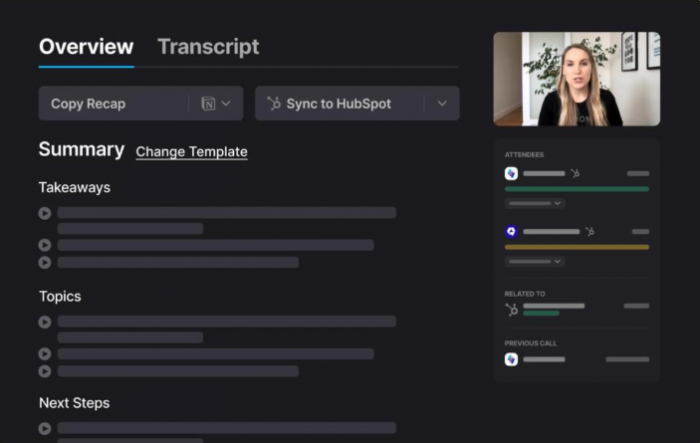
Fathom stands out because its free plan includes unlimited meeting recordings and transcriptions alongside AI-generated summaries. This makes it attractive to individuals who attend frequent calls but don't want to commit to a subscription immediately.
The platform also makes recorded conversations easier to revisit through clips, highlights, and search. Someone conducting customer interviews, for example, can return to an important response without replaying the entire conversation.
The strongest features:
● Unlimited free recordings: Captures supported meetings without a monthly recording-count restriction.
● Instant AI summaries: Prepares readable meeting recaps after conversations.
● Shareable highlights: Allows users to create clips and revisit important moments.
● Capture flexibility: Offers bot-based recording and a bot-free option, with platform restrictions for the latter.
The compromise: While the free plan is generous, advanced summaries, AI-generated action items, and the conversational meeting assistant are paid features. Teams also need subscriptions for additional shared workflows and CRM capabilities.
Pricing: Free plan available. Individual Premium starts at $16/user/month billed annually, or $20 monthly. Team pricing starts at $15/user/month annually, with a two-seat minimum.
Most suitable for: Individuals, consultants, and small businesses seeking substantial free recording and transcription capabilities.
4. Granola : AI Notes Without a Meeting Bot
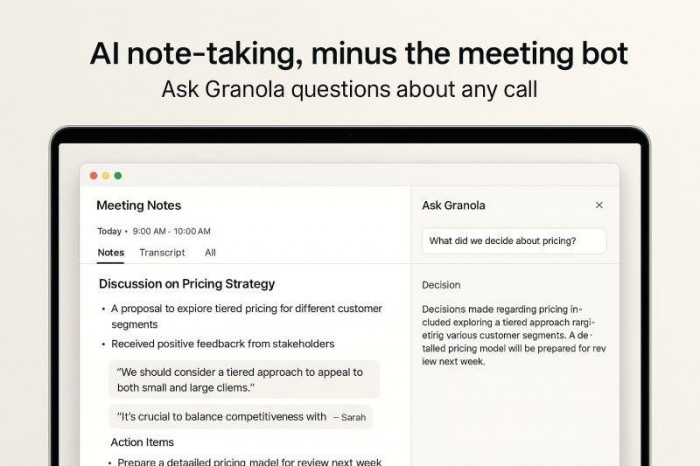
Granola approaches meeting notes differently by capturing audio through the user's device instead of joining calls as a separate participant. It combines personal notes with AI-generated context, creating organized summaries without interrupting the meeting experience.
This approach suits professionals who prefer writing a few important observations themselves while letting AI fill in the surrounding details. Users can also search earlier discussions and ask questions about meeting content.
What stands out:
● Bot-free capture: Records meeting speech without adding a visible AI participant.
● AI-enhanced notes: Develops personal observations into structured meeting summaries.
● Meeting search: Finds information across previous conversations without reviewing complete transcripts.
The trade-off: The free plan limits accessible meeting history to 30 days, while advanced integrations require a subscription. Granola also focuses on written notes rather than storing replayable audio and video recordings.
Pricing: Free plan available. Business starts at $14/user/month, billed monthly.
Best for: Freelancers, consultants, and professionals who prefer personal meeting notes without visible recording bots.
5. tl;dv : Finding Important Moments in Recordings
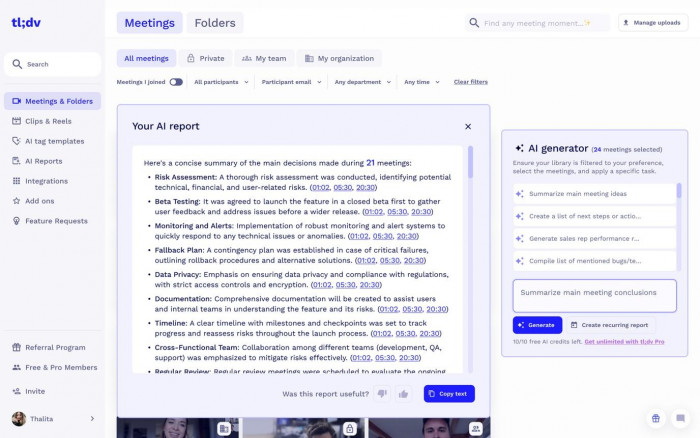
tl;dv is particularly useful when the actual conversation matters as much as its written summary. It records supported video meetings, creates transcripts, and helps users identify sections worth revisiting.
This becomes useful in customer interviews, product research, and sales discussions. A team member can share a relevant meeting clip rather than expecting colleagues to interpret a lengthy transcript or rely entirely on someone's written notes.
Notable capabilities:
● Meeting highlights: Creates clips and timestamps so important moments can be reviewed separately.
● Searchable transcripts: Makes it easier to locate specific remarks within recorded conversations.
● Multi-meeting reports: Helps compare discussion themes across different calls.
● CRM connections: Paid integrations can support sales and customer information workflows.
The catch: Although the free tier offers substantial recording functionality, advanced AI reports and unlimited AI note requests require Pro. Teams that primarily need written summaries may not benefit enough from the video-centered features.
Pricing: Free plan available. Pro starts at $18/user/month billed annually, or approximately $29 monthly.
Recommended for: Sales teams, researchers, and professionals who regularly share important sections of recorded meetings.
6. Notta : Transcription Across Languages and Devices
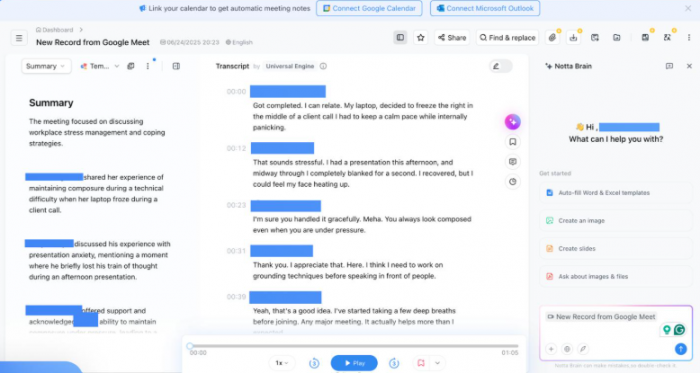
Notta is useful for people whose note-taking needs extend beyond scheduled video meetings. It supports live transcription, uploaded audio files, and recordings through web and mobile applications.
Its multilingual capabilities make it relevant for interviews, international discussions, and recorded research. Instead of treating every recording as a conventional office meeting, Notta provides a broader transcription workflow that can accommodate different kinds of spoken content.
Where Notta helps most:
● Multilingual transcription: Converts supported languages into written transcripts, with translation capabilities available through selected features and add-ons.
● Audio file uploads: Processes existing recordings without requiring the original conversation to take place inside a meeting platform.
● Speaker identification: Separates participants in transcripts to make discussions easier to follow.
● AI summaries: Produces organized takeaways from transcribed conversations.
What to keep in mind: The free tier allows 120 transcription minutes monthly but restricts individual conversations to three minutes. Translation and longer recordings may also introduce additional costs, making the advertised free allowance less practical for interviews.
Pricing: Free plan available. Pro starts at $8.17/month billed annually.
Good match for: Interviewers, multilingual professionals, and people converting recorded conversations into written notes.
7. Fellow : Keeping Meetings and Follow-Ups Organized
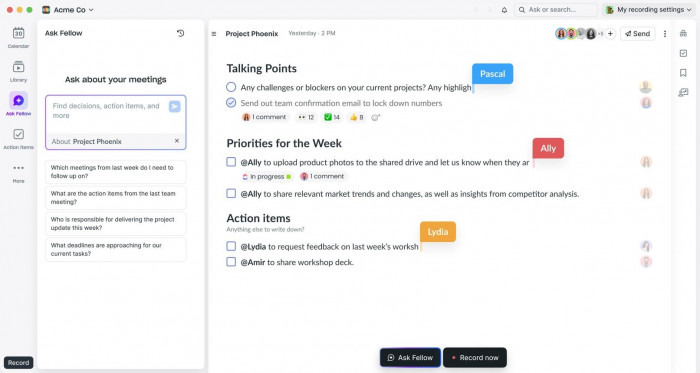
Fellow approaches AI note-taking as part of the complete meeting process. Alongside transcription and summaries, it helps teams prepare agendas, document decisions, assign action items, and organize recurring discussions.
Consider a weekly project meeting. Recording what everyone said is useful, but the more important outcome is knowing which tasks were assigned, what remains unresolved, and what needs attention before the next meeting. Fellow brings those activities into the same workspace.
Features that matter:
● Shared meeting agendas: Gives participants a structured place to prepare discussion topics before calls.
● AI meeting notes: Generates summaries, transcripts, and action items from supported meetings.
● Task management connections: Links meeting outcomes with tools such as Asana, Jira, and Notion on supported plans.
● Meeting organization: Helps teams maintain records of recurring discussions rather than treating each meeting separately.
Possible drawback: Fellow's free plan includes only five AI meeting recordings and notes per user as a lifetime allowance. That is enough to evaluate the software but restrictive for ongoing use. Unlimited AI notes require a higher plan.
Pricing: Free plan available. Team starts at $7/user/month billed annually, or $11 monthly.
Works well for: Project managers, department leads, and teams that need to turn meetings into organized follow-up work.
8. Read AI : Understanding More Than Meeting Notes
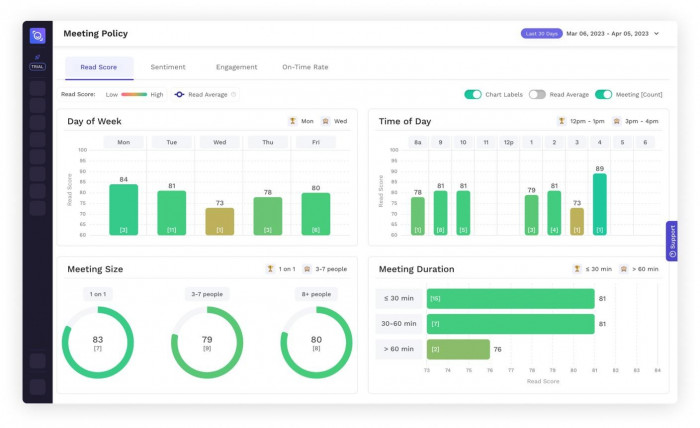
Read AI expands traditional note-taking with meeting insights, conversation metrics, and search across connected work information. It generates transcripts and summaries while also examining aspects of meeting participation.
Its broader approach is useful for professionals who spend considerable time in discussions and want to retrieve information across meetings, emails, and connected services. Rather than simply maintaining recordings, Read AI aims to make that information easier to search and understand.
What sets it apart:
● Meeting reports: Organizes summaries, transcripts, action items, and important questions.
● Conversation insights: Provides metrics and coaching information related to meeting participation.
● Ask Read: Helps locate information across supported connected work sources.
● Workspace features: Paid plans support team collaboration, sharing, and additional integrations.
Where it may disappoint: Conversation metrics are not always reliable indicators of meeting quality or employee performance. The free plan also permits only five meeting reports monthly, and audio/video playback requires a higher subscription than Pro.
Pricing: Free plan available. Pro starts at $15/user/month billed annually, or $19.75 monthly.
Particularly useful for: Managers and professionals interested in meeting records, conversation patterns, and searchable workplace information.
Free vs Paid AI Note Takers
Free plans are useful for understanding how a tool handles real conversations, but their restrictions are not always comparable. Some limit transcription minutes, others restrict meeting counts, and a few provide generous recording allowances while charging for advanced analysis.
Fathom and Granola offer particularly interesting free options for different reasons. Fathom emphasizes recordings and summaries, while Granola provides an ongoing bot-free note-taking workflow with limited historical access.
Notta and Otter.ai are worth examining for transcription, but their free allowances require closer attention. Fellow's free plan is better viewed as an evaluation option because its AI recording credits are limited.
For paid subscriptions, the decision should depend on the actual bottleneck. A team that needs CRM updates may benefit from paying for integrations, while someone who only needs brief notes from occasional meetings might gain little from upgrading.
What to Check Before Choosing
Before purchasing any AI note-taking subscription, test the software with a normal meeting rather than relying exclusively on demonstration summaries.
The most revealing test is a conversation containing several participants, interruptions, specific terminology, and at least one decision that changes during the discussion.
Examine whether the resulting notes capture the final decision, identify the correct task owner, and preserve enough context for someone who missed the meeting to understand what happened.
Recording method also deserves attention. A visible meeting bot may need admission from the host, while device-based capture can depend on operating-system permissions and application compatibility. Neither approach removes the obligation to inform participants and obtain consent where required.
Finally, review how long recordings are stored, who can access transcripts, whether the service uses customer data for model training, and what happens to notes when a subscription is canceled.
Which AI Note Taker Should You Choose?
There is no single best AI note taker for every type of meeting. The right choice depends on whether the priority is live transcription, organized summaries, collaboration, or retaining the original conversation.
For individuals prioritizing free recording capabilities, Fathom is a strong starting point. Granola offers a different experience for professionals who prefer taking personal notes without introducing a meeting bot.
Otter.ai is worth considering for live transcription, while Notta is better aligned with multilingual recordings and imported audio. Teams needing deeper integrations can examine Fireflies.ai, and those managing agendas and ongoing tasks may prefer Fellow.
For sharing video highlights, tl;dv has a clearer advantage. Read AI becomes more relevant when conversation analytics and information retrieval across connected work tools are priorities.
Final Take
The best AI note takers in 2026 are no longer competing on transcription alone. Their value increasingly depends on how accurately they preserve decisions, organize follow-up work, and help people recover information when it matters.
A good choice should reduce the work required after a meeting without creating another system that needs constant maintenance. Start with the free plans, review the actual notes they produce, and pay for additional features only when they solve a recurring problem.
An impressive transcript is useful. A dependable record of what was decided and what happens next is considerably more valuable.