


Table of Content
For AI video generation, speed is just as important as quality. MiniMax H3 is built for rapid workflow, combining video generation with native audio, camera control, references, and multi-shot creation. Available on Pollo AI, MiniMax H3’s fast generation experience makes it possible to create a 5-second video in under 5 seconds, giving creators a much shorter feedback loop. Instead of spending most of your time waiting, you can spend more time deciding what actually works.
What Is MiniMax H3?
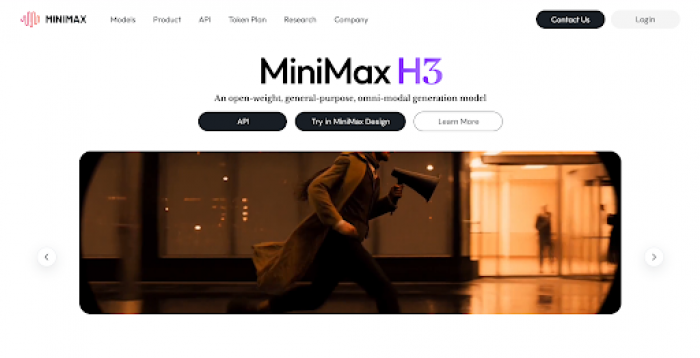
MiniMax H3 is an AI video model developed by MiniMax. It can understand text, images, video, and audio and generate videos with native stereo audio. H3 supports video outputs from 4 to 15 seconds, up to 2K resolution, and a range of aspect ratios including 9:16 for short-form content.
More importantly, H3 is not limited to simple text-to-video generation. It can also work with reference images and videos, control camera movements, generate multiple shots, extend video, and edit elements within footage.
That makes it useful for everything from social media clips and product ads to cinematic concepts and character-driven videos.
Why MiniMax H3's Speed Matters
Imagine you're creating a 5-second ad and want to test three different openings. With a slow workflow, you may generate one version, wait, discover that the camera movement is wrong, rewrite the prompt, and wait again.
However, with a much faster generation cycle, you can simply test multiple ideas in a very short time. This is especially useful for TikTok videos, Instagram Reels, YouTube Shorts, product ads, and other short-form content where multiple variations are often more valuable than one highly polished concept.
How to Use MiniMax H3 on Pollo AI
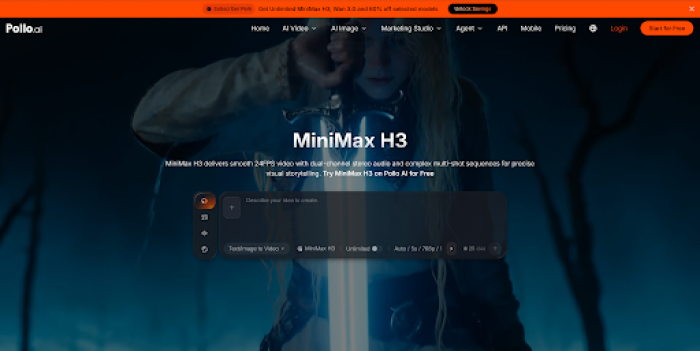
Pollo AI is a convenient way to use MiniMax H3 because you can access the model without building a complicated workflow around it. Its MiniMax H3 page supports text-to-video and image-to-video generation, while the platform also provides access to other AI video models.
Step 1: Choose MiniMax H3
Open Pollo AI's AI video generator and select MiniMax H3.
Step 2: Choose Your Input
Use text-to-video when you only have an idea.
Use image-to-video when you already have a product image, portrait, illustration, or other visual asset.
Use reference inputs when character or subject consistency is important.
Step 3: Write an Action-Oriented Prompt
Focus on what should actually happen and try to include the motions in the prompt.
Step 4: Generate Multiple Versions
This is where H3's speed becomes especially useful. Change one variable at a time—camera angle, movement, lighting, setting, or action—and generate another version. Compare the results and keep the strongest one.
Key Features of MiniMax H3
Native Audio Generation
MiniMax H3 generates audio together with the video, including dialogue, environmental sounds, and sound effects. The audio is designed to stay synchronized with the visual action.
For better results, don't ignore audio when writing your prompt. Make sure it gives clear instructions for both the visual scene and its sound.
Natural-Language Camera Control
H3's Director Mode allows you to describe camera movements directly in the prompt, including tracking shots, crane movements, push-ins, and handheld styles.
A useful structure is:
Subject + Action + Camera Movement + Environment + Lighting + Audio
Multi-Shot Generation
H3 can generate sequences with different camera angles and transitions based on natural-language instructions.
For a product video, you could write:
Start with a wide shot of the product on a table. Cut to a close-up of the logo. Switch to an overhead shot as the product is opened. End with a slow camera push-in.
This gives you a more structured sequence instead of one static shot.
Image and Video References
Reference inputs are useful when you need to maintain a specific character, product, or visual style. H3 supports image and video references, helping guide appearance, movement, and consistency.
For example, upload a character image and a dance reference video, then prompt:
Use the character from Reference Image 1 and reproduce the movements from Reference Video 1 while maintaining the character's appearance.
This is much more practical than trying to describe every detail from scratch.
Why Use MiniMax H3 on Pollo AI?
The advantage of Pollo AI isn't only access to MiniMax H3. You can also switch between different AI video models and workflows from one platform, making it easier to test which model works best for a particular project. Pollo AI also offers dedicated creative tools such as movie trailer maker, Instagram video maker, video ads maker.
For creators who work across devices, Pollo AI also provides a mobile app, so AI video creation doesn't have to stay tied to a desktop workflow.
MiniMax H3's biggest advantage is not any single feature. It's the combination of speed and control. If your goal is to create more videos, test more concepts, and reduce the time spent waiting for each generation, MiniMax H3 is worth trying. The faster feedback loop lets you spend less time waiting for AI to create and more time actually creating.