


Table of Content
- What Pika AI actually is
- The hands-on test, in detail
- The feature set worth knowing
- Pika now has audio — with an important distinction
- Pika AI pricing in 2026
- Pros and cons
- What people are saying
- My scorecard
- Who it is for, and who it is not
- The verdict
- What the new releases change — and what they do not
I did not want to judge Pika from the outside, so I opened an account, landed on the free Basic plan with its 80 credits, and gave it a job I would actually hand to a video tool.
The brief was a 30-second promo for a “Content Writing Masterclass”: open on someone stuck scrolling job boards in a dim room, then a cinematic flip into a bright, productive workspace. I typed the whole thing out, set it to 16:9, kept the model on Pika 2.5, and hit generate.
What came back was a 5-second clip. Not thirty. There was a person at a desk, but the cinematic transition I asked for never happened, and the frame was buried under floating text that read like alphabet soup: half-shapes pretending to be words, a warped “SEO” here, a smeared “GROW” there. At 480p it looked soft and rushed. I downloaded the MP4 anyway, because that file is the honest starting point for this review.
That gap between what I typed and what I got is the whole story of Pika in 2026, and it cuts both ways. Below is the full breakdown: what it is, what it costs, where it shines, and who should pay for it.
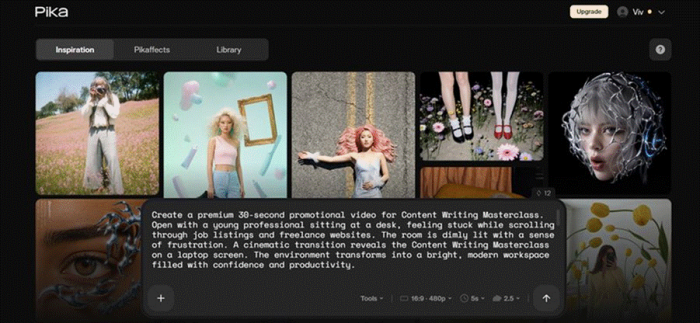
The exact brief I gave it. A full 30-second narrative prompt, entered on the free plan at 16:9, 480p, Pika 2.5. Note the duration selector already sitting at 5s, the real ceiling on a single generation.
At a glance
| Attribute | Detail |
|---|---|
| Best for | Short-form social clips and surreal VFX |
| Current model | Pika 2.5 |
| Free plan | Yes — 80 credits, capped at 480p |
| Paid from | $8/mo (Standard, annual billing) |
| Native clip length | 5 to 10 seconds (up to 25s via Pikaframes) |
| First fully-unlocked plan | Pro $28/mo — commercial use and no watermark |
Short version Pika is the fastest, most playful way to make a 5 to 10 second clip with an effect no rival can match. It is not a mini film studio, and it is honest about that once you stop asking it to be one. |
What Pika AI actually is
Pika (built by Pika Labs) launched in April 2023, founded by Demi Guo and Chenlin Meng, two Stanford AI PhD researchers who left the program to build it around a blunt tagline: “Reality is optional.” Since then the company has raised roughly $135 million, including an $80 million Series B in June 2024 at about a $470 million valuation, and it has shipped ten model versions in under three years. There are now two front doors: pika.art for making videos, and pika.me for persistent AI agents. This review is about the video side, which is where almost everyone lands.
The engine today is Pika 2.5. It turns a text prompt, a still image, or existing footage into a short clip: five to ten seconds natively, and up to twenty-five if you stitch keyframes with Pikaframes. What separates Pika from Runway, Kling, or Sora is not realism. It is a toolbox of physics-bending effects nothing else matches. You can melt, explode, inflate, squish, or “cake-ify” almost anything on screen. That playful streak, more than raw fidelity, is Pika’s real identity.
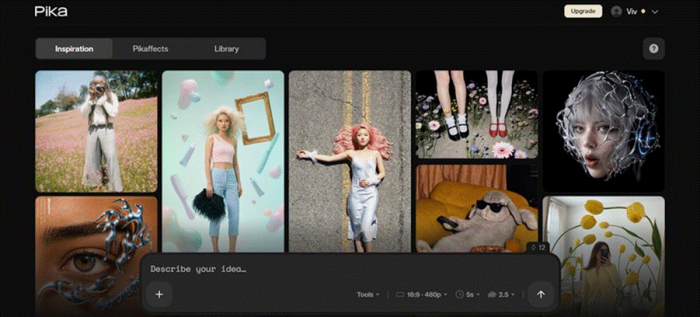
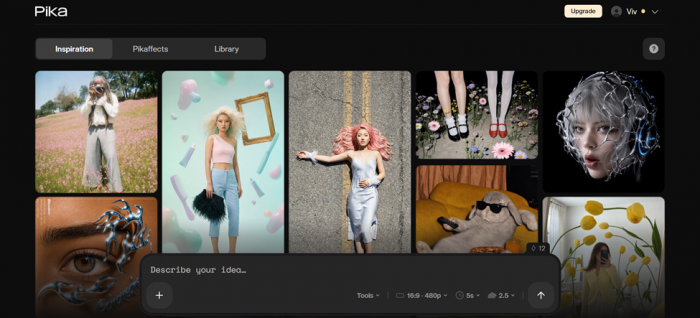
The creation dashboard. Inspiration, Pikaffects, and Library tabs, with a single prompt box driving everything. The interface is genuinely uncluttered, which is a real strength.
The hands-on test, in detail
Here is the setup, so you can weigh the result fairly. Free Basic plan, Pika 2.5, 16:9, 480p, one long narrative prompt asking for on-screen product text and a scene transition. Three things went wrong, and all three are documented Pika behaviors, not a one-off glitch on my account.
| What happened | Why |
|---|---|
| It made 5 seconds, not 30 | Pika 2.5 generates 5 to 10 seconds per pass. Reviewers put it plainly: do not expect a 30-second ad in a single generation. |
| On-screen text was garbled | Legible words are the hardest thing for any AI video model. Pika rendered warped, half-formed letters instead of real text. |
| The motion drifted off-brief | The cinematic transition never arrived. Testers note Pika 2.5 motion can wander, so multi-beat direction often needs a second attempt. |
| Context: close to worst case | Free tier at 480p plus a long prompt leaning on text and a scene change targets almost every weak spot Pika has at once. |

The actual output. A person at a desk, ringed by text that never resolves into real words. This is the free 480p tier being pushed toward its two hardest tasks at once: legible typography and a narrative cut.
To be fair to the tool, I went back and gave it what it is built for: a single vivid moment at a paid resolution, no on-screen text, one clear action. That is where Pika earns its reputation. Clips came back in under two minutes, the effects looked genuinely fun, and the output was the kind of thing that stops a scroll. The lesson is not “Pika is bad.” It is “Pika is a short-clip specialist, and a 30-second scripted ad is the wrong request.”
The feature set worth knowing
Most of Pika’s identity lives in its branded tools, the ones that actually change what you can make.
| Tool | What it does |
|---|---|
| Text, image and video to video | Generate from a prompt, animate a still, or restyle existing footage. The three standard workflows, all from one box. |
| Pikaffects | Physics-defying effects: melt, explode, inflate, squish, tear, cake-ify. No other tool has a comparable kit for surreal short-form. |
| Pikaframes | Interpolates between a start and end keyframe to push a clip toward roughly 25 seconds with a stable subject. Paid plans only. |
| Pikadditions and Pikaswaps | Drop a character or object into real footage, or swap one object in a scene for another. Handy for quick, playful edits. |
| Pikaformance | Audio-driven lip-sync that makes an image talk, sing, or rap. Runs at 3 credits per second, and works on the free plan. |
| MCP server | A native server at mcp.pika.me lets Claude and other agents trigger generations inside automated pipelines. Runway and Kling do not offer this yet. |
One thing to plan around Pika 2.5 does not generate music or voiceover. It can add sound effects after the fact, but every clip ships silent by default. For dialogue, narration, or a soundtrack you will need a separate tool, which adds cost and steps to any real project. |
Pika now has audio — with an important distinction
There is one sentence in the original review that now needs context: Pika 2.5 itself does not automatically turn a text-to-video generation into a finished video with a native soundtrack, narration, and music.
That distinction still matters. But Pika as a company now has its own dedicated audio models.
In August 2026, Pika introduced four separate audio systems:
| Model | What it does |
|---|---|
| Pika Soundtrack | Takes an existing video and creates synchronized sound effects, ambience, music, and voice that follow the action on screen. |
| Pika Music | Generates complete music from combinations of text prompts, lyrics, reference voices, and reference tracks. |
| Pika SFX | Generates focused sound effects or sequences of sounds from written instructions. |
| Pika Speech | Generates text-to-speech with controllable delivery and voice cloning from a short reference recording. |
Pika Soundtrack is the most relevant one for video creators. Instead of manually finding Foley, ambience, music, and other audio after generating a silent clip, you can give the finished video to Soundtrack and have it create audio around what is actually happening in the scene.
Pika says the model analyzes visual events and timing so that impacts, movement, ambience, voice, and music line up with the picture rather than simply placing generic audio underneath it.
Pika Speech pushes the company in another direction entirely. It generates 48 kHz speech, supports voice cloning from roughly five seconds of reference audio, and can create significantly longer audio than Pika's short-form video clips.
So the practical takeaway from my original test changes slightly. If you ask the consumer Pika 2.5 video generator for a polished 30-second commercial with integrated narration, typography, scene changes, and music in one generation, you are still asking too much from that workflow. But if you are willing to build the project in stages, Pika now supplies more of those stages itself.
That is a meaningful upgrade.
Pika AI pricing in 2026
Pika runs on credits. There are four plans, and the numbers below are annual billing (month-to-month runs roughly 20% higher). The most important detail is buried in two columns, so read the whole table before you pick.
| Plan | Price (annual) | Credits/mo | Watermark-free | Commercial |
|---|---|---|---|---|
| Free (Basic) | $0 | 80 | No | No |
| Standard | $8/mo (~$10 monthly) | 700 | No | No |
| Pro | $28/mo (~$35 monthly) | 2,300 | Yes | Yes |
| Fancy | $76/mo (~$95 monthly) | 6,000 | Yes | Yes |
The gotcha almost everyone hits Standard still watermarks your videos and blocks commercial use. That $8 plan gives you more credits than the free tier and nothing else that matters for real work. It is a higher-credit free plan, not a production plan. Pro at $28 is the first tier where Pika is fully unlocked. |
Credit cost depends on resolution and length. A five-second clip breaks down like this on Pika 2.5:
| Quality (5-sec clip) | Credits | What that buys per month |
|---|---|---|
| 480p | 12 (free) / 24 (paid) | Free plan gets ~2 full clips before it is empty |
| 720p | 20 | Standard ~35, Pro ~115, Fancy ~300 |
| 1080p | 40 | Standard ~17, Pro ~57, Fancy ~150 |
Three more things the pricing page underplays Credits are charged even when a generation fails or comes out unusable, and in practice a large share of attempts do. Monthly plan credits expire, while purchased add-on credits roll over. Those add-ons cost roughly twice the per-credit rate of a subscription, so they are a top-up for a busy month, not a monthly habit. |
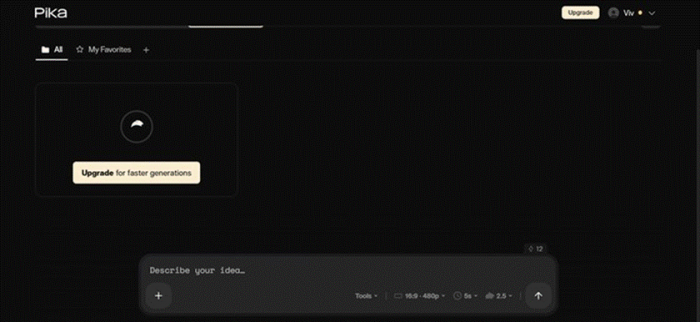
What 80 free credits looks like. At 480p a full text-to-video clip is 12 credits, so the free plan is a few generations of runway, not a workspace. Treat it as a demo.
Pros and cons
Chatter across Reddit, the App Store, LinkedIn, and Trustpilot, plus my own testing, lands on a consistent picture. The good news and the bad news are both real.
WHAT WORKS • Fastest in its class. Turbo clips return in seconds, full renders in about 60 to 90. • Pikaffects are one of a kind. Melt, explode, and inflate have no real equivalent elsewhere. • Cheap entry and a real free trial, so you can test before spending a cent. • Clean interface that does not demand editing experience. • MCP server support for agent and automation workflows. • Large, active community, so prompts and techniques are easy to find. | WHAT FRUSTRATES • Free tier is locked to 480p and about two usable clips a month. • On-screen text comes out warped and unreadable. • Motion can wander from the prompt on complex, multi-beat scenes. • No built-in music or voiceover, only after-the-fact sound effects. • Character consistency wobbles across separate clips. • Credits are spent on failed renders, and billing support has a rough reputation. |
What people are saying
The most telling thing about Pika is how split the feedback is. The product itself reviews well. The billing and support experience does not. All of these are from trusted, public sources.
| Source | What they said | Takeaway |
|---|---|---|
| App Store · Pikaffects 4.7 / 5, 3,400+ ratings | “It can get a bit pricey, but it is still pretty competitive.” | A creator using Pika for music videos and short films still rates it highly. |
| LinkedIn · Hands-on review Dec 2025 | “An accessible and creative AI video generation platform.” | Praised for expressive, fast short-form output, Pika’s core strength. |
| Reddit · r/ChatGPT Credit-burn thread | “You will burn through those credits in a few minutes.” | A fan warning that its unpredictability means many duds per keeper. |
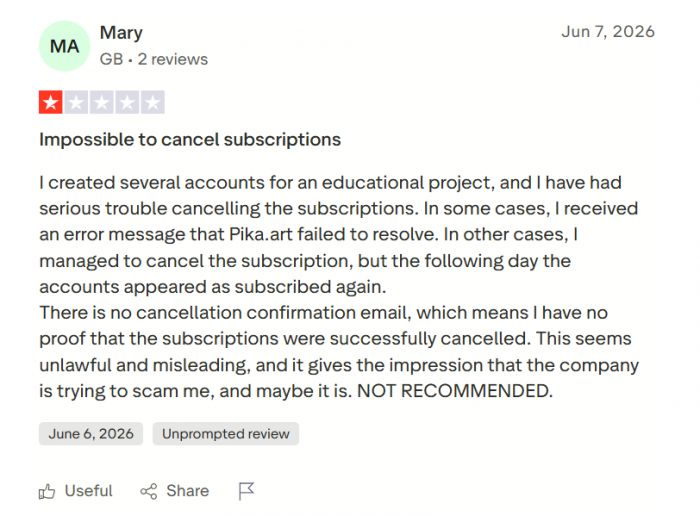
| Trustpilot · Pika 1.6 / 5, 87% one-star | “All I got were ‘generation failed’ and no response from support.” | The recurring complaint is billing and support, not video quality. |
My scorecard
Rated on what Pika is actually for, a fast creative short-clip tool, not the full production suite it never claimed to be.
| Category | Rating | Score |
|---|---|---|
Ease of use One prompt box, no ritual | █████████░ | 4.6 |
Speed Fastest renders in the category | █████████░ | 4.7 |
Creative effects Pikaffects are unmatched | ██████████ | 4.8 |
Output quality Great stylized, weak photoreal | ██████░░░░ | 3.2 |
Prompt accuracy Drifts on long, multi-beat briefs | ██████░░░░ | 3.0 |
Value Cheap entry, but skip Standard | ███████░░░ | 3.6 |
Support and billing The weakest link by far | ████░░░░░░ | 2.0 |
| OVERALL | A brilliant short-clip toy held back by billing and hard limits | 3.7 |
Who it is for, and who it is not
Reach for Pika if you • Make TikToks, Reels, or Shorts and want scroll-stopping visuals fast • Love surreal effects: things melting, exploding, or morphing • Want to animate a still image or bring a photo to life quickly • Iterate a lot and value speed over one perfect cinematic shot | Look elsewhere if you • Need a full 30-second scripted ad from a single generation • Require broadcast-grade photorealism or 4K output • Depend on clean, legible on-screen text or typography • Want built-in voiceover and music, or reliable fast support |
How Pika compares
Here is where Pika sits against the tools people usually weigh it against.
| Tool | Paid from | Free tier | Commercial from | Max length |
|---|---|---|---|---|
| Pika | $8/mo | Yes, 80 credits | $28/mo (Pro) | ~25s |
| Runway Gen-4.5 | ~$15/mo | Yes | ~$15/mo | ~16s |
| Kling 2.x | ~$8/mo | Yes | ~$8/mo | ~10s |
| Sora (ChatGPT Plus) | $20/mo | No | $20/mo | ~60s |
Pika is competitive on price and unbeatable on creative effects. The trade-off, which the community is candid about, is consistency on longer or more narrative work.
The verdict
Judged against the brief I actually gave it, Pika failed. It handed me a soft, 5-second clip full of garbled text when I asked for a polished 30-second promo with a clean scene change. But I will be straight about something: that brief was almost engineered to break it. Long, scripted, narrative, and leaning on legible on-screen words, which is close to the exact set of things Pika 2.5 is worst at, and I ran it on the free 480p tier for good measure.
When I stopped fighting the tool and gave it what it is built for, one vivid moment, an object melting, a photo brought to life, a five-second beat with a real effect, on a paid 1080p tier, it turned around fast, fun clips that stood out from anything a stock library would give me. Pika is not a miniature film studio, and it is not pretending to be. It is the quickest, most playful way to make a short clip with an effect nothing else can do.
So here is my honest recommendation. Skip Standard, since it is a watermarked free tier wearing a price tag. Start on the actual free plan to feel the ceiling for yourself, and only open your wallet for Pro at $28, the first tier that gives you watermark-free, commercially usable video. If your job is a 30-second ad with crisp text and a voiceover, this is not your tool yet, and no amount of prompting will change that today. But if you want scroll-stopping short clips this afternoon, few things beat it, and almost nothing beats it on price.
Bottom line A brilliant short-clip specialist with effects no competitor matches, let down by hard limits on length and text and a rough billing experience. Try it free, love it for what it is, and pay only at the Pro tier. |
What the new releases change — and what they do not
The August releases make Pika a more complete company than it was when I ran the original brief, but they do not magically fix the result I got.
The video generator is still built around short clips. Pikaframes can extend a sequence, but that is different from asking one prompt to produce a clean, coherent 30-second advertisement. Reliable typography is still something I would rather add in an editor than trust to a generative video frame. And a complicated multi-beat brief still asks the model to juggle more than a simple visual moment does.
What has changed is what you can do after that first clip exists.
Pika now has a model that can build a synchronized soundtrack around video, another that can generate music, another for sound effects, and another for speech. Developers also have a much broader API product for building those capabilities into automated workflows.
That makes Pika considerably more interesting as an ecosystem.
It does not change the central lesson from my test: use Pika for the part of the job it is good at rather than expecting one generation to behave like an entire production studio.
If anything, Pika's newest products reinforce that point. Instead of pretending one model should do everything, the company is increasingly splitting the job into specialized video, music, speech, sound-effect, soundtrack, and API workflows.