

Table of Content
Trial balance · 5 of 10 credits remaining ■■■■■□□□□□ 5 credits > one 25-second avatar render. That works out to roughly 12 credits per minute of video, about ten times what the same script costs as plain voiceover. |
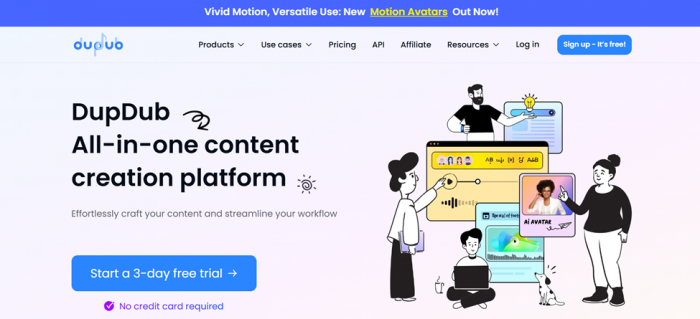
Signup took under a minute: email, password, six-digit code, done. Then a three-question survey asks what you do, what industry you are in, and what content you make. Answer those and a welcome modal tells you that you have a 3-day trial worth 10 credits with no card on file. It also asks what you want to try first. I picked AI Avatar.
That is where the evening went. I uploaded a portrait, scrolled a voice library showing 754 entries, filtered by accent and age, previewed a few, and pasted in a script. The text box capped me at 500 characters and I used 488. Then I hit Generate, and a confirmation box told me the render would cost 5 credits, leaving 5 behind. Half my trial, gone on a 25-second clip.
That number reframed the whole tool for me. So instead of another feature list, this review is built around the thing nobody explains properly: what a credit actually buys, how long you wait for it, and whether the output is good enough to publish.
Quick verdict
| Score | 3.9 / 5 |
| What it is | All-in-one AI suite: voiceover, talking avatars, transcription, video translation, writing, basic video editor |
| Made by | Mobvoi Inc. (HKEX: 2438), the Google-backed company behind TicWatch |
| Best for | Solo creators and small teams needing voice plus avatar plus subtitles without three subscriptions |
| Not for | Anyone whose main need is one flagship avatar video a week at broadcast quality |
| Free trial | 3 days, 10 credits, no credit card |
| Entry price | About $15/month billed monthly, roughly $11/month billed annually |
| Strength | The voice library and its filtering |
| Weakness | Avatar renders cost roughly 10x what voiceover costs |
Who actually builds DupDub
Most reviews skip this, and it is the most useful trust signal available.
DupDub is not an anonymous wrapper. It is operated by Mobvoi Inc., founded in 2012 by Li Zhifei, a former Google machine learning and machine translation scientist. Backers have included Google, Sequoia Capital, SIG, Zhen Fund and Volkswagen Group. Mobvoi listed on the Hong Kong Stock Exchange on 24 April 2024 under ticker 2438.
The good part: this is a real, audited, publicly listed business with a decade of speech research behind it. DupDub is the international version of Mobvoi's Chinese product, Moyin Workshop, so the voice engine ran in production for years before it reached English-speaking creators.
The realistic part: Mobvoi's debut was rough, with shares dropping sharply on day one and the raise landing well below target. A parent under margin pressure is a parent that changes plan structures, which shows up in the user complaints below.
Eight tools, one login
| Tool | What it does | My take |
|---|---|---|
| AI Avatar | Turns a photo into a lip-synced talking video | The headline feature, and the expensive one |
| AI Voiceover | Text to speech from a 700+ voice library | Strongest tool in the suite, cheapest to run |
| Instant Avatar Cloning | Builds a persona from your footage | Fast, but trial credits barely cover a test |
| Instant Voice Cloning | Clones a voice from a short sample | Quick, quality depends on your input recording |
| Video Translation | Translates and re-dubs with lip-sync | 40+ languages. Lip-sync on dubbed audio is where most tools struggle |
| AI Transcription | Video or audio to text, plus URL imports | Good for turning an existing video into a script |
| AI Writing | Script and copy generation | Fine for a rough draft, not a reason to subscribe |
| AI Image | Text or image to image | Weakest link. Other testers report repeated server errors here |
Your credit balance sits top left at all times and updates live. Small thing, but I liked watching it drop instead of hunting through an account page.
The AI Avatar test, step by step
1. Choose your source. Upload a face photo (multiple faces supported), upload an animal photo (one animal only), or pick a template. There is also an AI Image Creation tile if you want to generate a face rather than supply one.
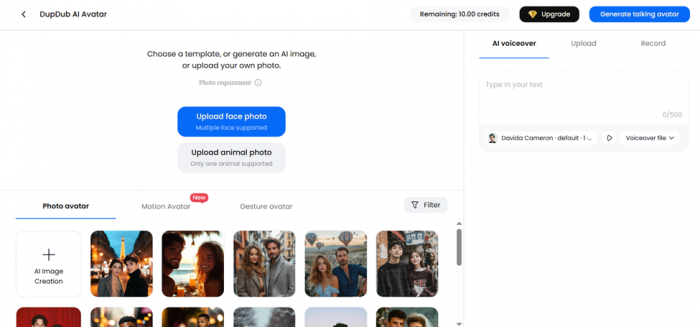
2. Pick your avatar type. Three tabs: Photo avatar, Motion Avatar (new, and currently DupDub's headline banner feature), and Gesture avatar. Photo avatar is the safe default.
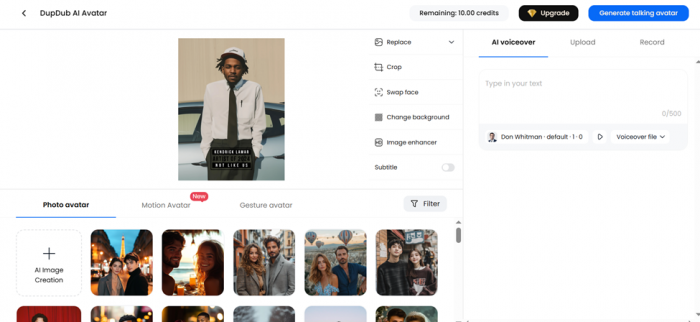
3. Fix the image before you spend credits. A side panel gives you Replace, Crop, Swap face, Change background, and Image enhancer, plus a Subtitle toggle. Use the enhancer first, because a soft source produces a soft render and you cannot get those credits back.
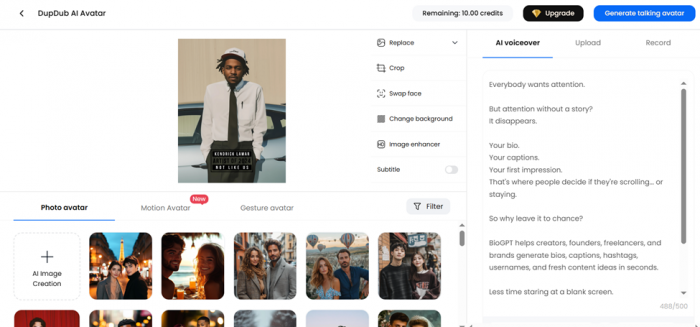
4. Add the voice. Three modes: AI voiceover, upload your own audio, or record directly. On the trial the text field caps at 500 characters.
5. Generate. The modal shows a preview, confirms the output is without a DupDub watermark, and states the exact credit cost before you commit. Mine read 5 credits.
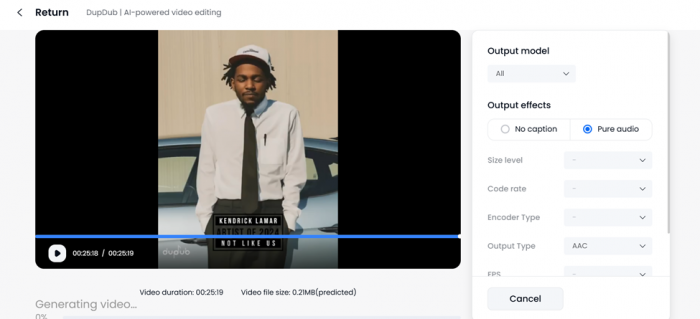
6. Wait. The projects page adds a Processing badge with a notice of roughly ten minutes of processing per one minute of finished clip.
| Photo tip that changes the output. DupDub's own guidance is that high-resolution, front-facing portraits with a clearly visible mouth area work best. Side profiles and heavy jaw shadow produce visible mouth artefacts. Test your worst photo first, not your best one. |
| Licensing warning. DupDub frames commercial use as conditional on having proper licensing for the photo and the voice. Animating a face you have no permission to use is your legal exposure, not the platform's. Use your own face, licensed stock with a model release, or a generated one. |
The voice library is the real product
If DupDub deserves a subscription, this is why.
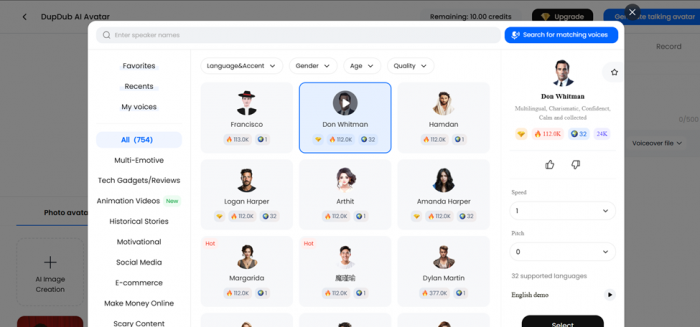
My session showed 754 voices. Filters cover Language and Accent, Gender, Age and Quality, and a “Search for matching voices” button does semantic matching rather than name search.
What impressed me more was the category rail, organised by what you are making rather than by voice metadata: Multi-Emotive, Tech Gadgets and Reviews, Animation Videos, Historical Stories, Motivational, Social Media, E-commerce, Make Money Online, Scary Content. Plus Favorites, Recents and My Voices for clones.
Each voice card shows usage counts. The detail panel gives a personality description (mine was tagged multilingual, charismatic, confident, calm and collected), a language count, Speed and Pitch dropdowns, an English demo player, and thumbs up or down feedback. The voice I picked listed 32 supported languages on its own, which makes single-voice multilingual campaigns realistic.
The catch is documented: verified buyers report that standard-tier voices mispronounce certain words while premium voices are noticeably better. If you produce in German, Dutch or other non-English languages, audition on your real script before committing.
Editor and export
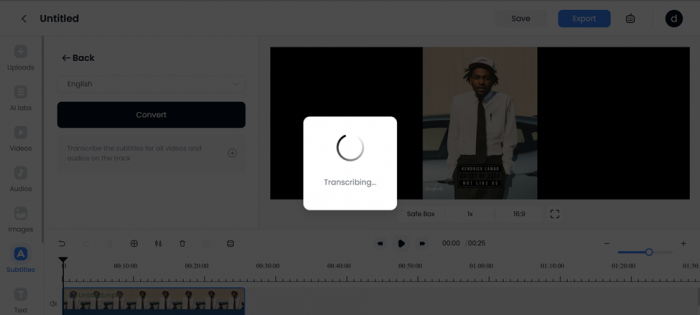
The finished clip opens in DupDub's editor: a single-track timeline with a Safe Box guide, speed control and aspect ratio switch, plus rails for Uploads, AI labs, Videos, Audios, Images, Subtitles and Text.
Subtitles were the useful part. Pick a language, hit Convert, and a Transcribing overlay runs before dropping timed captions onto the track. A checkbox transcribes every clip on the timeline at once.
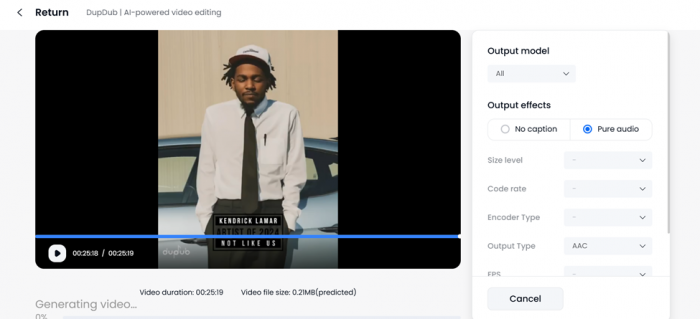
The export panel is more granular than most creator tools bother with: output model, output effects (no caption or pure audio), size level, code rate, encoder type, output type (AAC by default) and FPS. It also shows a predicted file size before you render, 0.21 MB in my case. That is real encoder access rather than one opaque Export button.
The credit math nobody publishes
This is the section I wish existed before I signed up. I worked it out from my own session plus DupDub's published conversion rate, and the numbers cross-check cleanly against the per-plan minute allowances listed publicly.
| Task | Credit cost | Source |
|---|---|---|
| Standard AI voiceover | ~1.2 / min (0.02 per second) | DupDub's localisation blog, matched by independent testers |
| Photo avatar video | ~12 / min (5 credits for 25s) | My session |
An avatar render costs roughly ten times what the same script costs as plain audio. Premium voices and Ultra quality push the audio number higher.
| Plan | Credits / month | Voiceover capacity | Avatar video capacity |
|---|---|---|---|
| Free trial | 10 (3 days) | ~8 minutes | ~50 seconds |
| Personal | 150 | ~125 minutes | ~12.5 minutes |
| Professional | 500 | ~415 minutes | ~41 minutes |
| Ultimate | 2,500 | ~2,080 minutes | ~208 minutes |
Those derived figures line up almost exactly with the per-plan minute caps DupDub publishes, which suggests the rate is stable rather than shifting silently.
The practical takeaway: if your workflow is voice-led (podcast narration, faceless YouTube, audiobooks, e-learning), 150 credits is generous. If it is avatar-led, 150 credits is under 13 minutes of video a month and you will be on Professional within a fortnight.
Two more facts: unused credits roll over while your subscription is active, and if you cancel they freeze rather than delete, returning if you resubscribe.
DupDub pricing in 2026
| Plan | Annual rate | Credits | Storage | Who it fits |
|---|---|---|---|---|
| Free trial | $0 | 10 total | Limited | Testing only |
| Personal | ~$11/mo (~$15 monthly) | 150 | 100 GB | Solo creators, voice-led output |
| Professional | ~$30/mo | 500 | 300 GB | Active creators mixing voice and avatar |
| Ultimate | ~$110/mo | 2,500 | 2 TB | Small agencies, localisation work |
| Scale | ~$250/mo | Higher | Higher | Sustained company volume |
| Business | ~$900/mo | Custom | Custom | Enterprise |
| Pay as you go | One-time | Pack | n/a | Occasional projects |
Paid plans include an unlimited commercial license and watermark-free video. The refund window is 3 days, applies only if you have not used the product, and deducts a 5% processing fee.
| Verify before buying. DupDub has adjusted plan structures more than once and directory listings disagree with each other. Treat this as a planning guide and confirm at checkout. |
What real users are saying
Pulled from platforms that verify purchases, not aggregators recycling press copy. Paraphrased.
AppSumo 4.2 / 5 25 verified purchasers The distribution is polarised rather than average: 18 five-star, 2 four-star, 1 three-star, 4 one-star. No soft middle. People either got what they wanted or felt burned. |
AppSumo buyer 5 stars Jan 2024 Called the interface easy to navigate and performance fast and reliable, singled out AI voiceover as the workflow win, and specifically credited support for responding quickly. |
AppSumo 1 star x4 2024 to 2026 Three distinct complaints, all from verified buyers. Feb 2024: standard-plan voices mispronounced words while only premium tiers were usable. Jan 2025: a German buyer said non-English voices were removed after purchase and German pronunciation degraded. Jan 2026: a buyer with 35 deals reported their lifetime plan showing zero credits, unresolved after sending support screenshots. |
Product Hunt 5.0 / 5 24 reviews Consistent themes: natural and expressive text to speech, deep control over tone, pitch, pauses and pronunciation, and an intuitive interface. Named use cases include language lessons, audiobooks, TikTok and YouTube narration, and marketing. Read with a caveat: at least one reviewer openly disclosed receiving a free premium month in exchange for a review, so treat 5.0 as directional. |
G2 Verified Business reviewer A reviewer producing Business English course material listed three benefits: a wider range of speakers and accents than in-house recording could reach, faster and cheaper turnaround than commissioning voice actors, and the ability to re-record a changed script instantly at no extra cost. That third point is the underrated one. |
Trustpilot ~2.5 / 5 Public reviews Considerably harsher. Positives cite dubbing and text to speech for endorsement content and multi-accent story narration. Negatives focus on friction, including a complaint that the avatar tool required a manually cropped face rather than detecting one. |
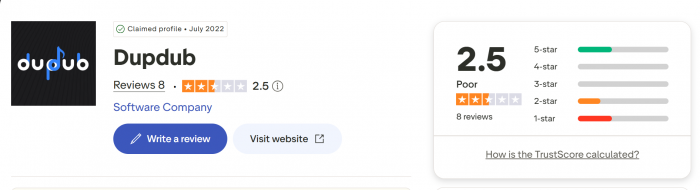
Reading it together: the voice engine earns praise consistently on every platform. The complaints cluster around plan and entitlement changes over time, and non-English voice quality on lower tiers. Those are commercial and localisation problems, not core technology problems.
Scorecard
I scored only what I tested directly.
| Criteria | Score | Why |
|---|---|---|
| Signup and onboarding | ■■■■■■■■■□ 4.5 / 5 | Under a minute, no card, sensible survey |
| Breadth of tools | ■■■■■■■■■□ 4.5 / 5 | Eight genuinely distinct tools in one dashboard |
| Voice library depth | ■■■■■■■■■□ 4.5 / 5 | 754 voices sorted by use case, not just metadata |
| Avatar setup experience | ■■■■■■■■□□ 4 / 5 | Enhancer, face swap and background change sit before the paywall |
| Render speed | ■■■■■□□□□□ 2.5 / 5 | Roughly ten minutes per finished minute |
| Editor and export control | ■■■■■■■■□□ 4 / 5 | Real encoder settings and a predicted file size |
| Cost transparency | ■■■■■■■■□□ 4 / 5 | Exact credit cost shown before every generation |
| Trial generosity | ■■■■■□□□□□ 2.5 / 5 | 10 credits is two short avatar renders |
| Overall | ■■■■■■■■□□ 3.9 / 5 |
Pros and cons
What works • Exact credit cost displayed before every generation, so nothing is billed by surprise • 754 voices with speed, pitch and per-voice language counts, organised by content type • No watermark on avatar output, even on lower tiers • Image enhancer, crop, face swap and background change sit before the paywall moment • Credits roll over while subscribed and freeze rather than vanish if you cancel • Real export controls (bitrate, encoder, FPS, container) with a predicted file size • A publicly listed parent with a decade of speech research behind it • iOS and Android app shares the same credit pool as the web app | What does not • Avatar rendering costs roughly ten times what voiceover costs, and the trial is too small to discover that safely • Ten minutes of wait per finished minute rules out same-hour turnarounds • Non-English voice quality on standard tiers draws repeated, specific criticism • Multiple verified reports of plan entitlements changing after purchase • Refunds are 3 days only, and only if the product is unused • AI image generation is the weakest tool and other testers have hit server errors • Support is email and knowledge base only, with no live chat |
How it compares
| Tool | Entry price | Best at | DupDub wins on | DupDub loses on |
|---|---|---|---|---|
| DupDub | ~$11 to $15 | Doing seven jobs adequately in one login | Price per tool, voice breadth | Not best at any single job |
| HeyGen | ~$24 to $29 | Avatar realism and volume | Cost, bundled audio tools | Avatar quality, render speed |
| Synthesia | ~$29 (~$18 annual) | Corporate training, SCORM | Price, creative flexibility | Enterprise governance |
| ElevenLabs | $5 to $11 | Pure voice realism | Video and avatars in the same app | Raw voice quality at the top end |
DupDub is a consolidation play. If you pay for a TTS tool, an avatar tool and a transcription tool today, replacing all three with one $30 Professional plan is straightforward value. If you need one of those excellent, buy the specialist. Prices move often, so confirm before committing.
Sign up if you are • A faceless YouTube, TikTok or Reels creator producing narrated content regularly • An e-learning or course builder who re-records scripts often • A small team localising one message into several languages • Already paying for two or more separate AI content subscriptions | Skip it if you are • Producing one flagship avatar video a week where realism is the point • Working mainly in German or Dutch on a budget tier without auditioning first • An enterprise needing SSO, SCORM or procurement-grade governance • Only ever needing voice, where a dedicated TTS plan costs less |
Final verdict
Two days on, the thing I keep coming back to is the moment the confirmation box told me my 25-second clip would cost 5 credits. Not because it felt expensive, but because DupDub told me before it charged me. I have used tools that would have taken those credits, rendered something unusable, and left me to work out where the balance went. DupDub showed the number, showed the preview, and let me back out.
That habit runs through the product. The predicted file size before export. The image enhancer sitting in front of the generate button instead of behind it. The credit balance pinned to the corner. Somebody on that team clearly got burned by an opaque credit system and decided not to build one.
What I would not do is sign up for DupDub as an avatar tool. Ten minutes of rendering per finished minute is not something you can build a schedule around, and the credit rate leaves Personal with under thirteen minutes of avatar video a month. If talking-head video is your main output, this is not it.
Sign up for it as a voice tool that happens to include everything else. The library is the best thing here by a wide margin, and I say that having gone in expecting the avatar feature to be the story. Seven hundred and fifty-four voices, sorted by what you are actually making, with per-voice language counts and pitch and speed on the same panel, is a well-built piece of software. At $11 to $30 a month it replaces a TTS subscription, a transcription subscription and a caption tool, and that arithmetic is hard to argue with.
Use the trial on your real workload, not a test script. Run your worst photo, your hardest pronunciation and your actual target language through it inside those three days. Ten credits is not much, but it is enough to find out whether the voice you need sounds right in the language you need it in. That answer is the whole decision.
Verdict · 3.9 / 5 A very good voice platform wearing an all-in-one video platform's marketing. |