


Table of Content
I spent the better part of two weeks bouncing between anonymous Instagram viewers, and Insnoop was the tool that pulled me down the rabbit hole. I fed it public usernames, watched stories load, tried to save a few highlights, and kept a notepad open the whole time to mark what worked and what quietly broke.
The honest summary is this. Insnoop does the one thing it promises. It lets you watch public Instagram stories and highlights without logging in, and without your name showing up in the viewer list. But after enough sessions the cracks start to show. Stories sometimes loaded a full day behind. Twice the site flat out refused to pull a profile that clearly had active content. And the constant hopping between near identical domains such as insnoop.io, insnoop.com, and insnoop.me left me wanting one steadier option to keep bookmarked.
So this guide is the result of that testing. I narrowed the field to five alternatives worth your time, and everything below reflects how these tools behaved in 2026, not how their landing pages describe themselves.
What Insnoop is, and why people go looking for alternatives
Insnoop is a free, browser based anonymous story viewer. You paste a public username, the tool fetches that account's stories and highlights, and you can watch or download them without an Instagram login. There is no signup and no app to install. It works only on public accounts, which is worth repeating because it matters later.
The reason so many people search for a backup is not that Insnoop is bad. It is that the entire category runs on borrowed time. These viewers scrape public data, so they tend to break whenever Instagram changes something on its end. Here is what pushed me to line up alternatives:
● Reliability wobble: scraper viewers stop working the moment Instagram adjusts its public endpoints, so any single tool is one update away from a bad day.
● Stale results: a few times I was served cached stories that were not the account's current, live content.
● Mirror domains and ads: the lookalike domains vary in quality, and the weaker mirrors lean hard on pop ups and redirect ads.
● No analytics: it shows you content, but it will not tell you posting patterns, follower trends, or engagement.
One thing to get straight before you try any of these No legitimate viewer can show you stories from a private account. The content has to be public for a third party server to reach it. Any site that promises private story access is a scam, and usually a data grab. Every tool in this guide works on public accounts only. |
The five alternatives at a glance
Here is the short version before the detail. I grouped these by what each one is genuinely good for, based on hands on use rather than marketing copy.
| Tool | Best for | Cost | Reliability in 2026 | The catch |
|---|---|---|---|---|
| StoriesIG | Fast, no fuss story viewing | Free | High | Heavy desktop ads |
| AnonyIG | Feature rich free viewing | Free | High | Aggressive ad partner consent |
| InstaNavigation | A clean, low clutter screen | Free | Good | Slower at peak times |
| Picuki | Browsing plus light editing | Free | Mixed | Recurring downtime |
| ViewIGStory | Uptime and clean downloads | Freemium | High | Story only, small fee |
The tools, tested one by one
StoriesIG: the free all rounder I reached for most
If I had to pick one free viewer to replace Insnoop, StoriesIG would be it. It has been the default choice in this space for years, and it earns that by simply working. Paste a username, and stories, highlights, reels, and posts load quickly with no account and no signup. During my testing it was the tool I trusted to just fetch the content on the first try.
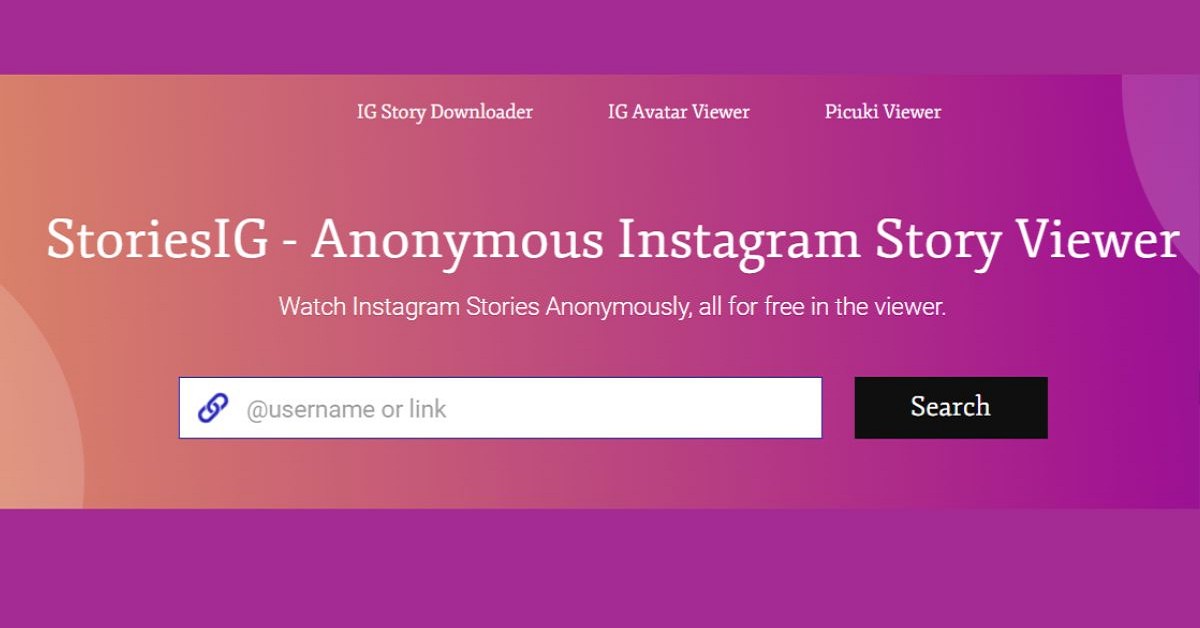
Why it stands out ● Consistently fast loads and the strongest uptime of the free options I tried. ● Covers stories, highlights, reels, and posts, plus downloads. ● Zero login and no personal details required. |
What works ● No login, works on any device ● Best free reliability in 2026 ● Broad content coverage ● Downloads supported | Where it falls short ● Ads get heavy on desktop ● No analytics or profile insights ● An ad blocker makes it far more pleasant |
AnonyIG: feature rich, but mind the ad partners
AnonyIG is the closest functional twin to StoriesIG and my go to backup when the first tool had an off day. It handles everything StoriesIG does and adds cleaner profile browsing and tagged photos, with a mobile experience that felt a notch more polished. The one thing I would not gloss over is its cookie consent screen, which asks permission for a very long list of advertising partners.
Why it stands out ● Stories, highlights, reels, downloads, and profile browsing in one place. ● Cleaner mobile layout than most free rivals. ● Uptime tracks closely with StoriesIG, so it is a natural fallback. |
What works ● Feature complete for free ● Nice on mobile ● Good fallback when others are down | Where it falls short ● Cookie consent requests a large roster of ad partners ● That is a real privacy trade off ● Use with an ad blocker if privacy matters |
InstaNavigation: the cleanest interface of the bunch
If ad clutter is what drove you away from Insnoop, InstaNavigation is worth a look. Of the free tools I tested, it had the lightest ad load and the most modern layout, which made quick story checks feel almost pleasant. Content coverage is broad, spanning stories, highlights, posts, and profiles. The trade off is speed under load.

Why it stands out ● The tidiest, most modern interface among free viewers. ● Lighter ad footprint than StoriesIG or AnonyIG. ● Broad access across stories, highlights, posts, and profiles. |
What works ● Clean, low clutter experience ● No login needed ● Broad content access | Where it falls short ● Slower during busy periods ● Occasional inconsistent results ● Still relies on ads to stay free |
Picuki: for browsing and light editing in one place
Picuki is the odd one out here in a good way. On top of anonymous viewing it adds a grid style way to browse an account and a built in photo editor with filters, cropping, text overlays, and even background removal. If your goal is to find content and lightly repurpose it, that combination is genuinely handy. Be aware of two things: reliability is patchy, and the original picuki.com has drifted over time, so you will often land on mirror sites that carry the name.
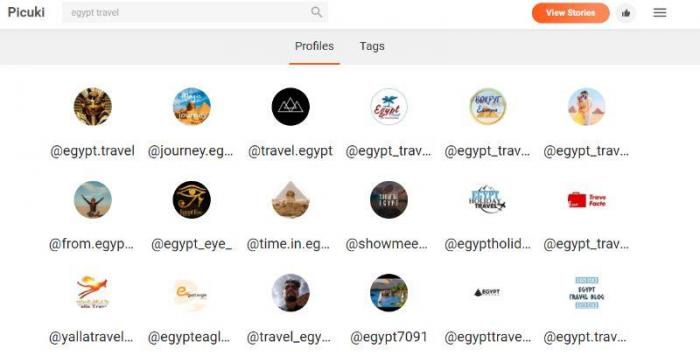
Why it stands out ● Grid browsing plus a real, if basic, in browser photo editor. ● Filters, cropping, text, and aspect ratio presets for reels and posts. ● Useful when you want to view and edit in a single window. |
What works ● Editing tools most viewers lack ● Clean grid browsing ● No account needed | Where it falls short ● Recurring downtime is common ● Many lookalike mirror domains ● Editor compresses images on export |
ViewIGStory: when uptime and clean downloads matter
This is the tool I would pay for if anonymous story viewing were part of my actual workflow. ViewIGStory is built around uptime, keeps the viewer itself free of ads, and offers watermark free downloads. It is story focused rather than a do everything profile browser, and the free tier is deliberately limited, but the small day pass is cheap enough that it barely registers.
Why it stands out ● Designed around reliability, with no ads on the viewer itself. ● Watermark free story downloads. ● Roughly ten free views a day, then a low cost 24 hour pass for unlimited access. |
What works ● Strong, consistent uptime ● Ad free viewing experience ● Clean, watermark free downloads | Where it falls short ● Story focused, not full profile ● Free tier is limited ● Needs a small fee for heavy use |
Side by side comparison
The write ups above cover the feel of each tool. These tables line them up on the details that usually decide which one you keep open in a tab. One thing they all share, so it is not a column below: none of them ask you to log in.
Content and feature coverage
| Tool | Stories | Highlights | Reels | Posts and profiles | Downloads | Editing |
|---|---|---|---|---|---|---|
| StoriesIG | Yes | Yes | Yes | Yes | Yes | No |
| AnonyIG | Yes | Yes | Yes | Yes | Yes | No |
| InstaNavigation | Yes | Yes | Yes | Yes | Yes | No |
| Picuki | Yes | Yes | Limited | Yes | Yes | Yes |
| ViewIGStory | Yes | No | No | No | Yes | No |
Cost, ads, and access
| Tool | Free access | Paid option | Ad load | Downloads |
|---|---|---|---|---|
| StoriesIG | Unlimited | None | Heavy on desktop | Yes, watermark varies |
| AnonyIG | Unlimited | None | Heavy | Yes, watermark varies |
| InstaNavigation | Unlimited | None | Light | Yes |
| Picuki | Unlimited | None | Heavy | Yes, plus in browser editing |
| ViewIGStory | About 10 views a day | Around 0.99 for 24 hours | None on the viewer | Yes, no watermark |
Cross platform support
Every one of these runs in the browser, so there is nothing to download and no app permissions to hand over. That keeps them light, and it is a quiet privacy win. What differs is where each one actually feels best.
| Tool | Desktop browser | Mobile browser | Install needed | Best experienced on |
|---|---|---|---|---|
| StoriesIG | Yes | Yes | No | Either device, an ad blocker helps on desktop |
| AnonyIG | Yes | Yes | No | Mobile, where the layout is cleaner |
| InstaNavigation | Yes | Yes | No | Either, it stays smooth on both |
| Picuki | Yes | Yes | No | Desktop, the editor is easier with a mouse |
| ViewIGStory | Yes | Yes | No | Either, the experience is consistent |
The trade offs, visualized
Same story in one glance, with Insnoop kept in as the baseline. These are qualitative scores from my own testing combined with 2026 uptime reports, not a fixed benchmark, because tools in this space change often.
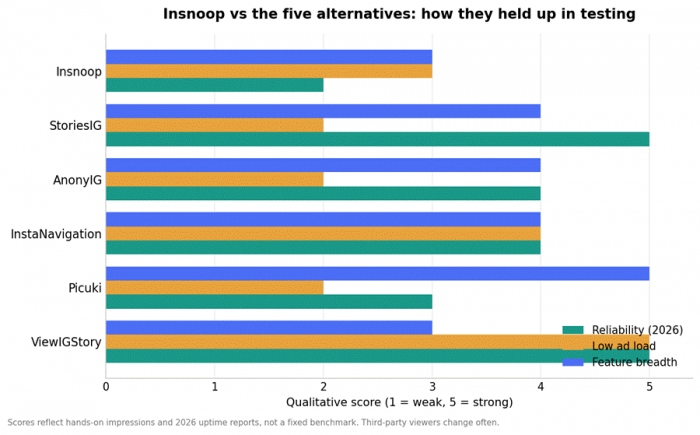
Higher is better on all three measures. Reliability reflects how often the tool simply worked when I opened it.
How to choose: use cases mapped to tools
Rather than crown a single winner, match the tool to the job. Find your situation in the left column and start there.
| Your situation | Best pick | Why it fits |
|---|---|---|
| Peek at one story right now | StoriesIG | Loads fast and rarely fails on the first try |
| Your usual tool just went down | AnonyIG | Closest match to StoriesIG, and its uptime tracks it |
| Ads and pop ups wear you out | InstaNavigation | Lightest ad load and the cleanest layout |
| Studying a competitor's whole profile | Picuki | Grid browsing lays out the full public feed |
| Saving content to edit or repost | Picuki | View and lightly edit in a single window |
| Downloading stories with no watermark | ViewIGStory | Clean, watermark free saves |
| You do this daily and hate downtime | ViewIGStory | Built around uptime, with a cheap day pass |
| You need follower or engagement data | A dedicated analytics tool | Story viewers are not built to report metrics |
Staying safe and honest about the limits
This category is useful, but it is not risk free, and pretending otherwise would not help you. A few ground rules kept my testing clean:
● Never hand over credentials: if a tool ever asks for your Instagram password, close the tab. Legitimate viewers never need your login.
● Respect the terms and other people: these viewers pull public data, which sits in a gray area of Instagram's terms of service. Use them responsibly, for reasonable purposes such as your own privacy, market research, or benchmarking public accounts.
● Run an ad blocker: the weaker mirror sites push fake virus warnings and redirect ads. A reputable ad blocker turns most of these tools from stressful to usable.
● Public means public: no external tool can access private stories. If a site claims it can, it is lying to you.
● Keep backups: since any one of these can break overnight, keep two or three bookmarked and rotate when one goes dark. That single habit saved me the most time.
My verdict after living with these tools
After all the testing, my routine settled into something simple. For a quick anonymous story peek, StoriesIG was the one I opened first, because it kept working when others stumbled, and AnonyIG rode shotgun as the backup. When I wanted the least cluttered screen, InstaNavigation won. And when I wanted to browse a full profile and crop or filter something on the spot, Picuki was the one place that did both.
If anonymous viewing were part of my day to day work rather than an occasional curiosity, I would happily pay the small ViewIGStory fee for the uptime and the clean, watermark free downloads. And if what I truly needed was engagement data, I would stop using story viewers altogether and pick a dedicated analytics tool, because no free viewer is built for that job.
Insnoop is not a bad tool. It is a fragile one, like almost everything in this space. That is the real lesson here. In a category this unstable, the smart move is not to marry a single viewer. It is to keep a small shortlist bookmarked, know what each one is best at, and rotate the moment one goes quiet. Do that, and losing access to any single tool becomes a shrug instead of a problem.