

Table of Content
- I did not come to PixAI as a believer.
- What PixAI actually is
- My session, step by step
- My first generation, and the prompt it quietly rewrote
- The number that made me pay attention
- How to not run out of credits
- Pricing, decoded
- The features actually worth knowing
- What users are saying
- Where it wins, where it grates
- Tsubaki.3 is coming, and it complicates my verdict
- Should you actually use it?
- The final verdict
THE VERDICT, UP TOP
|
I did not come to PixAI as a believer.
My username, which the site made me choose about four screens into signup, gives away the mood I was in. I had seen the same claim in enough places to want to test it myself: that this is the fastest way to go from a plain sentence to a finished anime illustration, with no GPU, no local install, and no Discord-bot gymnastics.
So I did the obvious thing. I made an account, accepted the 10,000 free credits it handed me on the very first login, and spent every single one of them in one sitting. What follows is the write-up of that session, plus the pricing and community context I dug into afterward. No affiliate links, no press access. Just what landed on my screen, and what I think you should know before you sign up.
15M+ registered users worldwide | 1M+ community models & LoRAs | 10,000 free credits, every day | 2022 the year it launched |
User and model counts are as reported by PixAI, which recently announced crossing 15 million registered accounts. It has been anime-first since launching in 2022.
What PixAI actually is
Strip away the marketing and PixAI is a browser-based, anime-first image generator built on Stable Diffusion foundations, wrapped in a community platform. You type a description, pick a model, and it renders illustrations in seconds. Its identity lives in three places, and knowing them upfront saves a lot of confusion.
Anime, on purpose The defaults are tuned for anime and stylized art. That focus is why you hit the look fast, and also why realism stays out of reach. | A model marketplace Beyond the flagship models, a huge library of community LoRAs covers specific characters and styles. You can train your own too. | A credit economy Everything runs on credits: earned free daily or bought. This is the single most important thing to understand before you start. |
My session, step by step
Signup was fast, and a little nosy
From the landing page to my first generated image took under three minutes, but PixAI is chatty during onboarding. It asks a lot before it lets you loose. Here is the exact run I went through, in order.
| 01 | The landing page and the login wallThe homepage leads with its “world’s number one” claim and a prompt box you cannot use until you sign in. Login options were Discord, X, Apple, Google, and email. I went with email to keep it clean.  Signed in with email |
| 02 | A 10,000-credit welcome, immediatelyThe moment I logged in, a Daily Reward popup dropped 10,000 credits into my account, framed like a gacha login bonus. You feel rich before you have generated anything. 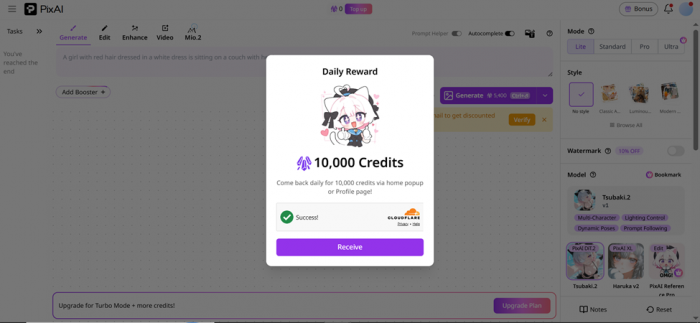 Balance: 10,000 credits |
| 03 | Onboarding, part one: who are you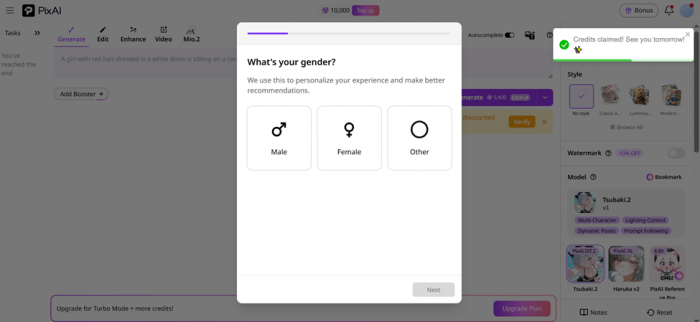 A short profiling flow. First a gender question (Male, Female, Other), stated as being used to personalize recommendations. You can tell it feeds the feed, not the generator. |
| 04 | Onboarding, part two: your tasteA grid of interests to tap (Fantasy, Romance, Sci-Fi, Music, Mystery, Game). Then a wall of character avatars to favorite, from Gwen Stacy to Oshino Shinobu. It is clearly building a personalized home feed. 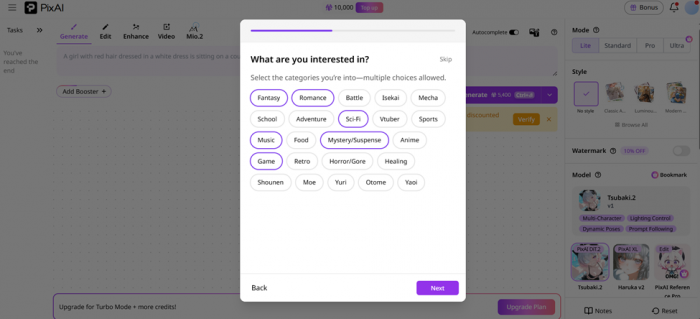 Multi-select taste profile |
| 05 | The prompt-style question I liked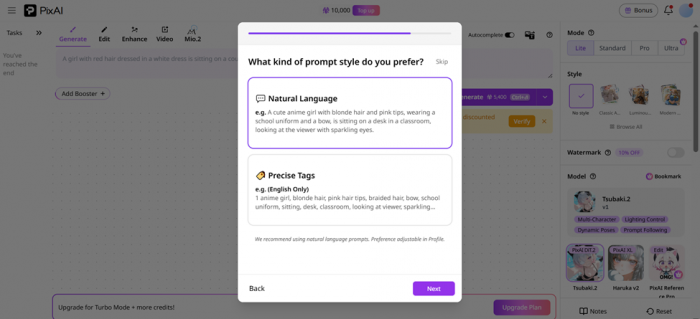 One screen asked whether I prefer Natural Language or Precise Tags. PixAI recommends natural language, adjustable later. A genuinely thoughtful touch for newcomers who have never written a tag string. |
| 06 | Picking a username, and a referral slot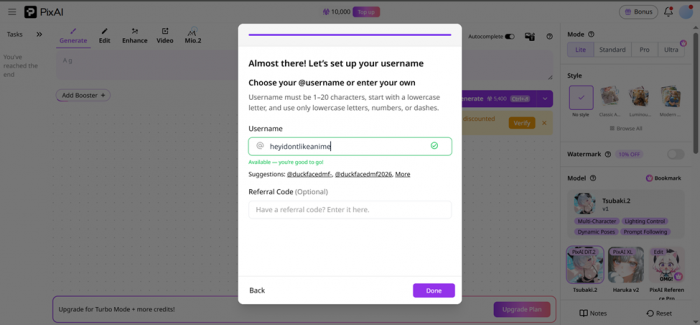 “Almost there,” it said, and had me choose a handle. I typed heyidontlikeanime, it checked availability live, and offered an optional referral field. More questions than I expected, none of them painful. @heyidontlikeanime is live |
My first generation, and the prompt it quietly rewrote
With onboarding done, I landed in the studio. The feed was busy with member art and a banner promising creators can earn up to 2.3 million credits a month, which tells you how central the economy is. I ignored all of it and typed a deliberately basic prompt to see how much lifting the tool would do on its own.
WHAT I TYPED Create a cute anime girl character with big expressive eyes, pastel hair, stylish outfit, soft lighting, and a detailed anime background. |
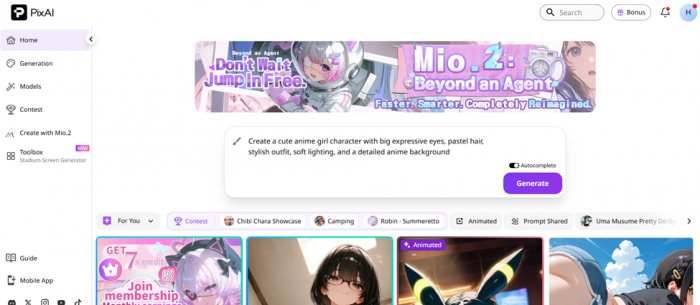
Here is the part I did not expect. With Prompt Helper on, PixAI silently expanded my one-liner into a much richer prompt before rendering, and showed me the rewrite afterward. This is the kind of assist that separates a beginner-friendly tool from a bare Stable Diffusion box.
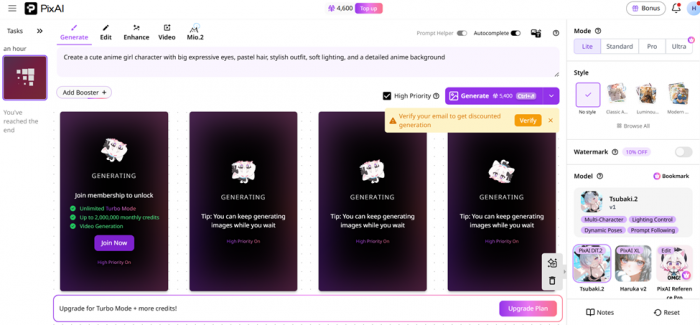
WHAT IT ACTUALLY RENDERED A portrait shot of a cute anime girl. She is centered against a dreamy pastel background filled with floating sparkles, soft rim lighting catching her hair… |
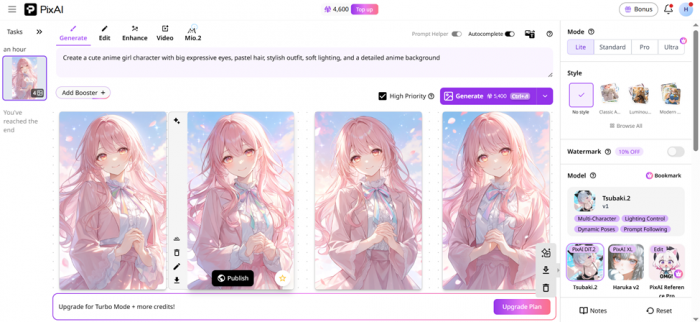
Roughly ten seconds later I had four variations, all pink-haired, softly lit, sparkly, and honestly nicer than my lazy prompt deserved. Faces were clean, the palette was consistent, and there were none of the melted eyes you sometimes get elsewhere. For a first try with a throwaway sentence, the hit rate was excellent.
The exact spec of that run
| Model | Tsubaki.2 (the current flagship) |
| Mode | Lite (fastest of four quality tiers) |
| Priority | High Priority enabled |
| Output | 4 images, 768 × 1280 each |
| Time | Around 10 seconds |
| Credit cost | 5,400 for the batch |
The number that made me pay attention
One batch of four images cost 5,400 credits. I started the day with 10,000. That means after a single generation, my balance sat at 4,600, not even enough for a second full batch of four on the free daily allowance. That is the whole story of PixAI’s economics in one screenshot.
| 5,400 used | 4,600 left |
One generation of four images, out of a 10,000-credit daily free allowance.
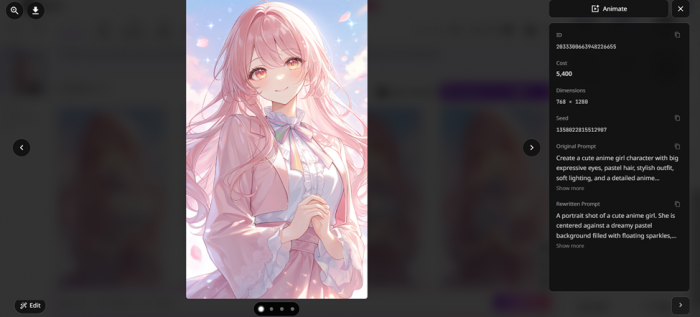
To be fair, that was Lite mode with High Priority on, both of which push the price up. Drop the priority, lower the mode, or make fewer images and a day’s free credits stretch further. Credits never expire either, so you can bank them: log in daily, share your work for extra credits, and build a buffer for bigger jobs like video or LoRA training. But if your instinct, like mine, is to iterate ten times to nail a look, you will feel the meter.
| The unglamorous truth. The free tier is not a trick, and you can create real work without paying. But heavy iteration burns credits fast, which is precisely the friction that nudges frequent users toward a membership. Go in knowing this and you will not feel ambushed. |
How to not run out of credits
Here is the part I got wrong, and it is worth being direct about it.
I wrote the section above believing 10,000 credits a day was the free ceiling. It is not. It is the daily login bonus, which is one of thirteen documented ways PixAI hands out free credits, and it is not even the largest. I burned my starting balance on the most expensive setting combination available before I had claimed a single other reward. That is a review of my impatience as much as it is a review of the platform.
The actual numbers are considerably more generous than my first impression suggested.
| Method | Reward | How often |
|---|---|---|
| Watch ads (mobile app only) | ~5,000 per ad, typically 10 ads, so up to 50,000 | Daily |
| Daily check-in | 10,000 on the free tier | Daily |
| Publish artwork | 1,000 each, up to 10 claims, so 10,000 | Daily |
| Social sharing | 1,000 per share, up to 3,000 | Daily |
| Likes received | Up to 2,000 | Daily |
| Refer a friend | 20,000 to both sides, no cap, no expiry | Per invite |
| Follow official accounts | Up to 50,000 | One time |
| Art contests | Up to 1,000,000, top placings often around 350,000 | Recurring |
Add the daily items together and a consistent free user is looking at roughly 75,000 credits a day. PixAI puts the annual figure at around 27 million, which is somewhere near 38,000 image generations without spending anything. For context, the platform states a standard generation costs roughly 700 to 1,000 credits. My batch of four was running about 1,350 an image, which tells you exactly how much Lite mode with High Priority inflates the bill.
| The catch, and it is a real one. None of this is passive. Reaching that daily ceiling means logging in, sitting through ad breaks in the mobile app, publishing work, and sharing it out. Call it fifteen minutes a day of chores in exchange for credits. The single biggest earner, watching ads, does not exist on the web version at all, so web-only users are working with a much smaller pot than the headline number suggests. |
|---|
Pricing, decoded
PixAI runs a freemium model with three paid tiers on top of a permanently free plan. Paid tiers differ mainly by monthly credit grant, daily login bonus, free LoRA training slots, and video features. All paid plans unlock Turbo Mode, so you stop waiting in the free queue. Figures below reflect PixAI’s most recent published pricing.
| Plan | Price / mo | Monthly credits | What you unlock |
|---|---|---|---|
| Free | $0 | 10,000 daily | Community models, editing tools, basic quality, train your own LoRAs |
| Starter ★ MY PICK | $7.99 | 300,000 | Turbo Mode, full video suite, Flow Edit, 3 free LoRA trainings, +20% daily |
| Plus | $22.99 | 1,000,000 | Everything in Starter, Professional video mode, 5 LoRA trainings, +100% daily |
| Premium | $35.99 | 2,000,000 | 10 LoRA trainings, 15 LoRAs per task, 35 private model slots, +200% daily |
Prices vary by region, currency, and ongoing promotions, and annual billing lowers the effective monthly cost. Verify the live numbers on PixAI’s membership page before subscribing.
| Two things reviewers keep flagging. First, the app charges more than the website for the same plan because of app-store fees, so subscribe on the web and log in via the app. Second, PixAI’s policy is no refunds once a payment clears, so start free and be sure before you commit. |
Can you actually sell what you make?
My original write-up never touched this, which was an omission, because for the game developers and novelists I recommend this tool to it is the only question that matters.
The short version: PixAI states that it does not claim ownership or copyright over the images you generate, and its AI Art Generator page says work can be used for personal or commercial projects subject to its Terms of Service. So the platform is not standing between you and a commercial release.
The longer version is where people get into trouble.
| Paying does not clear everything. A membership buys you credits and features. It does not automatically make every model, LoRA, reference image, or borrowed character safe to sell. Community model pages carry their own permission settings, including whether commercial use is allowed at all, which means the model you picked because it produced the nicest output may be the one blocking you. |
|---|
The features actually worth knowing
PixAI is more than a text box. A few tools genuinely change what you can make, and a couple are brand new as of this summer.
Tsubaki.2, the flagship The current top model. It follows longer, structured prompts more faithfully, handles multi-character scenes better, and ships with 35-plus one-click styles and four quality modes from Lite to Ultra. | Mio.2, chat to art Launched July 9, 2026, a conversational assistant. Describe what you want in plain chat and refine by talking, with no prompt engineering. The most beginner-friendly way in yet. |
LoRAs and custom training Pull from a million community models for a specific character or aesthetic, or train your own LoRA in the cloud. The real reason people building consistent original characters stick around. | ControlNet, inpainting, video Pose control (OpenPose, Canny, Depth), masked inpainting to fix one broken hand or face, plus image-to-video animation. Note that ControlNet is not on the free plan. |
PixAI Studio, and what it changes
The biggest thing to land since I published is not a model. It is a workspace.
PixAI Studio went live on August 3, 2026. It is a node-based canvas where each step of a production, image generation, video generation, editing, text, and audio, sits as a node you wire into the next one. Output flows down the chain. Instead of generating an image, downloading it, re-uploading it into a video tool, and starting again, the whole pipeline lives on one board.
| What it is for Multi-step production work. PixAI's own examples run from cinematic video to serialised manga, which are exactly the jobs the single prompt box was never going to handle. It pulls from the same model ecosystem and the same artwork you have already made, and it ships with templates so you are not staring at an empty graph. | Why it matters here My original verdict told you to look elsewhere for video and for anything resembling a broad creative suite. Studio is a direct answer to both. It does not make PixAI a general-purpose design tool, but the flat "this is a text box for anime portraits" framing no longer holds. |
|---|
What users are saying
I never trust a single reviewer, so I read across the App Store, Trustpilot, Reddit, and independent testers. The sentiment is genuinely split, and the split is instructive: people love the creativity and the free-to-start model, and the loudest complaint is always the same one I hit, credits.
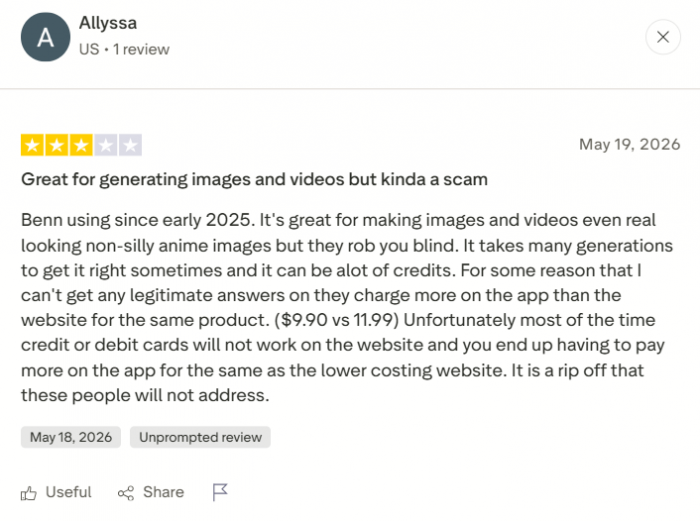
“One of the best AI art out there.” A reviewer who normally doesn’t write reviews expected a cash grab and was surprised: you can grind the currency free, base cost per image is reasonable, and community models cost nothing. App Store iOS · Aug 2025 ★★★★★ | “They rob you blind.” A long-time user since early 2025 loves the image and video quality, but says it can take many attempts to get a result right, and each one eats credits. Trustpilot from 24 ratings ★★★☆☆ |
“The strongest cloud-based option I’ve found for anime and manga.” After two weeks testing text-to-image, LoRA training, and ControlNet, an independent reviewer landed here, with one caveat: step outside anime and you hit the limits fast. PicLumen Independent · Jun 2026 ★★★★☆ | “The detail level was impressive for a free tool.” A 2026 tester fed it a simple sci-fi prompt and got multiple polished variations in seconds, praising the 10,000 free signup credits and the ecosystem feel. LumeFlow Independent · 2026 ★★★★☆ |
“Love the variety of LoRAs and user-made models.” Another App Store user enjoyed the gacha-style daily credits and the generous model library, though the content policy left them a little confused about the lines. App Store iOS · 2025 ★★★★☆ | “Fun and easy, but locked to 2D anime.” A hands-on reviewer found the editing tools genuinely one-click simple, but confirmed the ceiling: ask for something realistic or 3D and PixAI will not go there. Pollo AI Independent test ★★★☆☆ |
Trustpilot’s sample is small (around two dozen ratings at time of writing), so treat community sentiment as directional. Reviewers on the positive side also repeatedly praise responsive support and steady, frequent site improvements.
Where it wins, where it grates
✓ What I loved + Effortless anime results. A lazy one-line prompt still produced clean, consistent art. + Zero setup. No GPU, no install, no ComfyUI wrangling. Sign in and generate. + Prompt Helper. It quietly upgrades weak prompts and shows you the rewrite. + Genuinely free to start. 10,000 daily credits, plus more for sharing your work. + Deep when you want it. LoRAs, custom training, ControlNet, inpainting, video. + Fast, and getting faster. About ten seconds per batch, and Mio.2 lowers the bar further. | ✕ What grated − Credit burn is real. One batch of four ate more than half my daily free credits. − Anime only. No realism, no 3D. Ask for a landscape and it may still add a character. − App costs more than web for the identical plan, thanks to store fees. − No refunds once a payment clears, per the terms. − ControlNet is paywalled and advanced modes push credit use up quickly. − The content policy confuses people, a point that comes up again and again in reviews. |
Tsubaki.3 is coming, and it complicates my verdict
Everything I said about PixAI's ceiling was measured against Tsubaki.2, the model live in the generator today. That measurement may be about to expire.
Tsubaki.3 entered closed alpha over the summer, and on August 17, 2026 PixAI published the first public showcase of work made with it. No release date has been announced, and the team is explicit that the model is still being tuned and that what is on display is an early snapshot.
What is on display is the interesting part. The alpha work includes pixel art, retro film poster styling, holographic and mixed-media collage, quiet painterly realism on an evening train, and, most notably, full black and white manga pages with working panel layouts, tone work, and expressions that carry a scene.
| Why this matters for everything I wrote above. My review says PixAI hits a hard 2D anime ceiling: no realism, no range, ask for something outside the lane and it will not go there. The Tsubaki.3 alpha samples push directly into several of those supposedly closed doors. If that holds through to release, the ceiling I described was a Tsubaki.2 limitation, not a platform one, and the "look elsewhere if you need range" line in my verdict will need rewriting again. |
|---|
Alpha access has been going to creators posting standout work publicly on the platform, and new alpha pieces are being shared in a dedicated channel on PixAI's Discord. Tsubaki.2 remains the live flagship in the meantime, and nothing about my scoring changes until Tsubaki.3 actually ships and I can put it through the same lazy one-line prompt I used the first time.
Should you actually use it?
Yes, if you are ● An anime and manga fan who wants character art fast ● A hobbyist without a powerful PC for local Stable Diffusion ● A game dev or novelist building consistent original characters ● A total beginner who has never written a prompt ● Someone who will happily grind free daily credits | ✕ Look elsewhere if you ● Need photorealistic or cinematic images ● Want serious AI video as your main output ● Require a broad, multi-style creative suite ● Plan heavy daily volume and dislike credit systems ● Want pure pay-as-you-go with no subscription pull |
So, does the skeptic with the anti-anime username come away impressed? Mostly, yes. PixAI is the smoothest on-ramp to anime image generation I have used. The signup is quick, the free credits are real, the Prompt Helper makes weak prompts look good, and my throwaway one-liner turned into four genuinely pretty images in about ten seconds. For the specific job it was built for, it is very hard to beat. But I am not going to pretend the credit meter is not the main character. Watching my balance drop from 10,000 to 4,600 after a single batch was the moment the business model clicked into focus. The free tier is honestly usable, and credits never expire so you can bank them, but the instant you want to iterate the way real creative work demands, you feel the pull toward a subscription. That is not a scam, it is just the deal, and knowing it upfront is the difference between delight and resentment. My honest recommendation: start on the free plan today, spend your 10,000 credits the way I did, and see if the output makes you smile. If you generate more than a few times a week, the Starter plan at $7.99 a month is where the value lives, unlocking Turbo Mode and the full toolkit. If you only need the occasional icon or character sketch, the free tier plus a little daily grinding may be all you ever require. And if you came here for realism or video, this is not your tool, and no amount of credits will change that. |