

Table of Content
I went into Social Catfish the way most people probably do: a little curious, a little skeptical, and mostly wanting to know whether a “find anyone online” site actually shows you something useful or just walks you into a paywall. So instead of reading a dozen summaries, I sat down and clicked through every single screen myself.
I even logged in first, expecting a dashboard, and it quietly bounced me toward a payment page. So I backed out and just ran a search the normal way, no account needed to begin. For my test I picked a common, easy-to-remember name, Christopher Nolan, and fumbled the spelling so badly it went in as “CDhristopher.” The site still knew what I meant, which was my first small “oh, okay” moment. Here is everything I saw, in order.
Quick verdict, before you scroll
| Category | Rating |
| Ease of use | ★★★★½ 4.5 / 5 |
| Search options | ★★★★★ 5.0 / 5 |
| Data shown before paying | ★★★☆☆ 3.0 / 5 |
| Pricing transparency | ★★½☆☆ 2.5 / 5 |
| Overall rating | ★★★★☆ 3.8 / 5 |
Short version: the tool is genuinely easy to use, it surfaces real-looking location and contact clues, and it clearly does some digging. The friction is all in the finish. You hit a subscription wall, a countdown timer, and a request for your email before you see the full picture. Know that going in and it becomes a useful starting point.
Inside Social Catfish
Social Catfish is an online investigation and identity verification service run by SocialCatfish, LLC, based in Murrieta, California. It was co-founded by David McClellan and Moe Meyers, and it started life as a blog about romance scams and catfishing before it became a people search tool. Published sources differ on the exact founding year, with some listing 2013 and others 2015, and the company does not state one publicly. The core promise is simple: you feed it one detail about a person, and it tries to pull together a fuller identity picture from public records, court filings, social profiles, and commercial data feeds.
| The basics | |
|---|---|
| Legal entity | SocialCatfish, LLC |
| Based in | Murrieta, California |
| Founders | David McClellan and Moe Meyers |
| Founded | Disputed, sources list 2013 or 2015 |
| What it is | People search and identity verification |
| What it is not | An FCRA-compliant background check service |
| Regulatory status | Registered data broker in California and Vermont |
| BBB accreditation | Not accredited, seal revoked |
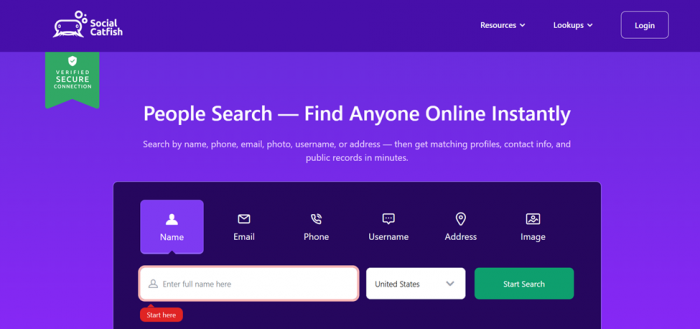
You can search six ways: by name, email, phone, username, address, or image. The image search is the piece that sets it apart from most people-search sites, since you can upload a photo and it looks for where that face shows up online. That makes it popular with two crowds in particular: online daters checking whether a match is real, and people trying to reconnect with someone they lost touch with.
One thing worth flagging early: this is not a background-check service for hiring. It is not built to be FCRA-compliant, so it should not be used to screen tenants or job candidates. Treat it as a sanity check, not a legal report.
The problem this category exists to solve
It is easy to be cynical about people search sites, and this article will be, in places. But the demand behind them is real and it is getting worse.
| What the FTC reported | Figure |
|---|---|
| Romance scam losses, first 9 months of 2025 | $1.16 billion |
| Change in romance scam reports year on year | Up 22% |
| Romance scams that started on social media in 2025 | Close to 60% |
| Platform named most often | |
| All 2025 scam losses that started on social media | $2.1 billion, nearly 30% of the total |
| Years running above $1 billion in romance scam losses | Every year since 2021 |
One caveat on all of these figures: they count complaints, not incidents. Romance scams are embarrassing in a way that a fake delivery text is not, so the real numbers are almost certainly higher than the reported ones.
That is the gap a tool like Social Catfish is selling into. A reverse image search on a profile photo, or a lookup on a phone number, is a reasonable thing to want before you trust a stranger with money. Whether the paid version of that is worth $29 a month is the question the rest of this article is trying to answer.
My step-by-step run, screen by screen
The landing page and the first search
The homepage leads with “People Search, Find Anyone Online Instantly” and a row of six tappable tabs. A green “Verified Secure Connection” badge sits in the corner, and the usual trust lines run along the bottom: private and secure search, trusted by 1M+ users, billions of records searched.
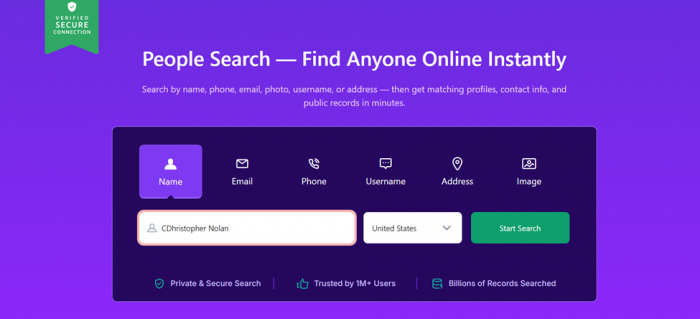
I clicked Name, typed my slightly-mangled “Christopher Nolan,” left the country on United States, and hit Start Search. Clean layout, no signup gate to begin. So far, so smooth.
It asks where the person lives
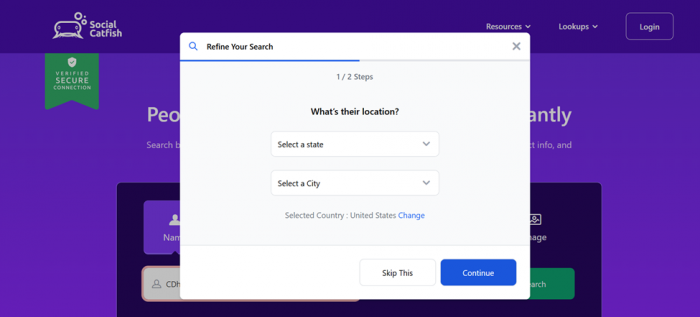
Instead of jumping to results, a “Refine Your Search” popup appeared, labeled Step 1 of 2, asking for a state and a city. I liked that there was a clear Skip This button. If you do not know where someone lives, you are not forced to guess
It asks for an age range
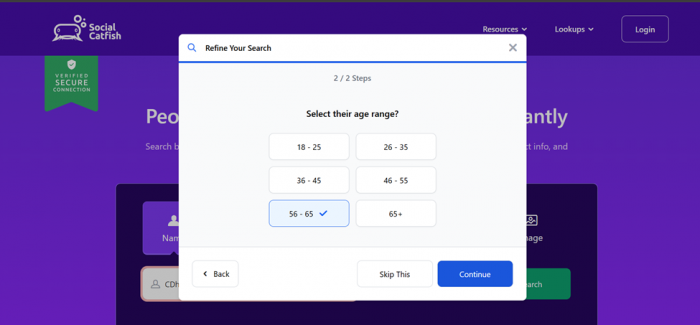
Next came Step 2 of 2, with six age buttons. I tapped 56-65 to see how tightly the filter would hold, then continued. Spoiler for later: the profile that came back read 48, then 53 on a different screen, so neither actually landed inside the range I picked.
The “searching” animation
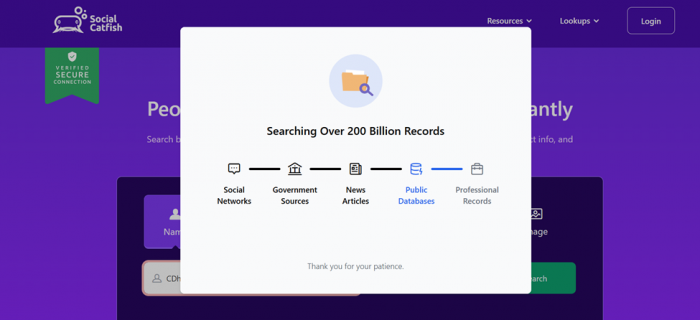
Then the theatrical part. A screen reading “Searching Over 200 Billion Records” lit up icons in sequence: Social Networks, Government Sources, News Articles, Public Databases, Professional Records, followed by a polite “Thank you for your patience.” I will be honest: this staged animation is partly for show. It is not fake exactly, but it is dressed up.
The results list
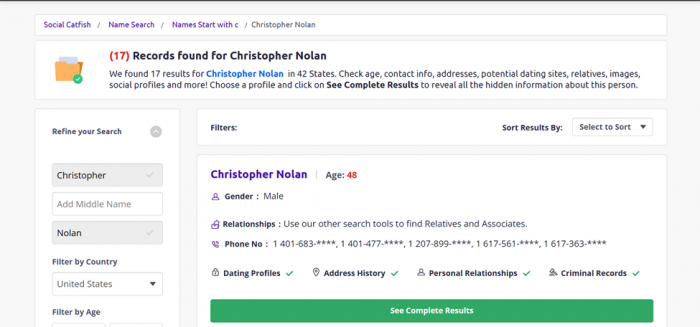
Here it got interesting. The page announced 17 records found for Christopher Nolan, spread across 42 states. The first card gave me a real preview: age 48, male, and a set of phone numbers, all masked (shown as 1 401-683-****). Green checkmarks teased Dating Profiles, Address History, Personal Relationships, and Criminal Records. This felt like the most genuinely useful screen of the whole run: enough to know a real record exists, without the full details yet.
The deeper “collecting data” stage
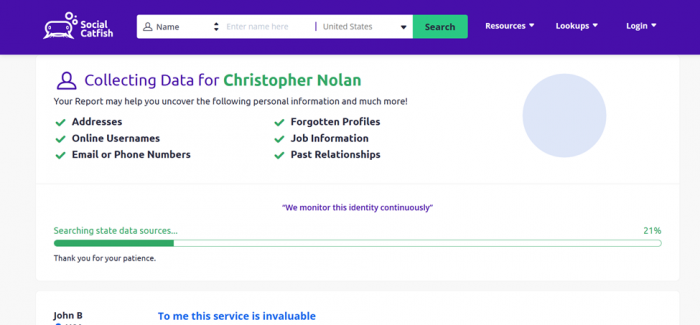
Clicking through landed me on a “Collecting Data for Christopher Nolan” page listing what the report might uncover: addresses, usernames, emails, forgotten profiles, job information, past relationships. A line read “We monitor this identity continuously,” and a progress bar crept along at 21%. A glowing customer quote had already started appearing, warming me up for the ask that was coming.
Report highlights, then the email request
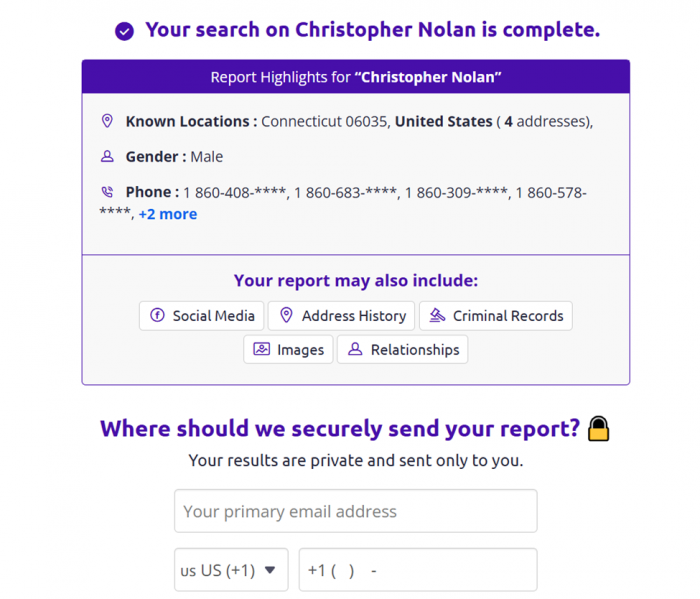
The next screen said “Your search on Christopher Nolan is complete” and gave me a highlights box: Known Locations of Connecticut 06035 with 4 addresses, gender male, and a list of phone numbers with a “+2 more” link. Then came the pivot: “Where should we securely send your report?” with fields for my primary email and phone number. This is the moment the free ride ends. You are being asked to hand over your own contact details before you see the rest.
The payment wall, and the countdown clock
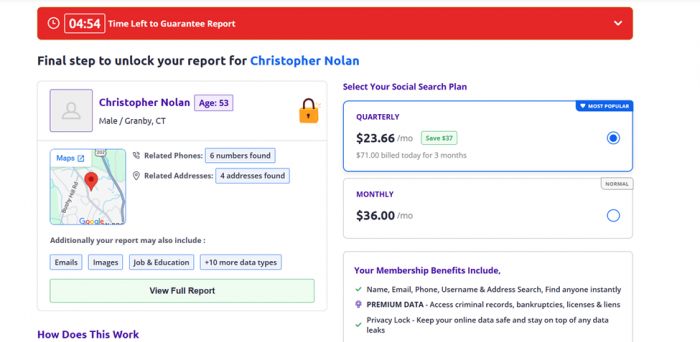
Finally, checkout. A red bar at the top read “04:54 Time Left to Guarantee Report,” ticking down. Classic urgency nudge. The summary card now showed Christopher Nolan, age 53, male, Granby CT, with 6 related phone numbers and 4 addresses found, a little embedded map, and teasers for emails, images, job and education, and “+10 more data types.” And the plans only appeared here, right at the very end.
What sits outside the search funnel
My run covered one path, the name search. There is more product than that, and some of it is arguably more interesting than the thing I actually tested.
| Feature | What it does | Included? |
|---|---|---|
| Face Recognition Search | Detects multiple faces in one photo, runs a separate report on each | Part of image search plan |
| Image search refinements | Narrow by name and age, location, or job title and company | Included, all skippable |
| Privacy Lock | Scans 200+ broker sites and the dark web, files removals for you, monitors for relisting | Sold separately, free scan to start |
| Protect browser extension | Chrome add-on flagging scam and suspicious sites | Free with account |
| Password breach checker | Checks a password against known breaches | Free, no account needed |
| Directory Hub | Public browsable index of profiles held | Free to browse |
Worth sitting with for a second: the same company sells you a service to remove your data from people search sites, and is itself a registered data broker running a people search site. That is not a contradiction exactly, but it is a business model worth understanding before you buy either half of it.
What you see free vs what is locked
| Visible for free (the preview) | Locked behind a subscription |
| Confirmation a record exists (17 matches) | Full, unmasked phone numbers |
| Age, gender, general location (CT 06035, Granby) | Complete address history (all 4 addresses) |
| Masked phone numbers and a map thumbnail | Emails, usernames, and social profiles |
| Category teasers (dating, criminal, relationships) | Job and education, relatives, plus 10 more |
The preview is enough to confirm you found a real person. It is not enough to actually verify or contact them. That gap is the product.
What stood out, good and not-so-good
LIKED
| WATCH
|
The pricing, and why nobody can quote you one number
Here is the thing that makes Social Catfish pricing hard to write about honestly: there is no single published price list. The cost only appears at checkout, after the search, and different sessions return different offers.
What my session showed
| Plan | Price | How it is billed |
|---|---|---|
| Quarterly (Most popular) | $23.66 / mo | $71.00 today for 3 months (Save $37) |
| Monthly | $36.00 / mo | Billed monthly, labeled "Normal" |
Treat that as a snapshot, not a price list. Yours may differ.
What the company itself says
The only first-party figures available are in Social Catfish's own FAQ, under the billing question.
| Stage | What the FAQ states |
|---|---|
| First 3 days | $6.48 or $6.87, depending on the plan chosen |
| Every 30 days after | $28.94 or $28.97, depending on the plan chosen |
Worth noting: elsewhere on the same FAQ page the company describes the trial as covering 5 days, while the billing answer says 3. If you sign up, assume the shorter window and diarise your cancellation for day 2.
Why published prices vary so much
Every figure below has been reported by a different reviewer. None of them are lying. They were each shown something different.
| Intro period, reported range | Monthly rate, reported range |
|---|---|
| $5.73, $5.99, $6.48, $6.87 | $26.99 to $39.95 |
The three things that actually matter
| 1. Subscription, not a one-off | There is no single-report purchase option in the standard funnel |
| 2. It auto-renews | The intro period rolls into a full monthly charge unless you cancel |
| 3. Refunds are not prorated | Cancelling mid-cycle does not refund the unused portion |
If you only need one report, set a phone reminder the moment you pay.
My star breakdown
| Category | Score | Why |
|---|---|---|
| Ease of use | 4.5 / 5 | Simple, guided, forgiving of typos |
| Search variety | 5.0 / 5 | Six inputs, including image and face search |
| Preview value | 3.0 / 5 | Enough to confirm, not to verify |
| Accuracy signals | 3.0 / 5 | Real data, but a shifting age |
| Pricing transparency | 2.0 / 5 | No published price list, offers vary by session |
| Pressure tactics | 2.0 / 5 | Countdown timer and early email capture |
| Company track record | 1.5 / 5 | Accreditation revoked, heavy volume of unanswered removal complaints |
What users are saying
I am one data point, so here is a snapshot of the recurring themes across public reviews, kept honest rather than cherry-picked.
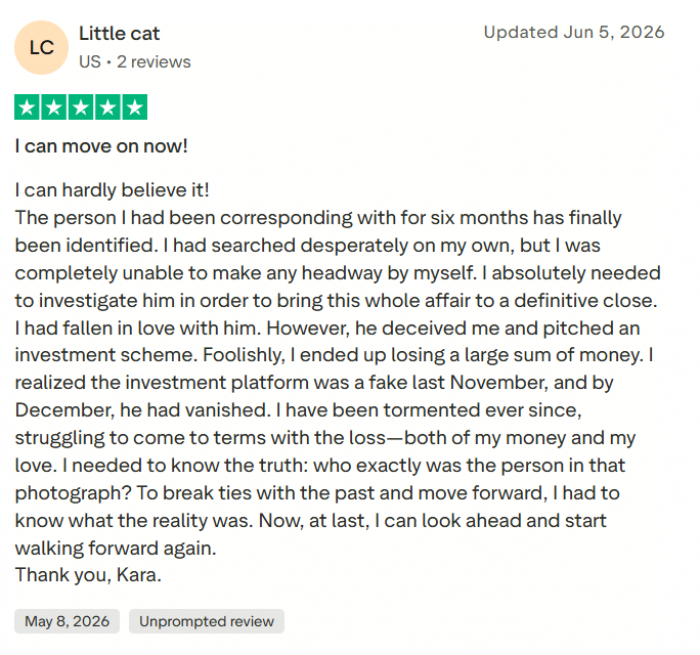
★★★★★ “It saved me real money” Super sad, but it saved me from wasting more time and cash. Seeing the profile of the actual person was unreal. Looking back, there were so many red flags I ignored. Common among people checking a suspicious match | ★★★★★ “The support team actually helped” It felt like they genuinely cared about helping, not like I was just a number. They validated the photos and phone numbers the scammer was using. Customer service is a frequent bright spot |
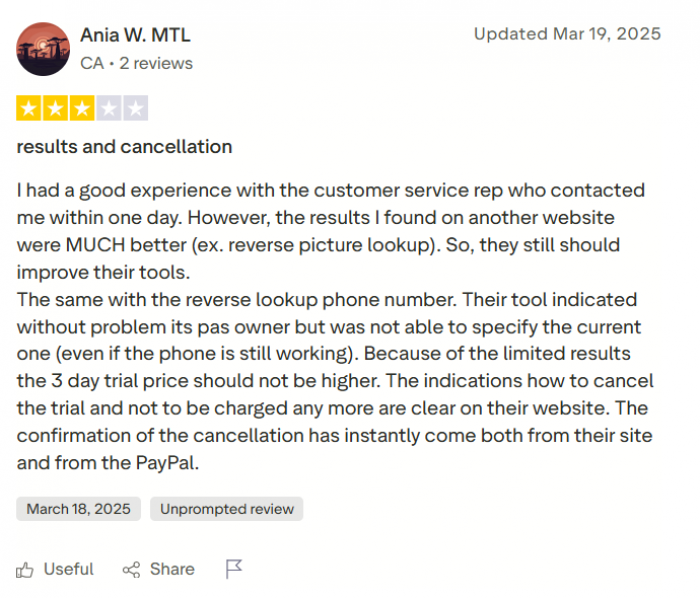
★★★☆☆ “Useful, but read the fine print” The reports had good info, but I did not realize it was a recurring subscription. Set a reminder to cancel if you only need one search. Billing surprises are the top complaint | ★★☆☆☆ “Results were hit or miss” Some matches were spot on, others felt outdated or mixed up with a different person. You still have to double-check what it gives you. A fair warning that public data needs verifying |
Who it is for, and who should skip it
A GOOD FIT IF YOU ARE ✓ Checking whether a dating match or marketplace seller is real ✓ Reconnecting with an old friend or relative from one clue ✓ Comfortable with a subscription and willing to cancel on time | PROBABLY NOT FOR YOU IF YOU ARE ✕ Screening a tenant or job candidate (not built for that, legally) ✕ Hoping for free, complete data with no strings ✕ Put off by countdown timers and upsell screens |
My final take
So, would I use Social Catfish again? Honestly, yes, but with my eyes open.
What it does well is real. It took a common name, tolerated my typo, and came back with a legitimate-looking record: a Connecticut zip code, a city, four linked addresses, and six phone numbers. For someone confirming whether a person is real before trusting them online, that is a meaningful head start, and the image search is a genuine edge over the usual crowd of look-alike sites.
Where it loses me is the finish. The staged “200 billion records” animation, the ticking 04:54 timer, the request for my own email and phone, and pricing that only appears at the very end all add up to a checkout engineered to push. None of it is a dealbreaker, but it is the opposite of relaxed. And the age that read 48 on one screen and 53 on another is a reminder that everything here is a lead to verify, not a verdict to trust blindly.
If I were recommending it to a friend, I would say this: use it as a first move, not the final word. Treat the free preview as confirmation that a real record exists, decide whether the locked details are worth a month of subscription, and if they are, set a reminder to cancel before the next bill.
FINAL SCORE 3.8 / 5 ★★★★☆ Capable and beginner-friendly, held back mainly by paywall pressure and the “verify everything” nature of public-data results. |