

Table of Content
There is a specific kind of letdown in typing “write me a bio” into an AI tool and getting back three tidy sentences that could describe almost anyone with a pulse and a LinkedIn account. Confident, polished, and completely forgettable.
The instinct is to blame the tool. Usually the tool is not the problem. The prompt is. AI writing tools do not know you. They only know what you tell them in the prompt, plus a very good sense of what a bio usually looks like. Give them nothing specific, and they will hand you the average of every bio ever written.
The good news is that a bio prompt is one of the easiest things to get dramatically better at, and you do not need to learn “prompt engineering” to do it. You just need to stop asking for a bio and start briefing the writer. This guide walks through what to include, gives you a reusable template, and shows real before-and-after prompts so you can see the difference on the page.
Why the prompt does the heavy lifting
These tools generate text by predicting what tends to come next, based on the words you give them. That single fact explains almost everything about why prompts succeed or fail.
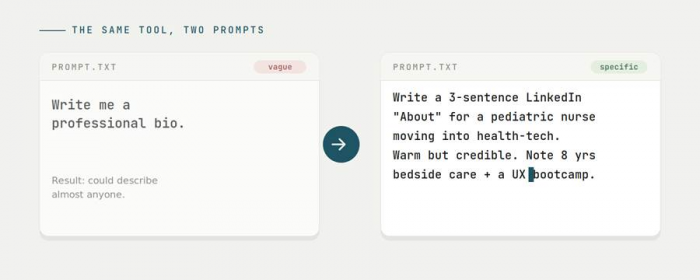
When your prompt is generic, the most likely next words are generic too: safe adjectives, rounded-off phrasing, the mush that fits any profession. When your prompt is specific, you narrow the field. Words like pediatric nurse, eight years, and health-tech pull the output toward a much smaller, much truer set of sentences.
The core idea You are not asking the AI to invent who you are. You are giving it enough raw material that it can only really describe one person, you, and then arrange that material well. |
So the goal of a good bio prompt is not clever wording. It is supplying the details, the audience, and the constraints that a human ghostwriter would ask for before writing a single line.

The seven ingredients of a strong prompt
Think of these as the questions a good writer would ask you over coffee. You do not need all seven every time, but the more you answer, the less the AI has to guess.
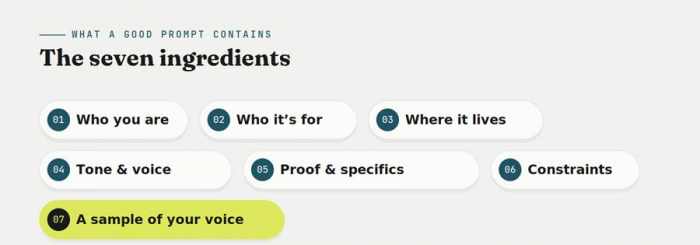
01 Who you are Role, field, and where you are in your journey. “Senior data analyst” beats “professional.” | 02 Who it is for Recruiters, clients, organizers, readers? The audience changes what belongs and what gets cut. |
03 Where it lives A LinkedIn About, an X bio, a website footer, and a speaker intro each want different lengths. | 04 Tone and voice Warm, dry, playful, plain, authoritative? Two or three adjectives beat “professional.” |
05 Proof and specifics Real numbers, named projects, credentials, results. Specifics make a bio believable. | 06 Constraints Word or character count, first or third person, and anything you want it to avoid. |
The seventh ingredient is the quiet one that changes everything: a sample of your actual voice. Paste in a paragraph you have already written, an email or an old bio, and ask the tool to match that rhythm. It is the fastest way to stop sounding like a template.
A template you can steal
Here is the framework in a form you can copy, fill in the highlighted parts, and paste straight into any AI tool. Delete the lines you do not need.
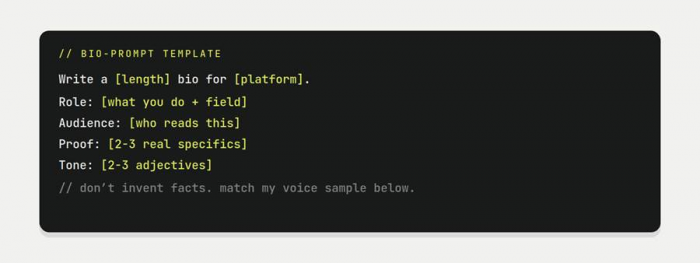
One small line, big payoff That “do not invent facts” rule matters more than it looks. Without it, tools will happily round your “some experience” up to “a decade of expertise.” Ask it to stick to what you gave it, then you decide what to add. |
Before and after: watch the prompt work
Same person, same facts, two prompts. The difference in output comes entirely from what went in.
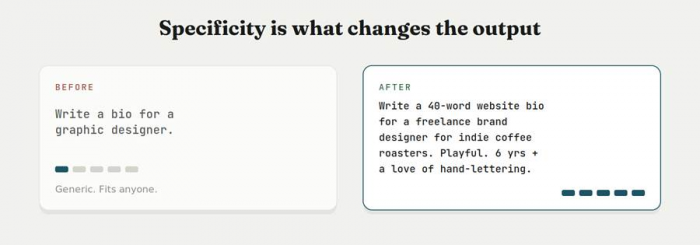
Example: a career switcher
Before Make me sound good for LinkedIn. I used to teach and now I work in tech. |
After Write a 3-sentence LinkedIn About for someone who taught high-school science for 7 years and is now an associate product manager. Frame the teaching as an asset, not a detour. Warm, confident, no jargon. |

Specific inputs, specific output. The detail you type in is the detail you get back on the page. Photo: Pexels
Tailor the prompt to the platform
A bio is not one thing. Where it appears changes the length, the voice, and even the grammar. Name the platform in your prompt and add the quirks below.
2,600 char limit | Ask for first person and a clear opening line. Front-load what you do now and let past roles support it. Skip the resume recap. |
X / Instagram ~150 characters | Demand brevity in the prompt. Ask for one role, one detail, and one bit of personality. Say whether emojis are welcome. |
Website / About flexible length | You have room to be human. Ask for a short version and a long version in one go, so you can use each where it fits. |
Speaker / author third person | Specify third person and a credibility-first structure. Ask it to end on something memorable, not a list of titles. |
Six mistakes that keep bios generic
✕ Asking for “a bio,” full stop No audience, no platform, no facts. Brief it like you would brief a person. | ✕ Piling on adjectives “Dynamic, passionate, results-driven” says nothing. One concrete result beats five adjectives. |
✕ Skipping the tone Leave tone out and you get the house style: smooth, corporate, forgettable. Two adjectives fix it. | ✕ Letting it embellish A bio with invented credentials is a liability, not a flex. Tell it to stick to your facts. |
✕ Treating draft one as final The first output is a starting point. The best bios come from two or three quick rounds. | ✕ Never pasting your own voice Without a sample, the tool defaults to its voice. A paragraph of yours is the cheapest fix there is. |
Iterate like it is a conversation
The biggest upgrade after a good first prompt is knowing you do not have to start over. React to what you got and steer.

1. Point at what is off. Be specific about the miss: “The second sentence is too corporate, say it plainly.”
2. Ask for options, not one answer. “Give me 3 different opening lines with different energy,” then build from the one that sounds like you.
3. Tighten at the end. Once the content is right: “Cut this to 40 words and keep the best line.” Trimming last keeps the voice intact.
4. Do the final pass yourself. Read it out loud and change a word or two to something you would actually say. That last human edit is what makes it yours.
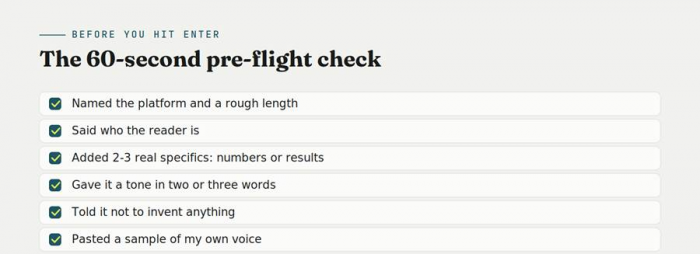
A 60-second pre-flight checklist
Before you hit enter on your bio prompt, run through this. If you can tick most of it, you are already ahead of the generic result.
The tool drafts. You decide.
A bio is a small piece of writing that does a surprising amount of work. It is often the first sentence a stranger reads about you. That is exactly why it is worth briefing well and reading closely, not outsourcing wholesale.
Use the template, feed the tool real specifics, give it your voice to match, and then do the last edit yourself. The AI can get you to a strong draft in seconds. The final version, the one that sounds unmistakably like you, is still yours to sign off on. That is not a limitation of these tools. It is the whole point.