

Table of Content
I went looking for one song to take on a long flight, and twenty minutes later I had three browser tabs open, two of them flashing download buttons I did not trust, and still no answer to the only question I cared about: was any of this actually legal?
So I closed the tabs and did the boring, sensible thing. I sat down and thought it through. What am I actually trying to do here? Is this a real law, or just YouTube protecting its own turf? When is converting a video genuinely fine, and when am I quietly kidding myself? What you are reading is basically my notes from that afternoon, tidied up so you do not have to repeat it.
Here is the thing I wish someone had told me back at tab one. None of this is about finding the perfect converter. It comes down to what you are converting and whether you have the right to. Once that landed for me, the whole subject got a lot simpler, and most of the "free MP3" noise online stopped being tempting at all.
The short version Converting a YouTube video to MP3 is legal when the video is your own, carries a Creative Commons license, is in the public domain, or you have the creator's permission. Converting copyrighted songs or videos without permission breaks both YouTube's Terms of Service and copyright law, even for private use. The tool you use is not the problem. The video and your permission are. If you just want music offline, a YouTube Music or Premium subscription is the simple, fully legal route. |
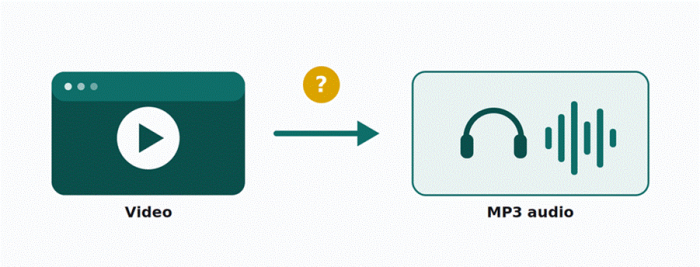
Pulling audio out of a video is the easy part. Whether you are allowed to depends entirely on the source.
2.7B People use YouTube every month worldwide | 125M Pay for YouTube Music or Premium (March 2025) | 300M+ Tracks in the official YouTube Music library |
The two layers of “legal”
The first thing that tripped me up was realizing that "is it legal" is really two questions wearing one coat, and I had been mashing them together. Once I pulled them apart, it clicked.
The first is YouTube's Terms of Service, which is a contract between you and the platform. The terms are blunt: you may not download or copy content unless YouTube shows a download option for it, you have written permission, or the law allows it. Pasting a link into a random converter site goes around YouTube's own systems, and that breaks the contract even if you never share the file.
The second is copyright law, which sits above YouTube entirely. Most videos are owned by a creator, a label, or a studio. Stripping the audio from a copyrighted song to avoid paying for it is copyright infringement in the United States, the United Kingdom, Germany, and most other countries, no matter what a website's headline promises.
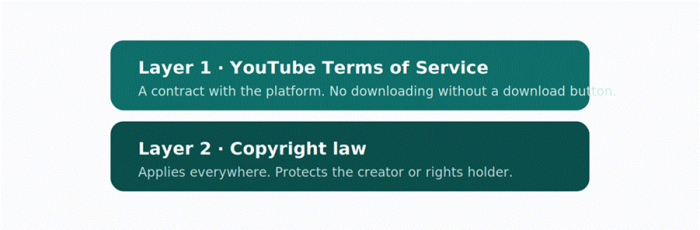
“Is it legal?” has two answers. A converter can break the platform's rules, copyright law, or both.
So a converter tool is not illegal on its own. The tool is neutral. What makes a conversion legal or not is the content you point it at and the permission you hold. The table below turns that into a quick check.
Is it legal to convert this video?
| The video is | Legal to convert? | Why |
|---|---|---|
| Your own upload | Yes | You hold the rights, unless you signed them away to a label or client. |
| Under a Creative Commons license | Yes | The license grants reuse. Credit the creator and check the exact terms. |
| In the public domain | Yes | Copyright has expired or never applied. Check the recording too. |
| Used with the creator's written permission | Yes | Direct permission settles the question completely. |
| A copyrighted song or music video | No | Infringes copyright and breaks YouTube's terms, even for private use. |
| Labeled “free to use” in the title only | Check | A title is not a license. Confirm the actual license before you rely on it. |
Green light If your video sits in one of the first four rows, you are clear to convert. The next section covers how to do it without tripping over YouTube's terms in the process. |
The legal methods, step by step
Once I knew a video qualified, the rest was just picking a route that keeps things clean. These are the four I would actually use, depending on the situation.

If the video is your own: YouTube Studio
1. Open YouTube Studio and select Content in the left menu.
2. Find your video, hover over it, and click the three-dot menu.
3. Choose Download to pull your original file straight from YouTube.
4. Extract the audio with free software (covered just below) and save it as MP3.
If you want your whole channel at once: Google Takeout
Visit Google Takeout, select YouTube and YouTube Music, and export your videos along with their metadata. Google packages everything into downloadable archives, and you get seven days to grab them before the export expires. This is the sanctioned bulk method and stays comfortably within the rules.
If the video is Creative Commons or public domain: verify first
To find these in the first place, run your search on YouTube, open the Filters menu, and under Features choose Creative Commons. Then open the video itself and confirm the license in the description, since the filter reflects what creators selected rather than a guarantee. Where the creator offers a direct download on their own website, that is always the cleanest route. Keep the creator's name and a link saved so you can meet the attribution requirement that most Creative Commons licenses carry.
To turn an allowed file into MP3: trusted, offline software
Once you have a file you are entitled to use, converting it is simple and fully offline. Free, open-source tools like Audacity and FFmpeg do this cleanly on your own computer, with no questionable website in the loop. FFmpeg extracts an MP3 in a single command such as ffmpeg -i input.mp4 output.mp3, while Audacity gives you a visual editor if you want to trim the audio first. Because the file never passes through a stranger's server, you skip both the malware risk and the privacy questions that come with link-in, file-out converter sites.
Which legal method should you use?
| Method | Best for | Within rules? | Good to know |
|---|---|---|---|
| YouTube Studio download | One of your own videos | Yes | Pulls your original file with no third-party tool. |
| Google Takeout | Your entire channel at once | Yes | Archive expires after 7 days. |
| FFmpeg or Audacity | Converting a file you may use | Yes | Runs offline; no upload to anyone. |
| YouTube Audio Library | Music for your own projects | Yes | Cleared tracks, many with no attribution. |
| Random converter website | Not recommended | No | Breaks the terms; common malware vector. |
The simple route for music: YouTube Music and Premium
This is the part that quietly won me over. If all you really want is songs offline, ripping MP3s is the hard way to do an easy thing. YouTube's own subscription handles offline listening, and plenty of people have already switched. As of March 2025, YouTube reported 125 million people paying for YouTube Music and Premium worldwide, up 25 million in a single year.
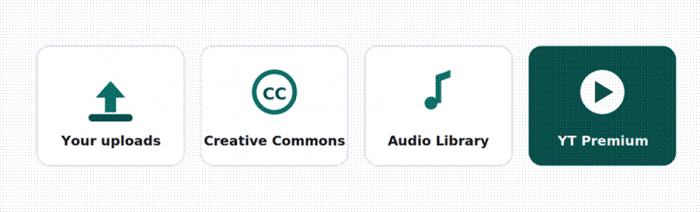
Four routes to audio you are allowed to use, from your own files to the official subscription.
Here is what a subscription includes and what it costs after the June 2026 price update in the United States. Note one honest limitation that runs through all of it: Premium downloads are not portable MP3 files. They are encrypted, they only play inside the YouTube or YouTube Music app, and they disappear if your subscription lapses. You are paying for convenient, legal offline access rather than a file you own outright, and a share of that payment reaches artists. YouTube says it paid more than $8 billion to the music industry between July 2024 and June 2025.
YouTube plans and offline access (US, 2026)
| Plan | Price / month | Offline downloads | Includes Music |
|---|---|---|---|
| Premium (individual) | $15.99 | Yes | Yes |
| Premium (family, up to 6) | $26.99 | Yes | Yes |
| Premium (student) | $8.99 | Yes | Yes |
| YouTube Music | $11.99 | Yes | Yes |
| Premium Lite | $8.99 | No | No |
Individual plan also offered annually at $159.99. Prices vary by country and change over time.
Making content? Use the Audio Library instead
If you are reaching for a converter because you need background music or sound effects for your own videos, podcasts, or projects, there is a purpose-built option that removes the legal guesswork. The YouTube Audio Library, free inside YouTube Studio, offers thousands of cleared songs and sound effects, many with no attribution required at all. Beyond it sits a whole ecosystem of royalty-free libraries built for exactly this need. Starting from a licensed source is faster than hunting for a convertible video, and far safer than hoping a track slips through.
Why “paste a link” sites are a bad deal
I want to be straight about why I closed those tabs, because the converter sites are everywhere and they look harmless. Three problems kept showing up: they break YouTube's terms, they carry real security risks, and they leave you exposed the moment you do anything beyond private listening.
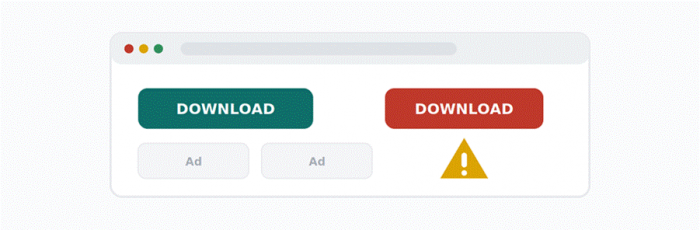
Free converter sites are a known home for misleading buttons, intrusive ads, and malware.
For private listening the practical risk is usually account-level rather than a courtroom, but repeatedly downloading copyrighted material, or worse, reuploading it, raises the stakes fast, from takedown notices to a suspended account. On the security side, free converters are a well-known vehicle for intrusive ads, fake download buttons, and outright malware, and you are often handing them a video URL and sometimes more. And the legal exposure jumps the moment you reupload a track, drop copyrighted music into a video you plan to monetize, or rip an album to dodge a subscription. Those are the exact uses that turn a gray area into clear infringement.
Official offline vs a random converter site
| Factor | YouTube Premium (official) | Random converter site |
|---|---|---|
| Within YouTube's rules | Yes | No |
| Malware and scam risk | None | High |
| Supports artists | Yes | No |
| Portable MP3 file you own | No | Sometimes |
| Reliable audio quality | Yes | Varies |
Worth remembering “Public” does not mean “free.” A video being viewable to anyone says nothing about whether you may download it. The right to watch and the right to download are two different things. |
Your 30-second decision check
This is the checklist I run in my head before converting anything. If you can answer yes to one of the first four and yes to the last one, you are clear.
☐ Did I upload this video myself?
☐ Is it labeled with a Creative Commons license that I have actually verified?
☐ Is the underlying work, and this specific recording, in the public domain?
☐ Do I have written permission from the rights holder?
☐ Am I keeping it for personal use, with credit where the license asks, rather than reuploading or selling it?
If none of the first four apply, the safe move is YouTube Music or Premium for listening, or the YouTube Audio Library for anything you are creating.
Where I landed
After all of that, here is what I actually do now. If it is my own upload, a Creative Commons track, something in the public domain, or a video I have permission for, I download my own file and run it through FFmpeg or Audacity. Done. No mystery websites, no second-guessing whether I am one click away from regretting it.
And for the thing that started this whole rabbit hole, just wanting music on a flight, I stopped fighting it and pay for the subscription. It is not a portable MP3, and yes, that bugged me at first. But it is legal, it is faster than any converter I tried, a slice of what I pay reaches the artists, and I never have to dodge a fake download button again. With 125 million people already paying for it, I am clearly not the one who was about to crack some secret code.

So if I had to boil my afternoon down to a single line: the convenience I was chasing was never hiding behind a sketchy converter. It was sitting in plain sight the whole time, on the right side of the line.