

Table of Content
Here is the thing nobody told you properly. If you run a business or creator account, and you are over 18, and your profile is public, Instagram switched you on for Google indexing on July 10, 2025. You did not opt in. You were opted in.
Which means one of two things is true right now:
› Your posts are quietly working for you, showing up in Google results for people who have never opened Instagram in their life.
› Or they are sitting there indexed and invisible, because your caption said "obsessed" and Google had nothing to read.
This guide fixes the second one. No theory, no fluff about the algorithm. Just the settings to check, the five things to change in how you post, and an honest note at the end about what this will and will not do for you.
What actually changed
Instagram used to ask search engines not to index user photos and videos. Since July 10, 2025 it allows Google, Bing and others to index photos and videos from public posts and Reels published on or after January 1, 2020, from accounts that are public, professional, and held by someone over 18. The setting is on by default. You can turn it off.
Why this is worth twenty minutes of your evening
Search stopped being one box a long time ago. Your customer does not pick between Instagram and Google. They use both, for different jobs, sometimes within the same minute.
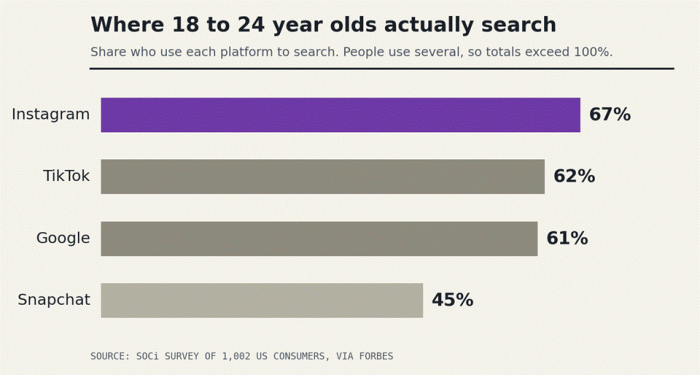
Figure 1. Instagram is already a search engine for the people you want to reach.
› 67% of Gen Z say they use Instagram to search, just ahead of TikTok at 62% and Google at 61%. (SOCi survey of 1,002 US consumers, via Forbes)
› 41% of Gen Z now go to social media first when they want to find something out. (SQ Magazine, 2026)
› About 90% of global search still runs through Google. Social search is additive, not a replacement. (Statcounter)
Read those three numbers together and the strategy writes itself. Your audience searches inside Instagram. Everyone else searches on Google. Until last year those were two separate buckets of effort. Now a single well written post can land in both.
The whole shift, in one sentence
A post used to have a shelf life of about 48 hours. An indexed post has a shelf life of years.
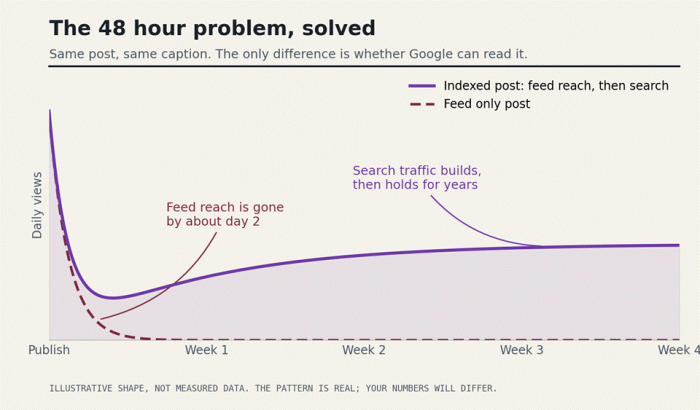
Figure 2. Indexing changes the economics of one post.
The sixty second check
Before you optimise anything, confirm Google is allowed to look. Five boxes. If any one of them is a no, nothing else in this guide matters yet.
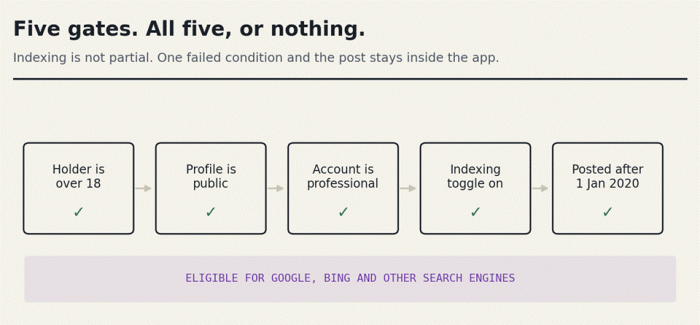
Figure 3. All five gates, or the post stays inside the app.
Table 1. Eligibility for search engine indexing
| Requirement | Where you check it | If the answer is no |
|---|---|---|
| Account holder is over 18 | Settings, then Account | No workaround. Under 18 accounts are excluded entirely. |
| Profile is public | Settings, then Account privacy | Switch to public, or accept that private stays private. |
| Account type is professional | Settings, then Account type and tools | Switch to Business or Creator. Personal accounts are never indexed. |
| Search engine indexing toggle is on | Settings, Account privacy, Search engine indexing | Turn it on. It ships on by default, but check anyway. |
| Post is dated Jan 1, 2020 or later | The post itself | Older posts are not eligible. Repost the good ones as fresh content. |
What Google can see, and what it never will
A lot of confusion comes from assuming everything on your profile is now fair game. It is not. The line is drawn tightly.
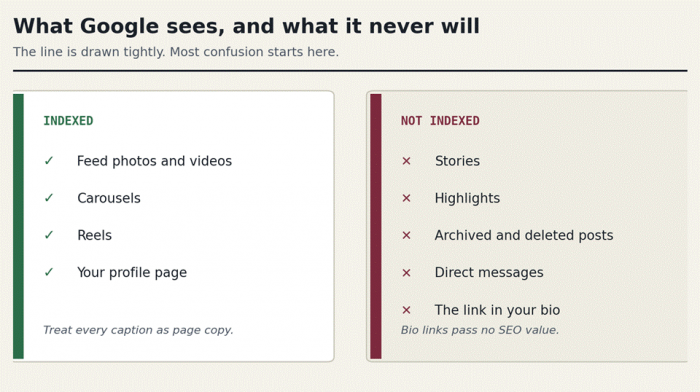
Figure 4. What Google can reach, and what stays private.
| Content | Status | What that means for you |
|---|---|---|
| Feed photos and videos | Indexed | Treat every caption as page copy. |
| Carousels | Indexed | Your best format for how-to and list content. |
| Reels | Indexed | Google cannot watch it. Give it words to read. |
| Your profile page | Indexed | Bio is your meta description. Write it like one. |
| Stories | Not indexed | Still purely an in app play. |
| Highlights | Not indexed | Useful for humans on your profile, invisible to crawlers. |
| Archived and deleted posts | Not indexed | Archiving is a real removal lever for old content. |
| Direct messages | Not indexed | As you would hope. |
| The link in your bio | Not crawlable | It passes no SEO value. Do not count on it for link equity. |
How Google actually reads your post
This is the part worth internalising. When your post lands in a search result, Google assembles it out of fields you already control. Here is the mapping, laid out as a result you might see tomorrow.
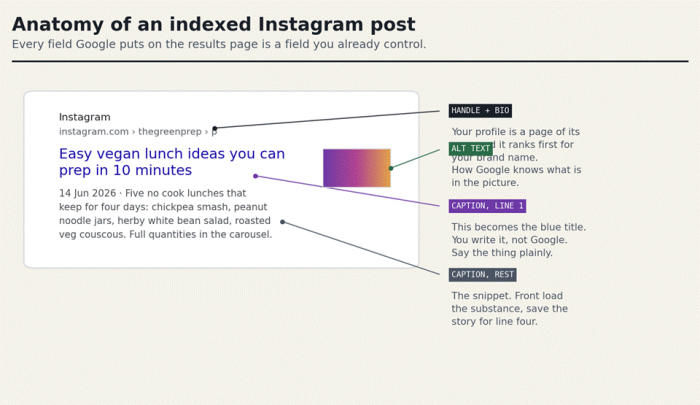
Figure 5. The result page, field by field.
Notice what is doing the work here. Not hashtags. Not your posting time. Not how many people saved it in the first hour. Words. Specifically, words you type into three fields most people leave empty or cute.
Five moves that change what gets indexed
Do these in order. The first one is worth more than the other four combined.
Front load the caption
The first line becomes your title in search. If it is a mood, you rank for nothing. If it is a plain description of what someone would type, you have a chance.
Do this
Write the first line as if it were the headline of a blog post. Say the thing. Then, on line two, be as charming as you like.
Move 02. Write real alt text
Instagram lets you set custom alt text on every image. It was built for screen readers. It now doubles as the only way Google knows what is in your photo.
Do this
Advanced settings, then Write alt text. Describe it the way you would to a friend on the phone. Include the thing you sell.
Move 03. Tag the location, every time
A location tag is the difference between ranking for "sourdough" and ranking for the search your actual customer makes, which has a place name in it.
Do this
Tag the neighbourhood, not just the city. Put the location in the caption text too, because that is what gets read.
Move 04. Put the words on the screen
Google cannot watch your Reel. It reads the caption, the alt text, and whatever text you have burned into the frame. A silent Reel with a vague caption is an empty page.
Do this
Add a clear text headline to the cover frame. Turn on subtitles. Keep the headline centred so the profile grid does not crop it.
Move 05. Post for the question, not the day
Search rewards content that is still true in eight months. A post about your weekend event dies with the weekend. A post answering the question you get asked every single month keeps earning long after your followers have scrolled past it. Look at your DMs and your saved replies. That is your keyword list, already written by real people in their own words.
Do this
Once a fortnight, publish one carousel or Reel that answers a recurring customer question in full, with the question itself as the first line of the caption
Captions, before and after
Same photo. Same brand voice. One of these is findable. Notice that the rewrite is not cold or corporate, it is just specific.
Table 3. Rewriting the first line
| Business | What you wrote | What Google can work with |
|---|---|---|
| Home renovation | obsessed with this one | Small bathroom remodel in a 1920s rowhouse: how we fit a walk in shower into 34 square feet. |
| Skincare brand | new drop | Barrier repair serum for dry, flaky winter skin: what is in it, and who it is actually for. |
| Meal prep creator | sunday reset | Sunday meal prep: five vegetarian lunches that still taste good on day four. |
| Wedding photographer | K + J forever | Autumn wedding at a barn venue outside Asheville: what the light does at 4pm. |
| Neighbourhood cafe | back on the menu | Gluten free cardamom buns are back at our Fishtown cafe, baked fresh Thursday to Sunday. |
Your first two weeks
You do not need a content overhaul. You need about ninety minutes, spread across fourteen days.
Table 4. A realistic fourteen day plan
| Days | What you do | Time | Why it matters |
|---|---|---|---|
| 1 | Run the eligibility check in Table 1. Confirm the indexing toggle. | 5 min | Everything else is wasted if this is off. |
| 1 | Rewrite your bio to say what you do and where you do it, in plain words. | 10 min | Your profile is a page too, and it ranks first. |
| 2 to 3 | Google site:instagram.com/yourhandle and see what is already there. | 15 min | You will find posts you forgot existed. Some you will want to archive. |
| 4 to 7 | List the ten questions customers ask you most. Exact wording. | 20 min | This is keyword research, done honestly. |
| 8 to 11 | Publish two posts that each answer one question, using Moves 01 to 04. | 30 min | Gives crawlers something new and specific to find. |
| 12 to 14 | Go back to your five best performing posts since 2020. Rewrite the first caption line. Add alt text. | 20 min | Edits are recrawled. Old work, new life. |
Did it work?
Do not wait for a feeling. Check. Indexing takes days to weeks, so run these searches a fortnight after you start, not the next morning.
› Everything of yours that Google holds: search site:instagram.com/yourhandle
› One specific post: search site:instagram.com/yourhandle "a phrase from your caption"
› Whether you rank for the real query: search the question your customer would type, with no site operator, in an incognito window.
› The reputation pass: search your own name and your brand name. Look at what a stranger sees first.
That last one is not optional. Everything you posted since January 2020 is now eligible, including the posts you wrote for 400 followers who already knew you. A caption that reads as a private joke to your community can read very differently to a person meeting your business for the first time on a results page.
The things nobody puts in the headline
Table 5. Common assumptions, corrected
| What people assume | What is actually true |
|---|---|
| "Hashtags will rank me on Google." | Hashtags help categorise you inside Instagram. Captions and alt text do the ranking work outside it. |
| "Indexed means ranked." | Indexed means eligible. Relevance, quality and engagement still decide whether you appear on page one or page nine. |
| "My bio link will pass SEO value to my site." | Bio links remain blocked from crawlers. Instagram sends you attention, not link equity. |
| "This replaces having a website." | It is a genuine second front door, and it is especially valuable if you have no site at all. It is not a substitute for owning your own domain. |
| "It happens overnight." | Crawling is gradual, and Instagram content often surfaces in lower positions while Google works through the volume. |
| "I cannot opt out." | You can. Turn the indexing toggle off, switch to private, or switch back to a personal account. Already indexed posts take time to drop out. |
So here is what I would do tonight
Open Instagram. Go to Settings, then Account privacy, and look at the indexing toggle. That is thirty seconds and it tells you whether the last two years of your work is visible to anyone outside the app.
Then open your last post. Read the first line of the caption out loud. If it sounds like something a person would type into Google at 11pm when they need what you sell, you are already doing this right. If it sounds like a diary entry, you now know exactly what to change, and it costs you nothing but a rewrite.
You do not have to become an SEO. You have to write like the person who finds you eight months from now has never heard of you. That is the whole discipline. Everything above is just detail.
Your posts stopped disappearing on Thursday. Start writing them like it.