


Table of Content
A friend of mine runs a two-person podcast production shop. She called me in June, mid-panic, because her annual renewal had just hit the card and she wanted to know whether she had been doing this wrong for a year. She had not. She had been paying for a marketing department and using a video slicer.
That call is why this guide exists. Almost nobody goes looking for a Munch Studio alternative because the software broke. They go looking because the shape of the bill stopped matching the shape of the work.
So I spent a week on it properly. I pulled the live pricing pages instead of trusting last year's blog posts, read the plan comparison tables line by line, and went through what users actually complain about on G2, Trustpilot and Capterra. Five tools made it through, not because five is a nice number, but because the sixth and seventh were worse versions of something already here.
Why we are leaving Munch Studio
| Munch Studio (munchstudio.com) | |
|---|---|
| What it is | AI social media manager. It trains on your brand, then plans, creates and posts. |
| Core promise | Run the account so you do not have to think about Tuesday. |
| Entry price | $38 per month billed annually, $48 month to month. |
| People switch to | Blaze AI, Quso.ai, or an agency. |
The confusing part: the getmunch web app has itself carried the Munch Studio name in places, which is why search results for this term are such a mess. Use your dashboard to tell them apart. A content calendar and a performance dashboard means you are on the newer product, and this guide is written for you. A stack of clips with virality scores means you are on the clipper.
What you are actually paying for
You cannot judge an alternative without knowing what you are giving up. Here is Munch Studio's real plan structure, pulled from the live pricing page rather than a directory listing.
| Plan | Monthly | Annual (per mo) | Brands | Seats | Repurposing | Scripts | AI videos | Storage |
|---|---|---|---|---|---|---|---|---|
| Essential | $48 | $38 | 1 | 1 (owner) | 500 min/mo | 5 / week | 10 / mo | 100 GB |
| Premium | $75 | $60 | 1 | Unlimited | 1,000 min/mo | Unlimited | 30 / mo | 1 TB |
| Studio | $148 | Not listed | Up to 5 | Unlimited | 2,500 min/mo | Unlimited | 50 / mo | 400 GB |
| Scale | $398 | Not listed | Up to 15 | Unlimited | 7,500 min/mo | Unlimited | 150 / mo | 1 TB |
Every plan includes brand training on your site and past posts, publishing to the five networks above, a tailored content strategy, unlimited posters and carousels, a planner and a performance dashboard. There is a 7-day trial and no permanent free plan.
Three things the marketing copy will not tell you. Essential is genuinely single-seat, so the moment a second person needs to log in, you are on Premium. Unlimited carousels is a real differentiator, and nothing else in this guide matches it. And the Studio tier ships with less storage than Premium (400 GB against 1 TB) while costing twice as much. Check that before you upgrade for the extra brands.
It does three jobs and charges you once
That bundling is the pitch, and it is why the bill feels heavy when you use a third of it. Bought separately, autopilot runs $19 to $79 a month, repurposing $15 to $29, generation $24 to $39. Munch Studio charges $38 to $60 for all three at once: fair value if you use all three, a bad deal if you use one.
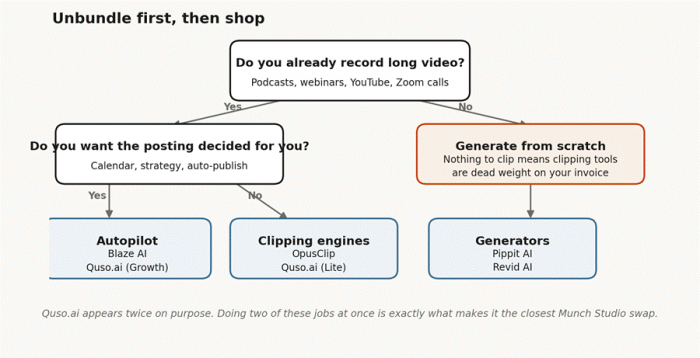
Figure 1. Two questions narrow the field from five tools to one or two.
Most people leaving Munch Studio need exactly one of these. Almost nobody needs all three. That sentence is worth more than the rest of this guide.
So why do people actually leave?
Read down the left column and stop at the row that stings.
| What you have noticed | What it usually means | What to shop for |
|---|---|---|
| You only ever touch the clipping tab | You are renting a strategy layer you never open | A dedicated clipper at a third of the price |
| Month three looks like month one | Autopilot plateaus without human input. Not a Munch problem. | Any tool. Fix the process or you churn again in 90 days. |
| You have no long video to feed it | The repurposing engine has nothing to eat | A generator, not a repurposer. Different category. |
The cross-platform review
All six side by side, Munch Studio included as the baseline you are measuring against. The sections after it are the detail behind each column.
| Tool | Entry (mo) | Free tier | Clips video | Strategy layer | Publishes to | Biggest catch |
|---|---|---|---|---|---|---|
| Munch Studio | $48 | None, 7-day trial | Yes, 500 min | Yes, full | IG, FB, LinkedIn, YouTube, TikTok | Studio has less storage than Premium |
| Quso.ai | $19 | 75 credits / mo | Yes | No | TikTok, IG, YouTube, LinkedIn, FB, X, Pinterest | Scheduling gated to Growth |
| Blaze AI | $79 | 7-day trial | No | Yes, plus ads and email | FB, IG, TikTok, YouTube, LinkedIn, X, Google Business | Double Munch Studio |
| OpusClip | $29 | 60 min, watermarked | Yes | No | YouTube, TikTok, IG (Pro tier) | Projects vanish 3 days after you cancel |
| Pippit AI | About $30 | 150 credits / week | No | No | TikTok, IG, FB, YouTube (3 accounts) | Built for sellers, not podcasters |
| Revid AI | About $39 | None | Partly | No | TikTok, IG, YouTube (Growth tier) | Credits burn on failed generations |
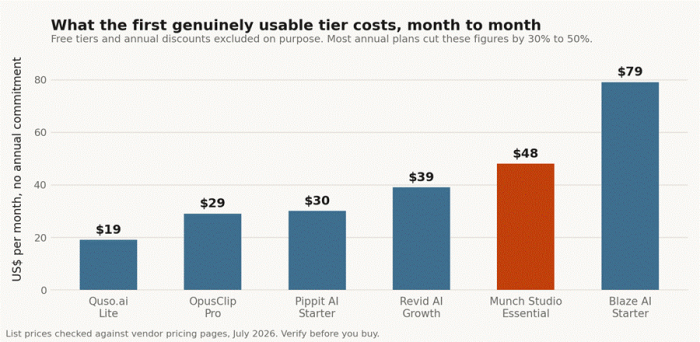
Figure 2. Month-to-month price of the first tier that is genuinely usable for a business.
The per-minute maths, since this is where most people switch
More Munch Studio leavers end up in the clipping column than anywhere else, so the economics matter more than the feature list. Munch Studio's clipping minutes are not expensive. They are mid-priced, which means you are not paying a premium for the clipper. You are paying for the layer around it.
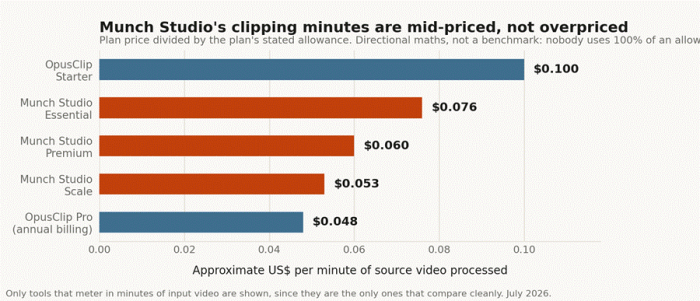
Figure 3. Plan price divided by the plan's stated allowance. Directional maths, not a benchmark.
Nobody uses 100% of an allowance, and only tools that meter in minutes compare cleanly here. Tools that meter in videos are excluded rather than fudged into the chart.
The verdict on each, before the detail
| Tool | I would pick it when | I would avoid it when | Verdict |
|---|---|---|---|
| Quso.ai | You want clipping and posting together for under $20 | The calendar is why you stayed | Closest like-for-like swap |
| Blaze AI | You want strategy, ads and reviews handled, not just posts | Your budget stops at $50, or your content is a podcast | The upgrade, not the escape |
| OpusClip | You want the safest, most-tested clipper going | You cannot live with the 3-day cancellation expiry | The default, and defaults earn that name |
| Pippit AI | You sell physical products online | You are a service business, a coach or a creator | Right tool, specific shop |
| Revid AI | You are faceless, daily, and never on camera | A client signs off, or you need to test before paying | Powerful, unpredictable, no free tier |
They are ordered by how close each sits to Munch Studio: the first is the nearest swap, the last replaces it only if you have no footage at all.
Quso.ai (formerly Vidyo.ai)
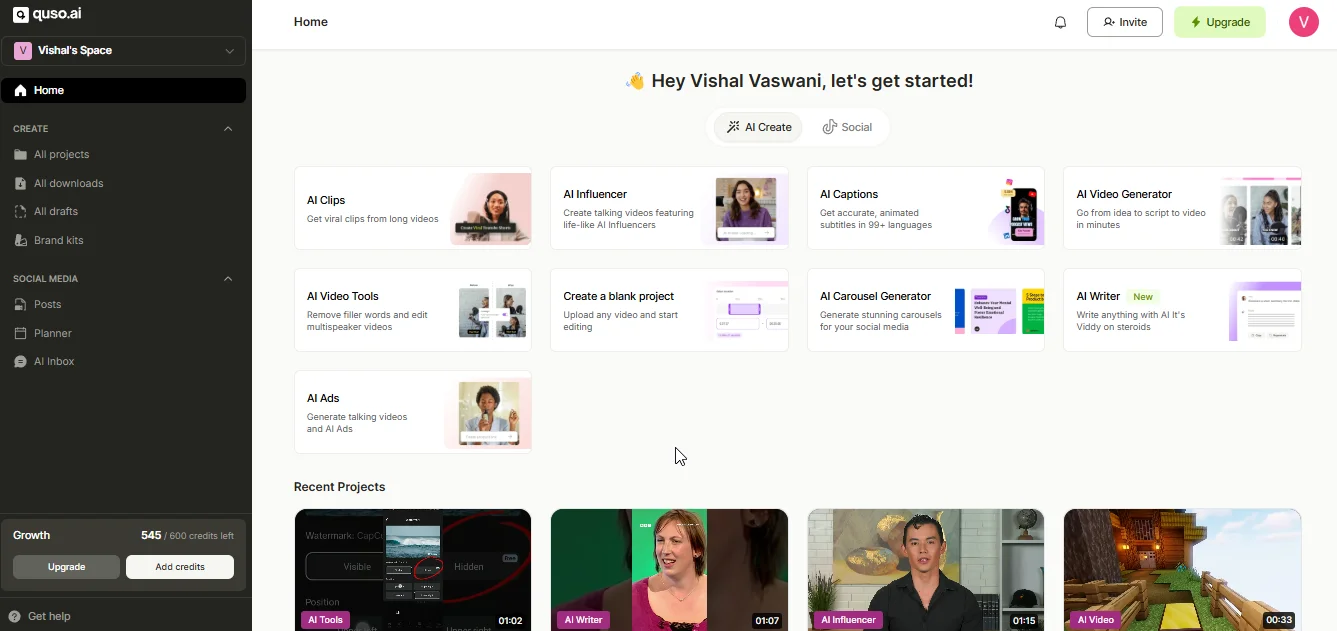
Use case: A weekly 90-minute podcast, one host, no editor. You already know what you want to post. You just need eight clips cut and pushed to TikTok by Tuesday, and you resent paying $48 for a calendar you override anyway.
What it actually is: the alternative shaped most like Munch Studio. It started as a pure clipper, then bolted on scheduling, avatars, a content planner and analytics. Same evolution, opposite starting point, and it shows in which half feels solid.
| Field | Detail |
|---|---|
| Pricing | Lite $19/mo. Essential $35 to $41/mo. Growth $49 to $59/mo. Annual billing cuts 33% to 50%. |
| Free tier | 75 credits a month, 720p, watermarked, with direct TikTok publishing |
| Publishes to | TikTok, Instagram, YouTube, LinkedIn, Facebook, X, Pinterest |
| Standout | One credit equals one minute, and the free tier lets you test clip quality on your own footage first |
| Watch out | Unlimited scheduling sits on Growth only. On Lite you are clipping, not publishing. |
Where it beats Munch Studio
• $19 against $48, with a genuinely free tier underneath. For a solo creator that gap is the entire argument.
• Its clipping engine is the older, battle-tested half of the product. Munch Studio's newer half is the clipper. Buy the half with more miles on it.
• Seven publishing destinations against Munch Studio's five, including X and Pinterest.
Where it loses
• The scheduler feels like the newer half, because it is. You may end up pairing it with a real one anyway.
• Credits go faster than the number suggests. Five captioned clips from one video can run 40 to 100 credits, the whole free allowance in one sitting.
• No strategy layer. It will not tell you what to post. If the calendar is why you pay Munch Studio, this is a downgrade.
Blaze AI

Use case: A local HVAC company posting three times a week, running Google ads, and answering Google reviews. Blaze covers all three from one login. Munch Studio covers one and does not touch the ads or the reviews.
What it actually is: the closest thing to Munch Studio's core pitch, aimed a notch higher up the market. Describe the business once, and it builds a strategy, a brand kit and a calendar, then publishes on its own.
| Field | Detail |
|---|---|
| Pricing | Starter $79/mo (3 accounts, 600 credits, 1 user). Growth $149/mo (10 accounts, 1,500 credits, unlimited users). |
| Free tier | 7-day trial, no card. Content starts auto-posting on day 3. |
| Publishes to | Facebook, Instagram, TikTok, YouTube Shorts, LinkedIn, X, Google Business Profile, plus email and blog |
| Standout | Done-for-you tiers where a human team owns the work, from $899/mo on a 12-month term |
| Watch out | Roughly double Munch Studio Essential, and no long-video repurposing at all |
Where it beats Munch Studio
• Strategy goes wider. Blogs, email, SEO, Meta ads and review management share one workspace, so the content system feeds the ad system.
• The credit maths is published openly, which is rare: a static post is 1 credit, an email 3, a blog 3, an AI video 15. You can budget a month on an envelope.
• There is an escape hatch. If autopilot fails, hand the account to Blaze's own team rather than churning to an agency and starting over.
Where it loses
• $79 against $48. That is the headline, and there is no arguing with it.
• Nothing to slice. If you feed Munch Studio a weekly 90-minute podcast, Blaze has no answer for that footage.
• 600 credits sounds generous until you notice AI video costs 15 each. That is 40 videos, fewer once you want blogs and email too.
OpusClip
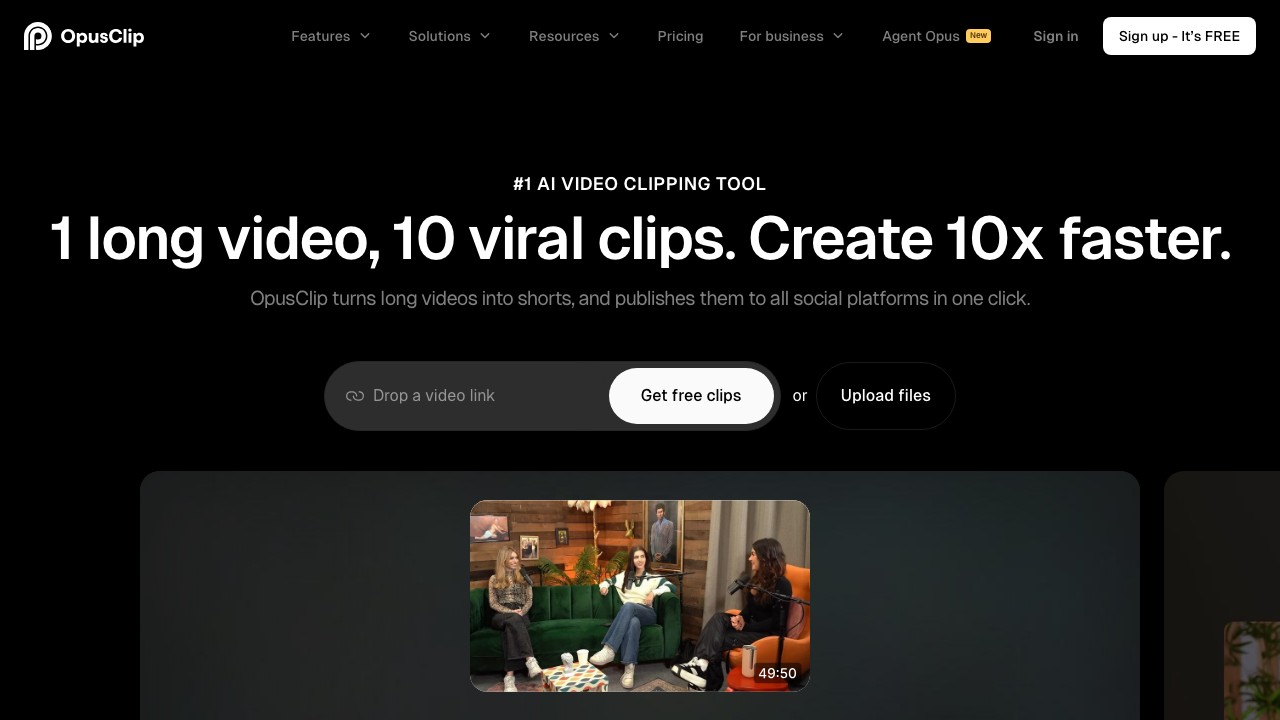
Use case: A YouTube channel publishing two long videos a week that need to become a dozen Shorts, where someone still eyeballs every clip before it goes out. You want the safest option, not the cheapest.
What it actually is: the category default, and the one your competitors are probably using. Paste a link, get ten clips back, each with a virality score from 0 to 100.
| Field | Detail |
|---|---|
| Pricing | Starter $15/mo (150 min). Pro $29/mo, or $174/year with all 3,600 credits granted upfront. Business is custom. |
| Free tier | 60 processing minutes, watermarked, and clips expire after 3 days |
| Publishes to | YouTube, TikTok, Instagram, on the Pro tier |
| Standout | The virality score. The one feature users say changed their workflow, because it tells you which four clips to review. |
| Watch out | The score, the editor, AI B-roll and the brand kit are all Pro-gated. Starter is a strange tier where you pay but cannot edit. |
Where it beats Munch Studio
• Pro on annual billing is roughly $14.50 a month with 3,600 credits upfront, useful if your recording schedule is lumpy rather than even.
• A real free tier, so you can test clip quality on your own footage first. Munch Studio gives you seven days and no free plan.
• Export to Premiere and Final Cut means it can sit inside a real edit pipeline rather than replacing one.
Where it loses
• No strategy, no calendar, no carousels, no brand training. It clips. That is the whole deal.
• Trustpilot reviews cluster around slow processing and failed renders, with a consistent thread about the cancellation flow.
• The three-day project expiry after cancellation catches people out constantly.
The single most expensive gotcha in this guide Cancel OpusClip and your projects become inaccessible after three days, even if you still have paid credits sitting in the account. If you are trialling it against Munch Studio, download exports as you go rather than treating the platform as storage. |
Pippit AI
Use case: A Shopify store with 40 SKUs and no videographer. You need a vertical ad per product this week, and good enough for TikTok is good enough.
What it actually is: CapCut's marketing engine, built by ByteDance. Paste a product URL and it scrapes the page, then builds a vertical ad around it. If you do not record long video, this is where you should be looking, because Munch Studio's repurposing minutes are dead weight on your invoice.
| Field | Detail |
|---|---|
| Pricing | Starter around $24/mo billed annually (roughly $30 month to month). Higher annual tiers run into the low thousands per year. |
| Free tier | 150 credits a week, refreshed every Monday. Roughly 2 minutes of video or 75 images. No publishing tools. |
| Publishes to | TikTok, Instagram, Facebook, YouTube, up to 3 accounts on Starter, with analytics |
| Standout | Link-to-video. Product page in, finished ad out. TikTok publishing is first-class, because of who owns it. |
| Watch out | The free plan unlocks two AI features and no publishing. The 7-day trial with 400 credits is the real evaluation. |
Where it beats Munch Studio
• It creates from a product link rather than from footage. If you sell things, that is a fundamentally better starting point.
• The free tier renews weekly and never expires, the most generous evaluation window in this guide by a distance.
• Output is licensed for commercial use on TikTok and CapCut, most of it cleared for Meta. Most tools here are vaguer about licensing than they should be.
Where it loses
• It is built for sellers. If you are a coach, a podcaster or a B2B brand, the whole product points away from you.
• Reviewers agree output suits social ads and product demos, not brand films or investor decks.
• No brand training in the Munch Studio sense, and no strategy layer.
Revid AI
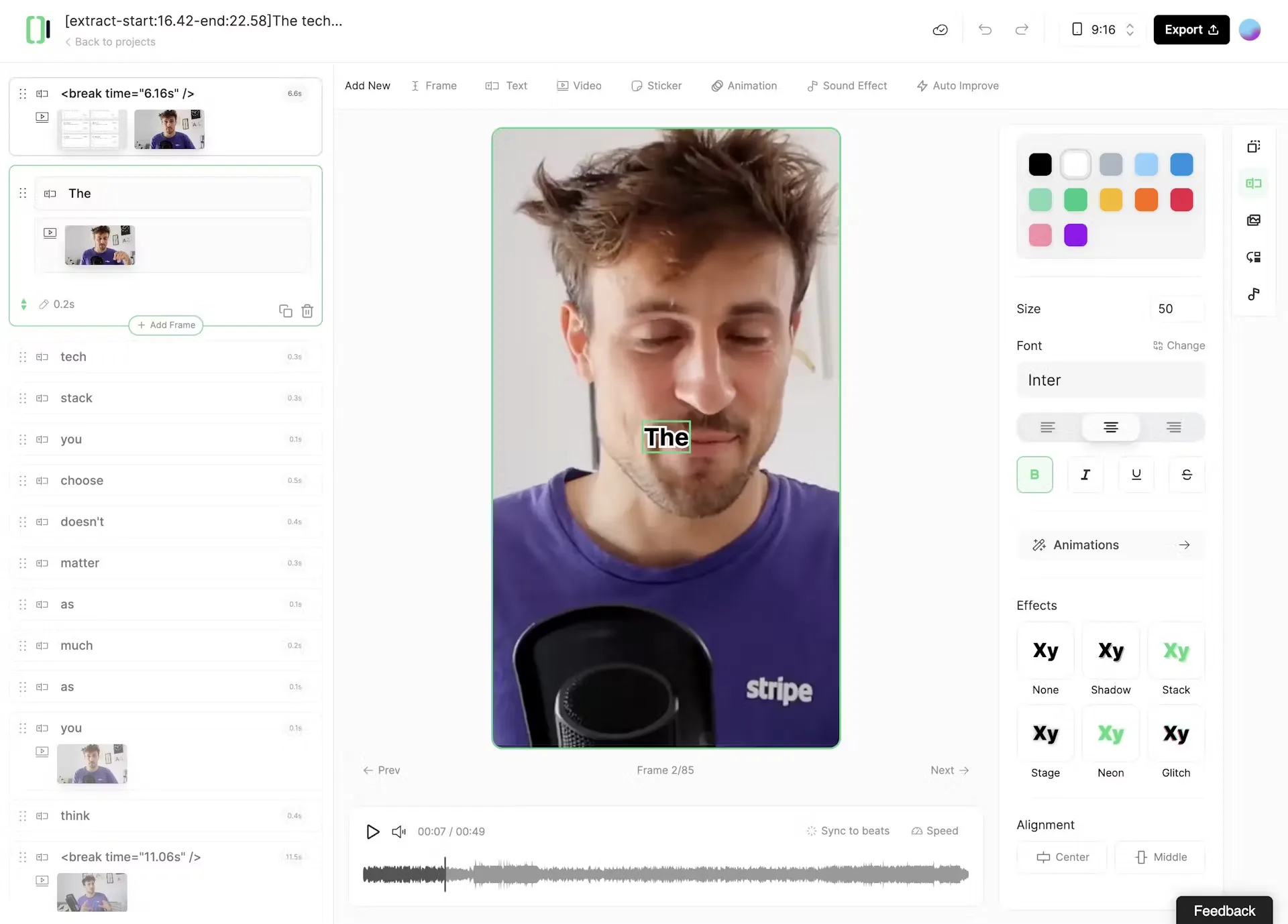
Use case: Three faceless channels posting daily from an RSS feed, where nobody appears on camera and nobody signs anything off. Volume is the whole point.
What it actually is: a faceless-content factory. Text, Reddit threads, tweets, URLs and podcasts go in, and short vertical videos come out, on a repeating schedule if you want.
| Field | Detail |
|---|---|
| Pricing | No free plan. Hobby around $39/mo. Growth listed at $99/mo but frequently promoted at $39. Ultra around $199/mo ($166 annual). |
| Free tier | None. You pay to export anything. |
| Publishes to | TikTok, Instagram and YouTube directly, on Growth and above |
| Standout | Auto-Mode Workers: pipelines that pull from RSS or YouTube and generate on a schedule. Growth gets 3, Ultra gets 10. |
| Watch out | Credits are reported as consumed on failed generations. Refunds need a request inside 30 days, under 10% of credits used. |
Where it beats Munch Studio
• Volume without footage. If you run three faceless channels, nothing else here comes close.
• Voiceovers in 70-plus languages, plus avatars, voice cloning and face swap on higher tiers.
• The automation workers are a difference in kind. Munch Studio schedules what it makes. Revid generates and schedules on a loop without you opening it.
Where it loses
• No free plan at all, which makes it the hardest tool here to evaluate before paying.
• Stock footage is generic and repetitive, and reviewers report caption errors on names that need manual correction.
• No approval workflows, so it is a poor fit for client work. The pricing is volatile too: a flagship tier permanently on a limited-time discount is telling you something.
The build-it-yourself option, with the actual maths
The question nobody in this category wants you to ask: can you buy a clipper and a scheduler separately and come out ahead? Here is the arithmetic, on annual billing where it exists.
| Your stack | Per month | What you gain | What you give up |
|---|---|---|---|
| Munch Studio Premium | $60 | Everything in one login. Nothing to wire up. | Nothing, if you use all of it |
| Quso.ai Growth | About $25 to $49 | Clipping, scheduling and analytics from one vendor | Strategy, brand training, carousels |
| OpusClip Pro + Buffer Essentials (5 channels) | About $45 | Virality scoring, plus a scheduler that is actually a scheduler | All of the above, and you write the captions |
The honest read
You can rebuild Munch Studio's clipping and posting for roughly the same money, and you will get a better clipper and a better scheduler for it. What you cannot rebuild at that price is the thinking layer: the calendar that decides what goes out on Tuesday, the brand training, the unlimited carousels.
If that layer saves you two hours a week, Munch Studio is cheap and you should stop reading. If you override it every single week, you are paying a premium for a feature you are actively fighting.
The billing models, and where the money hides
Sticker prices here are close to meaningless because the metering models differ so much. Work out which one you are buying into before comparing a single number.
| Model | Who uses it | Where it bites |
|---|---|---|
| Minutes of input video | Munch Studio, OpusClip, Quso.ai | A 90-minute podcast costs 90 minutes whether you keep 2 clips or 20. Output is free. Input is the meter. |
| Credits per action | Blaze AI, Revid AI, Pippit AI | The exchange rate is where the money hides. Blaze charges 15 credits for an AI video and 1 for a static post, so 600 credits is 600 posts or 40 videos. |
| Per channel or per brand | Buffer, Metricool, Munch Studio Studio and Scale | Cheap at 3 channels, painful at 12. Sensible for agencies, wasteful for one business that wanted a second seat. |
One more, because it decides your evaluation: Munch Studio has no permanent free plan. Seven days is your entire window, so plan the week before you start it.
A two-week test that actually tells you something
Most people evaluate these tools wrong. They upload one good video, get one good clip, and buy. Then month two arrives and the tool meets their real content, which is messier. This test breaks things early on purpose.
| Days | What to do | What you are actually measuring |
|---|---|---|
| 1 to 4 | Upload your worst recording, then your most technical one. Bad audio, a tangent, a screen share, a debate. | How the AI handles content that is not a demo reel. This is where tools separate, and almost every clipper weakens on screen content. |
| 5 to 8 | Count how many generated clips you would post without editing. | The real number. Under 30% means the automation is not saving time, it is moving it. |
| 9 to 12 | Publish four clips. Two the AI ranked highest, two you picked yourself. | Whether the virality score is signal or decoration. Your audience answers this, not the vendor. |
| 13 to 14 | Try to cancel. Do not complete it, just find the button and read the terms. | How hard the exit is. Several tools here have a documented problem with this. |
That last row is not a joke. The most common complaint across Trustpilot, G2 and Capterra for this category is not clip quality. It is billing and cancellation. Find the exit before you need it.
What I would actually do
If you have read this far you want a recommendation, not a matrix, so here is mine.
I would not leave Munch Studio to save $10. The switching cost is real: rebuilding a brand kit, reconnecting five accounts, retraining a tool on your voice, losing your history. That is a weekend, and a weekend is worth more than $120 a year.
I would leave for one of three reasons, and only these three:
• You only use the clipper. OpusClip if reliability matters most, Quso.ai if price does. You pay roughly half and get a better clipper, because it is the only thing either has to be good at.
• You need more than posts. Blaze AI. It costs more and does more: ads, blogs, email, reviews. If your marketing problem is bigger than social, you need a bigger tool, not a cheaper one.
• You have no footage. Pippit AI if you sell products, Revid AI if you run faceless channels. You are paying for 500 monthly minutes of an engine you cannot feed.
And here is the answer nobody selling software wants to give you: if your problem is that month three looked like month one, no tool on this list fixes it. Autopilot plateaus because it has nothing new to learn from you. Switch if the economics are wrong. Do not switch hoping a different algorithm will have opinions you do not have to supply.
My friend with the podcast shop moved to OpusClip and Buffer. She spends about $45 a month instead of $60, she writes her own captions now, and she says the clips are better. She also says she misses the calendar more than she expected to. Both things are true. That is usually how these decisions go.