

Table of Content
I've spent more hours than I'd like to admit inside anime AI generators: training LoRAs at 2 a.m., burning daily credits on character sheets, and quietly rage-quitting over a sixth mangled hand. PixAI has been a comfortable home base through a lot of that. It's one of the friendlier on-ramps into anime art: a huge model market, cloud LoRA training with zero code, and a free tier that doesn't feel like a bait-and-switch.
But “comfortable” isn't the same as “right for everyone.” Maybe PixAI's content filters keep tripping you up. Maybe you've bumped into its credit ceiling, or you want an API to wire generation into your own app, or you're just curious whether the grass is greener. Whatever brought you here, this is the comparison I wish someone had handed me: no hype, no invented benchmarks, and a clear-eyed take on where each tool actually earns its place, and where it doesn't.
A quick promise on honesty. Every tool here has genuine weak spots, and I've kept them in. Prices, credit systems and content policies in this space change constantly, so treat the specifics as a mid-2026 snapshot and confirm anything that matters on the official site before you pay.
First, what PixAI gets right
You can't judge a replacement without being clear on what you'd be replacing. PixAI's whole personality is “powerful, but you don't need a PhD in checkpoints to use it.” That balance is exactly why it's a hard act to follow.
| What it is | A cloud anime AI art generator with a huge model market and no-code LoRA training |
| Free tier | Generous daily free credits, earned just by logging in |
| Paid from | ~$8 / month (Starter) |
| Platforms | Web, iOS, Android |
| Standout | Beginner-friendly dual-mode UI, 1.5M+ community models, cloud training, image-to-video |
Where it shines
- Free daily credits that are actually usable, not a token trickle
- A massive Model Market of community LoRAs and checkpoints
- Cloud LoRA training with essentially zero technical setup
- A clean split between Quick mode and Professional mode
- Strong mobile apps and built-in image-to-video
- ControlNet available on paid plans for pose and composition
Why people still look elsewhere
- Content filters are conservative next to dedicated tools
- The best prices are locked behind annual billing
- The credit system can feel opaque until you've used it a while
- There's no public API for building your own apps on top of it
- Less raw model depth than Civitai, and less “pro” tooling than Leonardo
The five alternatives at a glance
If you read nothing else, read this. Here's the whole field, PixAI included as the yardstick, boiled down to one line each.
| Platform | Best for | Free daily allowance | Paid from | One-line verdict |
|---|---|---|---|---|
| PixAI | Beginner-friendly anime art + easy LoRA training | Generous daily credits | ~$8/mo | The friendly baseline this list is measured against |
| SeaArt | The widest all-in-one: art + video + ComfyUI | ~150 Stamina/day | ~$5.99/mo | Closest all-rounder, but mind the billing |
| Tensor.Art | Model hub + API for builders | ~50 credits/day | ~$9.90/mo | Best if you want an API or pay-as-you-go credits |
| Civitai | The deepest model & LoRA library | Earn / buy Buzz | ~$10/mo | Unmatched models; a learning curve and a Buzz economy |
| Yodayo | Anime art + character roleplay | ~150 Mochi/day | ~$9.99/mo | The most PixAI-like, with a companion twist |
| Leonardo | Professional, broader-than-anime production | 150 tokens/day | ~$12/mo | The grown-up choice for commercial work |
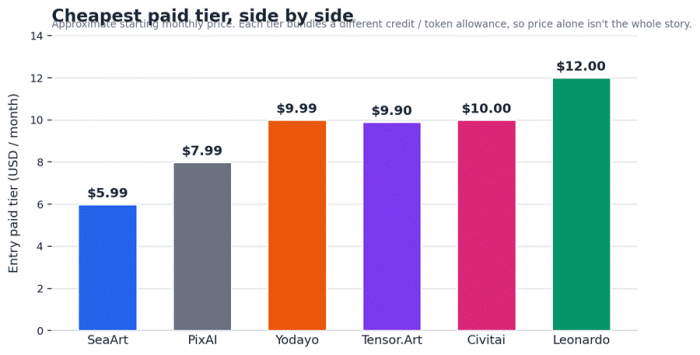
Entry-tier monthly pricing, side by side. Starting prices only; each bundles a different credit allowance.
The tools, one by one
Each tool below gets the same treatment: a spec card, an honest read on what it is and who it's for, the features that genuinely stand out, a plain pros-and-cons split, pricing, and a two-sided “choose it / think twice” call. Skim the cards, then dig into the two or three that fit you.
SeaArt AI: The closest all-rounder
| Best for | Creators who want PixAI's breadth plus video, face swap and node workflows in one place |
| Free tier | ~150 daily “Stamina” credits (reset every 24h, don't roll over) |
| Paid from | ~$5.99 / month |
| Platforms | Web, iOS, Android |
| Standout | Enormous model library, plus built-in video, LoRA training and a ComfyUI canvas |
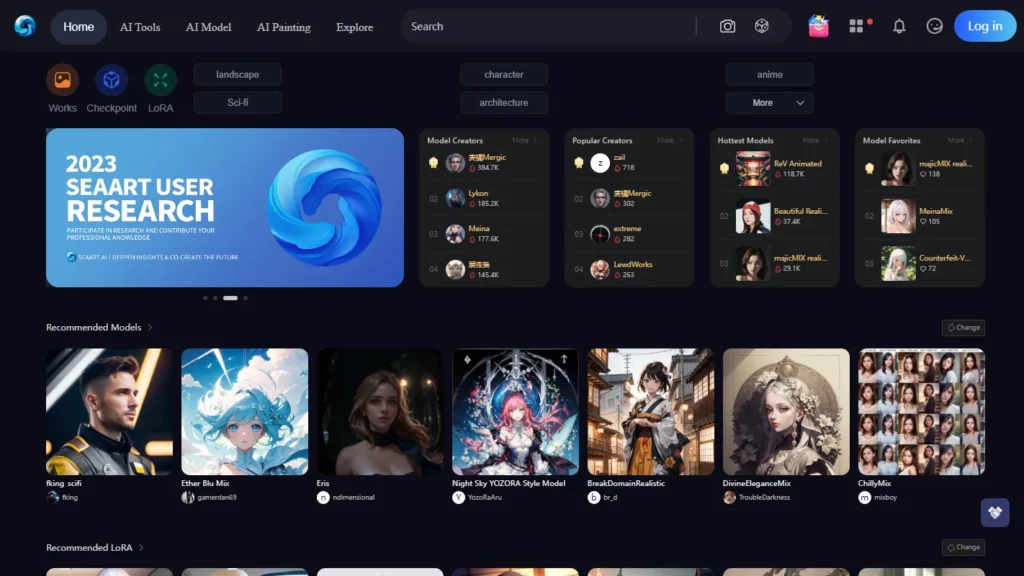
SeaArt is the tool most PixAI users try first, and for good reason: it covers the same anime-and-everything-else territory but pushes further into video (Kling/Veo/Sora-class engines pulled in through an aggregator model), face swap, virtual try-on and a full ComfyUI canvas for people who want node-level control. The free daily Stamina is genuinely usable for ten to fifteen images a day; beyond that you're topping up or subscribing.
The catch is trust and tidiness. SeaArt throws every feature at you at once, and its billing has a reputation problem: recurring reports of aggressive auto-renewals and confusing trial timing, plus third-party trackers and an unresolved history of models being copied from Civitai. None of that stops it being a powerful generator; it just means you should treat the checkout screen with care and read exactly what auto-renews.
What stands out
▸One of the largest model libraries anywhere: anime, realism, 3D, painting and niche styles
▸Built-in text-to-video and image-to-video, not just still images
▸Cloud LoRA training available to all users, no local GPU required
▸ComfyUI node workflows plus ControlNet for precise pose and composition
▸Easy Mode for beginners sitting alongside deep controls for power users
| What's great | What to watch |
|
|
Pricing at a glance
| Plan | Price | What you actually get |
|---|---|---|
| Free | $0 | Daily Stamina for core features; watermarks and lower priority |
| VIP (entry) | ~$5.99/mo | Larger daily Stamina, faster queue, watermark-free exports |
| Higher VIP | up to ~$30/mo | 300 to 12,000 daily Stamina, priority, commercial rights on paid tiers |
| Choose it if you want the broadest toolkit (art plus video plus ComfyUI) for the lowest entry price, and you're comfortable managing your own subscription settings. |
| Think twice if you need airtight licensing for corporate work, or you simply want a calm, minimal interface without upsells. |
Tensor.Art: The builder's pick

| Best for | Tinkerers and developers who want a big model hub plus a real API |
| Free tier | ~50 daily credits (reset daily; some accounts report ~100) |
| Paid from | ~$9.90 / month, or credit packs from $9.90 |
| Platforms | Web, mobile, API |
| Standout | Hundreds of thousands of community models, LoRA training, ComfyUI, plus API access |
Tensor.Art is Civitai-flavoured (a community model host you can also generate on) but with two things developers actually care about: a straightforward API with instant keys, and credit packs you can buy without any subscription. It runs Stable Diffusion, FLUX and Wan/Qwen models, supports LoRA training, ControlNet and ComfyUI, and its anime-heavy community means character LoRAs are everywhere.
Two honest frustrations temper the praise. First, “exclusive” models often stay locked behind a greyed-out download button even on Pro: you're buying cloud generation access, not model ownership. Second, the free tier is genuinely tight: around fifty daily credits, watermarks on free outputs, a resolution cap and short image retention, plus peak-hour queues. For casual play it's fine; for volume, budget for Pro or a credit pack.
What stands out
▸Instant API keys with credit-based billing, the easiest of these to wire into an app
▸Massive community model and LoRA library skewed toward anime and character work
▸In-browser LoRA training and ComfyUI workflows
▸Buy credits outright, with no subscription lock-in required
▸ControlNet, inpainting and upscaling built in
| What's great | What to watch |
|
|
Pricing at a glance
| Plan | Price | What you actually get |
|---|---|---|
| Free | $0 | ~50 daily credits, 1536×1024 cap, watermarks, ~14-day image storage |
| Pro | ~$9.90/mo | 300 daily credits + bonus, up to 3840×2160, priority + video tasks |
| Credit packs | $9.90 to $59.90 | 3,000 / 10,000 / 30,000 credits, no subscription needed |
| Choose it if you want to wire generation into your own product, or you'd rather own a bucket of credits than commit to a monthly plan. |
| Think twice if you were hoping to download premium models for offline use. That isn't what you're paying for here. |
Civitai: The model library the whole scene runs on
| Best for | Power users who live for models, LoRAs and reproducible prompts |
| Free tier | Browse and download most models free; on-site generation runs on “Buzz” you earn or buy |
| Paid from | ~$10 / month (Bronze) memberships |
| Platforms | Web + API; split across Civitai.com and Civitai.green |
| Standout | The largest open model library in existence, with full prompt/seed metadata on nearly every image |
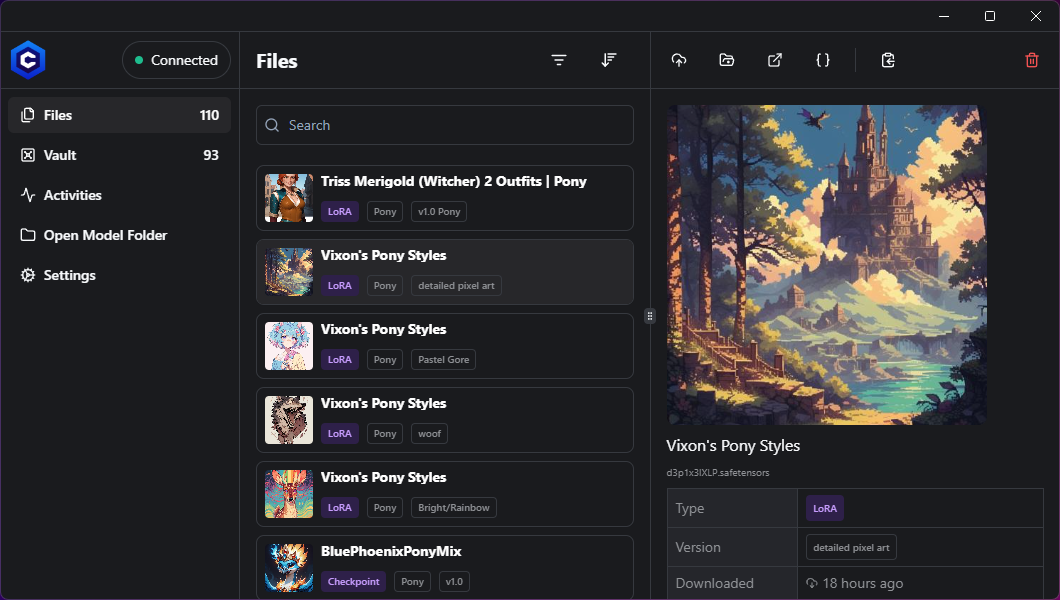
If PixAI's Model Market feels big, Civitai is the ocean it drinks from. Two-hundred-thousand-plus checkpoints and LoRAs span Flux 2, SD4, SDXL and older bases. And, crucially, most gallery images expose the exact model, LoRA stack, prompt, sampler, CFG and seed that produced them. That transparency is the best free education in AI art you'll find anywhere. It also runs an in-browser “Airship” generator, cloud LoRA training and multi-engine video.
But Civitai is the most friction-heavy option on this list. Generation runs on a three-colour Buzz economy (introduced in late 2025) that confuses almost everyone; direct card payments are restricted, so you're often buying Buzz with crypto; generated images auto-delete after thirty days; and the platform has weathered repeated content-moderation and payment-processor storms, spawning a stricter Civitai.green split. It is indispensable to the ecosystem, and genuinely not built for tidy corporate workflows.
What stands out
▸ The deepest model and LoRA library anywhere, well-tagged and searchable
▸ Every image is a tutorial: full prompt, seed and settings are visible
▸ On-site Airship generator + cloud LoRA training with no local GPU
▸ Multi-engine video generation (Kling, Veo and others)
▸ A real creator economy: earn Buzz when people use your models
| What's great | What to watch |
|
|
Pricing at a glance
| Plan | Price | What you actually get |
|---|---|---|
| Free | $0 | Browse + download most models; earn Buzz through site activity |
| Bronze | ~$10/mo | 10,000 monthly Buzz, private model slots, priority, purchase bonuses |
| Silver / Gold | $25 / $50/mo | 25k / 50k monthly Buzz, more storage, larger jobs, higher priority |
| Choose it if you want maximum model choice and you enjoy understanding exactly how each image was made. |
| Think twice if you want a simple credit-card checkout, permanent image storage, or a locked-down commercial environment. |
Yodayo: Anime art with a character companion attached

| Best for | Anime fans and VTuber creators who want art and roleplay in one community |
| Free tier | ~150 daily “Mochi” credits (expire in 30 days) + a signup bonus |
| Paid from | ~$9.99 / month (Plus) |
| Platforms | Web, iOS, Android (billed on statements as “Moescape AI”) |
| Standout | Generate a character, then talk to it: image gen + Tavern roleplay + gallery under one login |
Yodayo is the closest thing to PixAI in spirit (anime-first, community-driven, beginner-friendly) with one genuinely novel twist: a Tavern chat system where the character you just designed can become a roleplay companion with a consistent look and personality. It runs Stable Diffusion, Flux and Illustrious-XL with thousands of community LoRAs, and its “learn by remixing public prompts” loop is a fast way to level up.
Two things to know before you commit. First, in August 2025 Yodayo banned all explicit content under payment-processor pressure, which reshaped the platform and pushed part of its audience elsewhere; if you assumed it was an “anything goes” tool, it isn't anymore. Second, the Mochi currency is a little slippery: daily credits expire in thirty days, premium models cost more than you'd expect, and heavy chat quietly drains your balance. Even so, the image-to-persona workflow is something no direct competitor does as smoothly.
What stands out
▸ A unique image, then character, then roleplay workflow via Tavern
▸Anime-tuned models plus a big community LoRA library
▸Beginner-friendly interface with a strong prompt-learning community
▸Dedicated mobile apps for both art and chat
▸Negative-prompt control and reproducible seeds for consistency
| What's great | What to watch |
|
|
Pricing at a glance
| Plan | Price | What you actually get |
|---|---|---|
| Free | $0 | ~150 daily Mochi + signup bonus; enough for casual art or ~150 chat messages |
| Plus | $9.99/mo | 1,800 monthly Mochi; more headroom for images and roleplay |
| Pro / Premium | $14.99 / ~$29.99/mo | Unlimited basic image gen; stronger chat models and larger context |
| Choose it if you want anime art and a character you can actually talk to, in one welcoming place. |
| Think twice if you need permanent credit stockpiling, a non-English interface, or you're a heavy chat user watching a budget. |
Leonardo AI: The step up to professional polish

| Best for | Game artists, marketers and studios needing consistency, editing and an API |
| Free tier | 150 daily tokens (~25–75 images depending on model), no credit card required |
| Paid from | ~$12 / month |
| Platforms | Web + API (owned by Canva) |
| Standout | Custom model training, Consistent-Character tools, an AI Canvas editor and a real API |
Leonardo is the least anime-niche pick and the most production-minded. It's a Canva-owned, feature-complete studio: first-party models (Phoenix, Lucid) alongside third-party heavyweights (Veo 3, Sora 2, Kling, Flux, Nano Banana), a Consistent-Character engine, an AI Canvas for inpainting and outpainting, custom model training on ten to twenty images, image-to-video Motion, and a genuine Creative Engine API. The free tier is one of the best around and needs no card.
Where it's weaker: it isn't the anime specialist these other tools are, Midjourney still beats it on pure photorealistic portraits, in-image text remains unreliable, and the token meter drains fast the moment you switch on premium models or the Alchemy layer. Free generations are also public by default, and commercial rights only arrive with paid plans. If your work is broader than anime (brand assets, concept art, marketing at scale), Leonardo is the most grown-up option here.
What stands out
▸Custom model training on your own style or character (10–20 reference images)
▸Consistent-Character keeps the same face across many images
▸AI Canvas: inpaint, outpaint and edit in place
▸A mature Creative Engine API for building pipelines
▸Generous no-card free tier with clear commercial rights on paid plans
| What's great | What to watch |
|
|
Pricing at a glance
| Plan | Price | What you actually get |
|---|---|---|
| Free | $0 | 150 daily tokens (~25–75 images); public generations; core models + canvas |
| Entry paid | ~$12/mo | 8,500 monthly tokens, private generations, faster processing |
| Higher tiers | ~$30–$60/mo | 25k to 60k tokens, unlimited “Relaxed” gen on first-party models, API, training |
| Choose it if your work is broader than anime and you value consistency, editing and API access above niche model depth. |
| Think twice if you specifically want deep anime-community models and one-click character LoRAs. The specialists above do that better. |
Which one fits you?
Specs only get you so far. The better question is “what kind of creator are you?” Here's where I'd point people, and roughly why. Start with the map, then the table.
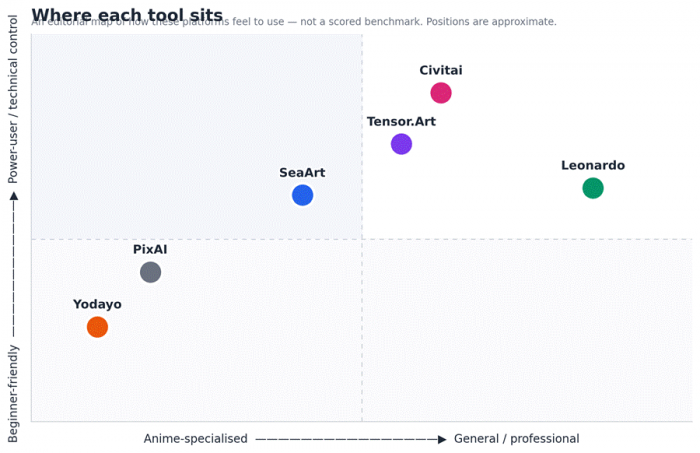
An editorial map of how each tool feels to use: anime-focus vs general, and beginner-friendly vs power-user. Not a scored benchmark.
| Your situation | Start with | Why |
|---|---|---|
| Hobbyist / fan artist on a tiny budget | SeaArt or Tensor.Art | The most generous free generation without needing a credit card |
| VTuber / character creator | Yodayo | Design a character, then roleplay it, plus proper mobile apps |
| Indie game dev / concept art | Leonardo, then Civitai | Consistency + canvas for assets; Civitai for niche style models |
| Developer building a feature | Tensor.Art or Leonardo | Both expose a real, documented API, which PixAI doesn't |
| Model tinkerer / power user | Civitai | The library and the prompt/seed metadata are simply unmatched |
| Marketing / commercial, licensing matters | Leonardo | Clear commercial rights on paid plans, and broad non-anime styles |
A few honest, category-wide caveats
None of this lives in a vacuum. Some truths apply across every tool here, and they're the kind of thing the marketing pages won't lead with:
| Payment-processor turbulence is reshaping the whole space. Civitai leans on crypto for purchases, Yodayo dropped explicit content in 2025, and SeaArt has faced billing and content scrutiny. Expect policy whiplash: features and freedoms can change with little notice. |
| Training-data ethics remain unresolved. Many community models are fine-tuned on scraped artwork with no opt-out for the original artists. If you're selling client work, that's a real consideration, not a footnote. |
| Credit systems are deliberately hard to compare. Stamina, Buzz, Mochi, tokens, credits: they don't map to each other cleanly. Always check the per-generation cost before you click, and find out what expires and when. |
| Prices and limits change monthly. Everything here reflects independent research around mid-2026. Verify current numbers on the official pricing page before subscribing: plan names and token counts move around. |
| Commercial rights usually require a paid tier. And remember: the platform's licence is separate from the licence on whatever community model you used to make the image. Read both before you sell anything. |
The final verdict
After living with these tools and their quirks, I don't think there's a single “best” PixAI replacement. There's a best one for each kind of work. Here's how I'd actually call it:
| If you want… | …reach for |
|---|---|
| The closest overall replacement | SeaArt: the widest feature set for the money, if you keep an eye on the billing screen |
| The most PixAI-like feel | Yodayo: anime-first, community-driven and friendly, with a companion twist PixAI doesn't have |
| Maximum model depth | Civitai: unmatched library and the best free education in the craft, friction and all |
| A builder's toolkit | Tensor.Art: a real API and pay-as-you-go credits for wiring generation into your own product |
| Professional, commercial polish | Leonardo: consistency, editing, licensing and an API for work that's broader than anime |
What I'd personally do: keep PixAI or Yodayo for fast, fun anime work, add Civitai as my model library and reference desk, and reach for Leonardo whenever a paid job needs consistency, editing or clean licensing. The mistake I see people make is trying to force one platform to do everything. A small, deliberate two-tool stack beats one overloaded account almost every time.
Before you go
If you take one thing from all of this, let it be this: don't overthink the choice on paper. Spin up two or three of these free tiers this week, throw the exact same prompt at each of them, and let your own eyes pick the winner. Ten minutes of side-by-side generation will tell you more than any comparison table, including this one.
The “best” tool isn't the one with the longest feature list; it's the one that matches how you actually work, at a price that doesn't make you wince. And it's completely fine, smart even, to keep a foot in two camps rather than marrying a single platform. The tools will keep changing. Your taste, and knowing what you need, won't. Now go make something.