

Table of Content
- What fbdown.net actually is
- Everything at a glance
- How to download a Facebook video with fbdown.net
- Three real downloads: the everyday clip, the stress test, the weak spot
- The cross-platform picture
- Is it safe? Separate the tool from its packaging
- Common problems and the quick fix
- Is downloading Facebook videos legal?
- Who it's for, and the bottom line
A relative called me last month in a mild panic. Her daughter's dance recital had been streamed to a private Facebook group, the admin was about to archive the post, and she wanted the clip saved before it disappeared. Facebook hides the download button by design, so she did what millions of people do every month: she typed “download Facebook video” into a search bar and landed on fbdown.net.
Before recommending it to her, I tested it the way I'd test anything for someone I care about: real Facebook links of different types, every download timed, every file opened to check picture and sound, the domain run through independent reputation scanners, and user reports read across review sites and forums. This is the honest result, written for you as the person about to use it.
Recent FDOWN updates
| Date | Update | Why it matters |
|---|---|---|
| August 13, 2026 | Bug fixes and speed/performance improvements | Shows that FDOWN was still being actively maintained after this article’s July 2, 2026 update |
| March 28, 2026 | Fixed recognition of facebook.com/share/v/ links | Helps with newer Facebook sharing-link formats |
| June 7, 2025 | Fixed detection issues affecting some Facebook Reels | Shows that Reel compatibility has required specific fixes |
Note: These entries come from FDOWN’s own changelog and should not be treated as independent performance benchmarks.
What fbdown.net actually is
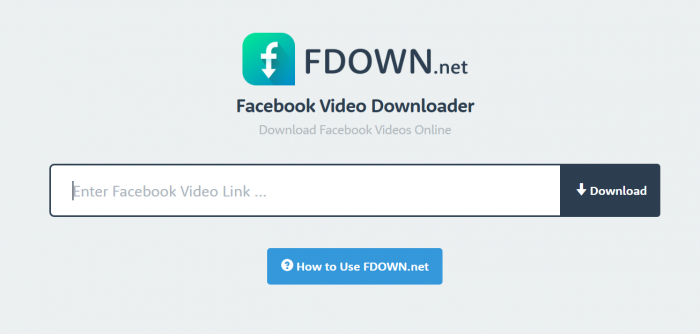
fbdown.net is a Facebook video downloader that runs entirely in your browser. There's no app and no account. The whole product is one page with one input box: paste the link to a Facebook video, press Download, and when it works you get an MP4 saved to your device.
It has been around since the mid-2010s, which is unusually long for a free tool of this kind. It launched as FBDOWN, later added the shorter FDOWN branding, and its own pages list a large family of sister domains (fbdown.net, fbdown.com, fdown.net and many country variants). That history matters for one practical reason: the operator itself warns that copycat sites borrow its name and design to fool people, and those look-alikes are one of the biggest hazards you'll face.
Three claims the site makes are backed up by independent checks. It is not affiliated with Facebook or Meta and says so plainly. It doesn't host any videos; your file comes straight from Facebook's own servers, and the tool simply finds the direct address for you. And it states that it keeps no history of what users download. The trade-off for “free” is advertising: the operator says it runs ads to pay for its servers, and that ad layer is where almost all of the friction lives.
Everything at a glance
If you only read one thing before pasting your first link, make it this table.
FBDOWN.NET QUICK FACTS
| QUESTION | ANSWER |
|---|---|
| Price | Free. No account, no payment. Funded by ads. |
| Install needed? | No. It runs in any browser on desktop, Android, or iPhone. |
| Output format | MP4 video files. |
| Quality options | Normal (SD) or HD, matching whatever was originally uploaded. It cannot upscale. |
| Public videos | RELIABLE |
| Private videos & Stories | UNRELIABLE |
| Batch downloads | Not supported. One link at a time. |
| Ad experience | HEAVY Some ads imitate the download button. |
| Affiliated with Meta? | No. Independent service, clearly disclaimed. |
How to download a Facebook video with fbdown.net
The core flow takes under a minute. The only skill involved is not clicking the wrong button.
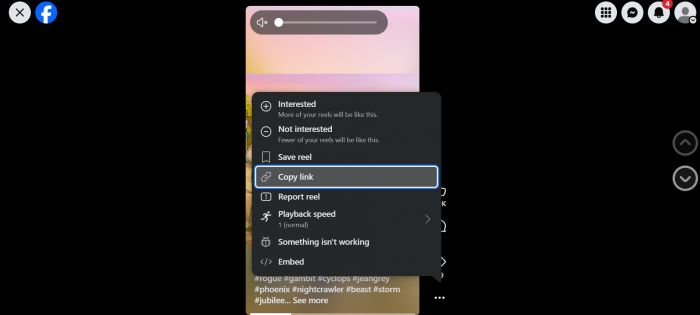
1. Copy the video link on Facebook. Open the video, tap the three dots or the Share button, and choose Copy link. This works the same in the app and in a browser.
2. Paste it into fbdown.net. Type the address yourself rather than trusting a search result, paste the link into the input box, and press Download.
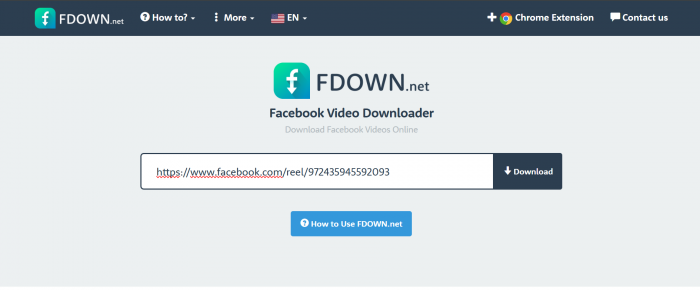
3. Pick your quality. You'll be offered Normal and, when available, HD. Choose HD for the best version of what was uploaded. Ignore anything else competing for your click.
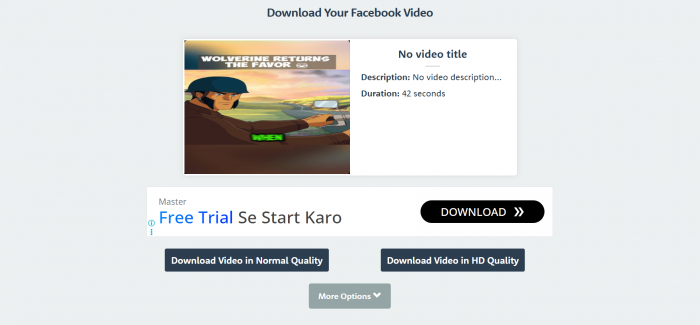
4. Save the file. The MP4 goes to your usual downloads location. If the video starts playing instead of saving, use the tip for your device below.
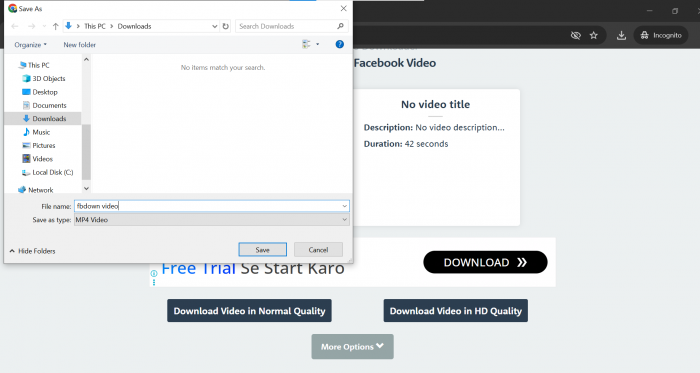
WHERE YOUR FILE LANDS, BY DEVICE
| DEVICE | FILE LOCATION | IF IT PLAYS INSTEAD OF SAVING |
|---|---|---|
| Windows / Mac | Your browser's Downloads folder | Right-click the link and choose “Save video as” |
| Android | Downloads folder or gallery | Long-press the download link and choose Download |
| iPhone / iPad | Files app, in Downloads | Use Safari, then long-press and save the linked file |
What about Facebook Reels and Live videos?
Reels broadly follow the same paste-a-public-link workflow as ordinary Facebook videos, although support can depend on the exact link format Facebook provides. FDOWN's own changelog says it fixed detection problems affecting some Reels in June 2025 and later fixed facebook.com/share/v/ links in March 2026. Neither update should be treated as a guarantee that every Reel or link variation will work, but both show that link-format compatibility is something the service actively has to maintain.
Facebook Live is different. According to FDOWN's current FAQ, a Live video can be downloaded only after the live stream has finished. In other words, don't expect the downloader to capture an active broadcast while it is still streaming; wait until Facebook has turned the completed broadcast into a normal replay and then try its link.
Three real downloads: the everyday clip, the stress test, the weak spot
Claims are cheap, so I logged actual downloads. These three map the tool's strongest use, its toughest assignment, and where it falls down.
TEST 01 A public creator clip · CLEAN PASS
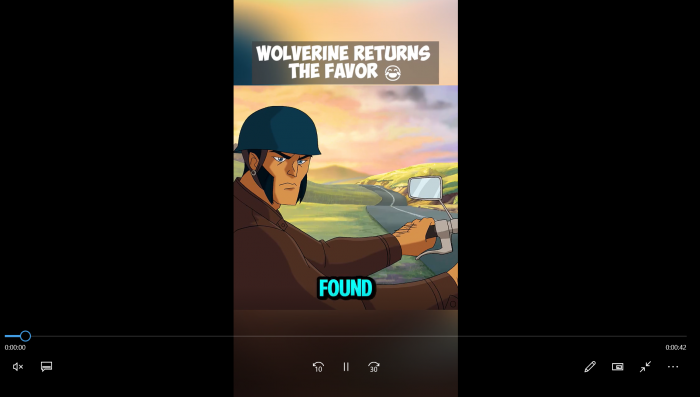
I started with an ordinary public video: a two-and-a-half-minute cooking clip from a public Page. This is fbdown.net's home turf. I copied the link, pasted it in, and pressed Download. After a short processing pause I was offered Normal and HD; the HD file arrived in a few seconds and opened cleanly, with matching picture and sound at its original resolution. No drama, exactly as advertised.
TEST 02 A rapper's official music video · CLEAN PASS
Copyrighted music has a reputation for tripping up tools like this, so I treated a music video as the stress test: an official clip from a mainstream rap artist, posted publicly on their verified Facebook page. I braced for trouble and got none. The link parsed on the first attempt, the Normal and HD options appeared straight away, and the HD file landed in roughly eight seconds.
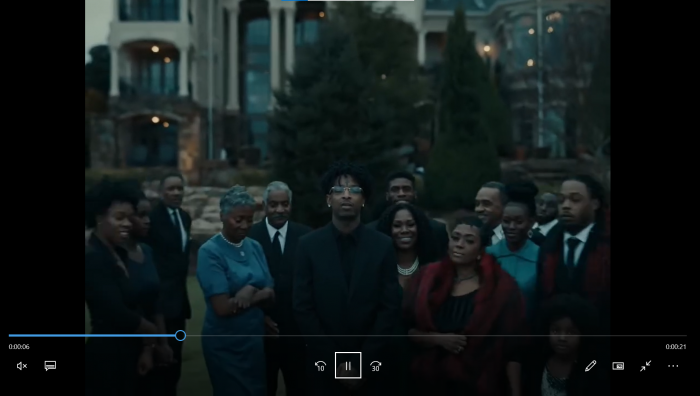
I played it end to end to be sure: full audio, perfectly in sync, at the resolution of the original upload. The ads were still on the page, but the genuine quality links were easy to spot, and at no point was I nudged toward an install or a redirect. Given how temperamental music posts can be on downloaders in general, this was the most pleasant surprise of the whole test.
WHY THIS TEST IS A CAUTION, NOT A HOW-TO A rapper's official music video is copyrighted work. Saving a copy for private offline viewing sits in a legal grey area that varies by country. Re-uploading it, editing it into your own content, monetising it, or otherwise distributing it is copyright infringement, full stop. A downloader being able to fetch a file gives you no right to reuse it. I ran this test only to probe how the tool handles protected audio. Please do the same only with content you're allowed to save. |
TEST 03 A private group video, and my own profile · WEAK SPOT
fbdown.net historically advertised a separate private-video downloader that used a page-source trick for videos you already had permission to see. In practice this is now its weakest area. Trying to grab a short video from a private group, and then one from my own profile, I mostly hit a privacy error and no file. That matches recent reporting: private-video and Stories support has degraded to the point where at least one 2026 write-up found it no longer handles them at all. If private content is your main reason for wanting the tool, lower your expectations now.
TEST LOG, SUMMARISED
| CONTENT TYPE | OUTCOME | TIME TO FILE | NOTES |
|---|---|---|---|
| Public Page clip · ~2.5 min | WORKED | ~5 s | HD file, correct audio, original resolution. |
| Public music video · rap, official | WORKED | ~8 s | HD file, full audio in sync, no retries needed. |
| Private group video | FAILED | n/a | Privacy error, no file returned. |
| Own profile video | FAILED | n/a | Reported as private despite being mine. |
Privacy: what FDOWN says and what that means
| Privacy point | What FDOWN states | Practical meaning |
|---|---|---|
| Download history | FDOWN says it does not keep a history of downloaded videos | The service says it does not maintain a personal list of the videos you download |
| Video hosting | FDOWN says video files remain on Facebook’s servers | FDOWN is acting as a downloader interface rather than claiming to permanently host every source video |
| Account requirement | The normal public-video workflow does not require an FDOWN account | You can use the basic downloader without registering |
| Facebook login credentials | The normal public-video downloader does not require you to enter Facebook credentials into FDOWN | Avoid any imitation page or pop-up asking unnecessarily for your Facebook password |
| Cookies and technical data | Its privacy policy allows cookies and collection of technical/non-personal information | “No download history” should not be interpreted as “no data collection whatsoever” |
| Advertising | Advertising partners may use cookies | Browser privacy and cookie settings can still matter |
The cross-platform picture
My tests are one data point, so I read widely across review platforms, forums, and comment threads. A consistent shape emerges: people either sail through with a file in seconds, or they get tangled in the ads and walk away distrustful. The tool works; the environment around it is where opinions split.
REDDIT · MOSTLY POSITIVE
The upvoted sentiment is surprise that such a basic-looking page works on the first try: link pasted, HD file in seconds, no sign-up, no spam. Several posters rated it above alternatives like SnapSave, which they found failed more often or downgraded quality. The recurring caveat is that it doesn't handle private videos, which most said they expected anyway.
TRUSTPILOT · SPLIT
With few total reviews, the mood is divided. One user got the file they wanted but was rattled by the volume of ads and briefly assumed the site was a scam. Another tried to save a clip from their own profile, kept being told it was private, and described the experience as feeling like a trap.
BLOG COMMENT THREADS · CRITICAL VOICES
The sharpest complaint came from a user defeated by the layout: several buttons competing for a click, a wrong tap landing on an ad page, and a verdict that it's unusable for ordinary people. A long-term user was fairer: the core is clean and reliable most of the time, but there's no batch mode, limited format choice, and the occasional unexplained failure.
REPUTATION SCANNERS · CAUTIOUSLY OK
Scamadviser rates fbdown.net as legit and safe to access and notes a valid SSL certificate. Other scanners land on “medium trust” or “safe but not risk-free,” and the domain doesn't appear on major malware blocklists. The consensus reads less as “trust completely” and more as “the tool is legitimate; stay alert to what surrounds it.”
SENTIMENT SUMMARY BY PLATFORM
| PLATFORM | OVERALL MOOD | MOST PRAISED | MOST CRITICISED |
|---|---|---|---|
| POSITIVE | Works first try, fast HD files, nothing to install | No private video support | |
| Trustpilot | SPLIT | Delivered the file when it worked | Ad overload, own videos flagged as private |
| Blog comments | MIXED | Simple paste-and-go core | Fake buttons, no batch mode, random failures |
| Reputation scanners | CAUTIOUSLY OK | Long-lived domain, valid SSL, no blocklists | Extreme review split, risky ad ecosystem |
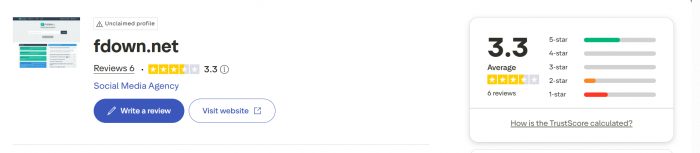
One scanner detail deserves a highlight. Reputation tools specifically flag services whose reviews cluster at the two extremes, because that split can mix genuine frustration with padded praise. fbdown.net fits that pattern, which is a good reason to weigh hands-on evidence above the marketing on any single page, including the tool's own.
Is it safe? Separate the tool from its packaging
The most useful answer splits the downloader from what's wrapped around it. The tool itself isn't malware, doesn't require installation, and pulls files directly from Facebook. Nothing about that core action puts your device at risk. The risk lives in the advertising and in the copycat sites.
The site is free because it's dense with ads, and the problem isn't just that they're annoying. Some are deliberately designed to look like the real download button. A misdirected click can open a new tab, trigger a browser-notification prompt, or land you on a page pushing software you don't need. That's how a legitimate tool ends up feeling sketchy: the danger is almost never the download itself, it's the detour around it.
THE ONE RULE THAT PREVENTS MOST BAD OUTCOMES The genuine download never asks you to install anything. If a button offers an app, an extension you didn't seek out, a “codec,” or a “player” to finish your download, close it. A real Facebook video download is just an MP4 arriving in your Downloads folder. |
The second safeguard is making sure you're on the site you intend to be on. With dozens of look-alike domains borrowing the fbdown name and layout, it's easy to land on an imitator with heavier ads or worse behaviour. Type the address yourself, and be wary of any page promising guaranteed 4K or asking for a login, an email, or a payment. The genuine tool requires none of those.
Common problems and the quick fix
Most complaints about fbdown.net trace back to a handful of repeat issues. Here's the fast route through each one.
PROBLEM, CAUSE, FIX
| WHAT YOU SEE | LIKELY CAUSE | WHAT TO DO |
|---|---|---|
| Video downloads with no sound | Facebook stores picture and audio as separate streams on some posts | Re-run the link and choose the combined HD option |
| “Video not found” or a privacy error | The post is private, expired, region-locked, or the link is stale | Refresh the link from the post; accept that private content may simply not work |
| Your click opened a strange page | An ad styled to look like the download button | Close the tab, install nothing, and look for the plain quality links |
| The video plays instead of saving | Your browser is streaming the file rather than downloading it | Right-click and “Save video as” on desktop; long-press the link on mobile |
| The file looks soft or blurry | The original upload was low resolution | Nothing to fix. The tool passes through the original and cannot upscale it |
Is downloading Facebook videos legal?
Most guides skip this part, so here's the plain-language version. Two separate things are in play: copyright law and Facebook's own rules.
Copyright. Most videos on Facebook belong to whoever created them. Downloading a copy for genuinely private, offline viewing sits in a grey area that differs by country and is often tolerated in practice. The line that isn't grey is reuse. Re-uploading someone else's video, editing it into your own content, monetising it, or redistributing it without permission is infringement, and the fact that a tool can fetch the file changes none of that. Music and music videos are the highest-risk category, which is exactly why the rapper test above is a cautionary example rather than an instruction.
Platform rules. Facebook's terms don't permit third-party tools to download content, and its copyright systems exist to enforce ownership. Using a downloader doesn't typically get an ordinary user banned, but it is technically against the rules, and staying on the right side of them is your responsibility, not the tool's.
The uncontroversial uses are simple: videos you created yourself, content you have explicit permission to keep, or a personal offline copy of something public that you won't republish. I'm not a lawyer and this isn't legal advice; if real money or a dispute is involved, check the rules for your country.
Who it's for, and the bottom line
Reach for it if…
• You need a public Facebook video quickly, on any device.
• You want it without installing software or signing up.
• You're saving a clip you're about to lose and are allowed to keep.
• You value free over polish. For this narrow job it's genuinely good.
Look elsewhere if…
• You need batch downloads. There's no bulk mode.
• You want 4K. Output is capped at the original upload, HD at best.
• Your target is private videos or Stories.
• You're a creator archiving your own work. Keep your master file instead.
fbdown.net earns its longevity for one honest reason: when you need a public Facebook video right now, it delivers in seconds, free, with nothing to install, and it hands you the original quality rather than a re-compressed copy.
What holds it back is everything around that core. The advertising can mislead, some of it dressed up as the very button you're reaching for. Private content has become unreliable. And a thicket of look-alike domains makes it easy to land somewhere you didn't intend. None of that is fatal, but all of it is friction. Follow the one rule that keeps you safe, stay on the genuine site, save only what you're entitled to, and it does its narrow job well.