


Table of Content
You found the perfect photo. Then you opened the caption box, stared at it for ten minutes, and typed "Happy Monday!" before hitting share.
If that sounds familiar, you are leaving reach on the table, and AI can fix the slow part, but only if you treat it like a writing partner instead of a vending machine. Give a model the right brief and it drafts five solid options in seconds. Paste "write me a caption" and it hands you the same bland line everyone else is posting. The difference is entirely in how you ask.
This guide skips the theory and gives you the parts you can actually use: a repeatable workflow, copy-paste prompts, a side-by-side edit you can learn from, and four tables you can come back to whenever you write a post. The data is here too, but woven in where it helps you make a decision, not piled up at the front.
First, what your caption is up against
Thirty seconds of context, because it shapes everything you will ask the AI to do. Instagram now has around three billion monthly active users, and average engagement has been sliding for years. Socialinsider's 2026 benchmarks put the typical rate below half a percent, down roughly a quarter from the year before. In a feed that crowded, every line of your caption has to earn its place.
Three rules follow from that, and they are the targets you will point the AI at:
The first line is everything. Instagram cuts captions off after about 125 characters and hides the rest behind a "more" link. If your opening words do not hook the reader, nothing below them gets read. Second, the algorithm rewards saves, sends, and fast comments more than passive likes, which is why a clear call to action matters so much: captions with a defined CTA have been found to earn around 70% more comments. Third, keywords have overtaken hashtags. Instagram reads your caption text to decide who sees the post, so a few real keywords now do more than a wall of tags. The figure below shows how those pieces fit together in a single post.
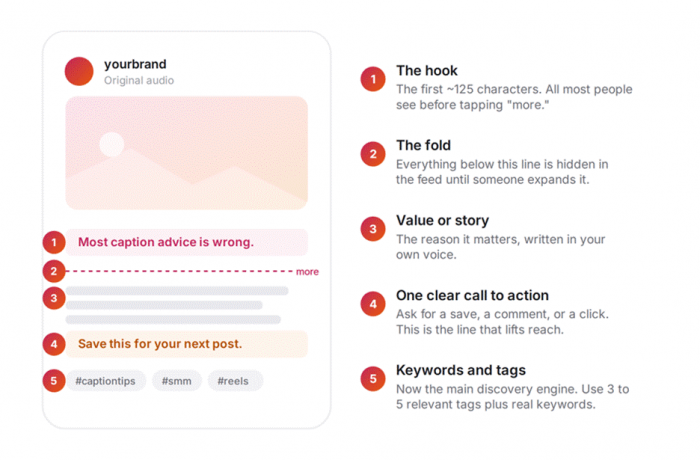
Figure 1. The anatomy of a caption that performs. The hook and the call to action do most of the heavy lifting.
Length is the other lever, and it is not one size fits all. Short wins for visual-first posts, while longer captions earn their keep when they teach or tell a story. Here is a quick reference you can match to whatever you are about to post.
| POST TYPE | CAPTION SWEET SPOT | WHAT THE FIRST LINE SHOULD DO | NOTES |
|---|---|---|---|
| Reel | Under ~150 characters | Complement the video's first 3 seconds | Let the video carry the message; short captions help watch-through |
| Single image | ~50 to 150 characters | State the single most interesting thing | Punchy beats long for visual-first posts |
| Carousel (educational) | ~150 to 220 words | Tease the value waiting inside | This range drove the highest comment rates in large studies; use line breaks |
| Story-led / community | ~200 to 300 words | Open mid-action, not with setup | Length is fine when the story earns it |
| Promo / product | ~80 to 150 words | Lead with the benefit, not the feature | Keep it to one clear CTA |
Table 1. Match caption length to the job of the post.
The workflow: seven steps that produce a postable caption
Run these in order. The order matters more than which tool you use, whether that is ChatGPT, Claude, Gemini, or a built-in caption assistant.
Hand the AI context before you ask for anything
The number one reason AI captions feel generic is that people give the model nothing to work with. Before you ask for a single line, give it what any human writer would need: who you are, who you are talking to, what the post shows, and the one action you want.
CONTEXT BLOCK
You are writing an Instagram caption for [brand], a [what you do] for [audience]. Our voice is [3 adjectives, e.g. warm, direct, a little playful]. The post is a [carousel / Reel / single image] showing [describe the visual]. The goal is to get people to [save it / comment / click the link in bio]. Use plain language and no cliches.
Tell it the format and the length
Point to the row in Table 1 that fits your post. Ask for "a short caption under 150 characters with the hook in the first line" for a Reel, or "a 150 to 200 word caption with a hook, a short story, and a question at the end" for a carousel. Remind it of the 125-character cutoff so it front-loads the good part.
Get the hook on its own
Because the first line decides whether anyone reads the rest, generate options for it specifically: "Give me 8 first-line hooks under 125 characters, mixing curiosity, a bold claim, and a relatable problem." Hooks are cheap to make and expensive to get wrong, so producing a batch and picking the best is one of the highest-leverage moves you have.
Ask for variations, never one answer
Request three to five versions in different tones so you have something to react to: "Write 4 versions, one conversational, one bold and punchy, one story-led, one straight informative." Even when none is perfect, the options clarify what you actually want, and you will often stitch the best line from one into the shape of another.
Make the call to action explicit
AI will not add a strong CTA unless you ask, and a vague one barely helps. Name the action: "End with a specific call to action that asks readers to save the post." Given the lift a clear CTA brings, this is not a step to skip. There is a swipe file of ready CTAs further down.
Do the human edit (the step that matters most)
This is where a real caption separates from an AI-shaped one. Cut anything that sounds like a machine wrote it: the throat-clearing intro, the tidy but empty phrases, the words you would never say out loud. Then add the one thing AI could not: a specific, true detail. "My hands were shaking before that pitch" lands where "I was nervous" never will. Read it aloud, and if it does not sound like you, keep going.
Add keywords and hashtags last
Once it reads well, make it findable. Weave two or three natural keywords into the text, the words your audience would actually search, then add 3 to 5 specific hashtags. You can ask the AI here too: "Suggest 5 relevant hashtags and 3 keywords I can work in naturally."
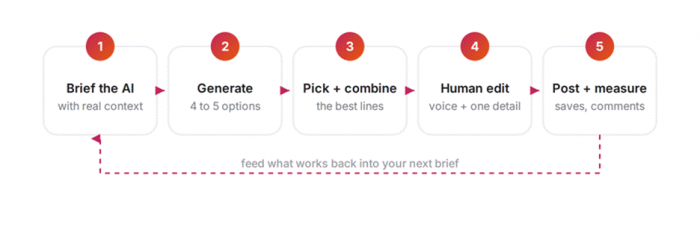
Figure 2. AI handles the volume. You keep control of the loop and improve the brief every week.
Notice how much of step 1 through 5 lives in the prompt. A vague prompt produces a vague caption, every time. The table below shows the swap that fixes it: same intent, far sharper instruction.
| INSTEAD OF ASKING THIS | ASK FOR THIS |
|---|---|
| "Write an Instagram caption." | Write a 150-word caption for [brand], a [x] for [audience]. Voice: warm, direct. Goal: get saves. |
| "Make it catchy." | Give me 8 first-line hooks under 125 characters. Mix curiosity, a bold claim, and a relatable problem. |
| "Add some hashtags." | Suggest 5 specific, relevant hashtags and 3 keywords I can weave into the text naturally. |
| "Make it better." | Keep my voice. Sharpen the first line, tighten the middle, and end with a CTA to [action]. |
| "Write something fun." | Write 4 versions: conversational, bold, story-led, and straight informative. |
Table 2. Specific instructions are the whole game. Vague in, vague out.
Watch it work: the same post, before and after
Here is what the loop looks like in practice. On the left is a typical first draft, the kind a model gives you from a thin prompt. On the right is the same post after a two-minute human edit.
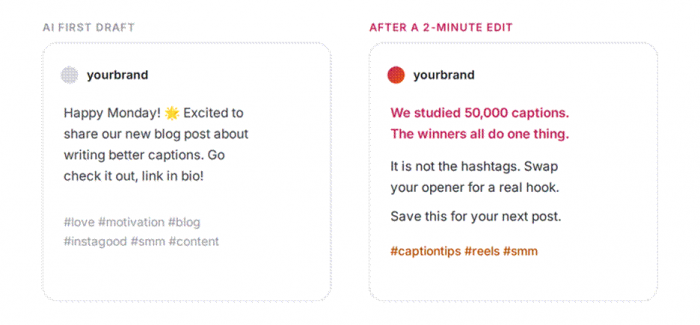
Figure 3. Three edits did the work: a real hook, the filler cut, and one specific call to action.
The edit changed three things, and they are the same three you will reach for every time. The opener went from filler ("Happy Monday!") to a hook with a reason to keep reading. The generic middle was cut and replaced with one useful, specific idea. And the thirty-tag pile became one clear CTA plus a handful of relevant hashtags. None of it took long, because the AI did the drafting and you did the judging.
Let AI do its half, and keep yours
It helps to be clear about the division of labor, because that is what keeps your feed sounding like you. AI is fast, tireless with variations, and a genuine cure for the blank page. What it cannot do is know your real voice, your audience's in-jokes, or what actually happened behind the photo. That part is yours, and it is the part readers respond to.
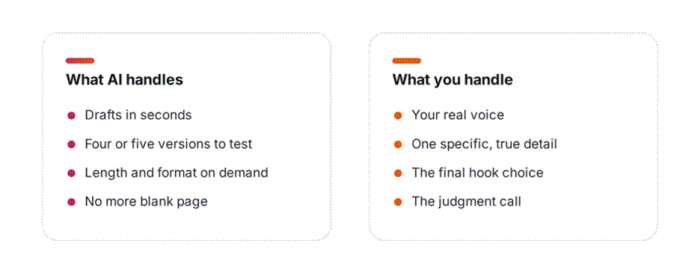
Figure 4. The split that keeps captions human while still moving fast.
Around 85% of marketers edit their AI drafts before posting, and the reason is simple: a lightly edited draft beats a raw one, and it beats a blank box even more.
There is a real risk in skipping your half. Roughly half of consumers say they engage less with content the moment they sense a machine wrote it, so the unedited copy-paste is quietly working against you. Treat the model as a fast, slightly generic junior writer: brilliant for a first pass, never the final word.
Steal these prompts
You do not need to write a fresh brief every time. These three cover most situations.
THE VOICE-MATCH REWRITE
Here are three captions I have written and like: [paste them]. Study the tone, rhythm, and vocabulary. Now write a caption in that same voice for this post: [describe the post and goal].
Pasting in a few of your own captions is the single best way to get AI to sound like you. It gives the model a target to copy instead of a vacuum to fill.
THE HOOK GENERATOR
Give me 10 scroll-stopping first lines for a post about [topic], each under 125 characters. No emojis, no cliches, no "Happy Monday."
THE CAPTION DOCTOR
Here is a caption I wrote: [paste]. Keep my voice, but make the first line stronger, tighten the middle, and end with a clearer call to action to [desired action].
That last one is the quiet favorite, because improving your own draft, rather than replacing it, gives you the best of both: your voice, sharpened.
And when you reach step 5, here is a swipe file of calls to action sorted by what you actually want the post to do.
| YOUR GOAL | A LINE YOU CAN PASTE |
|---|---|
| More saves | "Save this so it is there for your next post." |
| More comments | "Which of these trips you up most? Tell me below." |
| Profile visits | "I broke the full process down on the blog, link in bio." |
| Shares and sends | "Send this to the friend who keeps asking how you do it." |
| Replies and DMs | "Want the template? Comment CAPTION and I will send it over." |
Table 3. Pick the CTA that matches the result you want, then make it your own.
Mistakes that quietly kill engagement
A handful of habits show up again and again, and every one is avoidable. Skim the table, then never do them.
| THE MISTAKE | WHY IT COSTS YOU | THE FIX |
|---|---|---|
| Posting raw AI output | About half of people tune out when they sense AI wrote it | Always do a short human edit and add one true detail |
| Opening with "Happy Monday!" | Wastes the only line most people will read | Lead with your most interesting or useful sentence |
| Burying the point below the fold | Everything after ~125 characters is optional reading | Move your best line to the very top |
| Stuffing 30 hashtags | Attracts bots, not buyers, and looks spammy | Use 3 to 5 relevant tags plus real keywords |
| Every caption sounds the same | A single AI voice flattens your whole feed | Vary the format and let your edits keep it human |
| Writing to the character limit | The 2,200-character ceiling is a maximum, not a target | Match length to the job, then stop |
Table 4. The six habits worth breaking, and what to do instead.
Your quick start
Next time you sit down to post, run this. It is the whole article compressed into a checklist.
✓ Open with the context block prompt and fill in your brand, audience, and goal.
✓ Tell the AI your post type and target length from Table 1.
✓ Ask for 8 hooks and 4 full versions, then pick and combine the best.
✓ Spend two minutes editing: sharpen the first line, cut filler, add one true detail.
✓ Drop in a CTA from the swipe file and 3 to 5 relevant hashtags with real keywords.
✓ Post, then check saves and comments and feed what worked into next time's prompt.
THE BOTTOM LINE
Used this way, AI does not make your captions generic. It clears the slow, blank-page part of the work so you can spend your energy on the part that actually connects: sounding like yourself, saying something true, and giving one good reason to stop scrolling. The algorithm rewards that, and so do the people on the other side of the screen.