

Table of Content
I keep a folder on my laptop called clips_i_never_posted. If you make videos, you probably have one too. Mine is stuffed with long podcasts and interviews that would make great shorts, sitting untouched because slicing them by hand eats a whole evening and rarely feels worth it.
So when 2short.ai kept coming up in creator chats, I decided to test it for real instead of trusting the screenshots on its landing page. Not a polished demo clip. A full podcast episode with a rapper I had been meaning to cut for weeks. Below is exactly what happened, screenshots included, plus what verified users on trusted platforms think, and the score I would honestly hand it.
So what is 2short.ai?
2short.ai is an AI tool that takes a long video and pulls out the moments most likely to land as shorts. You give it a link, it reads the captions, finds the highlights, reframes them vertically, and drops on animated subtitles. It is built for spoken-word content like podcasts, interviews, lectures, and commentary, which is why a rapper interview felt like a fair test.

One thing worth knowing up front: it repurposes footage you already have. It does not generate new video from scratch. If your problem is that good moments keep dying inside long uploads, that is precisely the gap this fills. If you want an AI to invent a video for you, this is the wrong category of tool. The quick-facts table below sums up who it is for and what you get before we get into the hands-on test.
2SHORT.AI AT A GLANCE
| What it is | AI tool that turns long videos into short, captioned vertical clips |
| Best for | Podcasters, YouTubers, educators, coaches, and social media managers |
| Content type | Spoken-word video (the source needs captions to work well) |
| How it works | Paste a YouTube or Drive link, AI finds clips, you edit and export |
| Runs on | Browser-based, works on Chrome, Safari, and Edge. No install |
| Languages | Roughly 21 to 26 supported via captions |
| Exports | 1080p, no watermark, vertical / square / horizontal |
| Free plan | Yes. 30 minutes of AI analysis per month, with limited exports |
| Paid from | $9.90 / month |
| My rating | 8 / 10 |
Getting in took one click, but only one kind of click
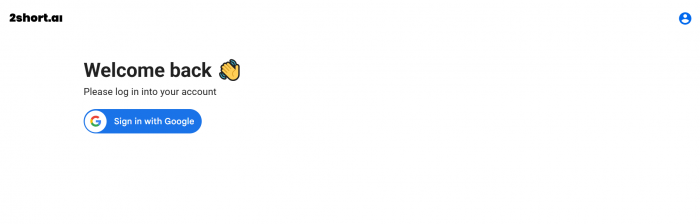
The sign-in screen offered a single option: continue with Google. No email and password, no Apple, nothing else. If you already live inside a Google account, that is genuinely fast and I was through in seconds. If you wanted to keep this tool separate from your main Google identity, you are out of luck for now. It is a small thing, but worth flagging if account hygiene matters to you.
What greeted me on the other side made up for the narrow door. The dashboard is calm and uncluttered, a dark workspace with a few bright gradient cards: Short clip maker, Unlimited video ideas, and a Scripting row underneath holding Script writer, Script outline, and Rewrite script of any video. Nothing shouted for my attention. It felt like a product that respects your eyes.
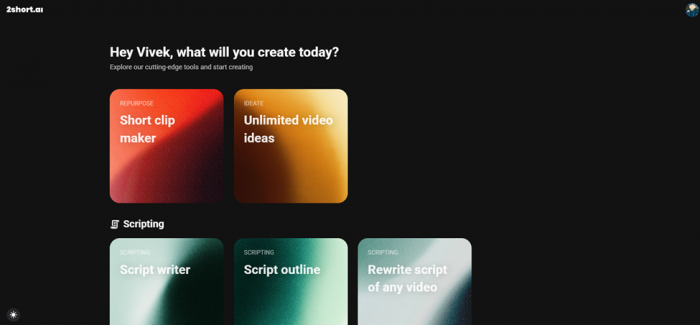
The dashboard after login. Clean, dark, and organised around a few clear actions.
Pasting a podcast and letting the AI think
I clicked Short clip maker. It asked me for a video, so I grabbed the link to the rapper’s podcast, pasted it in, and let it run. The processing took somewhere around two to three minutes. Not instant, but I have spent far longer just hunting for a decent in and out point by hand.
When it finished, it did the part I actually cared about. Instead of dumping the entire video back on me, it surfaced the strongest topics and segments, the bits it judged most clip-worthy, and laid them out as options. That framing is the real value. It turns a vague task, find something good inside ninety minutes of talking, into a short menu of choices. I scanned the suggestions, picked one segment built around a strong quote, and moved on to the editor.
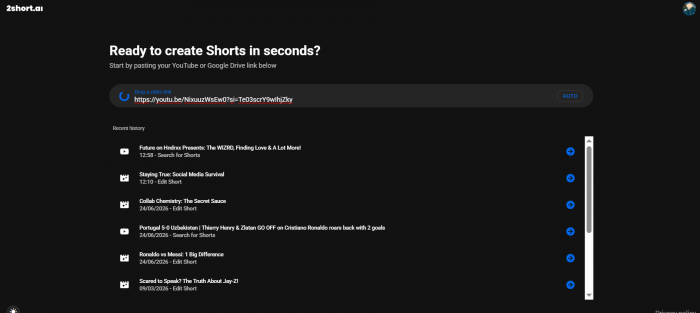 Step two: pasting the podcast link and the AI clip suggestions |
The editor is where it earns its keep
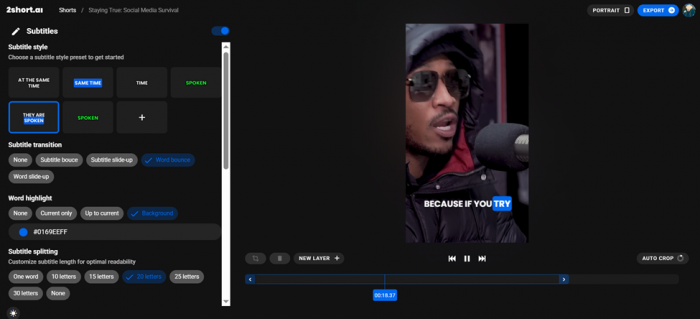
Once a clip is chosen, you land in an editor with controls for the clip itself and a dedicated panel for subtitles. The subtitle section surprised me the most, so here is the actual screen I worked in.
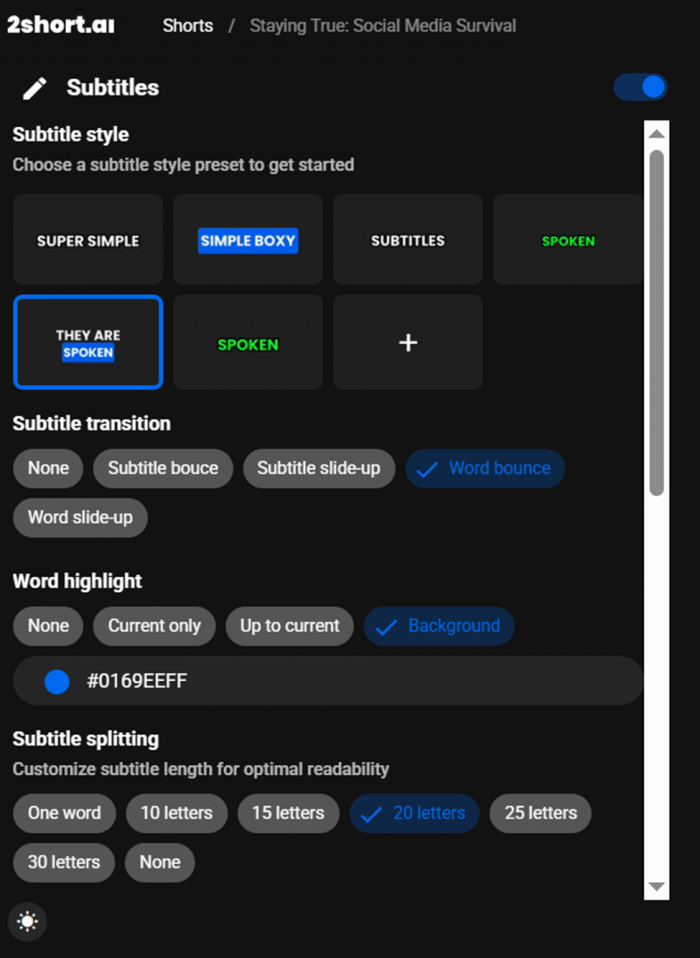
The subtitle panel. Style presets, transitions, word highlighting, and caption length controls.
You get a row of subtitle style presets such as Super Simple, Simple Boxy, and Spoken, then transition effects like word bounce and slide-up, a word-highlight option with a custom colour picker, and subtitle splitting so you can cap each caption at, say, twenty letters for readability. These are the small decisions that separate a clip that looks homemade from one that looks like it belongs on a real channel. I changed the style, set a highlight colour, capped the line length, and it genuinely looked sharp without me touching a timeline.
Exporting, and the moment of truth
I hit download. Like the analysis step earlier, the export ran for roughly two to three minutes. The file came down clean: vertical, captioned, and ready to publish. I uploaded it straight to YouTube as a short. No round trip through a separate editor, no rebuilding broken captions, no second render. From pasting a link to a live short, the whole job was a single calm afternoon task rather than the usual chore. That, more than any feature on the marketing page, is what sold me.
 Step four: the export screen or your finished short live on YouTube |
Here is the link of the video posted on YouTube - https://youtube.com/shorts/1f7LcUrPtMY?feature=share
What you actually get
Here is the feature set with the marketing language stripped out, so you can see what is doing the work.
2SHORT.AI FEATURE OVERVIEW
| FEATURE | WHAT IT DOES IN PRACTICE |
|---|---|
| AI clip selection | Scans your video’s captions and proposes the highest-engagement segments as ready shorts. |
| Center stage face tracking | Keeps the active speaker framed as the video is reformatted from wide to vertical. |
| Animated subtitles | One-click captions with style presets, transitions, word highlighting, and length control. |
| 1080p exports | High-quality output with no watermark, in vertical, square, or horizontal formats. |
| Brand presets | Add a logo and overlays so every clip stays visually consistent with your channel. |
| Language support | Reads captions across roughly 21 to 26 languages, so non-English content works too. |
| Built-in editor | Trim, reframe, and fine-tune captions in the browser. No installs needed. |
What it costs
2short.ai runs on a freemium model. The free tier is a real way to test the tool rather than a teaser, but exporting is restricted, so anyone posting weekly will outgrow it quickly. The current pricing breaks down like this.
PRICING AS OF MID 2026
| PLAN | PRICE | BEST FOR | KEY LIMIT |
|---|---|---|---|
| Starter (Free) | $0 | Trying it out | 30 min analysis / month, limited exports |
| Lite | $9.90/mo | Casual creators | 5 hrs analysis, 60 min exports, no ads |
| Pro | $19.90/mo | Regular posting | 15 hrs analysis, unlimited exports |
| Premium | $49.90/mo | Agencies & heavy use | 50 hrs analysis, priority support, beta access |
| A consistent warning across review sites, and one I would repeat: every paid tier is capped by analysis hours per month. There is no truly unlimited shorts plan, so heavy users can burn through hours faster than they expect. Budget your plan around how much long-form footage you really process. |
What I genuinely liked
A few things stood out clearly during my test, the kind of details that decide whether a tool stays in your workflow or gets forgotten after a week.
• Speed with no babysitting. Paste, wait two to three minutes, pick a clip. I never felt like I was managing the software.
• It chooses, then I decide. Getting a short menu of strong segments beats scrubbing a ninety-minute file looking for gold.
• Subtitles that look professional. The presets, highlighting, and length controls punch above the price point.
• A genuinely clean interface. Calm, dark, and uncluttered, which is rare for video software and easy on the eyes.
• No watermark on export. The 1080p file was ready to publish as-is, straight to YouTube.
Where it left me wanting more
No tool is perfect, and an honest review has to name the friction. These are the gaps that showed up for me, and they line up almost exactly with what other creators report.
• The AI sometimes misreads context. A couple of suggested segments fell flat, so you still need judgement and a manual touch.
• Editing stops at clips and captions. No music, b-roll, voiceover layers, or scene transitions, so it is not a full studio.
• Monthly hour caps. Every plan limits analysis time, which heavy creators will feel.
• Google-only login. Convenient if you use Google, restrictive if you would rather not.
• Needs captions on the source. Spoken-word video is the sweet spot; silent or music-only footage is not.
What other creators are saying
I did not want this to rest on one opinion, so I went through verified reviews on trusted platforms. The picture is consistent with my own afternoon: people love the speed and forgive the occasional miss. On G2, creators repeatedly describe it as a way to skip hiring a separate editor, praising how fast it turns a link into a finished clip with the right aspect ratio and captions. The most common complaint is just as steady, namely that when the AI misjudges a video’s context, the suggested clips need manual rescue. Reviewers also single out the support team as responsive and friendly.
STAR RATINGS ACROSS TRUSTED PLATFORMS
| PLATFORM | RATING | WHAT STANDS OUT |
|---|---|---|
| This review (hands-on) | ★ ★ ★ ★ ★ 4.0 / 5 | Fast, beginner-friendly, strong subtitles. Held back by AI misses and plan caps. |
| Appscribed | ★ ★ ★ ★ ★ 4.0 / 5 | Scores it 8/10 for speed, subtitle workflow, and creator-friendly exports. |
| SaaSworthy | ★ ★ ★ ★ ★ 4.0 / 5 | A 79% software score for fast, automated repurposing across platforms. |
| G2 (verified users) | ★ ★ ★ ★ ★ Positive | Loved for removing the need for a separate editor; criticised on context misses. |
| Capterra | ★ ★ ★ ★ ★ Positive | Highlights the clean interface and automatic selection that saves editing hours. |
Star values are derived from each platform’s published score where one exists (Appscribed 8/10, SaaSworthy 79%) and from verified-user sentiment otherwise. Aggregate averages on newer or unclaimed profiles can shift over time, so check the live listing for the current number.
There is one recurring note across independent reviews that is fair to pass on. Because 2short.ai only repurposes existing footage, comparison articles often pit it against tools that generate brand-new video, and on that axis it is not trying to compete. For a podcaster or YouTuber that distinction does not matter, since the whole point is to mine content you already filmed. For a brand wanting original ads built from a product link, it is simply the wrong fit. Knowing which camp you are in saves a lot of disappointment later.
My scorecard
After running a full project through it from link to published short, here is how I would mark each part of the experience. These marks reflect my own test, weighed against the broader user sentiment above.
HOW 2SHORT.AI SCORED FOR ME
| CATEGORY | MARK |
|---|---|
| Ease of use | 9.0 |
| Clip selection quality | 7.5 |
| Subtitle & editing tools | 8.5 |
| Speed | 8.0 |
| Value for money | 7.0 |
| Onboarding & login | 6.5 |
| Overall | 8.0 |
The verdict2short.ai did exactly what I hoped it would. It took a long podcast I was never going to clip by hand and handed me a polished, captioned short I was happy to publish. It is fast, friendly to beginners, and the subtitle controls are better than the price tag suggests. It is not a full studio. The AI occasionally misjudges what is interesting, the editing stops short of music, b-roll, and transitions, and the monthly hour caps mean heavy creators need to plan around them. The Google-only login is a minor but real friction. If you make spoken-word content and your real problem is that good clips keep dying in a folder, this solves that problem and solves it well. I came in skeptical and left with a short live on my channel, which is the most honest endorsement I can give. 8/10 A solid recommend, and a permanent spot in my workflow. |