


Table of Content
- How Gamma scored in testing
- What is Gamma, exactly?
- Signing up takes about two minutes
- Inside the new Graphic mode
- What has shipped lately
- Gamma pricing in 2026: every plan, plus the credit math
- Pros and cons after three weeks
- What people are saying on trusted platforms
- Who should actually pay for this
- Gamma against the usual suspects
- Final Verdict
Gamma carries one of the strangest reputations in AI software. G2 reviewers rate it 4.7 out of 5, while Trustpilot reads like a wall of refund complaints. Both cannot be the whole story, which is exactly why this review exists.

The answer took three weeks of hands-on testing. The 400 free credits ran out in nine days, a Plus upgrade followed, and the meter passed 1,400 before the test wrapped. The deliverables were real: a 12-card pitch deck, a client one-pager, a live webpage, and a batch of launch graphics for a side project. The very first output, a square promo image from a two-sentence prompt, came back as three fully designed concepts with names like Metamorphosis and Constellation, each with a headline, a mock interface, and a call to action button already placed. Image generators do not normally behave that way, and it set the tone.
Below: what Gamma does well, where it wastes time, what it really costs once credits enter the picture, and what verified reviewers say.
8.1 / 10 WEIGHTED SCORE ACROSS 8 CRITERIA Fast, genuinely useful, and fairly priced for anyone who shares work as links. Buy it for speed and strong first drafts, not for flawless PowerPoint files or responsive support. |
Best for • Founders, marketers, and consultants who present from a browser • Educators and course creators building visual material weekly • Anyone who needs a designed one-pager or launch graphic today | Skip it if • You deliver editable .pptx files to clients as the final product • Your brand team enforces pixel-exact corporate templates • You expect fast human support when billing goes wrong |
How Gamma scored in testing
| Criteria | Score | Notes from testing |
|---|---|---|
| Ease of use | 9.5 | Signup to first finished deck in under three minutes, no tutorial needed |
| Generation speed | 9.0 | A 10 to 12 card deck lands in roughly 30 to 60 seconds |
| First-draft design quality | 8.5 | Clean layouts and typography, though themes repeat across outputs |
| Graphics and AI images | 8.0 | Art-directed concepts, but tiny text inside images can blur |
| Editing control | 7.5 | The card editor is pleasant; pixel-level control is limited |
| PowerPoint export fidelity | 6.0 | Cards rarely map cleanly onto 16:9 slides, so plan for cleanup |
| Value for money | 8.5 | The free tier is a real trial and Plus at $8 monthly is fair |
| Customer support | 5.0 | The weak link, and public review platforms agree loudly |
| Overall | 8.1 | Weighted toward the things you touch daily: generation, editing, cost |
What is Gamma, exactly?
Gamma is a browser-based AI design platform from Gamma Tech, a San Francisco company founded in late 2020 by Grant Lee, Jon Noronha, and James Fox, former Optimizely colleagues. Instead of fixed 16:9 slides, it builds flexible cards that stretch to fit their content, which is why one file can work as a deck, a document, and a published webpage.
The public product launched in 2022, and the business behind it is unusually solid. In November 2025 the company said it had passed $100 million in annual recurring revenue while staying profitable, then raised a $68 million Series B led by Andreessen Horowitz at a $2.1 billion valuation, all with a team of about 50 people.
70M+ USERS WORLDWIDE | 400M+ GAMMAS CREATED TO DATE | 1M+ PIECES CREATED DAILY |
$100M+ ARR, RUN PROFITABLY | $2.1B VALUATION, NOV 2025 | ~50 EMPLOYEES |
Signing up takes about two minutes
1. Enter a work email or continue with Google. No credit card is requested at any point on the free plan.
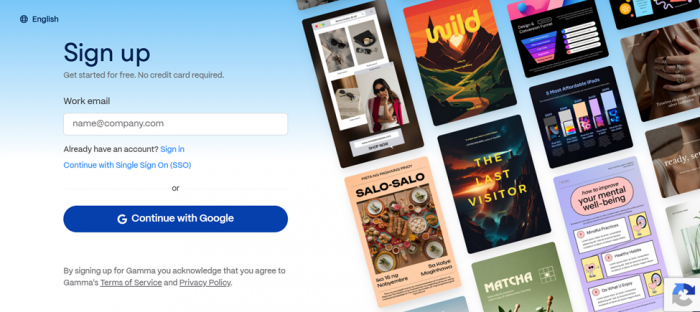
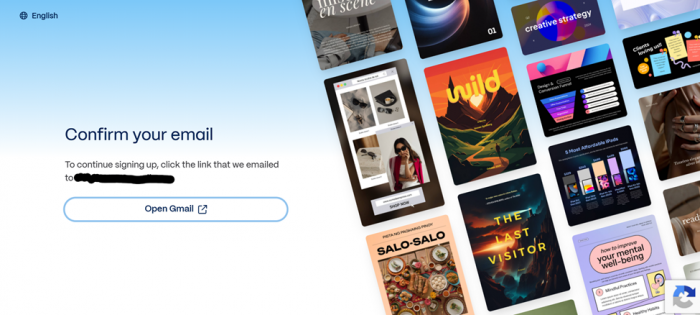
2. Click the confirmation link Gamma emails you. In testing it arrived in under a minute.
3. Answer four onboarding questions: planned use (personal, work, or education), your role, organization size, and where you heard about Gamma.
4. Land on the Generate screen and pick a format. You are creating seconds after the last question.
The survey is clearly feeding their marketing team, but it takes under a minute and nothing about it gates features.
Five things you can generate from one prompt box
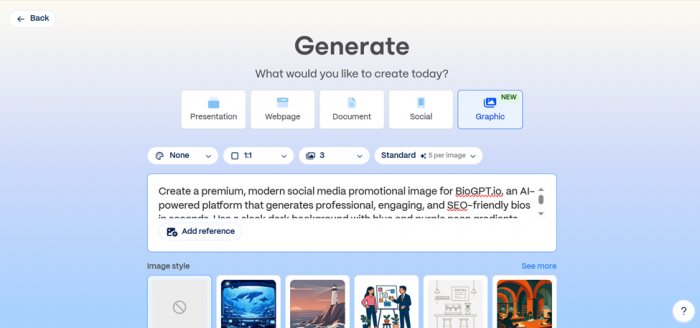
| Presentation | Type a topic, paste an outline, or upload a document and get a full deck to present from the browser or export. |
| Webpage | Publishes to a gamma.site address in one click, with custom domains on Pro and opt-in Google indexing. |
| Document | Report-style pages that read like a designed memo, the best pick for client one-pagers and briefs. |
| Social | Sized posts and carousels for LinkedIn and Instagram, generated with copy and imagery in place. |
| Graphic NEW | Standalone promotional images and visuals, part of the image push that became Gamma Imagine in March 2026. |
Inside the new Graphic mode
This is where Gamma delivers its biggest surprise. The Graphic screen pairs a prompt box with real controls: aspect ratio, image count, a quality tier (Standard runs 5 credits per image), themes like Pearl, Vortex, and Clementa, and styles such as Scene, Illustration, Flat Line Art, and Technical Line. You can attach a reference image too. Generate variations cost 15 credits per batch during testing.
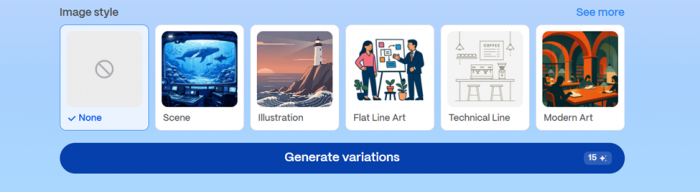
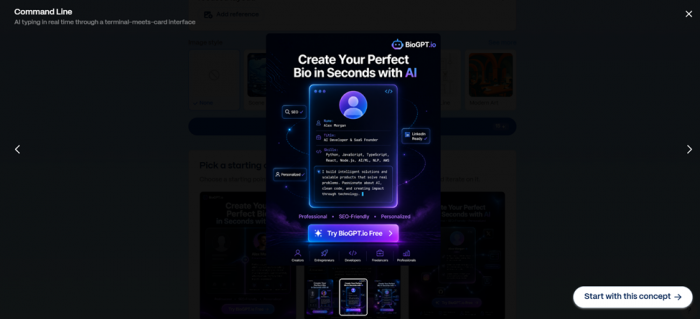
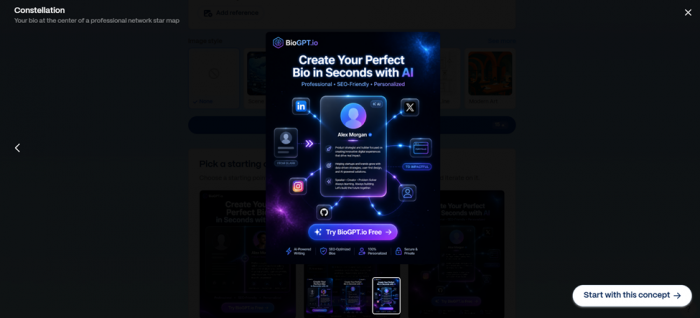
The test brief was a premium social promo for an AI bio-generator side project: dark background, blue and purple gradients. Instead of three random renders, Gamma returned three named concepts. Metamorphosis used a split-screen before and after reveal. Command Line staged it inside a terminal-meets-card interface with skills typing in real time. Constellation placed the finished bio at the center of a glowing network star map. Every one arrived as a composed marketing asset: logo, headline hierarchy, feature chips, and a call to action button.
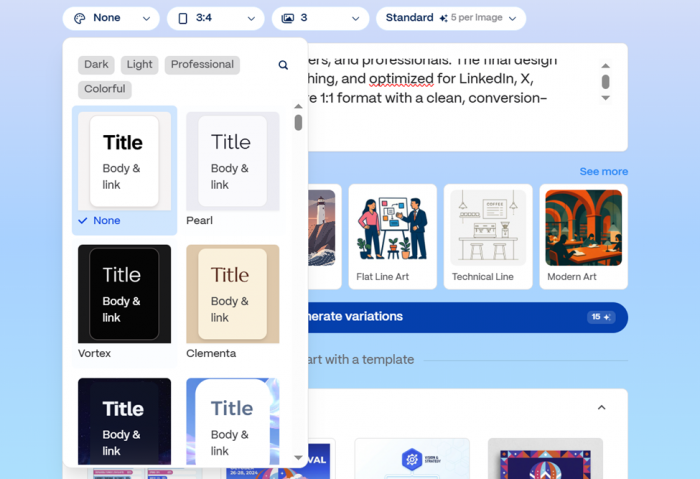
The catch shows up at small sizes: fine print inside the mock interfaces, like a fake profile bio, sometimes rendered fuzzy or garbled, an issue verified G2 reviewers also flag for in-slide images. Headlines and buttons were consistently crisp. For social ads and launch visuals, this beats prompting a raw image model: layout and copy arrive handled, so you are choosing between art directions rather than fixing one.\

What has shipped lately
| SEP 2025 | Gamma 3.0 ships with Gamma Agent, a chat design partner that researches with citations and restyles whole decks |
| NOV 2025 | $68M Series B led by Andreessen Horowitz at a $2.1B valuation; the company confirms it passed $100M ARR profitably |
| DEC 2025 | Adaptive light and dark theme logos, plus opt-in Google indexing for published Gamma sites |
| JAN 2026 | AI animations for generated decks on Ultra and Business, alongside gradient card backgrounds |
| MAR 2026 | Gamma Imagine launches as a dedicated AI image product for marketing visuals |
Gamma pricing in 2026: every plan, plus the credit math
The sticker prices are simple. The credit system underneath decides your real cost, so both are below. Figures reflect Gamma's public pricing page and help center as of August 2026, annual-billing view where one exists.
| Plan | Price | AI credits | Cards / gen | What stands out |
|---|---|---|---|---|
| Free | $0 | 400, one time | 10 | Full editor; exports to PDF, PPTX, PNG, and Google Slides with Made with Gamma branding |
| Plus | from $8 /user/mo, annual | 1,000 monthly | 20 | Removes Gamma branding and adds stronger AI image models |
| Pro | from $18 /user/mo, annual | 4,000 monthly | 60 | Custom fonts and branding, analytics, API access, up to 10 custom domains |
| Ultra | $100 /user/mo, monthly only | 20,000 monthly | 75 | Most advanced models and early feature access; annual billing is planned but not live |
| Team | $20 /seat/mo, 2-seat min | 6,000 per seat | 60 | Shared workspace, company theme, admin controls, central billing |
| Business | $40 /seat/mo, 10-seat min | Higher allowances | 60+ | SSO and enterprise-grade governance for larger orgs |
Annual billing saves up to 28 percent where offered. Confirm live numbers at checkout, since promotions and regional pricing shift.
The credit rules that actually matter • Generating a deck costs about 40 to 50 credits; small AI edits run 5 to 10, and manual editing is free • AI images cost roughly 2 to 40 credits each depending on the model, so premium models drain Plus fast • Unused paid credits roll over, capped near twice your monthly grant • Top-ups exist: about $6 buys 1,500 extra credits | The fine print worth reading twice • Free-plan credits never refresh; once the 400 are gone, AI features stop until you pay • Refunds are only available within 3 days of subscribing, monthly and annual alike, per the policy effective December 1, 2025 • Ultra has no annual discount yet, so heavy solo users pay full freight |
| CREDIT LEDGER · FREE PLAN | |
| PITCH DECK, 12 CARDS | 40 |
| TWO MORE DECKS | 80 |
| ONE PUBLISHED WEBPAGE | 40 |
| SOCIAL POST SET | 40 |
| GRAPHIC CONCEPTS, 3 BATCHES | 45 |
| STANDARD AI IMAGES × 21 | 105 |
| REWRITES + REGENERATIONS | 50 |
| BALANCE AFTER 9 DAYS | 0 |
Actual free-plan spend across nine days of ordinary use. When the balance hit zero, the test moved to Plus.
Pros and cons after three weeks
Where Gamma earns its keep • First drafts in under a minute that look intentionally designed, not templated • One file works as a deck, a document, and a live webpage without rework • The free plan includes the full editor and every export format • Graphic mode returns composed marketing concepts instead of raw renders • Plus at $8 a month billed annually is cheap for what it adds | Where it will test your patience • PPTX exports need cleanup, because flexible cards and fixed 16:9 slides are different shapes • Premium image models can empty the Plus allowance of 1,000 credits mid-month • Support has a poor public record; billing and refund complaints dominate Trustpilot • The 3-day refund window is unforgiving, especially on annual plans • Without theme adjustments, outputs share a recognizable Gamma look |
What people are saying on trusted platforms
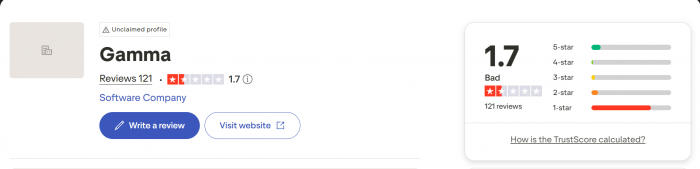
Ratings recorded in early August 2026 from each platform's primary Gamma listing; live scores drift.
| Source | Rating | What reviewers say |
|---|---|---|
| G2 | 4.7 / 5 · 1,000+ reviews | The strongest consensus anywhere: verified reviewers repeatedly credit ease of use, generation speed, and first-draft quality. The recurring gripe is content that reads generic until edited, and image text that loses clarity. |
| Capterra | 3.7 / 5 | A mixed picture. PowerPoint export friction and repetitive layouts surface most, matching what this test ran into. |
| Trustpilot | ~1.9 / 5 · ~120 reviews | Dominated by billing disputes, refund denials after the 3-day window, and slow support rather than product complaints. Read a page of these before buying an annual plan. |
| TechCrunch | Press coverage | Covered the November 2025 raise under a PowerPoint-killer framing, reporting 70 million users and a profitable climb past $100 million ARR on roughly $90 million in total funding. |
| Andreessen Horowitz | Investor + internal user | General partner Sarah Wang said the firm uses Gamma internally for market maps and social posts, adding that “it has fundamentally changed how we communicate.” One caveat: a16z led the Series B, so this is an investor talking about its own portfolio. |
The gap between platforms is the review in miniature. People who live inside the product rate it highly. People who tangled with billing or support mostly do not.
Who should actually pay for this
Get it • Founders drafting investor updates and pitch decks between meetings • Marketers who need launch graphics and landing pages the same day • Teachers and course creators producing visual material every week • Consultants sending proposals as polished links instead of attachments | Look elsewhere • Teams whose final deliverable is an editable .pptx handed to a client • Organizations enforcing strict, pixel-exact brand templates • Analysts building chart-heavy, data-dense presentations • Anyone who needs guaranteed human support on a deadline |
Gamma against the usual suspects
| Tool | Pick it when | The trade-off |
|---|---|---|
| Gamma | You want the fastest path from idea to a designed, shareable link | PPTX fidelity and a weak support record |
| Canva | You want one tool for every design job with a huge template library | Deck generation feels like one feature among hundreds |
| Beautiful.ai | You need rule-based formatting that keeps business slides tidy | Fewer formats and a more limited free tier |
| PowerPoint + Copilot | Your company lives in Microsoft 365 and .pptx is non-negotiable | Slower drafting and an extra license cost |
Final VerdictThe Plus subscription survived the test, and the line between keep and cancel sits in a very specific place. Gamma earns its keep on three jobs: decks presented from a browser or sent as links, one-page proposals that need to look designed by Thursday, and launch graphics that would otherwise mean hiring a designer. The Constellation concept from the first Graphic session went to LinkedIn with two small text edits. Total time from blank prompt to posted asset: under ten minutes, and the trick has repeated reliably since. PowerPoint still wins when a client wants an editable file. Every PPTX export in the test needed ten to twenty minutes of realignment, and one table arrived scrambled. The support horror stories also have a practical workaround: pay monthly, set a calendar reminder for the 3-day refund window, and structure the purchase so support never matters. Score: 8.1 out of 10. The product is quicker and more tasteful than its price suggests, the credit meter demands attention, and the company behind it is on firmer ground than most of its rivals. Spend the 400 free credits on real work before paying a cent. That test will tell you more than any review, including this one. |