

Table of Content
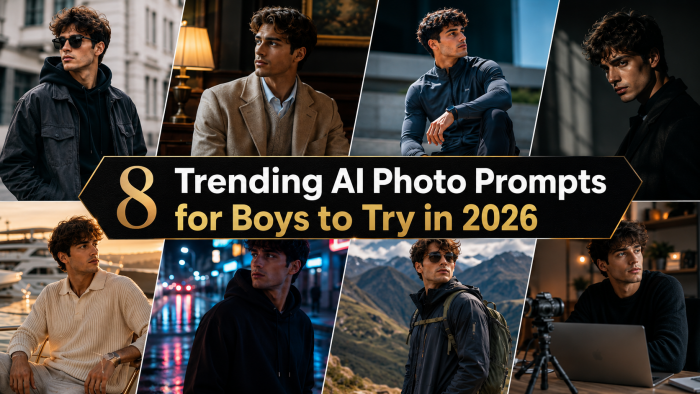
AI photo editing has moved from novelty to daily habit. Open any feed in 2026 and you will see boys turning ordinary phone selfies into cinematic street shots, royal portraits and moody studio frames, all from a single text prompt and one reference photo.
The trick is not the tool. It is the prompt. A vague request gives you a generic face in a generic scene. A specific prompt that names the outfit, the light and the camera style gives you something that looks like a real shoot.
This guide collects eight AI photo prompts for boys that are trending right now. For each one you get the exact prompt, a sample output, an explanation of why the look works, and ideas for changing it so your version does not match everyone else's.
For the sample outputs on this page I used Leonardo AI. Every prompt was pasted exactly as written, with my own photo uploaded as the image reference, and I kept the best of three attempts. Any tool that accepts a reference photo will work, and there is a full comparison of free and paid options further down.
What you need before you start
You need three things. A clear photo of yourself, an AI image tool that can read that photo as a reference, and about fifteen minutes to try a few versions.
The photo matters most. Take it in daylight, facing the camera, with no sunglasses, no heavy filters and nothing covering your face. A plain wall behind you helps the model separate you from the background.
If you want to understand what is happening behind the scenes, the overview of text-to-image models on Wikipedia explains how these systems turn a written description into pixels.
How to use these prompts
Every prompt below is written for image editors that accept a reference photo along with text. Upload your picture, paste the prompt, and the model rebuilds the scene around your face. Each prompt follows the same structure: who is in the frame, what they wear, where they are, how the light behaves, how the camera should treat it, and what size the image should be.
Two rules matter more than anything else. Always tell the model to keep your face, skin tone and hairstyle unchanged, and always specify an aspect ratio so the output fits where you plan to post it.
Treat each prompt as a base rather than a finished recipe. Swap the outfit colour, the location or the time of day and you get a fresh variation without starting from scratch. The "what to change" note under each prompt gives you a place to start.
In Leonardo AI the workflow is simple. Upload your photo through the image reference option, keep the reference strength around the middle of the range so the face stays locked without copying your original pose, choose a photorealistic model, match the aspect ratio in the prompt, and generate three or four images at a time. Setting names shift with updates, but the idea is the same in every tool.
Quick guide to the eight looks
Use this table to pick a starting point before you scroll down to the full prompts.
| Prompt | Look and mood | Best used for | Ideal photo to upload |
| Cinematic streetwear walk | Urban, energetic, film still | Feed posts and reels covers | Full body, standing, daylight |
| Golden hour rooftop | Warm, relaxed, sunlit | Profile pictures | Head and shoulders, front facing |
| Retro 90s film | Nostalgic, grainy, soft colours | Photo dumps and carousels | Casual half body shot |
| Royal heritage portrait | Grand, formal, painterly | Festive and wedding season posts | Seated or upright, neutral expression |
| Monochrome studio editorial | Sharp, dramatic, magazine style | Display pictures and headshots | Close up with clear face detail |
| Rainy neon night | Moody, cinematic, high contrast | Stories and vertical wallpapers | Half body, evenly lit face |
| Cafe racer bike pose | Rugged, outdoorsy, adventurous | Landscape posts and cover images | Full body, relaxed posture |
| Dark academia library | Quiet, thoughtful, vintage | Aesthetic feeds and pinned posts | Seated, side or three quarter angle |
1. Cinematic streetwear city walk
This is the look that dominates feeds in 2026. It borrows from film stills, with you walking through a crowd that dissolves into blur while the street lights do the rest of the work.
Copy this prompt
Create an ultra realistic full body portrait of the person in the uploaded photo, keeping the same face, skin tone and hairstyle. He is walking down a busy city street at dusk wearing an oversized black bomber jacket, a plain white tee, loose grey cargo trousers and clean white sneakers. Shoot it like a 35mm film still with shallow depth of field, soft motion blur in the background crowd, warm street lights and a slight teal tone in the shadows. Vertical 4:5 aspect ratio.
Output 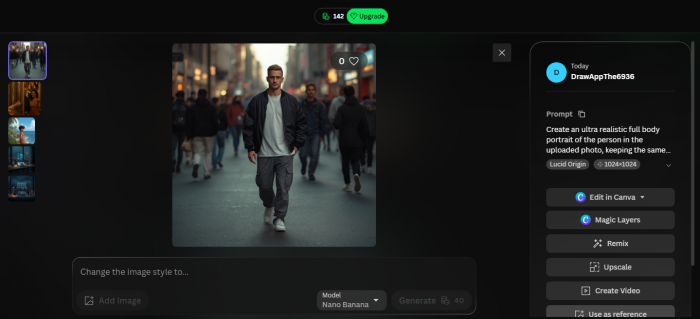 |
Prompt 1 output. Generated with Leonardo AI at a 4:5 ratio, best of three attempts.
The motion blur is what sells it. When everything behind you is moving and you are the only sharp element, the eye lands on your face first. The teal shadow tone is a small film trick that makes warm street lights look richer by contrast.
What to change: swap dusk for "late morning with hard sunlight and sharp shadows" for a completely different energy, or replace the bomber jacket with a long wool overcoat for a winter version. If the result looks too staged, add "candid, mid step, not looking at the camera" and generate again.
2. Golden hour rooftop
Warm, low sunlight flatters almost every face, which is why photographers chase it and why this promptseen’s prompt keeps trending. The rooftop setting adds depth without cluttering the frame.
Copy this prompt
Ultra realistic portrait of the same person from the reference photo, face and features unchanged. He stands on an open rooftop at golden hour with the sun low behind him creating a warm rim light on his hair and shoulders. He wears a relaxed beige linen shirt with the top button open and dark trousers. Subtle lens flare, a soft orange sky fading to pale blue, and an out of focus city skyline. Natural skin texture with no heavy smoothing. 3:4 aspect ratio.
Output 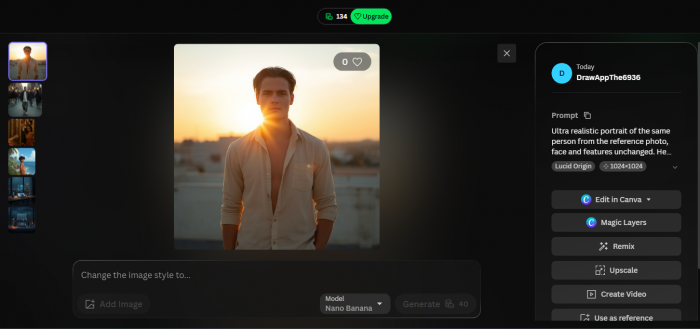 |
Prompt 2 output. Generated with Leonardo AI at a 3:4 ratio.
The reason this light works so well is explained on the golden hour photography page: the sun sits low, the light travels further through the atmosphere, and it arrives softer and redder than midday sun. Telling the model to place the sun behind you gives you that glowing outline around the hair.
What to change: move the scene to a beach, a bridge or an open field and keep everything else the same. If the flare washes out your face, remove the lens flare line and ask for "sun just out of frame" instead.
3. Retro 90s film look
Grain, faded colour and a light leak in the corner make an AI image feel like a memory rather than a render. This one is popular because the imperfections hide the small mistakes AI tends to make.
Copy this prompt
Recreate the person in the uploaded image as a 1990s film photograph while keeping his face exactly the same. He wears a faded denim jacket over a striped tee and stands in front of a pastel painted wall with a vintage bicycle nearby. Add visible film grain, slightly washed out colours, soft halation on the highlights and a light leak in one corner. The image should look like it was scanned from an old printed photo. Square 1:1 format.
Output 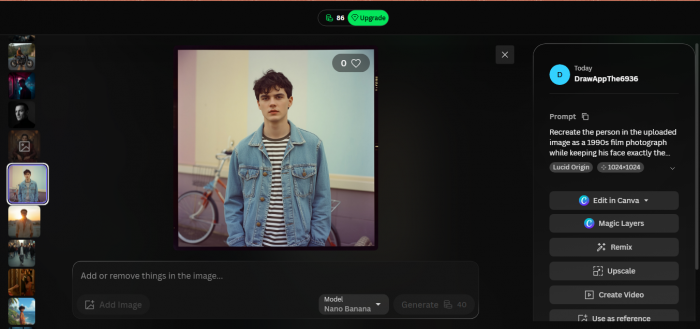 |
Prompt 3 output. Generated with Leonardo AI in a square format.
Film grain does two jobs here. It gives the image texture, and it softens skin and edges so any tiny AI artefacts disappear into the noise. Halation, the soft glow around bright areas, is what makes the shot feel like real film rather than a digital filter.
What to change: try wall colours in mint, peach or sky blue for a set of three that looks like it came off the same roll. Post them together as a carousel and the effect is much stronger than a single image. Add "white border with a date stamp in the corner" for an instant camera feel.
4. Royal heritage portrait
Every festive season brings a wave of regal portraits, and 2026 is no different. The prompt below leans toward embroidered traditional wear, but a velvet dinner jacket works just as well if you prefer a classic European look.
Copy this prompt:
Transform the reference photo into a grand royal portrait while keeping the person's face and identity unchanged. He is seated on a carved wooden chair wearing a deep maroon embroidered sherwani with gold thread work and a matching stole. The background is a palace hall with tall arches and soft candle light. Photorealistic with a slightly painterly finish, rich shadows, warm highlights on the fabric and a calm, dignified expression. Vertical 2:3 aspect ratio.
Output 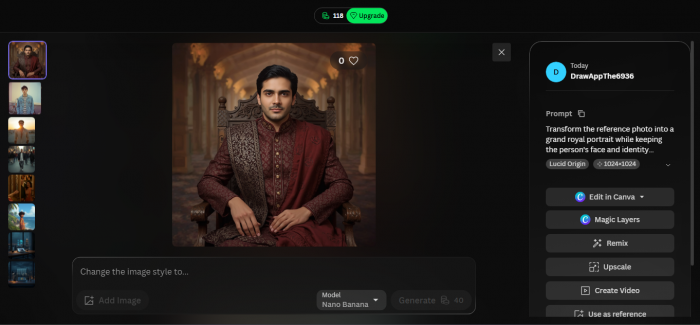 |
Prompt 4 output. Generated with Leonardo AI at a 2:3 ratio.
Keep the expression neutral. Big smiles tend to look out of place in this style, and the model handles a calm face far more reliably than a wide grin. Candle light is deliberate too, because it gives warm, uneven shadows that read as old paintings rather than a studio flash.
What to change: switch maroon for ivory, navy or forest green, or swap the sherwani for a black velvet dinner jacket with a bow tie. Replace the palace hall with a library or a stone courtyard if you want something less ornate.
5. Monochrome studio editorial
Black and white strips away colour distractions, so all the attention goes to bone structure and expression. It is the strongest option for a display picture that needs to look sharp at a tiny size.
Copy this prompt
High end black and white studio portrait of the person in the uploaded photo with identity preserved. Plain dark grey backdrop, single key light placed high and to one side to create Rembrandt lighting with a small triangle of light under the far eye. He wears a black turtleneck and looks slightly off camera. Sharp focus on the eyes, fine skin detail, deep contrast, magazine cover quality. 4:5 aspect ratio.
Output 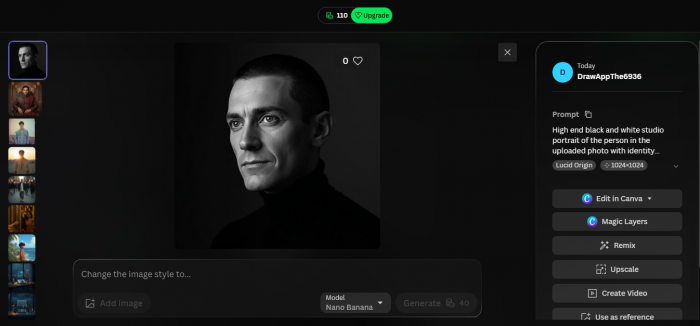 |
Prompt 5 output. Generated with Leonardo AI at a 4:5 ratio.
The key phrase here is the lighting pattern. Rembrandt lighting is a classic studio setup that leaves a small triangle of light on the shadowed cheek, and naming it in the prompt gives the model a precise target instead of a vague request for "dramatic light".
What to change: ask for "butterfly lighting from directly above the camera" for a softer, more symmetrical face, or change the backdrop to pure white for a clean commercial look. A crisp white shirt with an open collar is a good swap for the turtleneck.
6. Rainy neon night
Wet streets, coloured signs and a leather jacket. This look is built for vertical formats and it reads well even when the screen is small because the contrast is so strong.
Copy this prompt
Cinematic portrait of the same person from the reference image with the face unchanged, standing under a shop awning on a rain soaked street at night. Neon signs in pink and cyan reflect on the wet pavement and on the shoulders of his black leather jacket. Fine rain drops are caught in the light, light fog sits in the background and the depth of field is shallow. Moody colour grade with deep blacks. 9:16 vertical format for stories.
Output 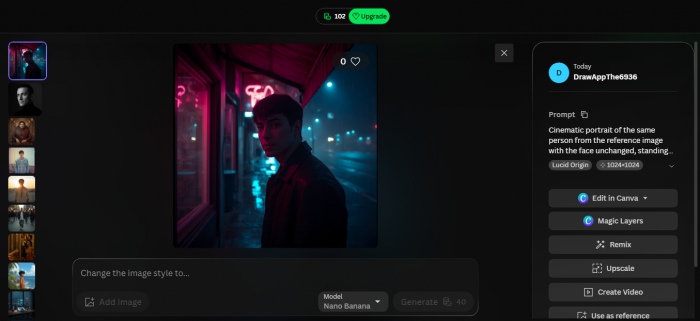 |
Prompt 6 output. Generated with Leonardo AI at a 9:16 ratio for stories.
Neon scenes are the most common place for AI to lose facial detail, so a clear, evenly lit reference photo matters more here than anywhere else. The awning gives the model a reason to keep rain off your face, and the fog pushes the background further away so you stay the subject.
What to change: if your face comes out too dark, add "soft light on the face from a nearby sign". Swap pink and cyan for orange and blue if you want the classic film palette, or set the scene at a bus stop or a station entrance for more structure in the frame.
7. Cafe racer bike pose
The bike pose has been a trending search for boys all year. A motorcycle gives you something to interact with, which solves the awkward "what do I do with my hands" problem that ruins a lot of AI portraits.
Copy this prompt
Realistic outdoor photo of the person in the uploaded picture, keeping his face and build exactly the same, sitting on a matte black cafe racer motorcycle parked on an empty mountain road. He wears a brown suede jacket, dark jeans and boots, with a helmet resting on the fuel tank. Late afternoon light, long soft shadows and pine trees blurred in the background. Natural colours, crisp detail on the bike. 3:2 landscape aspect ratio.
Output 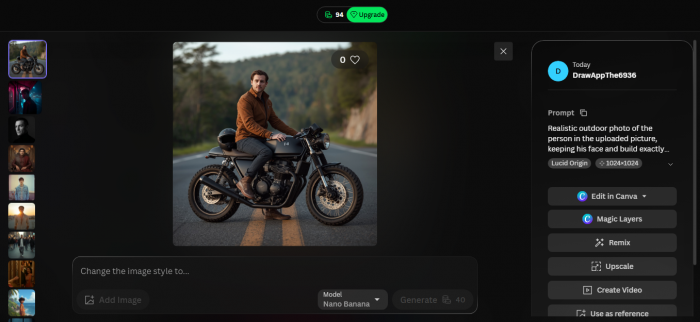 |
Prompt 7 output. Generated with Leonardo AI at a 3:2 landscape ratio.
Avoid naming a specific brand of motorcycle. The model often gets logos and badges wrong, and a plain matte finish looks cleaner in the final image anyway. Landscape framing gives the road room to stretch into the distance, which is where the sense of adventure comes from.
What to change: put the bike on a coastal road at sunset, or in a quiet city lane at night with the headlight on. A denim jacket and white tee gives a lighter summer feel than suede.
8. Dark academia library
Not every trending look is loud. The library portrait is slower and more thoughtful, and it stands out precisely because most feeds are full of street and neon shots.
Copy this prompt
Portrait of the person in the reference photo with identity preserved, sitting by a tall window inside an old wood panelled library. He wears a charcoal wool coat over a cream sweater and holds an open hardcover book. Soft daylight comes through the window, faint dust hangs in the air and shelves of leather bound books are out of focus behind him. Muted brown and green tones with a quiet, thoughtful mood. 4:5 aspect ratio.
Output 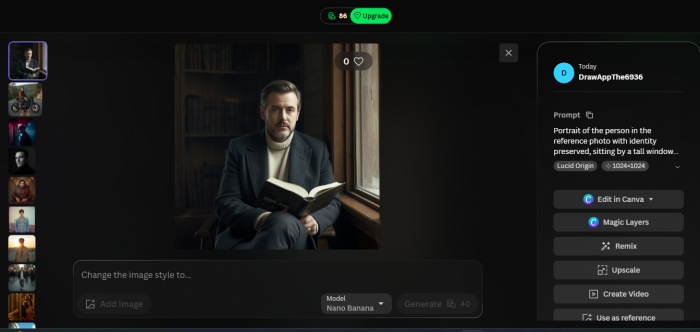 |
Window light from one side is the secret. It shapes the face gently, and the dust in the air catches that light and adds atmosphere without any extra objects in the scene. The book gives your hands a job, which keeps them out of trouble.
What to change: replace the library with a cafe window seat, a train carriage or a museum bench. Swap the coat for a tweed blazer or a simple black sweater. This one pairs well with a caption about reading, study or a quiet weekend.
Which tools you can use, free and paid
You do not need a paid subscription to try any prompt on this page. Most major tools have a free tier that covers a few images a day, which is enough to test all eight looks over a week. Paid plans matter once you want private generations, faster output, or a lot of variations.
The table below reflects what each tool offered when this article was checked in August 2026. Limits and prices change often, so confirm on each tool's own pricing page before relying on a number.
| Tool | Cost | What the free plan gives you | Best for |
| Leonardo AI | Free tier, paid plans from about 12 dollars a month | Around 150 fast tokens a day, roughly 10 to 15 images, and free creations are public | Image reference control and steady daily volume |
| Google Gemini | Free tier, paid plans from about 5 dollars a month | Around 20 images a day with a visible watermark | Fast edits of an uploaded photo with plain language |
| ChatGPT | Free tier, paid plans from about 20 dollars a month | A small daily image quota | Conversational editing and step by step tweaks |
| Midjourney | Paid only, from about 10 dollars a month | No free plan | Highly stylised, magazine quality results |
| Adobe Firefly | Free tier, paid plans available | A small monthly credit allowance | Clean results that are safe for commercial use |
| Microsoft Copilot | Free with a Microsoft account | Standard speed image generation at no cost | Quick experiments before committing to a tool |
| Stable Diffusion and FLUX | Free and open source | Unlimited generations if you run it on your own computer | Full control and complete privacy |
You want to stay free, then
Start with Google Gemini or Leonardo AI. Gemini is the easiest because you upload a photo, paste the prompt and reply in plain language to fix anything you do not like. Leonardo gives you more control over how strongly the reference photo is followed, which is why I used it for the examples here.
One thing to know about Leonardo's free plan is that your generations appear in the public community feed. If you would rather keep your face private, the entry paid plan turns on private generation.
If you are happy to pay
Leonardo's entry plan is the sensible upgrade if you like the workflow, since it adds privacy, more tokens and the character consistency features that help the face stay stable across a full set of looks. Midjourney is worth it if you care most about polish and style, though it has no free tier and its face matching is looser. ChatGPT's paid plan suits people who prefer to talk their way through edits.
You want total control
Open source models such as Stable Diffusion and FLUX run on your own computer, cost nothing per image and never upload your photo anywhere. The trade off is setup time and the need for a reasonably powerful graphics card.
Small changes that improve every result
Most bad AI portraits fail for the same handful of reasons. Fix these and the prompts above will work far more consistently.
• Upload a reference photo taken in daylight with your whole face visible and no sunglasses.
• Say "keep the face unchanged" near the start of the prompt, not buried at the end.
• Change one thing per generation. If you swap the outfit and the lighting at the same time, you will not know which change helped.
• Ask for "natural skin texture" whenever the output looks plastic or over smoothed.
• Give the hands a job: pockets, a book, a helmet, a coffee cup. Empty hands are where AI goes wrong most often.
• Match the aspect ratio in the prompt to the tool's own ratio setting. If they disagree, the tool setting usually wins and the composition suffers.
• Generate three versions and pick the one that looks most like you, not the one that looks most dramatic.
How to read a bad result
If the face is wrong, the reference photo is the problem. If the scene is wrong, the prompt is the problem. If the lighting is wrong, you probably described the mood instead of the light source. "Moody" means nothing to a model, but "one soft light from the left, dark background" does.
Upscaling and final touches
Most tools offer an upscale step after generation. Use it only on the version you plan to post, because it costs extra credits and rarely fixes a bad image. A light crop and a small contrast adjustment in your phone's editor is usually all a good generation needs.
Privacy and honesty before you post
Only upload photos of yourself, or of friends who have clearly said yes. Read what the app does with uploaded images before you share anything, and if you are under 18, check with a parent or guardian first. Practical guidance on protecting personal data online is available from the FTC online privacy and security section.
It is also worth being open about the fact that an image is AI edited. Many generators now attach Content Credentials that record how a picture was made, and several platforms show a label when they detect them. A short "AI edit" in the caption keeps things honest and, in practice, rarely costs you any engagement.
The bottom line
Good AI portraits come from three things in this order: a clean reference photo, a prompt that describes light and camera rather than mood, and the patience to generate a few versions before choosing. The tool is the least important part, which is why every prompt here works across free and paid options.
If you are starting today, here is the short version of the whole guide. Take one daylight photo of yourself against a plain wall. Pick one look from the table that matches where you plan to post. Paste the prompt into Gemini or Leonardo AI, generate three, and keep the one where the face is most yours. Post it at the ratio the prompt asked for, add a short AI edit note in the caption, and only then move on to the next look.
For the examples on this page I used Leonardo AI on the free plan, one photo, and no manual retouching. Nothing here needs a subscription, a camera or editing skills. What it does need is a bit of care with the reference photo and the honesty to label the result.
Save this page, come back when you want a new profile picture, and swap a detail or two so your version does not look like everyone else's. The prompts will keep working long after the trends move on, because they describe real photography rather than a passing filter.