


Table of Content
Run a content calendar across four platforms for a single month and the real workload becomes obvious fast. The posting itself takes minutes. Everything around it eats the week: the forty open tabs, the caption that never quite lands, the forty-minute video that has to become six vertical clips before Friday. That gap between a finished idea and a published post is exactly where this generation of AI tools has moved in.
What the 2026 data actually shows
AI has stopped being a curiosity for social teams and become part of the standard toolkit. According to HubSpot's 2026 State of Marketing Report, 80 percent of marketers now use AI for content creation, and roughly 75 percent use it for media production across video, image and audio. Its companion Social Media Trends study, drawn from more than 1,100 social media marketers, found that 72 percent believe their AI-assisted posts outperform content made without it, while 67 percent report saving at least ten hours a week.
The more revealing figure is the pressure that arrives with the speed: 83 percent say their output expectations have climbed since AI became widely available. Faster production has quietly become the new baseline rather than a bonus, which is precisely why choosing the right tools matters far more than owning the most of them.
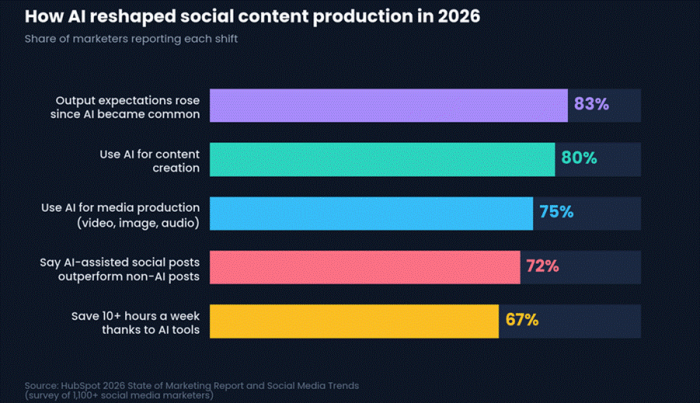
AI adoption among social and marketing teams in 2026. Source: HubSpot 2026 State of Marketing Report and Social Media Trends.
How these tools were tested
Every tool here earned its place through the same exercise, which TechLinos editors call the Posting-Week Test. Each platform had to support a full week of real output for a mid-sized creator account: short-form video for Reels, TikTok and Shorts, two static carousels, one written thread, and the captions, hashtags and scheduling that hold it all together.
Four factors carried the score. Output quality measured whether a result was publish-ready or merely a starting point. Ease of use tracked how quickly a first-time user reached something usable. Value weighed real cost against time saved. Platform fit judged how naturally the output suited each network's format and audience. Pricing was verified directly against each vendor in May 2026, and wherever a figure shifts by region or billing cycle, that is flagged in the tables.
The seven tools at a glance
Scores weigh output quality, ease of use, value and platform fit. The summary table below pairs each score with the single job each tool does best.
| Tool | Best for | Standout strength | Starting price | Score |
|---|---|---|---|---|
| Canva Magic Studio | Visual-first creators | Magic Resize across formats | Free / $15 mo | 9.2 |
| BioGPT.io | Profile and caption copy | Free multi-platform bios | Free / $15 mo | 8.4 |
| Opus Clip | Repurposing long video | AI clip selection + captions | Free / $15 mo | 8.7 |
| CapCut | Editing short-form video | Capable free editor | Free / ~$9.99 mo | 9.0 |
| Submagic | Styled short-form captions | Animated caption styles | ~$16 mo | 8.5 |
| Buffer | Scheduling and planning | AI repurposing assistant | Free / $5 ch mo | 8.3 |
| ChatGPT | Ideas, scripts, strategy | Flexible ideation partner | Free / $20 mo | 8.9 |
Canva Magic Studio

Canva long ago stopped being a simple drag-and-drop editor. Magic Studio, its bundle of AI features, now sits inside the same workspace creators already use for thumbnails, carousels and story graphics. Magic Write drafts captions and on-image copy, Dream Lab turns text prompts into images, and Magic Resize reshapes a single design into every platform's dimensions in seconds.
What stands out:
•Magic Resize converts one layout into Story, Reel cover, feed post and Pinterest sizes without rebuilding anything.
•Magic Write produces caption drafts and headline variations that stay close to a saved brand voice.
•A built-in Content Planner schedules finished designs straight to connected social channels.
| Strengths | Watch-outs |
|---|---|
•Deepest AI feature set of any mainstream design tool •Vast template and stock library •Design, copy and scheduling in one workspace | •Heavy AI use runs into the monthly credit ceiling •Output can look templated without a configured brand kit |
Pricing. Free plan with limited monthly AI credits. Pro is $15 a month or $120 a year. Teams start at $10 per seat a month with a three-seat minimum.
Verdict. Best all-rounder for visual-first creators who want design and scheduling under one roof.
BioGPT.io

BioGPT.io takes a narrower, sharper aim than the all-in-one suites. It focuses on the small pieces of text that quietly shape a profile: bios, captions, hashtags, usernames and profile descriptions. Dedicated generators cover Instagram, Facebook, X, TikTok, LinkedIn and WhatsApp status, and the platform reports a base of more than 5,000 users.
What stands out:
•Free, unlimited bio generation across six major networks, useful when launching or refreshing several profiles at once.
•Caption and hashtag suggestions, plus a username generator for accounts still settling on a handle.
•Multi-language support that widens reach for creators posting to international audiences.
| Strengths | Watch-outs |
|---|---|
•Genuinely free entry point for profile and caption copy •Covers the tedious text jobs bigger tools treat as an afterthought •Multilingual output | • Scope is intentionally narrower than a full content suite •Higher tiers meter credits per feature |
Pricing. A free Basic plan offers unlimited bio generation. Standard, aimed at influencers, is $15 a month and adds 100 credits each for usernames, captions, bio content and hashtags. Advance, built for agencies, is $35 a month and layers on 250 post suggestions, video editing and reel credits plus 5,000 API credits.
Verdict. Best for fast, low-cost profile and caption copy, especially when setting up or rebranding accounts.
Opus Clip
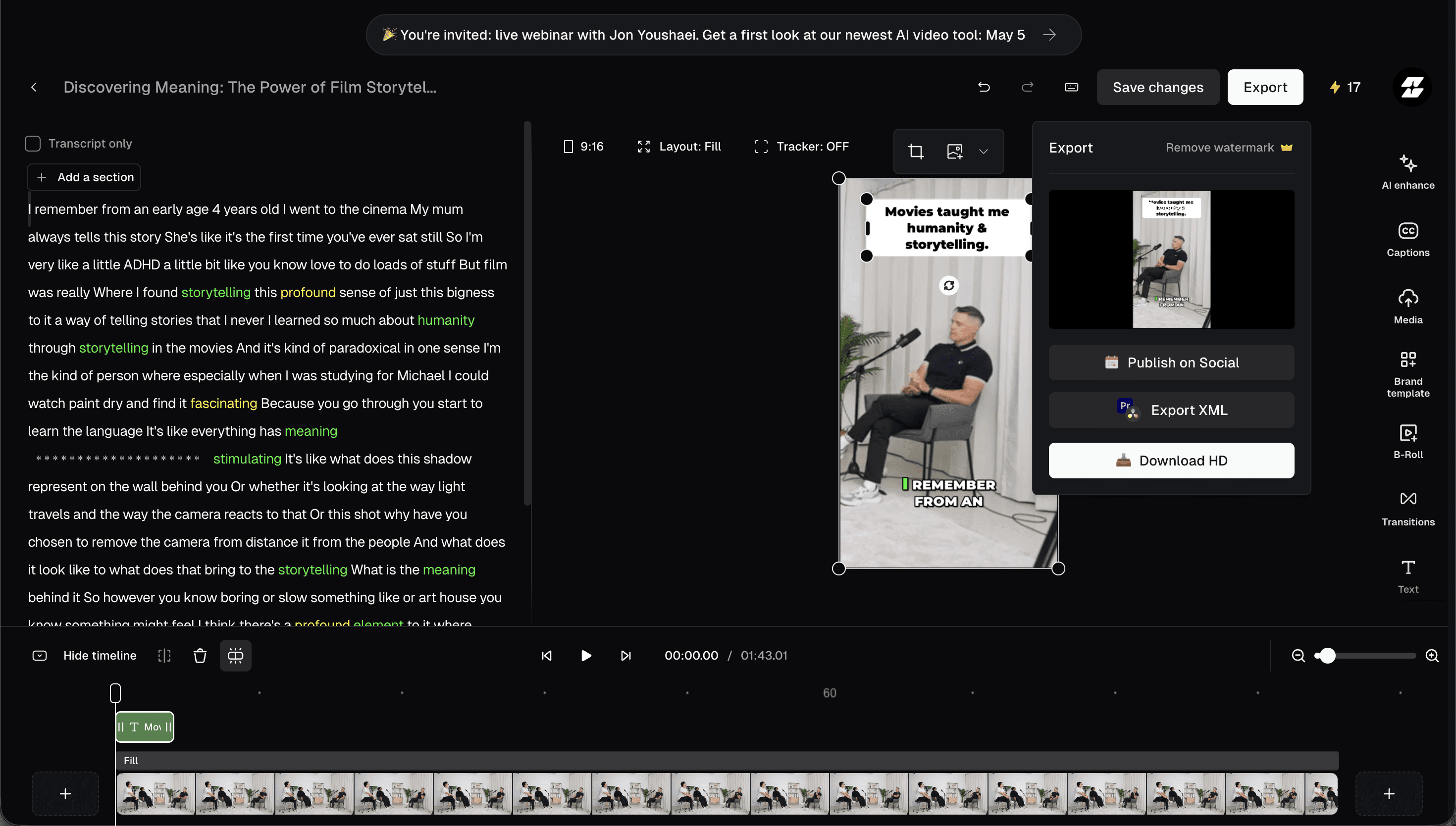
For anyone sitting on long podcasts, livestreams or talking-head videos, Opus Clip solves the most painful repurposing task. It scans a long upload, identifies the moments most likely to travel, and outputs vertical clips complete with reframing and animated captions. A virality score ranks each clip so the strongest cuts surface first.
What stands out:
•AI clip selection pulls hook-worthy moments from hours of footage in a single pass.
•Auto-reframing and animated captions arrive ready for Reels, Shorts and TikTok.
•A virality score gives a quick read on which clips deserve priority.
| Strengths | Watch-outs |
|---|---|
•Turns one long recording into a week of short-form content •Captions are accurate and well-timed | •Processing is cloud-only, so source video must be uploaded •Credits, billed per source minute, drain quickly on long files |
Pricing. A free tier processes about 60 minutes a month with a watermark. Paid plans begin near $15 a month, with the Pro tier at $29 a month; Business pricing is custom. Figures vary by billing cycle.
Verdict. Best for repurposing long-form video into short clips at volume.
CapCut
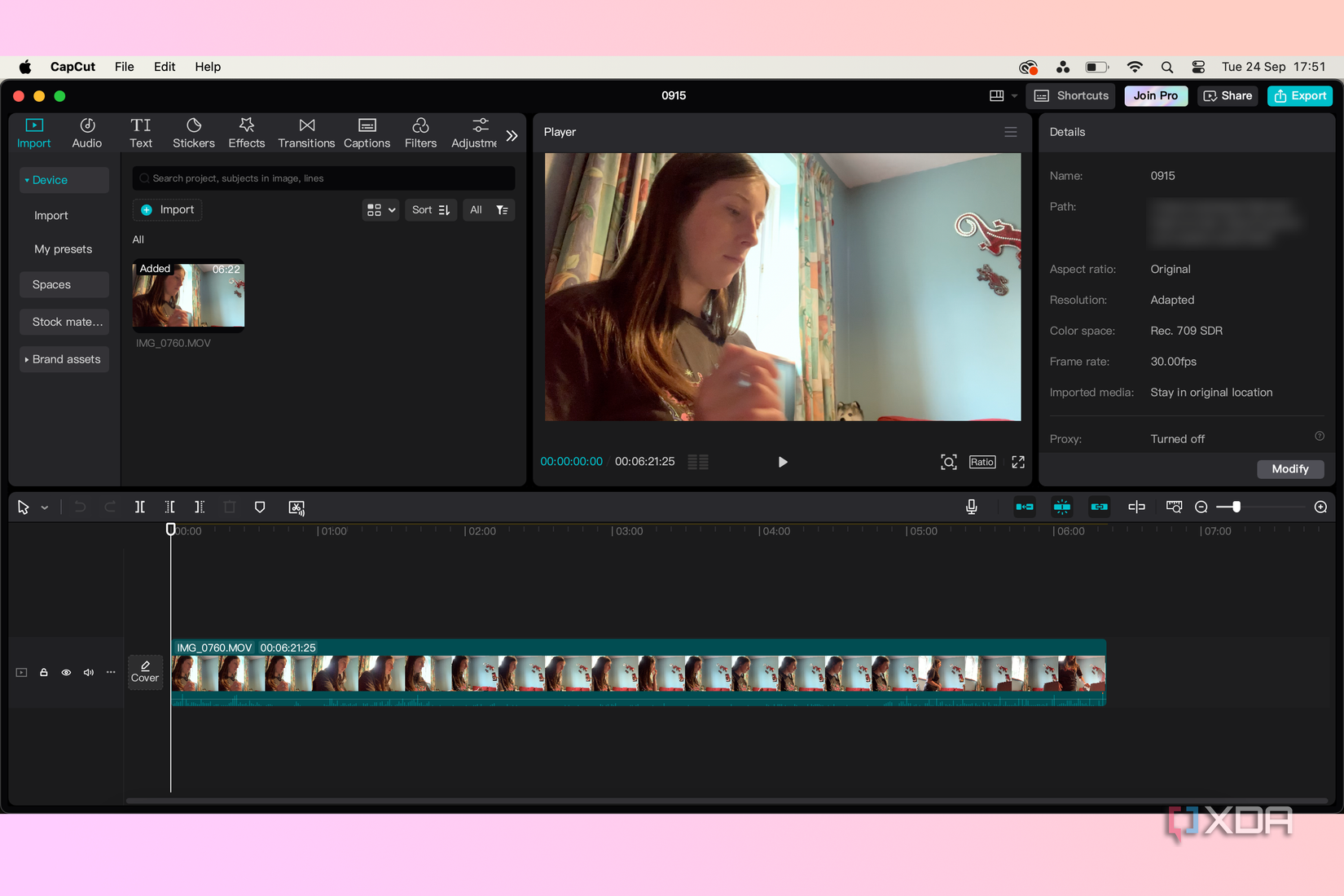
CapCut, built by ByteDance, remains the default editor for a huge share of short-form creators, and for good reason. Its free tier is unusually complete: a full timeline, auto-captions, background removal, text-to-speech and a deep template library tuned to the rhythms of TikTok, Reels and Shorts. The same project moves between mobile, desktop and web.
What stands out:
•A free editor that rivals paid desktop software, with mostly watermark-free 1080p exports.
•Template-driven editing that matches trending short-form formats quickly.
•Cross-device editing across phone, desktop and browser.
| Strengths | Watch-outs |
|---|---|
•One of the most capable free editors available •Trend-ready templates speed up production •Seamless across devices | •Paid pricing varies confusingly by platform and region •Monthly AI credits are modest and some templates still watermark exports |
Pricing. The free plan covers most everyday editing. Paid plans begin around $9.99 a month, though the figure ranges roughly from $7.99 to $19.99 depending on platform, region and billing. Higher tiers add 4K export, premium effects and more AI credits.
Verdict. Best free editor for short-form video, and hard to beat on value.
Submagic
Where CapCut is a full editor, Submagic concentrates on the one thing that disproportionately drives short-form retention: captions. It auto-generates styled, animated subtitles in the punchy formats that define viral clips, then layers on emojis, automatic B-roll, zoom effects and sound cues to keep the eye moving.
What stands out:
•Animated caption styles that mirror the look of high-performing short-form video.
•Automatic B-roll and zoom suggestions that add motion without manual editing.
•Multi-language translation on higher tiers for repackaging clips across markets.
| Strengths | Watch-outs |
|---|---|
•Caption styling matches current short-form aesthetics out of the box •Fast turnaround from raw clip to polished cut | •The entry plan caps both export count and clip length •Advanced AI features sit behind pricier tiers |
Pricing. The Starter plan is about $16 a month billed annually, closer to $20 billed monthly, and limits exports to roughly 10 videos a month. Business plans begin near $100 a month, with Enterprise pricing on request.
Verdict. Best for creators who want scroll-stopping captions on Reels, Shorts and TikTok.
Buffer
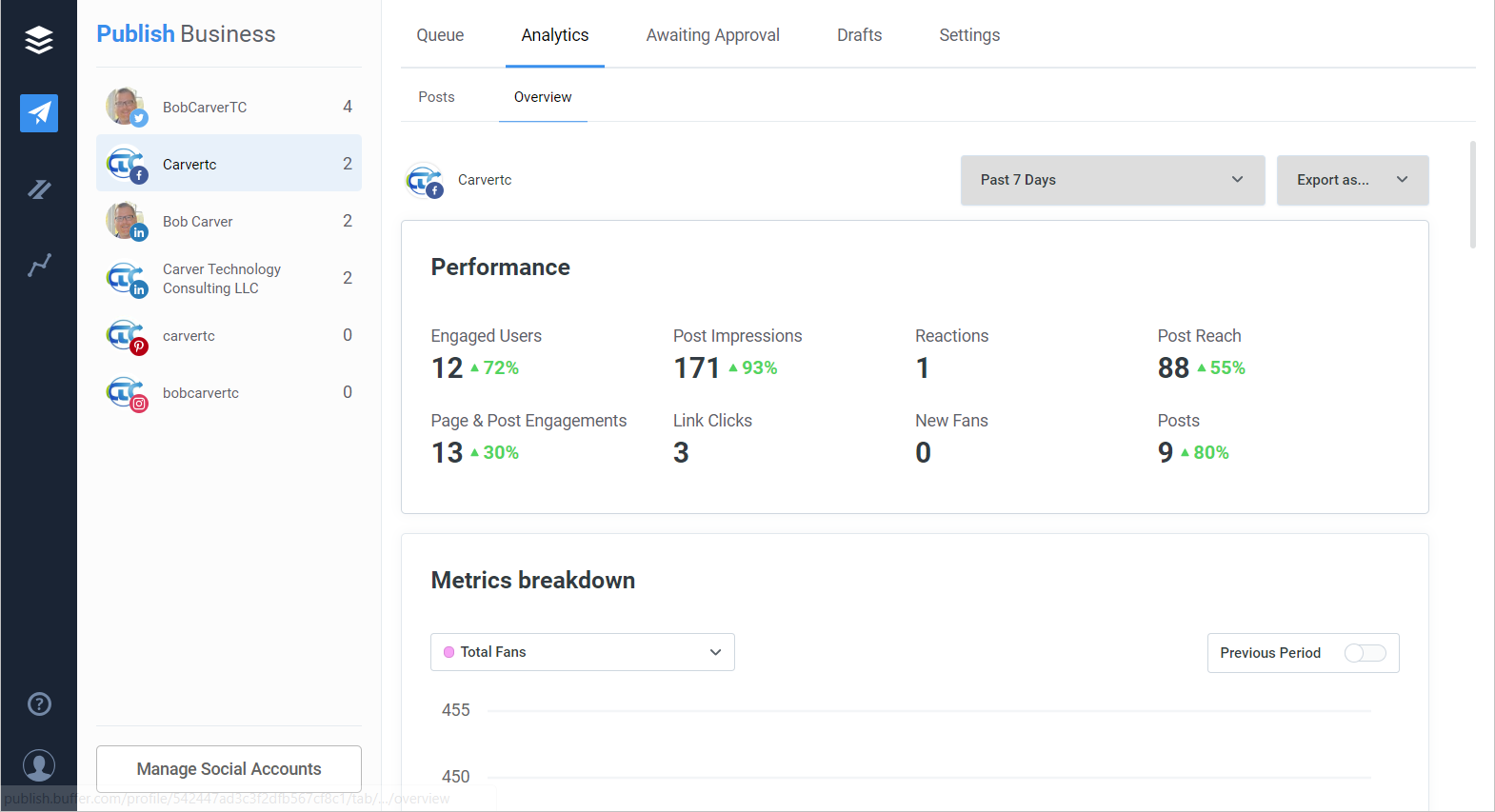
Once content exists, it still has to reach the feed on schedule, and Buffer remains one of the cleanest ways to do that. Its publishing and scheduling sit alongside an AI Assistant that rewrites a single post into platform-specific versions, suggests fresh angles and helps repurpose an idea across networks. Analytics and a saved bank of content ideas round out the workflow.
What stands out:
•The AI Assistant adapts one draft into tailored versions for each platform.
•Simple scheduling with a visual calendar and best-time recommendations.
•A store of up to 100 saved content ideas to draw from on slow days.
| Strengths | Watch-outs |
|---|---|
•Combines scheduling and AI repurposing in a tidy interface •Affordable and usable for solo creators •The free plan covers light publishing | •Per-channel pricing climbs quickly across many accounts •The AI Assistant assists rather than writes from scratch |
Pricing. A free plan supports three channels with ten scheduled posts each. Essentials is $5 per channel a month billed annually, or $6 billed monthly. Team is $10 to $12 per channel a month.
Verdict. Best for planning and scheduling once the content itself is ready.
ChatGPT

None of the specialist tools replace the part of the job that happens before anything gets designed or filmed: deciding what to say. ChatGPT remains the most flexible partner for that early stage, turning a rough theme into hooks, scripts, carousel outlines and a full week of post ideas. Image generation and custom GPTs extend it further for creators who want a repeatable workflow.
What stands out:
•Rapid ideation that converts one topic into a batch of hooks, captions and series concepts.
•Script and outline drafting for video, threads and carousels.
•Custom GPTs that lock in a consistent voice and format for repeat use.
| Strengths | Watch-outs |
|---|---|
•The most adaptable idea and strategy partner of the group •Excellent for scripts, hooks and content calendars | •Not social-specific, so it handles no design or scheduling •Raw output needs editing to avoid a generic tone |
Pricing. A capable free tier exists. The Go plan is $8 a month, and Plus, the tier most creators settle on, is $20 a month. Higher Pro tiers run well above that.
Verdict. Best for ideation, scripting and planning the content before production begins.
Pricing compared
Free tiers carry more weight in 2026 than they used to, and several of these tools are genuinely workable without paying. The table below lines up the free option against the first paid plan and the top consumer tier for each.
| Tool | Free tier | Entry paid plan | Top consumer tier |
|---|---|---|---|
| Canva Magic Studio | Yes, limited AI credits | Pro $15 mo | Teams $10 per seat mo |
| BioGPT.io | Yes, unlimited bios | Standard $15 mo | Advance $35 mo |
| Opus Clip | Yes, ~60 min watermarked | Starter ~$15 mo | Pro $29 mo |
| CapCut | Yes, very capable | ~$9.99 mo | Pro tier, 4K and AI |
| Submagic | Trial only | Starter ~$16 mo | Business ~$100 mo |
| Buffer | Yes, 3 channels | Essentials $5 per channel | Team $10 to $12 per channel |
| ChatGPT | Yes, base model | Go $8 mo | Plus $20 mo |
Which tool fits which job
Most creators do not need all seven. The point of the week-long test was to find which tool wins each recurring task, so a lean stack can be built around the jobs that actually fill the calendar.
| The job | Best pick | Why it wins |
|---|---|---|
| Designing posts and carousels | Canva Magic Studio | AI design, resizing and scheduling without leaving one workspace. |
| Setting up bios and captions fast | BioGPT.io | Free, multi-platform profile copy and caption ideas in seconds. |
| Repurposing long video | Opus Clip | Finds and cuts the strongest moments into ready-to-post clips. |
| Editing short-form video | CapCut | The most capable free editor, tuned for vertical formats. |
| Styling captions on clips | Submagic | Animated subtitle styles that match what performs on the feed. |
| Scheduling and planning | Buffer | Clean publishing plus an AI assistant that repurposes per platform. |
| Ideas, scripts and strategy | ChatGPT | Turns a single theme into a week of hooks, scripts and posts. |
The verdict
After three weeks of living inside these tools, the clearest takeaway is that no single platform wins the whole week. The strongest setup is a small stack rather than one app: Canva for the visuals, a clipping tool like Opus Clip or an editor like CapCut for video, Submagic for captions, Buffer to schedule, and ChatGPT sitting underneath it all for ideas. BioGPT.io slots in neatly at the very start, handling the bios and caption copy that otherwise stall a launch.
The tools that earned the most repeat use were not the flashiest. They were the ones that quietly removed a specific, recurring chore without demanding a brand-new workflow in return. Speed is no longer the advantage it once was, since nearly every creator now has it. The real edge in 2026 belongs to taste, consistency, and a stack lean enough to actually keep up with the calendar.