

Table of Content
- What is Morph Studio in 2026?
- My test, step by step
- Why it failed (and what that teaches you)
- What 75 Credits Bought in My Test
- What Morph Studio actually costs
- How Morph Studio scores across the web
- What people say after paying
- Pros and cons
- Five tips before you spend a single credit
- Category scores from this test
- Who should actually use Morph Studio?
The verdict
Worth a look if you • Want Seedance, Kling, Sora 2, Veo and Hailuo behind one login and one credit balance • Plan to iterate on paid credits, not the free tier • Like a node-style canvas for multi-shot sequences | Skip or wait if you • Expect the free tier to be a real trial; it covers one 10 second clip • Need on-screen text, logos, or exact brand fidelity • Are nervous about billing surprises and slow support |
Bottom line: a genuinely useful model aggregator wrapped in an untrustworthy free-to-paid funnel.
Most AI video reviews are written from other people's showreels. This one is not. I created a fresh Morph Studio account on 21 July 2026, collected the 75 welcome credits, and spent 40 on a single 1,993 character prompt: a premium vertical brand film for BioGPT.io, the glossy particle opener you see in Apple keynotes.
The result was bad. Not slightly off. Bad. And that failure turned out to be the most useful data point in this review, because it shows exactly where the gap sits between what the platform sells and what its entry model delivers. The numbers below come from the official pricing page, the public review record, and my own credit balance.
What is Morph Studio in 2026?
Morph Studio launched from Hong Kong University of Science and Technology research circles in 2023, founded by computer vision PhD dropouts and backed by 2.5 million dollars from Baidu Ventures. It debuted as one of the first text-to-video storyboard tools, partnered with Stability AI, and ran a team of about ten people.
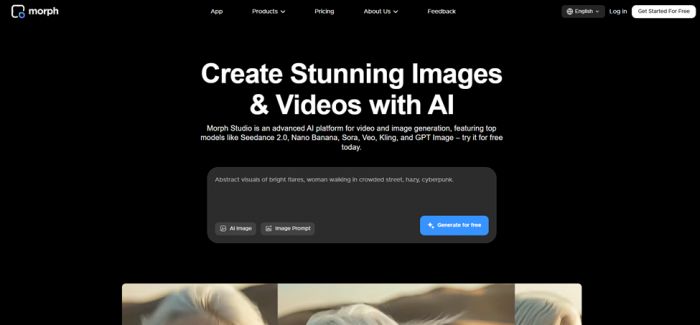
The 2026 product is a different animal: mainly a model aggregator, with one subscription, one credit balance, and third party engines including Seedance, Kling, Sora 2, Veo, Hailuo, Wan and Hunyuan next to its own Morph model. Reviewers describe the value as breadth of access rather than proprietary quality. My test supports that reading.
| Founded | 2023, HKUST computer vision researchers |
| Funding | $2.5M from Baidu Ventures |
| Team size | ~10 people (Feb 2024) |
| First partner | Stability AI (2024 launch) |
| Model today | Aggregator, 15+ engines |
| Access | Browser based, no card to start |
Company facts per TechCrunch (Feb 2024) and the official site.
The toolbox spans AI Video (text and image to video across the full model menu), AI Image (the free plan budgets about 50 images), Canvas (a node-style storyboard for chaining shots), and extras such as style transfer, upscaling, lip sync, and audio tools.
My test, step by step
One continuous session, screenshots at every stage. Data points are shown after each step.
Signup and the countdown
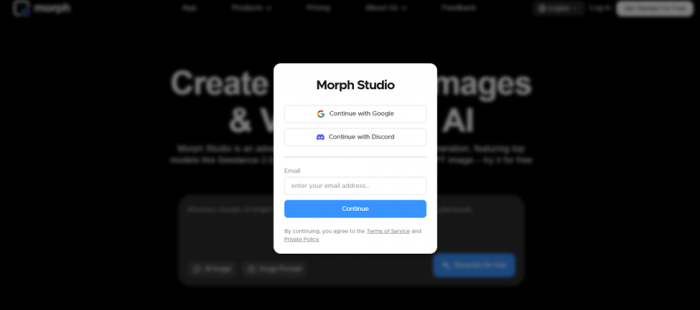
Google, Discord, or email, no card required, done in under a minute. Before I touched a single tool, the dashboard greeted me with a 24 hour countdown: subscribe within a day for 20 percent off. Urgency before capability.
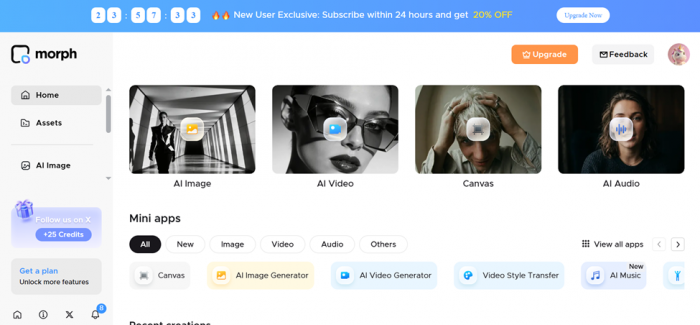
NO CARD REQUIRED 20% OFF TIMER: 24H
The free allowance
The Basic (free) plan credited my account with 75 welcome credits, confirmed in the credit history. The pricing page frames this as roughly three videos or fifty images a month on starter models.
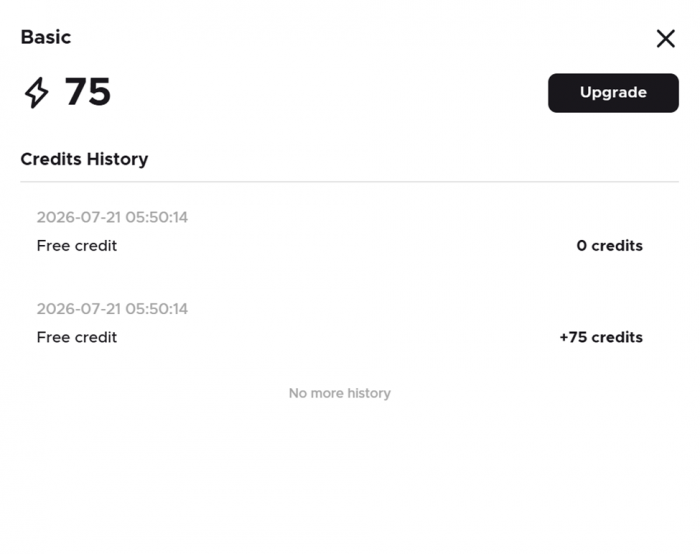
CREDITS +75 PLAN: BASIC / FREE
Picking the generator
In Mini Apps I opened the video generator. Default model: Seedance 1.0 Pro Fast. Settings: 10 seconds, 480p, 3:4 ratio. The interface priced the job at 40 credits and noted one free creation left.
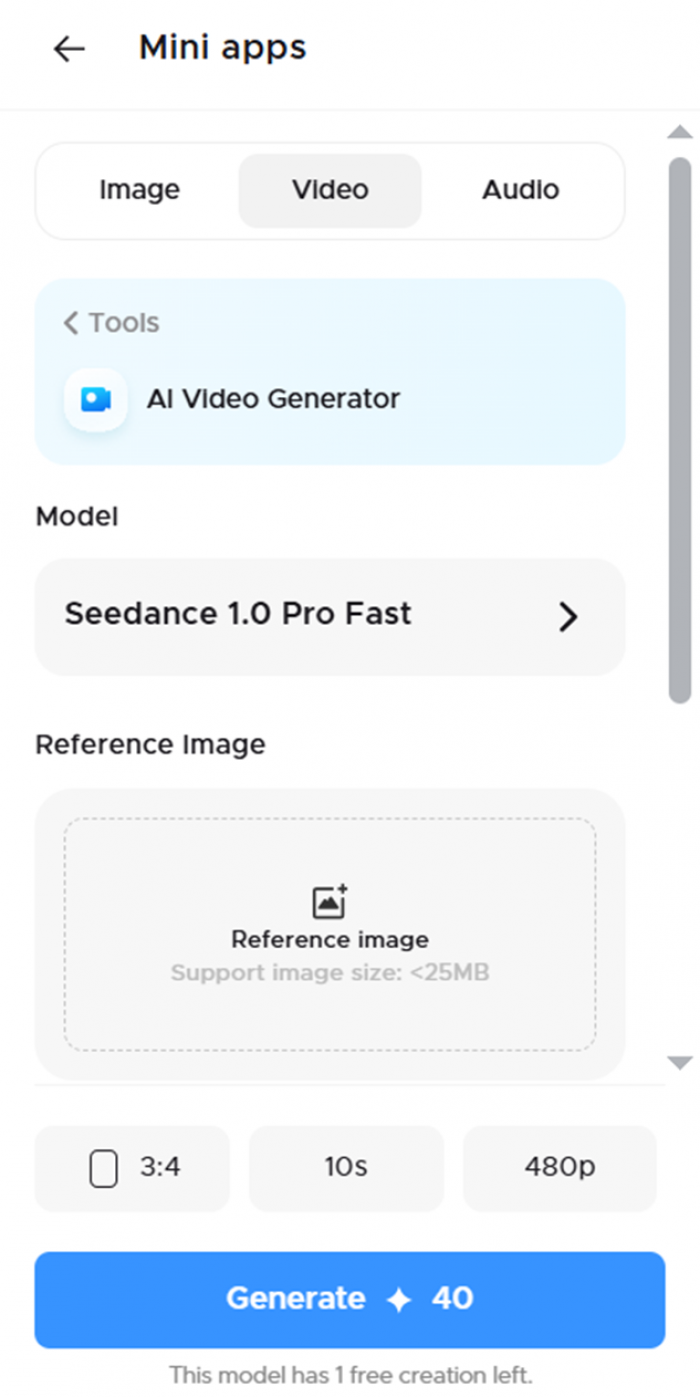
MODEL: SEEDANCE 1.0 PRO FAST 10S / 480P / 3:4 COST: 40 CREDITS
The prompt
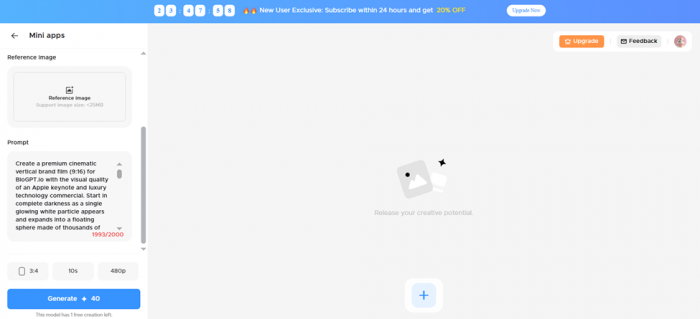
I pasted a 1,993 character brief, just under the 2,000 limit: a full storyboard for a 9:16 vertical BioGPT.io brand film, from a glowing particle through neural networks and glassmorphism interfaces to a glass ring logo reveal and four lines of typography, plus a negative prompt. The full text is below, unedited.
1,993 / 2,000 CHARACTERS
PROMPT:
Create a premium cinematic vertical brand film (9:16) for BioGPT.io with the visual quality of an Apple keynote and luxury technology commercial. Start in complete darkness as a single glowing white particle appears and expands into a floating sphere made of thousands of luminous particles. The camera slowly pushes forward with smooth cinematic motion, shallow depth of field, and soft volumetric lighting. The sphere seamlessly morphs into an elegant AI neural network, flowing data streams, and futuristic glassmorphism holographic interfaces. Display abstract AI concepts including writing, coding, image generation, video creation, automation, productivity, research, and chat assistants without replicating existing software. Use seamless particle morphs, liquid light transitions, invisible cuts, and energy ribbons instead of hard scene changes. The environment features black reflective surfaces, blue, cyan, and violet lighting, atmospheric fog, realistic reflections, floating particles, and premium minimalist design. The camera glides through the scene using cinematic dolly shots, smooth orbital movements, and subtle parallax. As the interfaces dissolve, their particles flow into the center, forming a glowing energy vortex that transforms into a polished glass ring. The ring rotates and reveals the BioGPT.io logo with realistic reflections and a soft glow. Display elegant typography beneath the logo: "Discover the Future of AI" followed by "Create • Learn • Automate • Grow". Finish with "Explore 1000+ AI Tools" and "Follow @BioGPT.io" on a clean black background before fading out. Ultra-realistic CGI, ray-traced lighting, HDR, 4K, 60fps, luxury motion graphics, flawless transitions, premium startup branding, Apple-inspired minimalism, OpenAI aesthetic, clean composition, smooth easing, cinematic color grading.
NEGATIVE PROMPT:
Low quality, blurry, pixelated, watermark, text artifacts, distorted logo, jump cuts, shaky camera, flickering, oversaturated colors, cluttered UI, cartoon style, anime, poor lighting, duplicated objects, compression artifacts, cheap effects, messy composition, unrealistic physics.
The wait and the bill
Generation took about five minutes. The interface had quoted 40 credits for the generation, while my balance showed 36 credits after it completed. Whatever caused that one-credit discrepancy, the practical result was the same: I no longer had enough credit for another identical 40-credit run, and the Generate button switched to Upgrade.
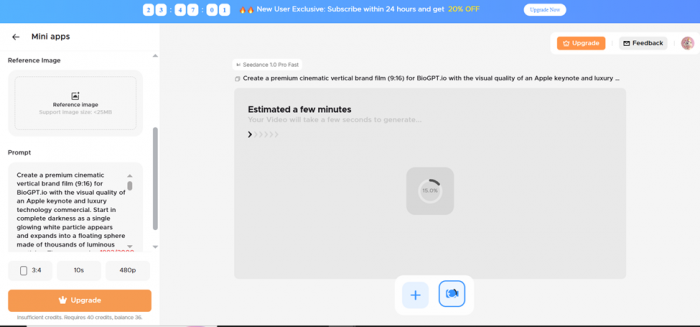
WAIT: ~5 MIN BALANCE: 36 CR NEXT RUN: LOCKED
The result
A mostly static circular emblem with the letters AI, surrounded by garbled pseudo-text like MCLITLMLFI EIUIRCHARANJCTRATAJ where BioGPT.io branding should be. Not 9:16, no cinematic camera work, none of the twelve requested scenes. Unusable.
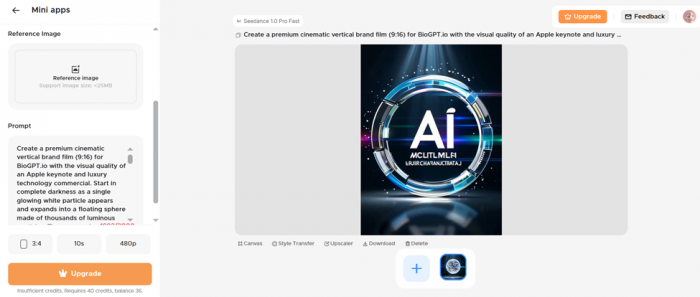
MATCHED PROMPT: NO USABLE: NO
POST-MORTEM
Why it failed (and what that teaches you)
Blaming the tool alone would be lazy. Four things collided here, and every one is a lesson for your first credits.
A. The ratio fight
My prompt demanded 9:16. The toggle sat at its 3:4 default, and interface settings always win. The aspect ratio button is the law.
B. Text is a trap
I asked for a logo plus four lines of typography. Diffusion video models mangle written words, and Seedance 1.0 delivered exactly that: confident gibberish.
C. Twelve scenes in ten seconds
The brief packed a whole storyboard into one clip. Overloaded prompts get averaged into a single busy frame instead of a sequence.
D. Entry model, entry output
Seedance 1.0 Pro Fast at 480p is the free workhorse. The look I described lives in Seedance 2.0 Pro, Kling 3.0, and Veo territory, all paywalled.
What 75 Credits Bought in My Test
START: 75 > ONE 10S CLIP: -40 > LEFT: 36 > NEXT RUN: 40
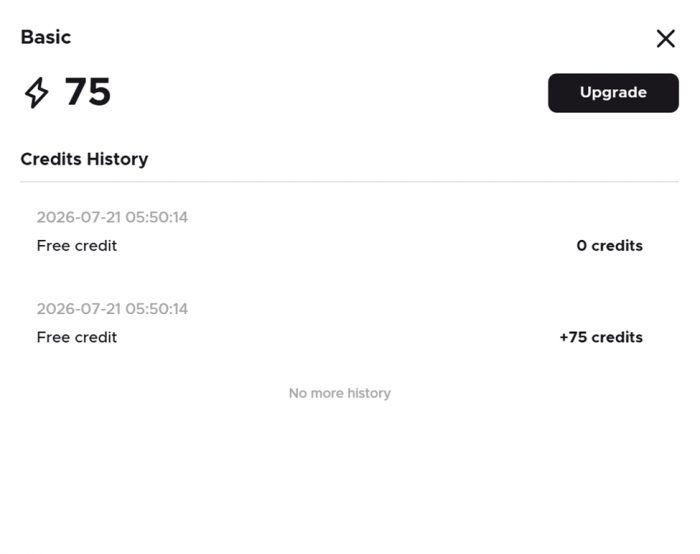
In my configuration, the free allowance behaved more like a one-shot test than a meaningful experimentation budget. A 10-second Seedance 1.0 Pro Fast generation at the settings I selected left the balance below what the interface required for an identical second attempt.
That does not mean every Free user gets exactly one video. Morph's current pricing table estimates three Seedance 1.0 Pro Fast generations from the 75-credit plan, which suggests shorter or cheaper configurations can stretch the allowance further. The useful number is therefore not simply “75 credits,” but the credit price displayed beside Generate for the particular model, duration and settings you choose.
What Morph Studio actually costs
Verified against the official pricing page on test day. Two details matter more than the headline numbers: failed generations do not consume credits, and commercial use is included on every paid tier.
| Plan | Monthly | Annual (per mo) | Credits / mo | ~Videos |
|---|---|---|---|---|
| Free | $0 | $0 | 75 | ~3 starter |
| Basic | $12 | $8.40 | 3,000 | ~75 |
| Pro | $35 | $24.50 | 12,000 | ~300 |
| Premier | $90 | $63 | 40,000 | ~750 |
Source: morphstudio.com/pricing, 21 July 2026. Annual totals: $100.80, $294, $756.
The fine print that changes the value
Those tilde-videos assume cheap models. Route your credits to the premium engines everyone actually wants and the monthly allowance shrinks fast.
| Model | Basic ($12): videos / mo | Pro ($35): videos / mo |
|---|---|---|
| Seedance 1.0 Pro Fast | 150 | 600 |
| Seedance 2.0 Pro | 35 | 141 |
| Sora 2 | 13 | 54 |
| Kling 3.0 Pro | 8 | 35 |
| Veo 3 | 2 | 8 |
| Veo 3.1 | Not available | 3 |
From the official model usage table, July 2026. A Basic subscriber gets two Veo 3 videos a month. Two.
What Has Changed Since My July Test
The subscription prices have stayed stable since I ran this test, but Morph Studio's model catalogue has not. The current pricing page lists 21 text-to-video model entries, turning the platform into a considerably broader model hub than the one I originally tested.
The important additions are not simply more names on a menu. Newer models target different types of production:
| Newer option | What Morph currently emphasizes |
|---|---|
| Seedance 2.5 | 4-to-30-second generation with image, video and audio references |
| Wan 3.0 | Multimodal input, clips up to 30 seconds and output options reaching 1080p |
| MiniMax H3 | Multimodal generation with high-resolution video capabilities |
| Veo 3.1 | Cinematic generation with native audio and stronger motion realism |
There is a catch. None of these premium additions makes the 75-credit Free plan substantially more powerful because the current model-usage table marks Seedance 2.5, Wan 3.0, MiniMax H3 and Veo 3.1 as unavailable on Free. Veo 3.1 is unavailable on Basic as well.
The difference between Free and paid Morph Studio is therefore becoming wider. Free still works as a low-cost way to understand the interface and test starter generation, while the reason to pay is increasingly access to the platform's wider model catalogue rather than simply receiving more of the same credits.
How Morph Studio scores across the web
Here is the uncomfortable part. Editorial reviewers, who test the product but rarely pay for a year of it, score it around four stars. Trustpilot, the only platform holding public customer feedback, sits at 2.6 out of 5, with every rating from the past twelve months at one star.
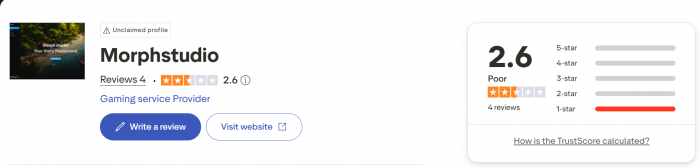
| Platform | Score | Volume | Type |
|---|---|---|---|
| Trustpilot | 2.6 / 5 | 4 reviews | Customer reviews, 100% one star past 12 mo |
| ToolsForHumans | 4.0 / 5 | Editorial | Hands-on editorial review |
| PopularAiTools | 4.0+ / 5 | Editorial | Editorial evaluation |
| Tenereteam | 4.7 / 5 | 5 users | Coupon site ratings |
| G2 | Listed | No public score | Business software directory |
As indexed July 2026. The editorial vs customer gap is the story.
The sample is tiny, and one review concerns an unrelated Roblox game with a similar name, so caution cuts both ways. What stands out is the pattern: paying customers complain about billing and support, not art quality.
What people say after paying
Summarized from published reviews; individual accounts are the reviewers' claims, not verified facts.
Trustpilot reviewer · 1 star
A subscriber says they bought a 99 dollar monthly unlimited plan, then found a 999 dollar annual charge queued two days later with no explanation. Support's reported answer: wait a month.
Trustpilot reviewer · 1 star
Another buyer expected 10 second generations and found only 5 second clips after paying. The refund request reportedly went nowhere, and they call the model weak for the price.
Trustpilot reviewer · 1 star
A 959 dollar annual subscriber reports slow processing, credits sometimes consumed twice, vague content-violation rejections on harmless prompts, and support that never materially responds.
ToolsForHumans · 4.0
Credits the platform for putting Kling, Sora, Veo, and Seedance behind one login, but says outputs need a human QA pass and renders can stretch from minutes to an hour.
AIToolsSet · editorial
Highlights that failed generations refund credits and paid tiers carry commercial rights, while flagging a canvas learning curve and repeated reports of slow support.
This review · tested
One 1,993 character cinematic brief on the default model returned garbled text, the wrong ratio, and none of the requested camera work. 40 credits, about five minutes, zero usable seconds.
Pros and cons
Where it earns money • 15+ frontier video models under one login and credit pool • Transparent pricing with a 30 percent annual discount • Failed generations do not burn credits • No card required; signup takes under a minute • Canvas workflow for multi-shot sequences • Commercial use on every paid tier | Where it loses them • Free tier ends after one 10 second clip • Veo 3.1 is out of reach on Basic, nearly so on Pro • Trustpilot sits at 2.6 with billing complaints • Discount countdown pressure starts at signup • Entry model garbles text, drifts from long prompts • Support is a recurring complaint across sources |
Five tips before you spend a single credit
1. Set the ratio button first. Writing 9:16 in the prompt does nothing while the toggle says 3:4. The interface setting always wins.
2. One shot per prompt. Describe one camera move and one transformation per clip, then chain shots in Canvas instead of cramming a storyboard into ten seconds.
3. Never ask for legible text. Skip logos and taglines in the generation; add them later in an editor, where they will actually spell correctly.
4. Test short before going long. Shorter clips cost fewer credits; the free tier math assumes roughly three brief Seedance runs. Prove the concept cheap, then commit.
5. Ignore the countdown. The 24 hour discount expires, the product does not change. If you subscribe, start monthly, screenshot the plan terms, and watch your first statement.
Category scores from this test
| Category | Score / 10 | |
|---|---|---|
| Signup and onboarding | 8 | ########-- |
| Model catalogue breadth | 9 | #########- |
| Pricing transparency | 6 | ######---- |
| Free tier usefulness | 4 | ####------ |
| Output quality (default model) | 3 | ###------- |
| Trust and support record | 3 | ###------- |
| Prompt adherence | 2 | ##-------- |
OVERALL TESTED SCORE: 5.0 / 10
Unweighted mean of the seven category scores from this hands-on test.
Who should actually use Morph Studio?
If you are a prolific creator who wants to compare Seedance, Kling, Sora 2, and Veo without juggling four subscriptions, the aggregator pitch is real, and on Pro the per-video economics of mid-tier models are genuinely decent. That user should still pay monthly first.
But my test and the paying reviewers point at the same weak spots. The free tier demos the credit system, not the quality. The default model cannot carry a premium brief. And the worst reviews are not about art. They are about money: surprise charges, shrunk plan terms, silent support.
My advice is boring and specific. Spend the 75 free credits on one short, single-scene, text-free prompt with the ratio set correctly. If it impresses you, pay monthly first, and keep a screenshot of the plan terms from the day you subscribe.