


Table of Content
The first version of a caption is almost never the one that gets posted. It sits in the notes app for an hour, gets rewritten four times, and still ends up sounding like everyone else. That bottleneck is exactly where free AI writing tools have quietly become useful for Instagram, not as a replacement for a real voice, but as a way to get past the blank screen and the hashtag guessing.
This roundup leans on hands-on testing, current 2026 pricing, and aggregated ratings from G2, Capterra, and Trustpilot. It reaches past captions on purpose, because growth on Instagram in 2026 lives in Reels as much as in text, so two short-form video tools sit alongside the writers.
THE 30-SECOND ANSWER
Best overall writer ChatGPT Free — the most human captions, full stop. Best for a new or tired profile BioGPT — bio, hashtags, and username in one free tool. Best all-in-one Simplified — write, design, and schedule under one login. Best for Reels HeyGen or Revid AI — turn a script into video without a camera. |
In a hurry? Stack BioGPT for the profile, ChatGPT for captions, and HeyGen for one weekly Reel. That covers most of a feed for free.
One number that reframes the problem
Most stats about AI and social media repeat the same line about adoption going up. A more useful figure is where the time disappears. Analysis of caption workflows in 2026 puts the average manual caption at roughly 25 minutes once brainstorming, drafting, editing, and hashtag research are added up. Posting seven times a week turns that into close to three hours, before a single design tool even opens.
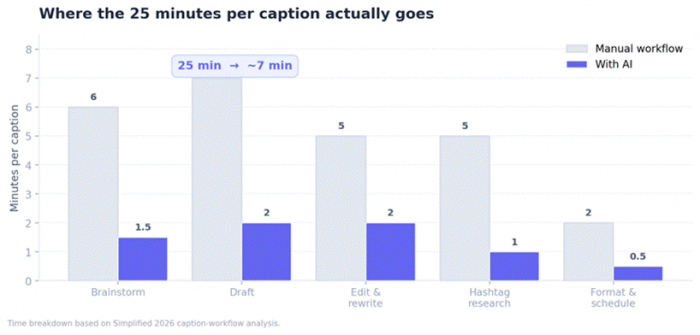
Figure 1. Manual vs AI-assisted time per Instagram caption, by stage.
Editing and hashtag research, not the first draft, eat the largest slices. Those are the stages free AI tools compress hardest, turning a 25-minute caption into about seven and freeing the saved time for the part machines handle poorly: sounding human.
The shortlist at a glance
Five free tools made the cut. Free-plan limits and aggregate ratings below are verified against current pricing pages and review platforms in 2026.
| Tool | What it does | Free plan | Rating |
|---|---|---|---|
| ChatGPT | Writes captions | ~15-20 msgs/day | Not listed |
| BioGPT | Bio, hashtags, captions | Free, no card | 5,000+ users* |
| Simplified | Write + design + schedule | 5,000 words (one-time) | G2 4.6 (5k+) |
| HeyGen | AI avatar Reels | 3 videos/month, 720p | G2 4.8 (1,468) |
| Revid AI | Faceless Reels | ~3-5 trial videos | Mixed |
*Self-reported by BioGPT. ChatGPT and BioGPT are not listed on standard B2B review platforms, so their entries note the available signal.
The tools, reviewed
ChatGPT Free
For pure caption quality, the free version of ChatGPT remains the one to beat. It handles tone shifts, follows formatting instructions closely, and produces captions that read like a person wrote them. Fed three or four examples of an existing posting style, it mirrors that voice closely, which matters more than raw cleverness when the goal is a feed that feels consistent.
| Free plan | Around 15 to 20 messages per day before a cooldown; usage-based, not word-capped |
| Best for | Captions that need to sound genuinely human |
| On Instagram | Pure text generation; no native bio, hashtag, or scheduling tools |
| Watermark | None |
✓ Pick it if the words are the priority and a separate scheduler is fine. A two-step prompt (ask for three hook angles, then write only the winner) beats asking for a finished caption cold. ✗ Skip it if an all-in-one dashboard or built-in hashtag and scheduling tools are the main need. |
BioGPT

Where general chatbots write anything, BioGPT narrows in on the parts of Instagram creators actually fuss over: the bio, the caption, the hashtag set, and the username. It bundles a free bio generator, post suggestions, caption and hashtag ideas, profile descriptions, and multi-language support in one place, removing the tab-switching that slows the ChatGPT approach down.
| Free plan | Free tier, no credit card required |
| Best for | Setting up or refreshing a profile fast |
| On Instagram | Bio generator, username ideas, captions, hashtags, post prompts |
| Watermark | None |
✓ Pick it if a new or tired profile needs a bio, handle, and starter hashtags sorted in one sitting. The 150-character bio is one of the hardest pieces of writing on the platform, and ten viable drafts break that stall instantly. ✗ Skip it if long-form blog drafts or anything outside the social context are the real job; it is social-first by design and output still wants a personality pass. |
Note on trust: the platform reports use across more than 5,000 users in 2026, a self-reported figure rather than a third-party rating.
Simplified

Simplified earns its place because the free plan covers more of the pipeline than anything else here. It writes captions, designs the post, and schedules to a handful of platforms under one login, with three social accounts on the free tier. For a solo creator tired of juggling four apps, that consolidation is the draw.
| Free plan | One-time 5,000 AI words; 3 social accounts; design and scheduling stay usable |
| Best for | Running write, design, and schedule in one place |
| On Instagram | Caption writer, post designer, multi-platform scheduler |
| Watermark | None on text output |
✓ Pick it if app-switching is the real pain and a single free dashboard for static posts is worth a depth trade-off. Burn the words on evergreen templates early, then lean on the free design and scheduling long-term. ✗ Skip it if a steady daily writer is needed; the 5,000-word AI credit is one-time and does not refill, and there is no viral-post database or IG-specific algorithm optimisation. |
What users say (G2 4.6/5, 5,000+ reviews): praised for breadth and value, often preferred over single-purpose chatbots for social work; the common complaint is a workspace that takes time to learn, plus slow support for some free-trial users.
HeyGen
Captions stop the scroll, but Reels are what the 2026 algorithm rewards, and HeyGen is the most approachable way to make talking-head video without a camera. It turns a typed script into a polished AI-avatar clip in minutes, which suits creators who want a consistent on-screen presence without filming daily. Avatar realism took a clear step up in its latest generation, and multilingual dubbing across 175-plus languages opens the same Reel to several audiences.
| Free plan | 3 videos per month; 720p export; watermark on output |
| Best for | Script-to-Reel avatar video without filming |
| On Instagram | Text-to-video avatars, voice options, multilingual dubbing |
| Watermark | Yes, on the free tier |
✓ Pick it if the feed needs a face and consistency but filming every week is not realistic. Best for one weekly hero Reel scripted elsewhere first. ✗ Skip it if high video volume is the goal; the free three-video ceiling is tight and the credit system counts every re-render, so paid tiers add up. |
What users say (G2 4.8/5, 1,468 reviews; Trustpilot 2.3/5, 1,619 reviews): realistic avatars, ease of use, and fast output draw strong praise, and it was G2's fastest-growing product of 2025; the low Trustpilot score concentrates on billing surprises and the credit system.
Revid AI

Where HeyGen builds avatar videos, Revid AI is built for the faceless short-form format that dominates Reels, Shorts, and TikTok. Its script-to-post workflow takes a topic or article and stitches stock footage, captions, and an AI voiceover into a 60 to 90 second vertical clip. It also writes hooks and scripts tuned for short-form, so the text and the video come from one place.
| Free plan | Limited trial, roughly 3 to 5 videos, no card; free exports may carry a watermark |
| Best for | Automated faceless Reels from a script or article |
| On Instagram | Script-to-video, AI hooks, voiceover, viral templates |
| Watermark | On free exports until upgrade |
✓ Pick it if the plan is to test whether faceless video fits a niche before spending money. The built-in hook writing is the underrated growth lever, since the first line decides the watch. ✗ Skip it if broadcast polish is expected out of the box; captions are basic and the stock-footage look can feel generic without a pass in a separate editor. |
What users say: reviewers value the speed of turning text or long video into short clips and the beginner-friendly interface; the most common gripe is free-tier downloads that sometimes fail, plus basic captions.
How they compare, side by side
Feature lists hide how a tool performs day to day. The scorecard rates each free plan across four practical axes, and the three tables that follow isolate the angles most likely to decide the pick.
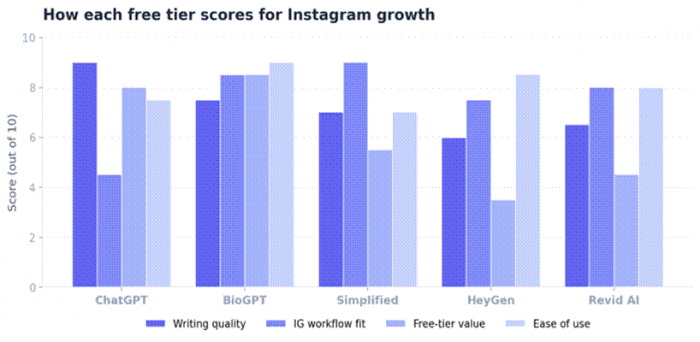
Figure 2. Editorial scorecard of free tiers across four practical axes.
Free-tier value and limits
| Tool | Free output | Resets? | Real-world ceiling |
|---|---|---|---|
| ChatGPT | ~15-20 msgs/day | Daily | One-at-a-time captions, comfortably |
| BioGPT | Free, no card | Ongoing | Setup bursts, not daily volume |
| Simplified | 5,000 AI words | One-time | Runs out fast for daily writers |
| HeyGen | 3 videos/month | Monthly | One weekly hero Reel at most |
| Revid AI | ~3-5 trial videos | One-time | Enough to test, not to scale |
Instagram workflow fit
| Tool | Bio | Hashtags | Captions | Reels |
|---|---|---|---|---|
| ChatGPT | Manual | Manual | Strong | No |
| BioGPT | Built-in | Built-in | Yes | No |
| Simplified | Caption only | Limited | Yes | Design + schedule |
| HeyGen | No | No | Script only | Avatar video |
| Revid AI | No | No | Hooks + script | Faceless video |
Output type and effort to publish
| Tool | Output | Effort to publish | Notes |
|---|---|---|---|
| ChatGPT | Text captions | Low | Mirrors tone closely when fed samples |
| BioGPT | Profile text + hashtags | Medium | Strong structure, needs a voice pass |
| Simplified | Text + designed post | Medium | Adequate; depth traded for breadth |
| HeyGen | Avatar video | Low for talking-head | No timeline editor for complex cuts |
| Revid AI | Faceless video | Medium-high | Captions, footage often want a 2nd tool |
A free stack that works together
No single free tool covers everything, so the move is stacking a few that overlap as little as possible, spanning text through video:
1. Profile foundation BioGPT for the bio, username direction, and a starter hashtag set. 2. Daily captions ChatGPT Free, prompted with two or three past captions so the tone carries. 3. Weekly hero Reel HeyGen for a talking-head clip, or Revid AI for a faceless one, scripted in ChatGPT first. 4. Assembly Simplified to design the static posts and queue everything in one tab. |
Used this way, the tight video limits stop hurting, because the free three-to-five clips get spent on the one Reel a week that matters most, while the cheaper text tools carry daily volume.
What free tiers will not fix
Instagram does not penalise AI-assisted captions in 2026, and text captions sit outside the labelling rules for photorealistic AI images. The limits are practical, not algorithmic:
•Free word, message, and video caps run out faster than they look once posting is daily; the video tools especially are built to push an upgrade.
•Unedited AI output converges on a recognisable, slightly flat house style. The edit pass is not optional.
•None of these tools replace knowing the audience, which remains the part that actually drives growth.
Final verdict
After living inside these tools for a stretch of real posting, the honest answer is that the best free option depends on the weakest link in a given workflow. ChatGPT Free still writes the most human captions and would be the desert-island pick for the words alone. But the tool that surprised most was BioGPT, simply because it removes the two tasks that cause the most quiet dread, writing a bio and guessing at hashtags, without asking for a card or a long sign-up.
The smartest setup is not loyalty to one app. It is a small free stack that spans the whole feed: BioGPT for the groundwork, ChatGPT for the captions, HeyGen or Revid AI for a weekly Reel, and Simplified to tie design and scheduling together. That combination costs nothing, claws back most of those three weekly hours, and leaves the part machines cannot do, sounding like an actual person, exactly where it belongs.