

Table of Content
I have rewritten my own LinkedIn headline more times than I would like to admit. Same story with the About section. For a long stretch I treated them as the same job, one long and one short, and my profile read exactly like that. Views were flat. Recruiters skimmed and clicked away.
The shift came when I stopped seeing these two fields as competitors. They are not a short version and a long version of the same message. Your headline has one job: get a stranger to stop and click. Your About section has a completely different job: once they have clicked, give them a reason to trust you and reach out.
After testing dozens of versions on my own profile and rewriting them for people in sales, engineering, and consulting, I have a clear read on what belongs in each. This guide lays it out, with the real character counts, the parts most people leave empty, and copy you can adapt today.
The short answer Your headline (220 characters) is the searchable, always-visible line under your name. Load it with your role, your specialty, and the outcome you deliver. Your About section (2,600 characters) is your first-person story: open with a hook, prove you can do the work, and close with a clear next step. |
The core difference at a glance
Before the detail, here is how the two fields stack up. Notice that they barely overlap in purpose, and that is the point.
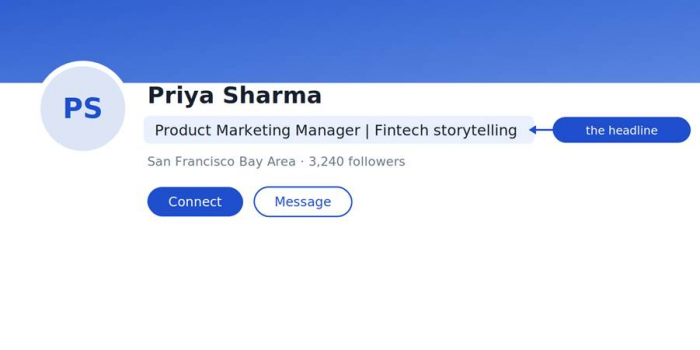
Your headline is the line under your name. It travels into search results, the feed, and every message, so it earns attention long before anyone opens your profile.
| What matters | Headline | About section |
|---|---|---|
| Character limit | 220 | 2,600 |
| Visible before cutoff | 60 to 70 characters | 200 to 300 characters (2 to 3 lines) |
| Where it appears | Search, feed, comments, requests, messages | Full profile only |
| Weighted in search | Yes, heavily | Yes, indexed |
| Best voice | Third person, tight | First person |
| Primary goal | Get the click | Build trust, prompt contact |
| How often it is read | Constantly, often without a visit | Only after someone lands on your profile |
What your LinkedIn headline should include
Your headline follows you everywhere. It sits under your name in search results, next to every comment you leave, in the feed when you post, and at the top of every connection request you send. It is the single most reused line on your whole account. LinkedIn also weights it heavily for search, so the words you choose decide whether you surface when someone looks for what you do.
You get 220 characters, but only the first 60 to 70 show in most places. Front-load accordingly. Here is what earns a spot in that space.
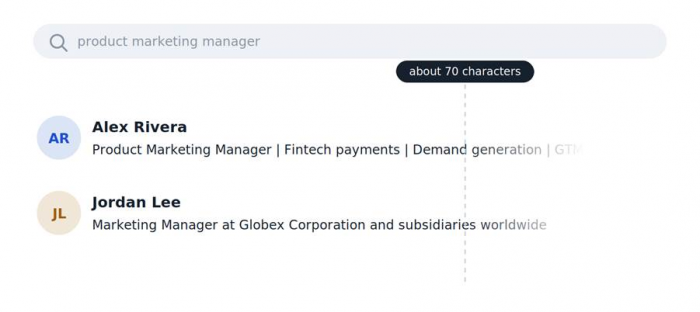
• Your actual role or function. If someone searches "product manager," that phrase needs to be in there. Save the clever titles for elsewhere.
• A specialty or niche. "Product Manager" is generic. "Product Manager for fintech payments" is both findable and memorable.
• The outcome you create. What changes because you did your job well? "Helping banks cut fraud losses" says far more than "results-driven professional."
• The keywords your audience types. Use the exact terms a recruiter or client would search, not internal jargon.
• A touch of personality, if it fits. One human detail can make you stick. Keep it after the practical part, since it may sit past the visible cutoff.
A reliable pattern
Role, then specialty, then the outcome or a proof point, then any extra keywords. Worked through, it looks like this:
| Senior Data Analyst | Turning messy SaaS data into decisions | SQL, Python, dashboards leaders actually use |
What to leave out
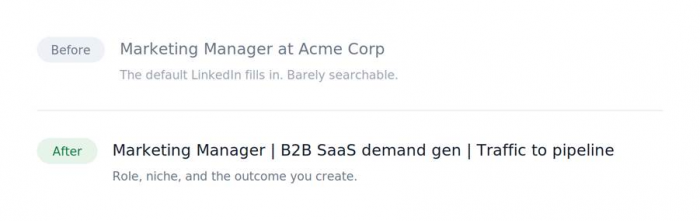
Skip "Open to work" as your entire headline, since LinkedIn gives you a dedicated frame for that. Drop buzzwords like "guru" and "ninja." And do not settle for the default LinkedIn fills in for you, which is just your current job title at your current company. That default is the most common headline on the platform, and it does nothing to make you stand out.
What your LinkedIn About section should include
If the headline earns the click, the About section is where you keep the person reading. It is the one place on your profile where you speak in your own voice, free of job titles and start dates. LinkedIn describes it in almost those exact words in its own profile guidance. And it carries weight: LinkedIn reports that complete profiles receive far more opportunities than incomplete ones, and a filled-out About section is a big part of what counts as complete.
You get 2,600 characters, roughly 400 to 500 words. But only about two or three lines show before the "See more" link on desktop, and even less on mobile. So the opening does the heavy lifting. Build it in four parts, in this order.
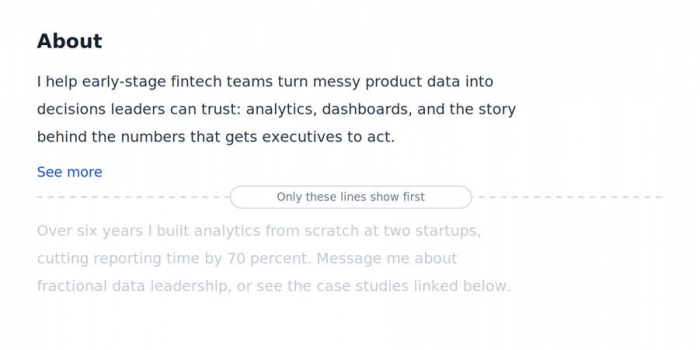
1. The hook (first 2 to 3 lines). This is the only part most visitors see before deciding whether to expand. Skip "I am a passionate professional." Open with a specific problem you solve, a surprising result, or a plain statement of who you help and how.
2. The proof (the middle). Back it up with concrete results, real numbers, named skills, and the kinds of problems you have solved. This is where keywords earn their place, since LinkedIn indexes this text too. Write them into natural sentences rather than a pile-up.
3. The human layer. A sentence or two on how you work or why you care. People connect with people, and this is what separates a profile from a resume.
4. The call to action (last lines). Tell the reader what to do next: message you about X, book a call, or check the link below. A profile with no next step leaves interested people with nowhere to go.
One formatting note: write in first person, so "I help" rather than "Jane helps." Keep paragraphs short and add line breaks. A solid block of 2,600 characters gets skipped no matter how sharp the writing is.
Character limits and where the text gets cut
The limits are identical whether or not you pay for Premium. What actually moves your results is writing to the visible portion rather than the maximum.
| Field | Max characters | Visible before cutoff | Write for |
|---|---|---|---|
| Headline | 220 | 60 to 70 | The first line a stranger reads |
| About | 2,600 | 200 to 300 (2 to 3 lines) | The hook that earns "See more" |
70 If your headline makes sense inside its first 70 characters, it works in search and messages. | 300 If your About hooks a reader inside its first 300 characters, they will click "See more". |
Nail both and you are already ahead of most profiles on the platform.
Common mistakes, and the quick fix
The same handful of errors show up again and again. Each one has a fast correction.
Headline slip-ups
• Leaving the LinkedIn default of job title at company. Fix: rewrite as role plus outcome.
• Stuffing every keyword with no rhythm. Fix: lead with the two or three that matter, then stop.
• Being clever instead of clear. "Chief Happiness Wizard" is not searchable. Fix: say what you do, then add flavor.
About section slip-ups
• Writing in third person like a press release. Fix: switch to "I."
• Front-loading your job history. Fix: open with value, keep the timeline in Experience.
• No call to action at the end. Fix: close with one clear next step.
• A single unbroken block of text. Fix: short paragraphs and white space.
How the two work together
Think of them as a two-step. The headline is the ad, and the About section is the landing page. The headline gets someone to click through from a search result or a comment thread. The About section decides whether that click turns into a message, a follow, or a hire.
The strongest profiles keep the two aligned. If your headline promises "fintech product leadership," your About should deliver proof of exactly that inside the first few lines. When the promise and the payoff match, people trust you faster. When the headline says one thing and the About wanders off somewhere else, that small mismatch quietly costs you connections.
Here is a check I run on every profile I rewrite: read the headline, then read the first three lines of the About. Do they sound like the same person talking about the same thing? If not, tighten both until they do.
Which one should you fix first?
If you only have ten minutes today, start with the headline. It reaches people whether or not they visit your profile, so a sharper headline pays off in more places right away, in search results, in the feed, and on every comment you have ever left. A weak headline also means fewer people ever open the About section at all, so fixing it lifts everything downstream.
Once the headline is pulling people in, move to the About section. That is where attention turns into action. In practice I rewrite in that order for almost everyone: headline first for reach, About second for depth. The one exception is a profile that already gets steady visits but very few messages. There the About section, and especially its closing call to action, is usually the thing quietly holding you back.
Templates you can adapt today
Structure travels between people, but the details are what make a profile yours. Start from one of these and swap in your own specifics.
Headline starters
| Who you are | Pattern |
|---|---|
| Job seeker | [Target role] | [Key skill], [Key skill] | Recently [proof point] |
| Founder | Founder at [Company] | Helping [audience] [outcome] | [Industry] |
| Freelancer | [Service] for [audience] | [Outcome you deliver] | Booking [month or quarter] |
About opening lines
| Approach | Opening line |
|---|---|
| Problem first | Most [audience] struggle with [problem]. I help them [outcome]. |
| Result first | In the last [time period] I helped [audience] [specific measurable result]. |
| Plain and human | I do one thing well: [what you do] for [who you do it for]. |
The final verdict
After all the rewrites on my own profile and a lot of client work, here is where I land. Treat these two fields as a team with separate jobs, and both get much easier to write. The headline is not the place for your life story, and the About section is not the place to repeat your job title. Give the headline your role, your niche, and the outcome you create, tuned so the first 70 characters can stand on their own. Give the About section a real hook, honest proof, a bit of personality, and a clear next step, written the way you actually talk. The profiles that pulled ahead for me were never the ones with the fanciest wording. They were the ones where a stranger could read the headline, understand it in two seconds, click, and find an About section that delivered exactly what the headline promised. Get that alignment right and you will feel it in who reaches out. Everything after that is polish. |