


Table of Content
I gave myself one week and one rule: every bio in this comparison had to be something I would actually paste into a live profile. No mockups, no filler. A working Instagram bio at 150 characters, an X bio at 160, a TikTok bio squeezed into 80, and a LinkedIn headline that had to sell a whole person in a single line. I ran each brief twice, once through a free, purpose-built bio generator and once through ChatGPT, then checked both against a character counter the slow, honest way.
By the third day I had a firm hunch about which tool I would open first, and it caught me off guard, because I walked in assuming the bigger, smarter model would take everything. It did not. It won some tasks convincingly and lost others in ways that quietly ate my time. Here is what happened, task by task, so you can pick the tool that matches the job rather than the one with the famous name.

Short on time?
|
The detail most comparisons skip
A social bio is not judged by how well it reads. It is judged by whether it fits.
Every platform trims your bio at a fixed number of characters, and it counts in a way that catches people out. Emoji usually count as two characters each, not one, so a bio that looks like six tidy little lines can slip over the cap without you noticing. These were the limits I was writing to during the week.
| Platform | Bio field limit | What that feels like |
|---|---|---|
| 150 characters | Three or four short lines with emoji | |
| X (Twitter) | 160 characters | One or two sentences, no room to waste |
| TikTok | 80 characters | Barely a sentence, the tightest of the set |
| Facebook (personal) | 101 characters | A single punchy line |
| LinkedIn headline | 220 characters | Role plus value plus a hook |
| 160 characters | A short keyword-aware intro | |
| Threads | 150 characters | Shares the Instagram cap |
This matters more than it first appears, because of how ChatGPT works under the hood. Large language models do not read or write in characters. They split text into tokens (chunks that run to roughly four characters of English each) and produce one token at a time, with no live character counter ticking along beside them. So when you ask ChatGPT for "an Instagram bio under 150 characters," it is estimating the length, not measuring it.
In practice that bit me repeatedly. ChatGPT would hand me a bio it described as comfortably within the limit, and once I dropped it into a counter it had landed several characters over, one version at 172 against a 150 ceiling. The drift gets wider with emoji and with non-English text, where the token-to-character ratio moves even further from a clean count. A purpose-built bio generator sidesteps the guesswork, because it is built around the cap and shapes the output to fit from the first draft. That one difference is why the smaller tool kept out-scoring the smarter one on the short-format jobs.
How each one actually works
The dedicated bio generator
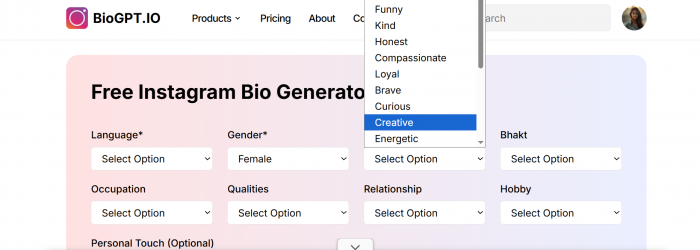
You do not write a prompt. You make a handful of choices. On the Instagram tool I used, you pick a language (English, Hindi and Hinglish were on offer), a tone or "nature" such as cool, calm, funny or honest, an occupation, a hobby, and a relationship status, then you can add one personal line of your own.
Hit generate and you get a stack of ready-to-paste bios, already formatted with line breaks and emoji in place, usually a dozen or more in a single run. You skim, copy the one you like, and you are done. It does ask you to sign in before it generates, which is worth knowing going in.
ChatGPT
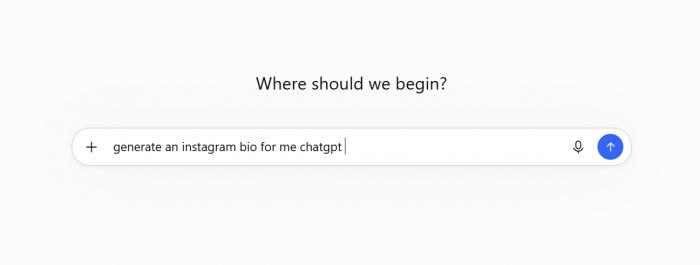
You start from a blank box and a prompt, and the result tracks the quality of the request. A lazy prompt ("write me an Instagram bio") returns a generic, faintly corporate line wrapped in quotation marks that you then delete. A detailed prompt (who you are, the vibe, the platform, the character limit, "short lines with an emoji at the start of each") returns something genuinely good.
It will give you ten variations on request, and you can say "make number three funnier and shorter" and it obliges. The catches are the counting and a little cleanup: stray quote marks, an over-eager extra sentence, the odd hashtag you never asked for.
Head to head
Same briefs, both tools, scored on the things that actually mattered while I was setting up real profiles.
| What I cared about | Bio generator | ChatGPT | My pick |
|---|---|---|---|
| Speed to a usable bio | A few clicks | Needs a written prompt | Bio generator |
| Staying under the character limit | Built around the cap | Estimates, often overshoots | Bio generator |
| Line breaks and emoji formatting | Pre-formatted for the field | Has to be asked, sometimes flattens | Bio generator |
| Options in one run | A dozen or more | As many as you request | Tie |
| Platform presets (IG, X, TikTok) | Yes, per platform | You specify each time | Bio generator |
| Tone and personality control | Pick from a list | Describe anything in words | ChatGPT |
| Long, layered writing (LinkedIn About) | Not its job | Strong | ChatGPT |
| Refining by conversation | Regenerate for a fresh set | Polish the same line step by step | ChatGPT |
| Languages and regional styles | Multiple, regional formats included | Broad, prompt-dependent | Tie |
| Effort and prompt skill needed | Almost none | Some | Bio generator |
| Cost | Free, unlimited on the free plan | Free tier with usage limits | Tie |
Read across the rows and the split is clear: the generator owns the short profile bio, ChatGPT owns the long and the bespoke. That matches the week almost exactly.
Where ChatGPT genuinely wins
I have no interest in underselling the big model. There were tasks where it was plainly the better writer, and I would not hand them to anything else.
Long-form profiles For a LinkedIn About section (up to 2,600 characters) it can hold a thread across several sentences, build a small career narrative, and read like a person rather than a slogan. |
One specific voice Feed it two or three lines you have written before and it matches your rhythm and vocabulary surprisingly closely, which a fixed menu of options cannot do. |
Thinking, not just writing Ask which of three angles positions you best for a particular role and it will reason through the trade-offs instead of just producing more copy. |
Everything in one place When the bio is part of a bigger job (rewrite my bio, then draft three launch captions and a pinned post) it handles the whole set inside one conversation. |
Where a dedicated bio generator wins And the jobs where the smaller tool was simply the faster, safer call, every time. |
The limit is handled for you On the 80-character TikTok bio this was the gap between a single paste and four rounds of trimming words I had already fallen for. |
Formatting arrives done Stacked lines and emoji come pre-arranged for the profile field, not as a paragraph you then have to chop into shape. |
No prompt craft required You do not need to know how to talk to an AI to get a clean result, which counts if you are building a bio for a parent, a small business, or yourself late at night. |
Volume on tap A dozen usable directions in one run is a better launch pad than a single "perfect" answer you immediately start second-guessing. |
The free bio generators worth knowing
If you decide the purpose-built route suits your task, these are the ones I would point a friend toward, starting with the tool I kept parked in an open tab all week.
1. BioGPT.io Top pick
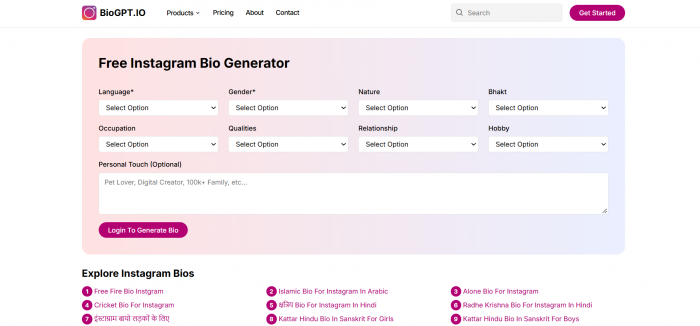
The one that covered the widest spread of platforms without fuss. It has separate generators for Instagram, Facebook, X, TikTok, WhatsApp status and LinkedIn, all free with unlimited generation on the free plan, and it supports several languages including regional ones that most tools skip. Output turns up formatted and in bulk, so you are choosing rather than coaxing. Paid tiers exist for extras like captions, hashtags and usernames, but the core bio generation costs nothing. If you only try one thing from this list, make it this.
2, Ahrefs free bio generator
A clean, no-signup option that turns out a tidy, professional line. Lighter on personality and on formatting, but perfectly fine when you just want something correct and quick.
3. A general writing app with a bio template

Plenty of writing tools ship a "social bio" template. Useful if you already pay for one, though they rarely enforce the platform's character cap for you, so you are back to counting by hand.
The distance between them really comes down to two things: how many platforms a tool covers, and whether the output is pre-shaped for the profile field. BioGPT led on both in my testing, which is why it takes the top slot ahead of a couple of bigger names rather than because of them.
How I actually used them together
By the end of the week I stopped treating this as a contest and started running the two as a single, short process, which got me better bios faster than either one alone. There is a reason I began every Instagram attempt on a purpose-built page instead of a chat box: when the 150-character wall is baked into the tool, I write tighter and stop wrestling with the counter. If you want to feel that difference for yourself, run one brief through a dedicated Instagram bio generator and the same brief through a blank ChatGPT prompt, and watch which one you reach to paste first.
1. Draft the shape
Open a dedicated bio generator and lock the format and length before worrying about a single word. Grab the two or three options that feel closest.
2. Sharpen the words
Paste those into ChatGPT and ask it to tighten the wording, swap a cliché, or make one line hit harder, with a clear instruction not to add length.
3. Count, then post
Drop the final version into a character counter, with emoji counting as two, and only then paste it into the profile. Ten minutes, and it both fits and sounds like you.
My verdict after a week
After seven days of pasting real bios into real profiles, my answer is that this is not the model-versus-tool showdown it usually gets framed as. ChatGPT is the better pure writer, and for anything long or deeply personal I will keep going back to it. But for the job most people mean when they say "write my bio," a short line that has to fit a strict box and look right in the profile, the purpose-built generator won more often, and it won on the thing that quietly wastes the most time: staying under the limit without me babysitting every draft.
If I could keep only one tool for day-to-day profile bios, I would keep the bio generator and save ChatGPT for the moment a brief grows past a single line. That is not the conclusion I expected to reach on day one. It is the one the character counter kept handing me. Match the tool to the task in front of you and you will spend less time editing and a lot more time posting.