


Table of Content
I have spent the better part of the last few years rewriting Facebook bios for local shops, and I can tell you the pattern is always the same. A café owner hands me a page that says something like “Welcome to our page, we love coffee” and then wonders why nobody nearby ever finds it. So we sit down together, open the profile on one screen and the public search results on another, and we start cutting. Every time, the version that works is shorter, plainer, and stuffed with the things a neighbor actually types into a search bar: the town name, what you sell, and how to reach you before lunch.
This guide is the checklist I run through on those calls. There is no fluff about “engagement” here. The goal is narrow and practical: make your bio work for the person standing three blocks away who does not yet know you exist.
First, a clarification most guides skip. Facebook bio means two different things. A personal profile has a short 101-character bio field. A Facebook Page (what a business should use) has an Intro block, a short description, and a longer About section. Local customers are found through your Page, so this guide focuses there.
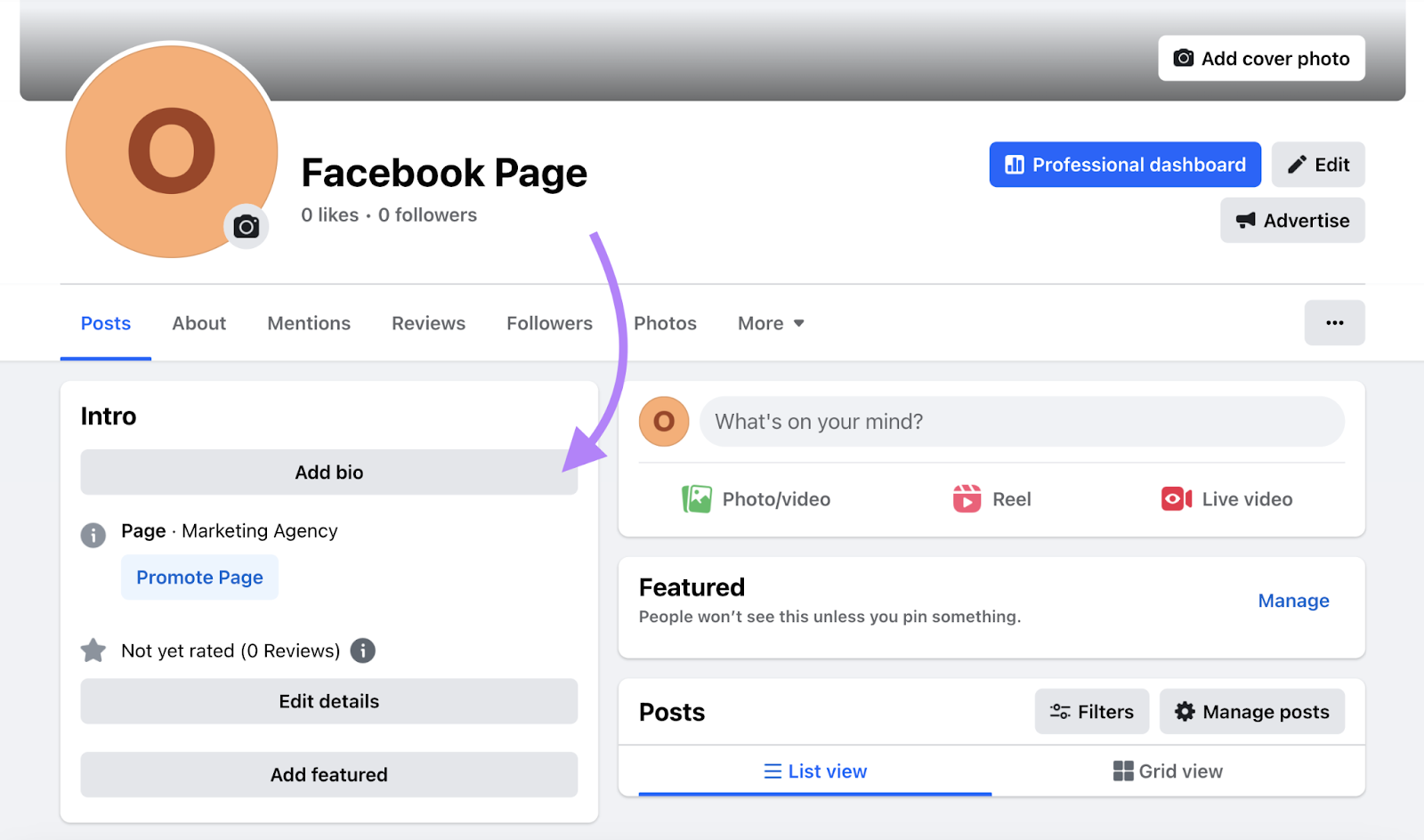
The two places your bio actually lives
Before you write a single word, know which field you are filling in and how much room you have. Facebook trims text in different spots, and a bio that reads well in the editor can get chopped mid-sentence in search. Here is the practical map I keep next to me.
| Field | Where it appears | Rough limit | Priority |
| Profile bio | Personal profile, under your name | 101 characters | Low |
| Page short description | Search snippets, page preview | ~255 characters | High |
| Intro block | Left column of your Page | Category, hours, address, phone | High |
| About / Our Story | About tab, expanded view | Long form | Medium |
| Username (@handle) | Your page URL and mentions | Up to 50 characters | High |
Notice where the priority sits. The short description and the Intro block do the heavy lifting, because those are the fragments Facebook shows before someone clicks. Treat them like a shop sign, not an essay.
The five building blocks of a bio that gets found
Every strong local bio I have written contains the same five ingredients. Miss one and the page still works, but it leaks reach. Include all five in the first 150 characters and you give both the algorithm and a hurried human everything they need.

| # | Block | What to write |
| 1 | What you sell, plainly | Use the term a customer would type, like “wood-fired pizza” or “emergency plumbing.” Not brand-voice fluff. |
| 2 | Where you are | Name the town, suburb, or neighborhood so you read as local, not national. |
| 3 | One reason to pick you | A single proof point: “family-run since 1998,” “same-day repairs,” “gluten-free menu.” |
| 4 | A clear next step | Call, book, message, or visit, matched to your Page button. |
| 5 | Contact you can act on | Phone and hours in the Intro block. “Open till 9pm” can win the sale on its own. |
Lead with what you sell and where. Save personality for the end, because snippets cut off early and your keywords must survive the trim.
Keywords: put the right ones where they count
Facebook is a search engine that people forget is a search engine. When someone types “barber near me” or “vegan bakery Austin,” the platform scans your category, page name, and description. You are not gaming anything by including those phrases. You are simply answering the question being asked.
Where to place local keywords
• Page name: keep your real business name, add a natural descriptor, like “Maple Lane Dental | Dentist in Portland.”
• Category: choose the most specific one Facebook offers, then add secondary categories. This drives more visibility than the description does.
• Short description: work in your service plus your location once, naturally, near the front.
• About section: room for the neighborhoods you serve, nearby landmarks, and secondary services.
One rule that saves you from looking spammy: write the keyword the way you would say it out loud to a customer. If it sounds like a robot stacked five city names in a row, delete four of them.
Match your button to your bio
Your Page has a call-to-action button right under the cover photo. This is the most under-used lever in local marketing. If your bio ends with “book your table” but the button says “Learn More,” you have created a tiny moment of friction. Line them up.
| Business type | Best CTA button | What your bio should say |
| Restaurant / café | Book Now / Order Food | “Reserve a table” or “Order pickup” |
| Salon / clinic | Book Now | “Book your appointment” |
| Trades (plumber, electrician) | Call Now | “Call for same-day service” |
| Retail / boutique | Shop Now / Send Message | “Message us to check stock” |
| Service quotes | Send Message / Sign Up | “Message us for a free quote” |
Step-by-step: optimize your bio in one sitting
Set aside twenty minutes. Open your Page on a laptop, not the phone app, because the desktop editor exposes fields the app hides. Then work down this list in order.
1. Claim a clean username (facebook.com/YourBusiness). Short, no numbers, matches your other profiles.
2. Set the primary category to the most specific match, then add up to two secondary categories.
3. Write the short description with your service plus town in the first line. Read it aloud once.
4. Fill the Intro block completely: address, phone, hours, price range, and website. Empty fields cost you reach.
5. Confirm your name, address, and phone match your Google listing and website exactly. Same spelling, same format.
6. Set the CTA button to the action your bio asks for.
7. Add services with short descriptions and prices where it fits. Each one becomes searchable text.
8. Expand the About / Our Story with neighborhoods served and a short, honest paragraph on who you are.
9. Preview the page in an incognito window and search your own service plus town to see what a stranger sees.
Bio ideas and fill-in templates by business type

Here are the templates I actually hand to clients. Copy the one closest to your trade, swap the bracketed parts, and trim anything that pushes the first line too long. Each one already contains the five building blocks in the right order.
Café / Coffee Shop Barber / Salon Plumber / Trades Dentist / Clinic Restaurant Boutique / Retail Gym / Studio Real Estate Agent Profile bio, 101 characters: “Baker in Leeds, gluten-free cakes to order, DM to book, @sweetleedsbakes.” That is service, place, action, and handle in one breath. |
What separates a good bio from a bad one
After enough rewrites you start to see the same wins and the same wounds. Here is the side-by-side I use to explain it to owners who are attached to their old copy.
| A strong bio does this | A weak bio does this |
| Names the exact product or service in customer language | Opens with “Welcome to our page” and wastes the first line |
| States the town or neighborhood in the first line | Hides the location or omits it entirely |
| Gives one memorable proof point, not five vague ones | Stacks buzzwords like “premium bespoke solutions” |
| Ends with a clear action that matches the button | Leaves the Intro fields blank |
| Keeps hours, phone, and address filled and current | Uses a generic button with no path behind it |
| Reads like a real person talking, out loud, once | Never gets checked in a logged-out search view |
Mistakes that quietly cost you nearby customers
These are not dramatic errors. They are small gaps that leak reach every day without you noticing, which is exactly why they survive so long.
| Mistake | Why it hurts |
| Blank or wrong hours | Local searches spike around “open now.” An empty field pulls you out of that pool, and stale hours breed one-star surprises. |
| Mismatched details | A phone or address that differs across your sites makes search engines lose confidence in all of them. |
| A vague category | “Local Business” is a wasted slot. Pick the narrowest label that fits, then add the rest as secondary. |
| An ugly URL | A long numeric link is unshareable. A clean @handle prints on a receipt, a van, or a flyer. |
| No neighborhoods listed | If you serve five suburbs, name them in the About section. It widens the searches you appear in. |
| A button that dead-ends | A broken booking link loses the customer at the exact moment they were ready to act. |
A quick reference to keep open while you edit
| Element | Do this | Skip this |
| First line | Service + town | “Welcome to our page” |
| Category | Most specific option | Generic “Business” |
| Tone | Spoken, plain, specific | Buzzword salad |
| Contact | Phone, hours, address filled | Empty Intro fields |
| Action | Clear verb + matching button | Generic button, no path |
| URL | Clean @handle | Long numeric link |
| Check | Logged-out search preview | Assuming it looks fine |
Final verdict
I have run this exact process on cafés, clinics, barbershops, and a stubborn family plumbing business that refused to change its bio for two years. The pattern held every single time: the moment the first line said what they sold and where, and the moment the Intro block was fully filled, the “how did you find us” answers started shifting from “a friend” to “I saw you on Facebook.” That is the whole game. A local Facebook bio is not creative writing. It is a shop window that has to answer three questions before someone scrolls past: what is this, where is it, and can I act on it right now.
If you only do three things from this guide, do these: put your service and town in the first line, fill every field in the Intro block, and set a CTA button that matches the action your bio asks for. Come back a week later, check your logged-out search preview, and you will already see the difference. Fix the foundation first, because that is the part that quietly earns you the walk-ins.