

Table of Content
- What Were Pinterest Idea Pins?
- Why Pinterest Discontinued Idea Pins
- What Replaced Pinterest Idea Pins?
- How to Create an Idea-Style Pin Today
- Structure a Multi-Step Pin Properly
- Pinterest Pin Sizes and Formats
- Best Alternatives to Pinterest Idea Pins
- Choose Formats Based on Goals
- Make Pins Easier to Discover
- Repurpose Existing Idea Pin Content
- Mistakes That Hurt Pin Performance
- Measure What Actually Works
- Final Verdict: What to Use Now
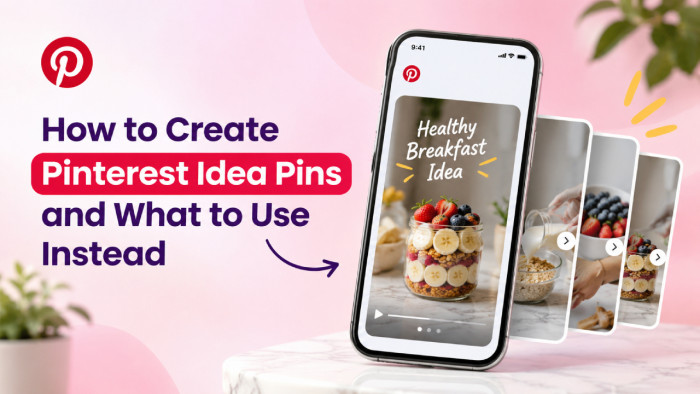
Pinterest Idea Pins once allowed creators to publish multi-page tutorials, visual guides, and short videos. However, Pinterest discontinued the separate Idea Pin creation format in 2023, leaving many older tutorials and publishing instructions outdated.
Creators can still produce similar content using video Pins, image Pins, and Pinterest Collages. The important change is how that content is created and distributed. This guide explains what replaced Idea Pins, how to recreate their storytelling format, and which options make the most sense today.
What Were Pinterest Idea Pins?
Idea Pins were Pinterest's multi-page storytelling format, designed for creators who wanted to explain an idea rather than simply display an image. They supported photographs, videos, text overlays, music, and other creative elements within a sequence of pages.
They were especially useful for recipes, beauty tutorials, DIY projects, home organization, and educational content. A standard image Pin might display a completed project, while an Idea Pin could walk viewers through the entire process.
Their defining features included:
● Multi-page storytelling: Creators could combine photographs, videos, and instructions into a single visual sequence.
● Built-in editing: Text overlays, music, and creative effects helped explain individual steps.
● Native content discovery: Viewers could explore and save tutorials without leaving Pinterest.
● Instructional flexibility: Complex topics could be divided into shorter, easier-to-follow sections.
The main limitation was that Idea Pins originally emphasized on-platform engagement rather than directing visitors to external websites. That distinction became important as Pinterest moved toward a more unified publishing system.
Why Pinterest Discontinued Idea Pins
In May 2023, Pinterest announced that it was combining standard Pins and Idea Pins into one creation experience. Instead of maintaining separate publishing workflows, the platform began bringing their features together.
Previously, creators had to choose between the richer storytelling tools of Idea Pins and the external linking capabilities of standard Pins. Pinterest's changes made image and video publishing more consistent while extending access to creative tools and destination links.
The transition removed the need for a separate Idea Pin creation option. Existing Idea Pins were not immediately deleted, but the dedicated publishing workflow was gradually phased out.
This explains why older guides still reference an Idea Pin button that no longer appears. The name disappeared from the creation process, but creators can still publish instructional and sequential visual content.
What Replaced Pinterest Idea Pins?
Pinterest did not introduce one identical replacement. Instead, its current publishing system offers several formats suited to different types of content.
| Original Idea Pin Use | Current Alternative | Key Difference |
| Multi-step tutorial | Stitched video Pin | Steps play as one continuous video |
| Single visual tip | Image Pin | Presents one focused idea |
| Product demonstration | Video Pin | Shows actions through motion |
| Styling inspiration | Pinterest Collage | Combines images and product cutouts |
| Product recommendations | Product-focused Pin | Connects inspiration with shopping |
Video Pins are the closest replacement for the original Idea Pin experience. They preserve sequential storytelling, although viewers watch the steps as a video rather than swipe through separate pages.
Image Pins are more suitable for standalone ideas and external links, while Collages work better for collections of related visuals.
How to Create an Idea-Style Pin Today
Pinterest's mobile app supports combining multiple photographs or video clips into a stitched video Pin. This is the most direct way to recreate an old Idea Pin tutorial.
Step 1: Start a New Pin
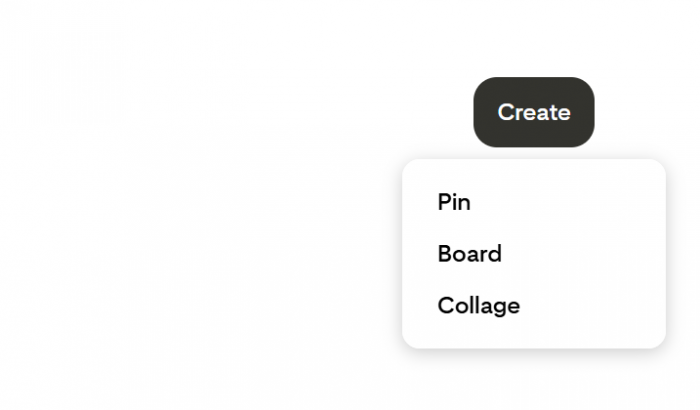
Open the Pinterest mobile app, sign in, tap the Create (+) button, and select Pin. The separate Idea Pin creation option is no longer available.
Step 2: Add Your Content
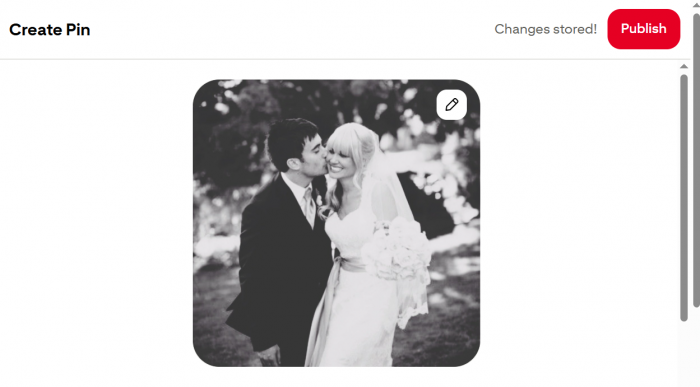
Select the photographs or video clips you want to include. If the app offers the choice, select the option to combine them into one stitched video rather than publish separate Pins.
For a tutorial, arrange the material in the order viewers need to follow. Start with the subject or finished result, then show the individual actions.
Step 3: Edit the Sequence
Use Pinterest's available editing tools to adjust clips and add text or other visual elements. Keep explanations brief enough to read comfortably on a phone screen.
Each clip should communicate one clear point. Avoid displaying long paragraphs over moving footage, especially when the video already demonstrates the action.
Step 4: Select a Cover
Choose Edit cover and select a frame that clearly represents the topic. The cover should tell someone what the Pin contains before they open it.
A finished project, completed recipe, or clearly labeled tutorial generally communicates more than an unrelated decorative image.
Step 5: Add Publishing Details
Enter a descriptive title, useful description, relevant board, and destination link where appropriate. Pinterest also allows relevant topic tagging in supported creation flows.
The title should identify the subject, while the description can explain what viewers will learn or find at the linked destination.
Step 6: Review and Publish
Check the visual order, text readability, cover, and destination before publishing. Business accounts may also have access to scheduling options.
Desktop limitation: Uploading multiple images through Pinterest's desktop creator generally creates separate Pins rather than one stitched video. Desktop users can assemble a finished video in an external editor and upload it as a video Pin instead.
Structure a Multi-Step Pin Properly
An effective tutorial needs more than a sequence of attractive images. Each frame should move the explanation forward, and the viewer should understand the intended result before investing time in the details.
Consider a tutorial titled “How to Organize a Small Kitchen Drawer.”
| Frame | What to Show |
| Opening | Finished, organized drawer |
| Step 1 | The cluttered drawer before organizing |
| Step 2 | Items sorted into categories |
| Step 3 | Dividers positioned inside the drawer |
| Step 4 | Items arranged in their sections |
| Ending | Completed result and a practical takeaway |
Opening with the finished result establishes the purpose immediately. The following clips explain how to achieve it, while the final frame reinforces the outcome.
This approach is particularly useful for recipes, transformations, DIY projects, and practical demonstrations. For more detailed tutorials, divide complicated actions into additional clips rather than overcrowding individual frames.
Pinterest Pin Sizes and Formats
Pinterest supports different image and video dimensions, but vertical content is generally better suited to mobile viewing.
| Content Type | Recommended Format |
| Standard image Pin | 1000 × 1500 pixels, 2:3 |
| Full-screen video Pin | 1080 × 1920 pixels, 9:16 |
| Alternative vertical video | 2:3 or 4:5 |
| Pinterest Collage | Flexible visual composition |
Organic video Pins generally support durations between four seconds and five minutes. Pinterest also supports common video file formats such as MP4 and M4V, with MOV available through supported mobile workflows.
Titles can contain up to 100 characters, while descriptions support up to 800 characters. However, not all text is visible in every browsing context, so the visual needs to communicate the main idea independently. For full-screen videos, keep essential text away from the edges where Pinterest's interface may overlap the content.
Best Alternatives to Pinterest Idea Pins
The right alternative depends on whether the goal is to explain a process, attract website visitors, promote products, or collect visual inspiration.
1. Image Pins for Searchable Content
Image Pins work well for blog articles, visual tips, checklists, and completed projects. They allow creators to present one clear idea and connect it to a relevant external page.
For example, a recipe creator can publish an image of the finished dish with a descriptive title and link to the full recipe. The Pin introduces the content, while the website provides the detailed instructions.
2. Video Pins for Tutorials
Video Pins are better suited to processes involving movement or multiple steps. Cooking techniques, beauty tutorials, home improvement projects, and transformations benefit from showing actions rather than describing them through static images.
Creators can combine photographs or footage into one video to preserve the sequential structure of the original Idea Pin format.
3. Product Pins for Shopping
Product-focused Pins connect visual inspiration with shopping opportunities. They are useful for businesses, retailers, and creators promoting relevant products.
Shopping capabilities depend on account eligibility, product information, and Pinterest's supported merchant tools. Publishing an ordinary image with a product link does not automatically create a fully shoppable product listing.
4. Pinterest Collages for Inspiration
Pinterest Collages allow creators to arrange image cutouts, products, and visual elements into a single composition.
They are particularly useful for outfit combinations, interior design concepts, mood boards, and gift collections. However, Collages are designed for visual exploration rather than sequential tutorials, so they are not direct substitutes for every Idea Pin.
Choose Formats Based on Goals
A format that attracts saves may not be the best choice for generating website traffic. Pinterest supports different user behaviors, and the publishing format should reflect the desired outcome.
| Creator Goal | Recommended Format | Reason |
| Drive blog traffic | Image Pin | Connects a visual idea to an article |
| Teach a process | Video Pin | Demonstrates individual actions |
| Share quick tips | Image Pin | Communicates information immediately |
| Promote products | Product-focused Pin | Supports shopping intent |
| Build visual collections | Collage | Groups related images and products |
The important question is what viewers should do after discovering the content. A tutorial should help them understand a process, while a blog preview should give them a clear reason to visit the linked article.
Make Pins Easier to Discover
Pinterest operates as a visual discovery and search platform. A clear profile also matters, and these Pinterest bio ideas can help creators communicate their niche. Users actively look for recipes, tutorials, design inspiration, products, and practical solutions, making search relevance an important part of content creation.
A visually appealing Pin still needs enough context for Pinterest to understand its subject.
● Use descriptive titles: “Small Kitchen Organization Ideas” explains the content more clearly than a vague headline such as “Try This Today.”
● Write meaningful descriptions: Include relevant search terms naturally while explaining what the viewer will find.
● Choose relevant boards: Place content in collections that reflect its subject rather than unrelated categories.
● Match content with intent: A Pin promising a tutorial should provide useful instructions or link to the complete guide.
● Use accurate destinations: External links should lead to the specific article, product, or resource described.
Avoid relying entirely on curiosity-driven language. Pinterest users often search with a specific goal, so direct titles and relevant visuals can make content easier to evaluate.
Repurpose Existing Idea Pin Content
Older Idea Pin concepts can still be valuable, particularly when the original photographs, video clips, and instructions are available. Rather than uploading the same material repeatedly, adapt it into formats that serve different purposes.
For example, an Idea Pin explaining five ways to style a bookshelf can become:
● A short video Pin combining the original styling methods into one visual demonstration.
● An image Pin showing the completed bookshelf and linking to a detailed styling article.
● A Pinterest Collage featuring decorative objects, books, and related design inspiration.
Each version offers something different. The video explains the process, the image directs viewers to additional information, and the Collage presents a collection of visual ideas.
Creators should also update old captions, covers, and calls to action. Material originally designed for an Idea Pin may need different text or a destination link when published through the current Pin system.
Mistakes That Hurt Pin Performance
Even well-designed Pins can be difficult to discover or understand when basic publishing decisions are overlooked.
1. Starting with too much explanation: A lengthy introduction delays the useful information. Show the topic or intended result early, especially in tutorial videos.
2. Using unreadable text: Small fonts and crowded overlays are difficult to follow on mobile screens. Use brief phrases and sufficient contrast.
3. Selecting the wrong format: A complex demonstration may be difficult to explain through one image, while a simple visual tip rarely requires a lengthy video.
4. Publishing misleading links: A destination should provide the information promised by the Pin. Unrelated landing pages create unnecessary friction.
5. Repeating identical designs: Uploading near-duplicate Pins with only minor wording changes offers limited additional value. Develop different visual angles or content purposes instead.
Improving these elements is more useful than adding unnecessary effects or increasing publishing volume without a clear content strategy.
Measure What Actually Works
Pinterest Analytics helps creators understand how their content is discovered and what actions viewers take afterward.
Four measurements are particularly useful:
| Metric | What It Indicates |
| Impressions | How often the Pin appeared on screen |
| Saves | Interest in keeping or revisiting the content |
| Pin clicks | Interest in opening the Pin |
| Outbound clicks | Traffic sent to an external destination |
The importance of each metric depends on the publishing goal. A tutorial receiving 20,000 impressions and 600 saves may be valuable for building visibility. However, a blog-focused Pin receiving 5,000 impressions and 200 outbound clicks may contribute more directly to website traffic.
Video creators should also examine viewing metrics, including video views and average watch time, to identify whether viewers are staying long enough to follow the content. Comparing performance according to the intended result provides more useful information than treating impressions as the only measure of success.
Final Verdict: What to Use Now
Pinterest Idea Pins are no longer available as a separate creation format, but their storytelling purpose remains relevant.
Stitched video Pins are the closest alternative for multi-step tutorials, transformations, and demonstrations. Image Pins are better for searchable ideas and website traffic, while product-focused Pins and Collages serve shopping and visual inspiration.
The more useful approach is to stop treating Idea Pins as a format that needs replacing exactly. Pinterest's current publishing tools give creators several ways to present the same subject, each suited to a different objective. Choosing the format around the content and intended viewer action matters more than recreating the old Idea Pin experience.