

Table of Content
- Why Community Posts Matter
- How to Create YouTube Community Posts
- Choosing the Right Post Format
- Writing Posts That People Actually Answer
- Seven Community Post Ideas Worth Using
- Using Polls to Understand Subscribers
- Turning Comments Into Conversations
- Connecting Posts With Video Uploads
- Measuring Community Post Performance
- Mistakes That Reduce Engagement
- Final Verdict
Not every subscriber watches every video, and uploading more content does not automatically create a loyal audience. YouTube Community posts offer another way to connect with viewers through polls, questions, images, and discussions between uploads.
However, posting regularly is not enough. The real value comes from understanding what subscribers care about, encouraging useful conversations, and turning their feedback into better content. Here's how to make Community posts a meaningful part of a YouTube engagement strategy.
Why Community Posts Matter
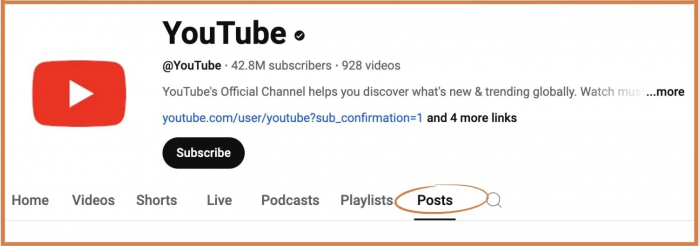
YouTube Community posts allow creators to interact with viewers without producing another video. Unlike regular uploads, which require viewers to commit time to watching, posts encourage smaller interactions such as voting in a poll, answering a question, or sharing an opinion.
These posts appear on a channel's Posts tab and may also reach viewers through the homepage, Subscriptions feed, and other recommendation surfaces. Consequently, their visibility is not restricted to existing subscribers.
Their biggest advantage is the information they reveal about audience interests. A creator asking subscribers which editing problem they struggle with can identify potential video topics while encouraging participation.
However, engagement alone does not indicate audience loyalty. A popular poll may attract casual viewers, while a smaller discussion involving returning subscribers can reveal more about the channel's core audience. Both have value, but they serve different purposes.
How to Create YouTube Community Posts
Creating a Community post takes only a few steps, although the available options depend on the format and device.
1. Open YouTube: Sign in to your channel and click the Create button, then select Create post.
2. Choose a format: Write a text update or select an image, poll, quiz, GIF, or supported media option.
3. Prepare the content: Add your message, upload the required media, or enter the available answers for a poll or quiz.
4. Publish or schedule: Review the post and publish it immediately or schedule it for a later time.
5. Monitor responses: Open the channel's Posts tab to review interactions and respond to subscribers.
On mobile, use the Create button in the YouTube app and select Post. YouTube restricts standard posts for supervised accounts and channels designated Made for Kids.
Creators should also understand that Community posts differ from YouTube's separate Communities feature. Posts are published by the channel owner, while eligible channels can enable Communities where subscribers initiate their own discussions.
Choosing the Right Post Format
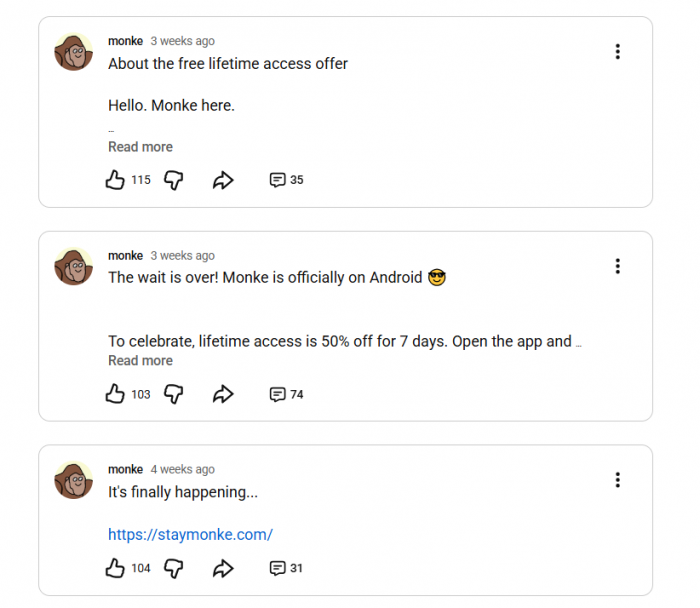
Different Community post formats encourage different behaviors. Choosing one should depend on the information or interaction the creator wants rather than which format generally attracts the most attention.
| Post Format | Best Use | Expected Interaction |
| Text | Questions and channel updates | Detailed comments |
| Poll | Topic selection and preferences | Quick votes |
| Image | Behind-the-scenes content | Reactions and discussions |
| Quiz | Educational challenges | Knowledge-based participation |
| GIF | Reactions and short previews | Casual engagement |
| Video | Sharing existing uploads | Video discovery and discussion |
Polls are effective for collecting structured preferences, but they rarely explain why someone selected an answer. Text questions require more effort yet often produce more detailed feedback.
Image posts work particularly well when the visual itself carries information, such as comparing thumbnail designs or sharing progress on a project.
The most useful approach is to match the format to the purpose. A creator comparing two designs needs an image poll, while someone investigating a recurring subscriber problem benefits more from an open-ended question.
Writing Posts That People Actually Answer
A Community post needs a clear reason for subscribers to participate. Announcements provide information, but questions connected to recognizable experiences generally create stronger opportunities for discussion.
For example, consider these two posts.
Basic announcement: "New video about YouTube growth coming tomorrow. Stay tuned!"
More engaging alternative: "I'm covering YouTube growth mistakes in my next video. Which problem has been harder for your channel: getting people to click or keeping them watching?"
The second version introduces a specific problem and asks subscribers to make a relevant choice. Their answers can also influence which examples receive greater attention in the video.
Three writing principles are particularly useful:
● Ask one focused question rather than several unrelated ones. Subscribers should understand the subject immediately and know what kind of response is expected.
● Connect the question to a genuine audience interest. Questions about problems, decisions, or experiences usually provide more useful feedback than broad requests for opinions.
● Explain how the response matters. Mentioning that poll results will help select an upcoming tutorial gives subscribers a clear reason to participate.
Avoid ending every post with generic instructions such as "Like and comment below." When the content contains a meaningful question, the invitation to respond already exists.
Seven Community Post Ideas Worth Using
A channel needs more than repeated polls and upload announcements. Different post ideas encourage different types of engagement while keeping discussions connected to the channel's subject.
1. Let subscribers select an upcoming topic : "Which tutorial would help you more next week: improving YouTube thumbnails or understanding audience retention graphs?"
This allows viewers to contribute to the publishing schedule while giving the creator a measurable indication of interest.
2. Identify a recurring audience problem : "What's the most difficult part of editing your videos: cutting unnecessary footage, fixing audio, or finding suitable music?"
Responses reveal practical difficulties that can become future tutorials or supporting content. These insights can also guide YouTube script writing, helping creators address the questions subscribers actually want answered.
3. Compare two creative decisions : "I'm deciding between two thumbnail layouts. One highlights the final result, while the other shows the editing process. Which communicates the topic more clearly?"
Including both images makes the comparison more specific and useful.
4. Test subscriber knowledge : "Which YouTube metric tells you how often viewers click after seeing a counted thumbnail impression?"
A quiz can reinforce information from an earlier video while encouraging viewers to check their understanding.
5. Revisit previous advice : "Last month, I shared several ways to improve video titles. Which suggestion have you applied, and what changed?"
This generates feedback about the usefulness of existing content rather than focusing entirely on new uploads.
6. Acknowledge viewer suggestions : "Several subscribers requested a detailed explanation of audience retention graphs. I'm covering that next. Which part of the graph needs the clearest explanation?"
Acknowledging suggestions demonstrates that comments influence the channel's editorial decisions.
7. Start a niche-specific discussion : "Do you prefer learning a new editing technique through a short demonstration or a complete step-by-step tutorial?"
The responses can help determine video length, presentation style, and the level of explanation viewers expect.
These examples are effective because they connect participation with something relevant to the audience. Random questions may generate votes, but topic-specific discussions provide information that remains useful after the post disappears from viewers' feeds.
Using Polls to Understand Subscribers
Polls provide quick audience feedback, but the quality of that feedback depends on how the question and answers are structured. YouTube supports text and image polls with up to four answer options. A well-designed poll compares clear alternatives without combining several ideas into one choice.
For example, asking "Do you like my videos?" provides limited insight because most participants already have some interest in the channel. Asking which tutorial should come next produces information that can influence publishing decisions.
Poll results also require careful interpretation. Votes represent participating viewers, not the entire subscriber base. The results can be affected by the people YouTube shows the post to and their willingness to respond.
The most overlooked step is what happens afterward. If subscribers select a topic, acknowledge the outcome and explain the next decision. Repeatedly collecting opinions without responding to them turns participation into a one-sided activity.
Turning Comments Into Conversations
A post receiving comments is not necessarily creating meaningful interaction. The creator's response determines whether discussions develop or stop after the first reply. Generic responses such as "Thanks for sharing" acknowledge a comment but offer little opportunity for further participation. Addressing the substance of a comment is more productive.
For example, if someone mentions struggling with low audience retention, asking whether viewers leave during the introduction or midway through the video creates a more specific discussion. Other subscribers facing similar issues can contribute their experiences.
Creators should prioritize thoughtful questions, recurring problems, and constructive criticism rather than attempting to answer every comment. Consistent moderation also matters because spam and personal attacks discourage useful participation.
A healthy discussion does not require the creator to control every exchange. Subscribers sharing advice, disagreeing respectfully, or helping one another can make the Posts tab more valuable than a collection of creator announcements.
Connecting Posts With Video Uploads
Community posts become particularly useful when connected to the channel's publishing process. Rather than using them only to announce new uploads, creators can build discussions before and after releasing videos.
Before publication, a poll can identify what viewers already understand or which problems need additional explanation. This feedback can influence the final script, examples, or presentation.
On publishing day, share the video with a specific reason to watch. Instead of repeating the title, explain the question it answers or highlight a useful detail that subscribers may otherwise overlook. For longer tutorials, mentioning useful YouTube chapters can also help viewers find the sections most relevant to them.
After publication, return to the topic through a follow-up question, additional explanation, or discussion about viewers' experiences applying the advice.
This approach gives Community posts a different role at each stage. It also reduces repetitive promotion, which can become less useful when subscribers already encounter the same videos through their Home and Subscriptions feeds.
How Often Should You Post?
YouTube does not prescribe a universal Community posting frequency. The appropriate schedule depends on how frequently the channel uploads videos, the audience's interests, and the creator's ability to maintain discussions.
Starting with two or three purposeful posts each week offers enough variety to compare responses without publishing unnecessary updates.
| Day | Content Type | Purpose |
| Monday | Topic poll | Collect audience preferences |
| Wednesday | Behind-the-scenes image | Share progress and context |
| Friday | Video-related question | Encourage discussion |
This is a starting framework rather than a fixed rule. Channels publishing videos daily may need fewer announcements, while channels with longer production cycles can use Community posts to maintain contact between releases.
Scheduling content saves time, but engagement still requires attention after publication. A channel that publishes polls regularly without checking the responses is collecting information without using it.
Measuring Community Post Performance
YouTube Studio provides Posts analytics that help creators understand which topics attract attention and how viewers respond.
The most useful metrics include impressions, likes, subscriber gains, and top-performing posts. Poll votes and comments provide additional information about participation.
| Metric | What to Examine |
| Impressions | How frequently the post was displayed |
| Likes | Positive audience reactions |
| Poll votes | Preferences among participating viewers |
| Comments | Depth and relevance of discussion |
| Subscribers gained | Audience growth attributed to posts |
These numbers should not be treated equally. A behind-the-scenes photograph receiving 500 likes demonstrates positive interest, while a poll attracting 120 votes about future tutorials can provide more actionable editorial information.
Comments deserve similar attention. Ten detailed responses identifying the same problem may be more useful for content planning than dozens of short reactions.
Creators should compare similar formats across several weeks rather than judging a strategy from one successful post. Reviewing which subjects attract returning participants, which questions produce useful answers, and which discussions influence future videos provides a clearer picture of engagement quality. The goal is to understand subscriber behavior, not simply increase every available metric.
Mistakes That Reduce Engagement
Several common posting habits weaken engagement even when the channel publishes consistently.
● Repeated video promotion: Sharing every upload without additional context gives subscribers little reason to interact with the post itself.
● Unrelated engagement questions: Random polls may attract participation but reveal little about the interests that brought viewers to the channel.
● Ignoring audience feedback: Asking subscribers to choose topics without acknowledging the results reduces the perceived value of participation.
● Publishing similar posts too frequently: Repetition makes discussions predictable and can distract from more relevant updates.
● Avoiding constructive criticism: Comments identifying unclear explanations or missing details can improve future content and should not automatically be treated as negativity.
Another mistake is assuming that successful posts must attract large numbers. A smaller discussion involving people genuinely interested in the channel's subject can provide more useful information than a broadly appealing poll.
Building a Subscriber-Led Community
The long-term purpose of Community posts is to establish a relationship in which subscribers contribute more than views and likes. Their questions, suggestions, and experiences can influence future videos and help other viewers understand the channel's subject.
Recurring discussions, audience-selected tutorials, and follow-up conversations create opportunities for this participation to continue beyond individual uploads.
YouTube's separate Communities feature extends the concept by allowing subscribers on eligible channels to initiate discussions of their own. While regular Posts are creator-led, Communities offer a dedicated space for more subscriber-driven interaction.
Both features benefit from consistent moderation and a clear editorial focus. The strongest communities develop around shared interests and useful conversations rather than constant requests for engagement.
Final Verdict
YouTube Community posts work best when creators use them to understand subscribers rather than simply attract more reactions. Polls can influence content decisions, thoughtful questions uncover audience problems, and discussions extend the value of existing videos.
A practical strategy combines relevant post formats, a manageable publishing schedule, and regular attention to responses. Performance metrics help identify what attracts viewers, but meaningful feedback reveals what keeps them interested. The goal is not to publish more Community posts. It is to make each interaction useful enough that subscribers have a reason to participate and return.