


Table of Content
The Sitemap Generator on UploadArticle.com is a free, browser-based tool that crawls a website and produces a standards-compliant XML sitemap file in seconds. No account. No installation. Paste the URL, click generate, download the file.
Bottom line up front: this tool is well-suited to bloggers, freelancers, and small business owners who need an XML sitemap quickly without installing a WordPress plugin or learning a desktop crawler. It is not the right pick for high-velocity publishers or enterprise sites that need automatic regeneration on every content change.
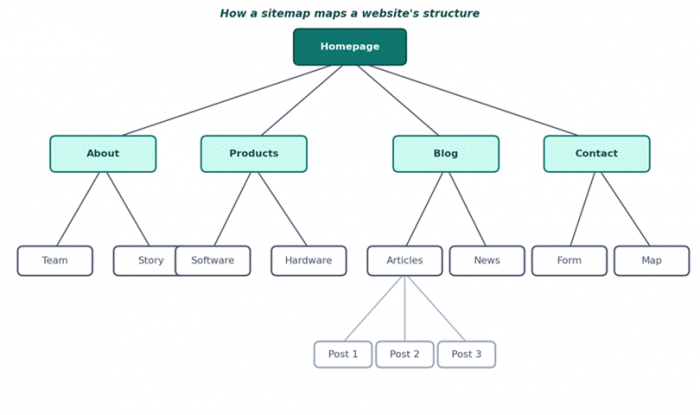
Figure 1: A sitemap captures the parent-child structure of every page on a site
Why sitemaps still matter in 2026
Search engines discover most pages through internal links, but that discovery can take weeks for new sites or pages buried deep in the structure. A sitemap shortens that timeline by handing crawlers an explicit list of URLs to fetch, along with last-modified timestamps that signal freshness.
| Metric | Figure | Source |
|---|---|---|
| Organic search share of trackable traffic | 53% | BrightEdge |
| Google daily search queries | 8.5 billion+ | Statista |
| Daily IndexNow URL submissions, 2026 | 5 billion+ | Pressonify (IndexNow protocol data, Feb 2026) |
| Global SEO software market value, 2026 | USD 96.42 billion | Precedence Research |
Sources: market reports cited above, checked May 2026
Two shifts make sitemaps more relevant in 2026, not less. First, IndexNow, supported by Bing, Yandex, Naver, Seznam, and Yep, lets sites push update notifications instead of waiting for crawls. Second, AI answer engines including ChatGPT Search (which uses Bing's index) and Perplexity rely on sitemap freshness signals. Per Perplexity's own crawler documentation, PerplexityBot follows robots.txt and reads sitemaps for content discovery.
The implication for any site, regardless of size, is that the sitemap has shifted from a passive index to an active discovery layer. A well-maintained sitemap accelerates the cycle from publish to indexed, which compounds across both traditional Google search and the newer AI surfaces that increasingly intercept the same queries.
What the UploadArticle.com Sitemap Generator is
The tool is a web-based external crawler. Users open it in a browser, paste a homepage URL, and the tool follows internal links from that starting point to build a list of discovered pages. The output is a single sitemap.xml file conforming to the sitemaps.org 0.9 schema, each URL listed with a loc tag and optional lastmod and changefreq hints.
Two practical points matter. The tool is external to the site, so it has no connection to the CMS or database; it can only find pages reachable through internal links from the starting URL. Orphan pages and content rendered exclusively in JavaScript will not be captured. Independent reviewer testing published by GiftAMelody in April 2026 confirms the workflow is manual on-demand rather than automatically regenerating on content changes.
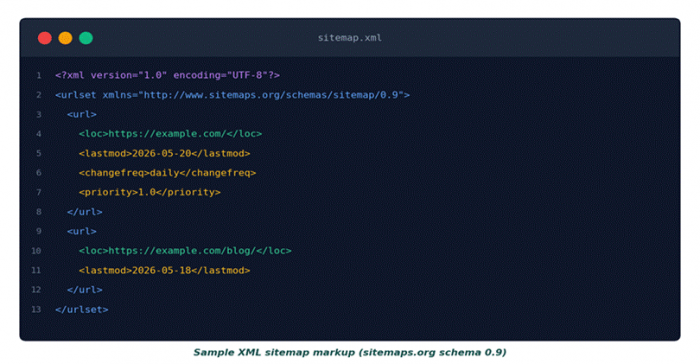
Figure 2: The tool produces output following the standard sitemaps.org schema
Key features at a glance
The feature set is deliberately narrow. The tool focuses on one job and avoids the configuration surface area of WordPress plugins or desktop crawlers.
| Feature | Detail |
|---|---|
| Tool type | Web-based external crawler |
| Price | Free, no paid tier |
| Signup required | No |
| Output format | XML sitemap file conforming to sitemaps.org 0.9 schema |
| Site compatibility | Any publicly accessible website regardless of CMS |
| Customisation | Update frequency, priority levels, URL include/exclude |
| Crawl method | Follows internal links from the starting URL |
| Automation | Manual on-demand regeneration |
| Limitations | No JavaScript rendering, no orphan-page detection |
Features verified against the vendor's product page and independent reviewer testing (GiftAMelody, April 2026), checked May 2026
Customising what the tool generates
The generator exposes a small set of controls that map directly to fields in the sitemaps.org schema. Knowing what each control does makes the output more useful to search engines.
Update frequency (changefreq)
Sets a hint for how often a URL is expected to change. Common values are daily for news and blog index pages, weekly for active e-commerce categories, and monthly for static service pages. Google has publicly stated it largely ignores changefreq as a directive, but Bing and other engines still use it as a soft signal.
Priority
A decimal between 0.0 and 1.0 indicating relative importance within the site. Homepages typically score 1.0, pillar content around 0.8, deeper archive pages around 0.3. Like changefreq, priority is a hint rather than a guarantee, and Google places little weight on it. The value of setting it carefully is more for Bing and IndexNow-participating engines than for Google.
Include and exclude URLs
The tool allows manual filtering of the URL list before export. Common exclusions: tag and category archive pages with thin content, paginated archive URLs after page two, expired promotion pages, and any URL marked noindex in its meta tags. Cleaning the list here keeps the sitemap focused on URLs that should actually appear in search results.
How to use it: six steps from URL to indexed
The entire process from open to submitted typically completes in under ten minutes for a straightforward site. The diagram below visualises the sequence; the same steps are described in detail underneath.
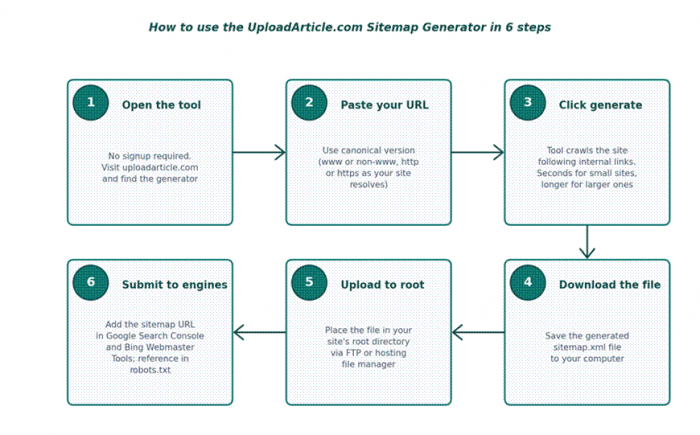
Figure 3: The six-step workflow from opening the tool to submitting the sitemap
1. Open the tool. Visit uploadarticle.com and locate the Sitemap Generator section. No account or download is required.
2. Enter the canonical URL. Paste the homepage URL in the exact format the site resolves to, whether that is www or non-www, http or https. Mismatched canonicals are the most common cause of incomplete crawls.
3. Generate the sitemap. Click the generate button. The tool crawls the site, follows internal links, and compiles discovered URLs into XML. Small sites finish in seconds; larger sites take longer.
4. Download the file. Save the generated sitemap.xml file locally. The output is plain XML that uploads directly without modification.
5. Upload to the site root. Place the file in the site's root directory via FTP or the hosting file manager. The standard public URL ends in /sitemap.xml.
6. Submit to search engines. Add the sitemap URL inside Google Search Console under Sitemaps, and inside Bing Webmaster Tools. Add a Sitemap directive in robots.txt to help other crawlers find the file.
Who this tool is for
The strongest fit is for site owners who want an XML sitemap without learning a CMS plugin or installing desktop software. That covers three groups in particular: bloggers and small business owners on platforms where a sitemap plugin is not native or not desired; freelancers managing client sites across mixed platforms who need a single approach that works everywhere; and developers shipping static sites, JAMstack builds, or custom CMS setups without built-in sitemap output.
Cases where another tool fits better
Sites that publish daily or have rapidly changing inventories should look at automated alternatives. The same applies to JavaScript-heavy single-page applications, since the external crawler cannot render client-side content reliably. Enterprise sites running scheduled audits will need the depth of a tool like Screaming Frog. WordPress sites already running Yoast SEO or Rank Math have automatic sitemap generation built in and do not need an external generator at all.
Side-by-side against free alternatives
The comparison below positions the UploadArticle.com tool against three common alternatives. Each tool fits a different workflow, so the right answer depends on the platform and publishing cadence.
| Feature | UploadArticle.com | XML-Sitemaps.com | Yoast SEO | Screaming Frog |
|---|---|---|---|---|
| Price | Free | Free up to 500 URLs | Free, Premium USD 99/year | Free up to 500 URLs |
| Signup required | No | No | WordPress install | Desktop install |
| Platform | Any public site | Any public site | WordPress only | Any public site |
| Automation | Manual | Manual | Automatic on content change | Manual or scheduled |
| URL cap on free tier | Not publicly stated | 500 | Unlimited | 500 |
| Best for | Quick sitemap, no install | One-off small sites | WordPress automation | Technical audits |
Sources: vendor pricing pages (xml-sitemaps.com, yoast.com, screamingfrog.co.uk), checked May 2026
The trade-off is clear. UploadArticle.com swaps automation and advanced features for zero friction. For a single sitemap on a site that updates monthly, that trade is usually worth it. For high-velocity sites, it is not.
Best practices after generating your sitemap
Generating the file is half the work. Submission, freshness signals, and discipline around updates are what turn a static XML file into an indexing tool.
Submit through Google Search Console
Inside Google Search Console, open the Sitemaps section and paste the full sitemap URL. Google fetches the file on its own schedule from that point forward and reports indexing errors against it. Without submission, the sitemap still works, but the feedback loop disappears.
Pair with IndexNow for Bing and Yandex
Google publicly tested IndexNow in 2021 and has not adopted it as of mid-2026, but Bing, Yandex, Naver, Seznam, and Yep process more than 5 billion IndexNow URL submissions per day according to Pressonify's February 2026 protocol data. For non-Google traffic, IndexNow accelerates discovery dramatically. Bing Webmaster Tools includes an IndexNow integration that pairs with any sitemap.
Add the sitemap reference to robots.txt
Add a single line at the bottom of robots.txt: Sitemap: https://example.com/sitemap.xml. Most major crawlers read robots.txt before crawling and will pick up the sitemap reference automatically. This complements rather than replaces Search Console submission.
Regenerate after significant content changes
Because the UploadArticle.com tool is manual, the sitemap goes stale on its own. Re-run the generator after publishing batches of new content, after major URL restructures, or after a site migration. Monthly regeneration is sufficient for stable sites; weekly for active publishers.
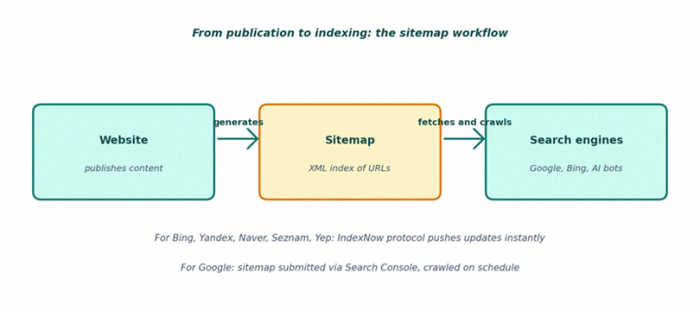
Figure 4: The sitemap workflow, from publication to indexing across Google and IndexNow engines
Troubleshooting common issues
Three issues account for most failed or incomplete crawls. Each has a clear fix that takes seconds once the cause is identified.
The tool misses pages on the site
This almost always means the missing pages are orphans, reachable only through navigation menus rendered in JavaScript, or buried behind login walls. The external crawler can only follow standard HTML anchor links from the starting URL. Fix: add internal text links from indexed pages to the orphan URLs, then regenerate. For JavaScript-rendered navigation, server-side rendering or a static HTML fallback solves the underlying issue.
The generated file does not validate
Run the generated XML through Google Search Console's sitemap report, which flags schema errors specifically. The most common cause is a stray non-UTF-8 character in a URL or a redirect chain that resolves to a different canonical than the one listed. Fix the source URLs and regenerate rather than editing the XML by hand.
Search engines do not show the sitemap as processed
After submitting in Google Search Console, the sitemap can sit in Pending status for several days before Google fetches it. This is normal for new sites. If the status remains Pending beyond two weeks, verify the sitemap URL returns a 200 response when fetched directly, and confirm robots.txt does not block crawler access to the file.
Common mistakes to avoid
•Listing pages set to noindex alongside indexable URLs, which creates a conflicting signal.
•Letting the sitemap go stale during a site migration without regenerating from the new URL structure.
•Forgetting to update the sitemap reference in robots.txt after moving the file path.
•Ignoring image and video tags on media-heavy sites, which leaves Google Images traffic unclaimed.
•Submitting the sitemap once and never regenerating, then wondering why new pages take weeks to index.
Final verdict and a buying lens
The UploadArticle.com Sitemap Generator fits a narrow but real workflow: site owners who want a valid XML sitemap quickly, without learning a CMS plugin or installing software. It is honest about what it does: crawl from a URL, output XML, hand the file back. It does not try to be an automation platform, an SEO audit tool, or a content planner.
For that defined job, the tool is a clean choice. For everything beyond it, the comparison table above points to the better-fit alternative. The worst outcome for any site is a sitemap nobody owns; the second worst is using a tool that promises more than it delivers. This tool avoids both by being narrow on purpose, and that narrowness is exactly what makes it useful for the audience it is built for.