

Table of Content
For the longest time, I believed that once an Instagram story disappeared, it was gone forever. Like most people, I assumed those 24-hour moments simply vanished into the digital void. It wasn’t until I wanted to revisit and share a meaningful memory that I discovered Instagram’s story archive. What felt like a hidden feature completely changed how I now use my profile.
Unarchiving a story helped me reconnect with my past moments and gave me the power to shape my profile the way I wanted. Instead of losing memories to time, I learned how to preserve and showcase them again. Here’s exactly how I did it, along with everything I discovered along the way.
Discovering My Hidden Story Archive
One day, while scrolling through my profile, I realized that many moments that once defined my journey were no longer visible. Trips, small celebrations, creative posts, everything I had shared through stories was missing. Curious, I explored Instagram’s settings and found the archive section.
What I found felt like a private memory vault. Every story I had ever posted was stored there, arranged by date. From that moment, I realized I could bring any memory back whenever I wanted, without reposting or starting from scratch.
The Steps I Used to Unarchive a Story
When I finally decided to unarchive my first story, this is the exact path I followed, step by step:
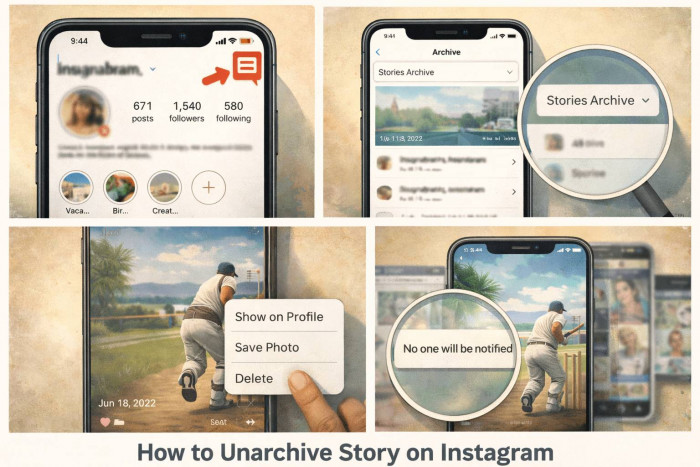
1. I opened Instagram and went straight to my profile by tapping my profile picture in the bottom-right corner.
2. In the top-right corner, I tapped the three-line menu icon to open the main options.
3. From the menu, I selected “Archive.”
This opened my archived content.
4. At the top of the archive screen, I checked the dropdown menu.
If it showed the Posts Archive, I switched it to Stories Archive to view my saved stories.
5. I scrolled through my archived stories until I found the one I wanted to restore.
6. I tapped on the story, which opened it exactly as it looked when it was first posted.
7. In the bottom-right corner, I tapped the three-dot icon.
8. From the options, I selected “Show on Profile.”
9. Instantly, the story was unarchived and appeared again inside my highlights section.
10. If the story had already been part of a highlight earlier, it returned there automatically.
If not, Instagram gave me the option to add it to a new or existing highlight.
What I Noticed After Unarchiving
The story did not return as a fresh 24-hour story, which I initially expected. Instead, it stayed permanently visible in my highlights. What surprised me most was that no one was notified. It felt like a quiet, personal update rather than a public announcement.
This made me realize that unarchiving is a subtle way to refresh your profile while keeping full control over what people see.
Common Mistakes I Almost Made
At first, I thought unarchiving would push the story back to the top of everyone’s feed, but that never happens. I also assumed my followers would be notified, which isn’t true. Another mistake I almost made was thinking my stories were deleted when I couldn’t find them. Later, I realized the archive setting must be turned on for stories to be saved.
These small misunderstandings can make people feel stuck, but once you know how the system works, it becomes very simple.
When Unarchiving Makes the Most Sense
I now use this feature whenever I want to bring back a meaningful moment, whether it’s from a vacation, a birthday, a personal milestone, or even a creative project. Instead of letting memories disappear, I choose the ones that still reflect who I am and give them a permanent place on my profile.
It’s also helpful when I want my profile to tell a story rather than feel empty or random.
How Unarchived Stories Improved My Profile
Once I started unarchiving and organizing my highlights, my profile felt more alive. Each highlight became a chapter of my journey. Visitors could understand me better without scrolling endlessly. It gave my profile structure, personality, and emotional depth.
What once felt like scattered moments now feels like a visual diary.
Privacy & Control: What I Love Most
One of the best things about this feature is how private it is. Only I can see my archive. No one knows which stories I bring back, and nothing happens without my permission. I can choose exactly what stays visible and what remains hidden. That sense of control made me feel much more confident using Instagram.
Final Thoughts
Unarchiving a story on Instagram changed the way I see my profile. It showed me that my memories are never truly lost; they're simply waiting to be rediscovered. With just a few taps, I brought back moments that still matter to me and gave them a permanent place.
If you’ve never opened your archive before, I truly recommend doing it. You might be surprised by how many beautiful memories are waiting there, ready to be shared again.