


Table of Content
What Insnoop Refers To and Why People Search for It
Insnoop (often styled InSnoop) is best known as a free, browser-based Instagram story viewer that allows users to see and download Instagram Stories and Highlights from public accounts without logging in or revealing their identity. Instead of using the official Instagram app, a user enters an Instagram username into the tool’s search box, and if the profile is public, Insnoop retrieves the content directly from Instagram’s public data. This anonymous viewing feature has made it popular among casual users, marketers, researchers, and anyone curious about checking Instagram Stories privately. (SoftwareCurio)
The topic often appears in internet searches because many Instagram users want to view content without appearing in the viewer list or logging into their account. It has become a notable part of discussions around privacy tools, story viewers, and third-party browser utilities that interact with social media content.
How Insnoop Works and How You Use It
Insnoop is not an app you download from a store. Instead, it is a web-based tool you access through your browser on desktop or mobile. There is no signup required, no login, and no password entry at any point. This is part of what makes it appealing and simple to use.
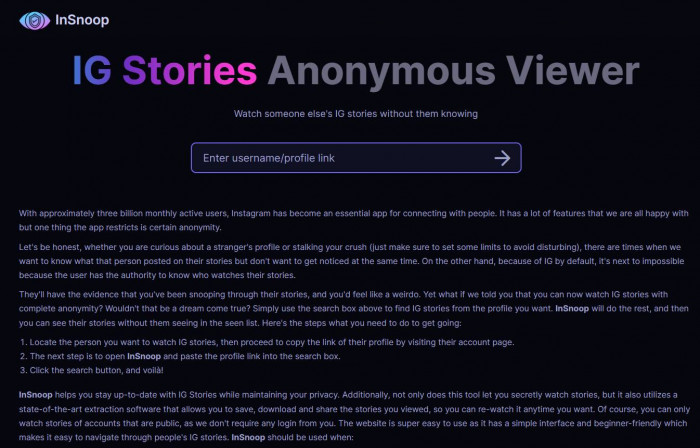
Step-by-Step Walkthrough:
Open Your Web Browser
Start by opening any modern browser such as:
1. Google Chrome
2. Mozilla Firefox
3. Microsoft Edge
4. Safari
In the address bar, type insnoop.com and press Enter.
The homepage usually loads quickly and displays a simple interface with a search field.
Enter an Instagram Username
On the homepage, you’ll see a search box.
1. Type the public Instagram username of the account you want to view.
2. Do not include the “@” symbol.
Correct: natgeo
Incorrect: @natgeo
Make sure the account is public. Private accounts cannot be viewed through Insnoop.
Click the Search Button
After entering the username:
1. Click the Search button
or
2. Press Enter on your keyboard
The system will then process the request and attempt to fetch available public content. This usually takes a few seconds.
View Stories or Highlights
If the account:
1. Is public
2. Has active stories
3. Or has saved highlights
You will see the available content displayed on the screen.
Typically, stories appear in a scrollable preview format, allowing you to:
1. Click and view each story
2. Navigate between story slides
3. See highlights grouped by category (if available)
If no stories are active, the site may display a message indicating that nothing is currently available.
Download Content (If Available)
Some versions or pages of Insnoop provide a download option.
If enabled, you may see a download button below the content:
1. Photos usually download as JPEG (.jpg) files
2. Videos usually download as MP4 (.mp4) files
Click the download button, and the file will save directly to your device’s default download folder.
Example of Usage
Imagine you want to check the Instagram Stories of a public account to see how they use story highlights for marketing ideas. You type the username into Insnoop’s search box, click search, and then watch or download the Stories without logging into your own Instagram account. This could save time compared to manually opening Instagram and navigating through the app.
Ratings and Reviews from Real Users
While Insnoop is not a mainstream app listed on major review platforms like Trustpilot, G2, or Capterra, there are independent evaluations from security and tech review sites that offer insight into its reputation.
| Source | Rating or Review Summary | Key Notes |
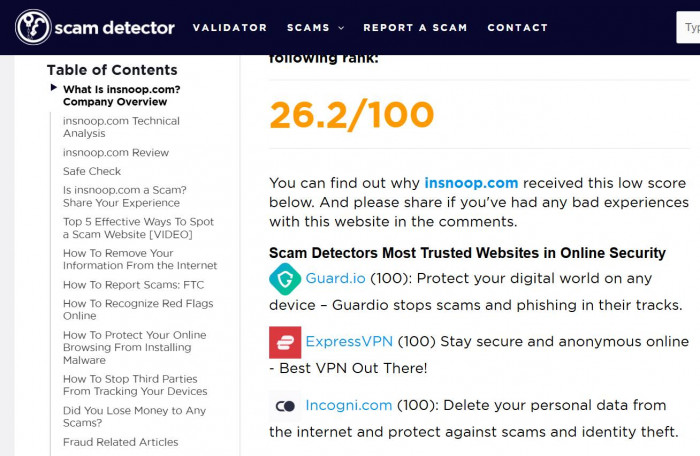
| Scam Detector | Trust Score 26.2 / 100 | Low score suggests potential risk factors and high caution advised. |
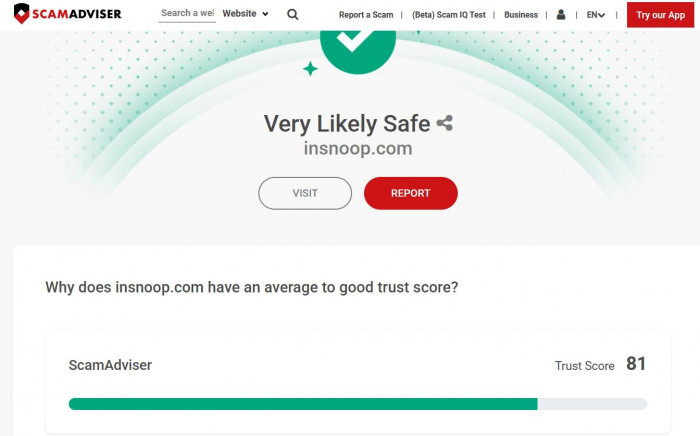
| ScamAdviser | Likely Safe | SSL present and domain ranked by Tranco, but privacy concerns remain. |
| SoftwareCurio | Functional but limited | Works for public stories, simple interface; some reliability issues noted. |
| PrivateStoryViewer | Mixed reliability | Some users report server errors and inconsistent performance. |
Benefits Users Appreciate
Many people who try Insnoop highlight a few clear advantages:
1. Simple and Free to Use
You do not need an account, login, payment, or personal information to start viewing public Instagram content. This makes it accessible for anyone with internet access.
2. Anonymous Viewing
Users appreciate that their visit does not appear in the platform’s viewer list, preserving privacy when browsing Stories.
3. Browser-based Interface
Because it runs in any web browser, you can use it on a phone, tablet, or desktop without installing anything.
4. Download Options
Some versions let you save photos or short videos directly to your device for later viewing.
These benefits are why casual users, researchers, and marketers may find it convenient for quick checks or content observation.
Limitations and Common Concerns
Despite its convenience, Insnoop also has limitations and potential issues:
1. Only Public Accounts
Insnoop cannot access private Instagram profiles. Content protected by privacy settings is inaccessible through the tool.
2. Reliability Problems
Users frequently report server errors where stories fail to load, leaving them unable to view content temporarily.
3. Transparency and Ownership
Insnoop operates anonymously without clear company information or contact details. This lack of transparency raises trust concerns, especially regarding privacy and data practices.
4. Terms of Service Conflict
Because Instagram’s rules prohibit unauthorized third-party tools, using Insnoop may technically violate Instagram’s terms. While there are no widely reported bans, the risk exists.
5. Security Risks from Clones
Copycat sites or fake domains may try to mimic Insnoop. These can pose security risks or phishing attempts. Users are advised to verify they are on the official site.
Comparison with Similar Tools
While Insnoop is one of many anonymous Instagram viewers, a few alternatives offer similar or extended features.
| Tool | No Login Required | Public Story Viewing | Additional Features | Reliability |
| Insnoop | Yes | Yes | Download Stories | Mixed due to server issues |
| StoriesIG | Yes | Yes | More stable access, occasional analytics | Higher reliability |
| Inflact | Partially | Yes | Analytics, scheduling, paid plans | Professional quality |
| Pixwox | Yes | Yes | Profile stats, story access | Moderate reliability |
This comparison shows that while Insnoop is free and simple, other tools may offer better stability or additional utility for professional usage.
Final Takeaway
Insnoop is a free, browser-based Instagram Story viewer primarily used to watch and download public stories anonymously without logging into Instagram. It works simply by entering a username into a search box and retrieving publicly available content.
It is most useful for:
1. Casual users who want privacy while browsing.
2. Marketers doing competitive research.
3. Researchers observing public trends.
However, users should be aware of limitations:
1. It only works for public accounts.
2. Server reliability issues can interrupt access.
3. Ownership and data practices lack transparency, raising trust questions.
If your priority is simplicity and anonymous viewing without login, Insnoop can be a useful tool. But for more reliable or professional needs, you may want to explore alternatives with better accountability and stability.