

Mixkit is a free library of stock video, music, sound effects and video-editing templates, run by Envato, the company behind Envato Elements and marketplaces like ThemeForest and AudioJungle. Its catalogue includes 46,000+ video clips, 1,000+ music tracks, 3,000+ sound effects and 851 templates. You don’t need an account, there’s no watermark on the files, and most assets download in a single click.
This is a hands-on account, not a feature list. I worked through all four libraries, downloaded footage, tracks, effects and a template, and put each into an actual edit to see how it held up. Below is what I did, the results, where the site pushes you toward Envato’s paid plans, and the licensing you need to check before using anything commercially.
Understanding Mixkit
Mixkit is the free entry point into Envato’s wider ecosystem. Envato sells a paid subscription called Envato Elements, and Mixkit works as a smaller, hand-picked, no-cost slice of that catalogue. Because the assets are curated rather than open upload, the quality stays fairly consistent across the site.
The product is four libraries: Stock Video, Stock Music, Sound Effects and Video Templates. Each has its own browsing page, its own filters, and its own license terms. That last point is easy to miss and matters a lot, so I’ll return to it in detail. There’s no trial countdown and no paywall on the Mixkit side; you search, preview and download, with the paid option sitting one click away rather than blocking the free content.
My First Look
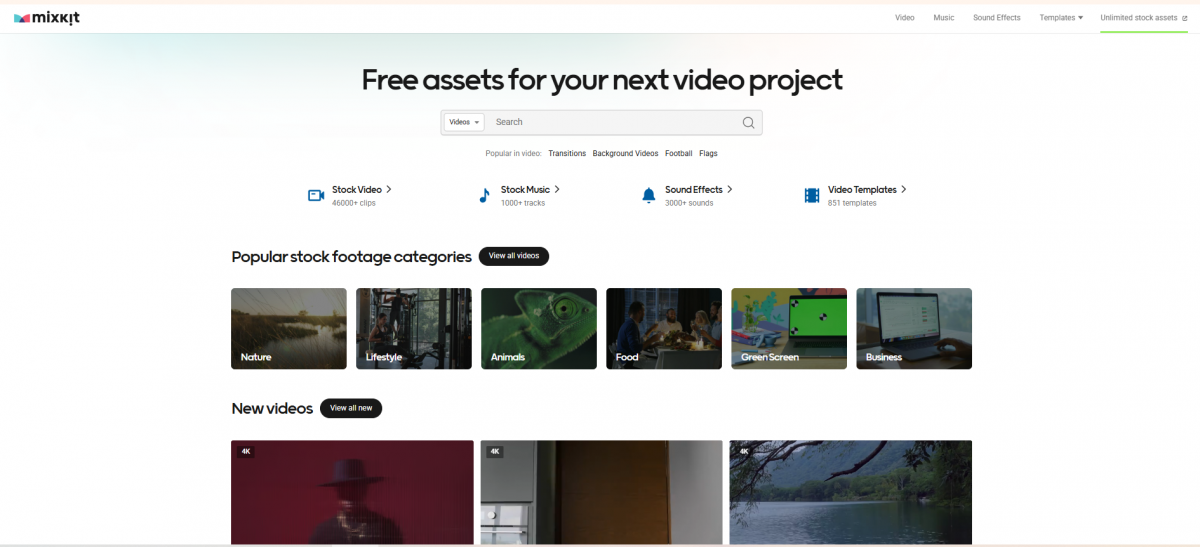
The homepage makes the scope clear straight away. A central search bar has a dropdown to switch between Videos, Music, Sound Effects and Templates, and four tiles beneath it show the full catalogue with live counts: 46,000+ clips, 1,000+ tracks, 3,000+ sounds and 851 templates. I knew the size of each library before I scrolled once.
Under the search bar are quick links for popular video searches (Transitions, Background Videos, Football, Flags) and a row of footage categories: Nature, Lifestyle, Animals, Food, Green Screen and Business.
I started from these category tiles instead of searching. They took me directly to relevant collections, and I could preview the available clips without opening an account or entering an email address.
One element stays fixed to the top-right of the navigation on every page: an “Unlimited stock assets” link, which is the route to Envato’s paid subscription. It never blocks anything, but it’s always in view.
Inside the Library
The four libraries are not equal in size, and the counts tell you where Mixkit puts its weight.
| Library | Size | Typical use |
| Stock Video | 46,000+ clips | Backgrounds, B-roll, transitions, vertical social clips |
| Stock Music | 1,000+ tracks | Background beds for video, podcasts, ads |
| Sound Effects | 3,000+ sounds | Transitions, impacts, ambience, foley, notifications |
| Video Templates | 851 templates | Titles, openers, effects, logo stings |
This is a video-first library with audio and templates built around it. The footage count is far larger than everything else, so that is where most of the practical value sits. The music library is the smallest of the four, and that size limit becomes noticeable in use, which I cover in the audio section.
How the Footage Performed
I started in the video library and used the top category bar to move through sets: New, Backgrounds, Vertical, Nature, Lifestyle, Animals, Food and Transport. A large share of the clips carry a “4K” badge printed on the thumbnail, so you can spot the high-resolution footage before opening anything.
My editing test
I downloaded two nature clips, a forest river and ocean waves running over pebbles, then dropped them into a 1080p timeline. Instead of leaving the clips at their original framing, I scaled them up and adjusted the crop to create different compositions.
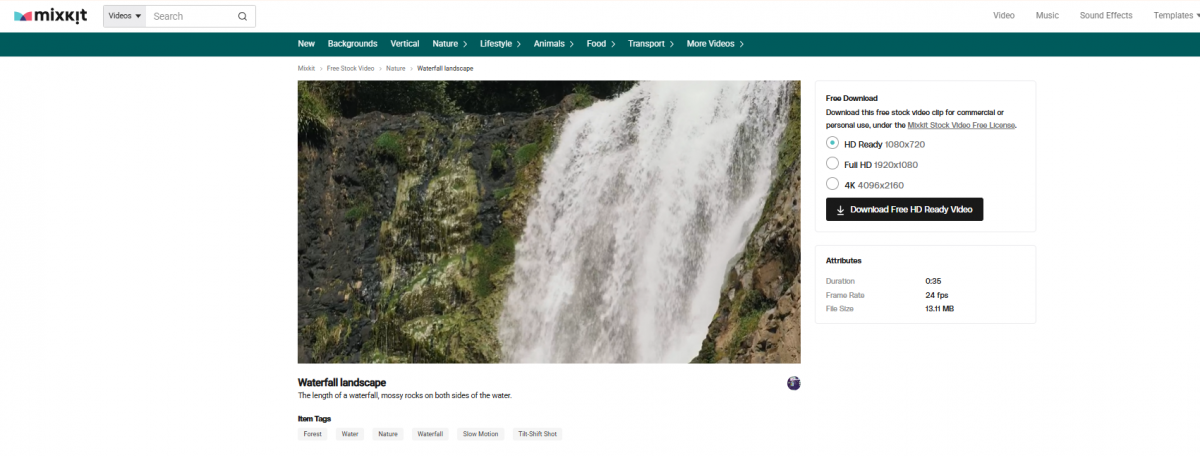
Both source files were 4K, so the reframed shots retained enough detail for my 1080p project. I ended up with three usable framings from a single clip without an obvious loss of sharpness.
The quality is strongest in specific categories. Nature, lifestyle and background footage looked clean in the edit: moving water, drifting clouds, a sunset over the sea. The corporate clips (an overhead boardroom shot, hands typing on a phone) worked but read as standard stock.
A number of clips are plain utility shots, such as a wall clock or a person with their head in their hands, useful when you need to illustrate a point fast.
I also pulled one clip from the Vertical category for a short-form edit. It filled the 9:16 timeline without manual cropping, making it suitable for Reels, Shorts and TikTok projects where the original orientation matters.
The result: Mixkit's 4K footage offers useful editing flexibility beyond simply filling gaps in a timeline. The strongest material is its scenic and lifestyle footage, while its corporate collection is more functional than distinctive.
Music and Sound Effects
The music page is built like an audio tool. Every track has a scrubbable waveform, a play button, the artist’s name, tags and a run time, with filters for Genre, Mood, Instrument and Tag down the side.
Testing the Music
For this part, I filtered the catalogue by mood and listened through several tracks using the waveform previews. I selected two different styles, a film-score piece and a lo-fi track, to check whether the library could handle different editing needs.
I placed the film-score track underneath a voiceover test and adjusted the audio levels. The music sat behind the speech cleanly without fighting the vocal, which made it suitable for narration-led content.
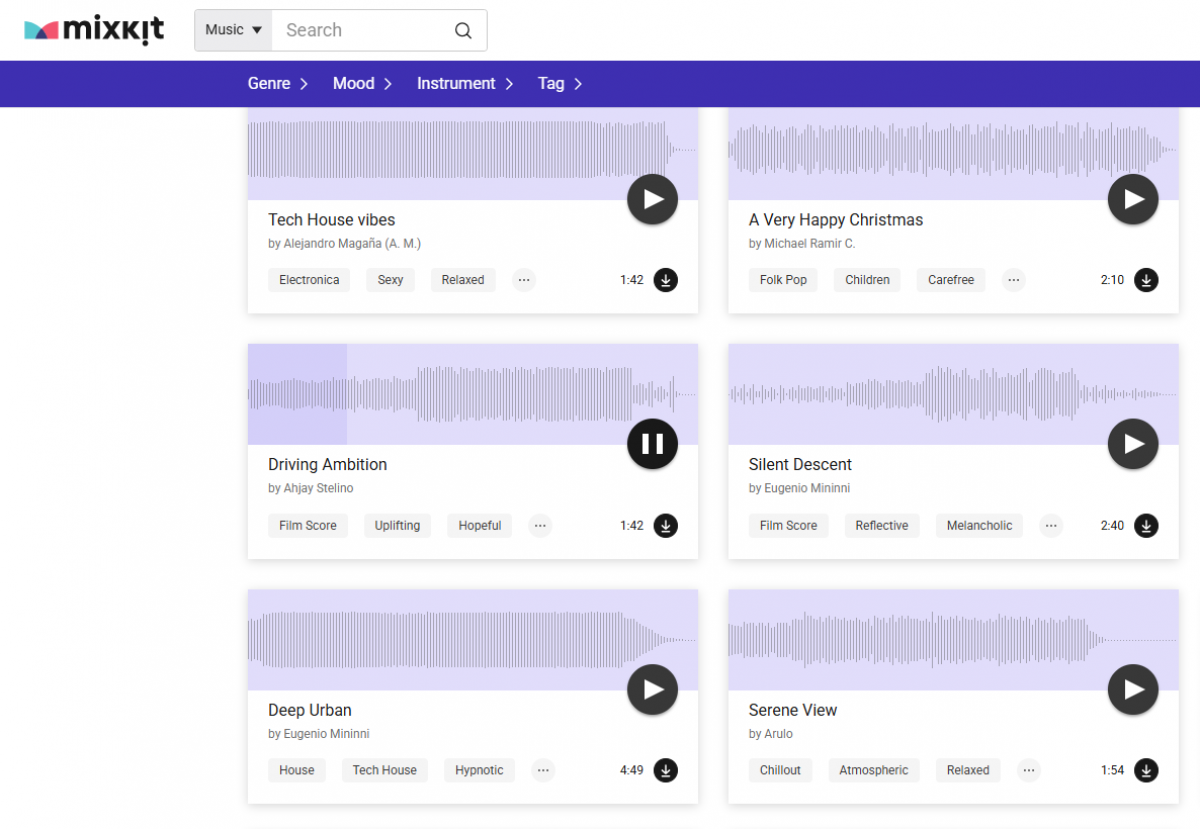
The tracks are credited to real artists (for example, Driving Ambition by Ahjay Stelino, Silent Descent by Eugenio Mininni and Hazy After Hours by Alejandro Magaña), and most run between about 1:40 and 2:50, which fits a normal video length.
The limitation is breadth. With around 1,000 tracks, the catalogue is good but shallow, and anyone making videos regularly will start reusing the same pieces. The audio quality is not the problem; the ceiling is quantity.
Putting Effects to Work
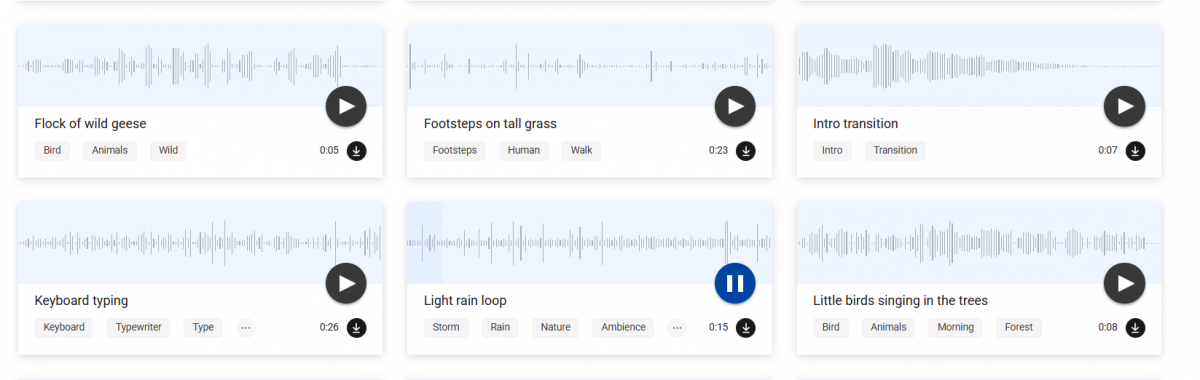
The sound effects library is larger and was the most useful part for me. Its 3,000 clips are sorted into Transition, Nature, Technology, Funny, Notification, Animals, Human and Warfare, among others, with a run time shown on each card.
I wanted to see how the effects behaved in an edit rather than judge them only through browser previews. I selected two:
● Fast whoosh transition: A one-second effect that I placed directly over a cut between two shots.
● Light rain loop: A fifteen-second recording that I added beneath a short sequence as background ambience.
The whoosh matched the transition without needing additional cleanup, while the rain recording added texture without distracting from the main audio.
There is also an “AI Sound Generator” tab in the navigation, so Mixkit has started adding generative audio alongside the fixed library.
My main observation was that the sound effects were easier to put straight to work than expected. The short, clearly labelled clips reduced the amount of trimming and searching required for basic audio details.
Templates in Practice
The templates section is split by editor, with separate tabs for Premiere Pro, After Effects, Final Cut Pro and DaVinci Resolve. The file you download is built for your specific software, so you pick the editor first and get a matching project rather than a generic file to convert.
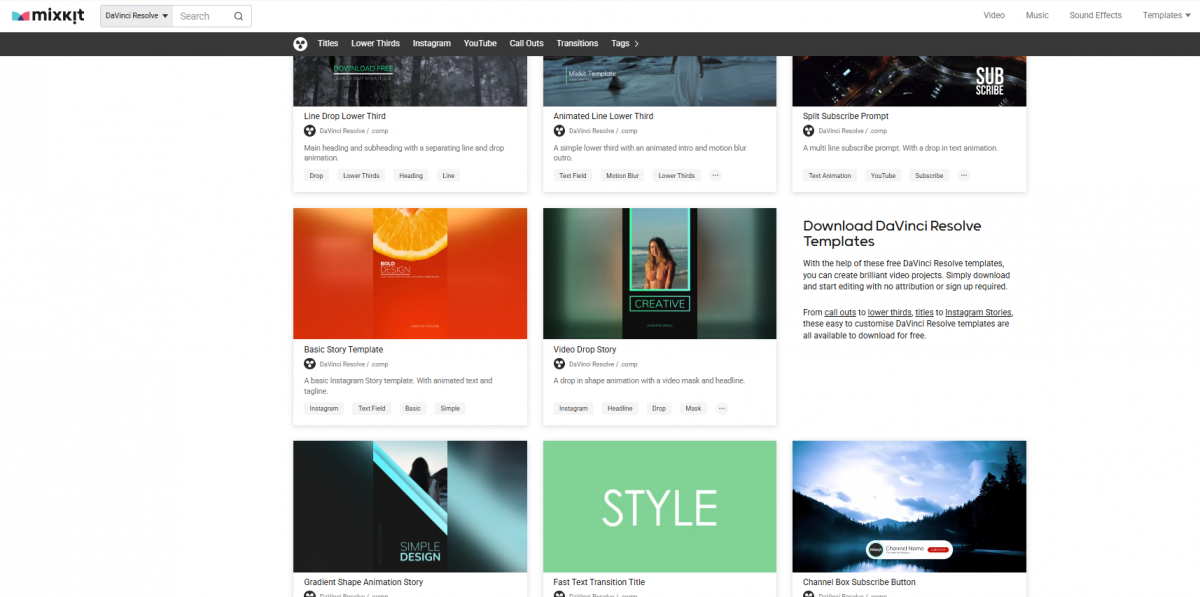
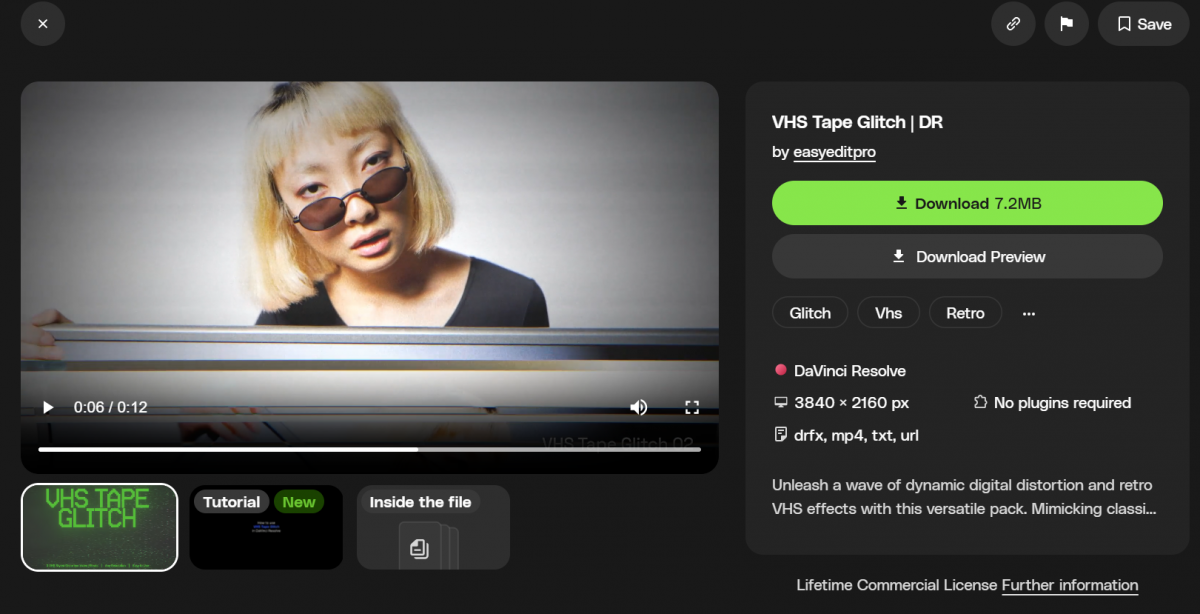
I opened the DaVinci Resolve collection and chose a template called “VHS Tape Glitch | DR” by easyeditpro.
The detail page included:
● A video preview and a separate “Download Preview” option to inspect the effect before downloading.
● A 7.2MB file size, 3840 × 2160 resolution and the included formats: drfx, mp4, txt and url.
● A “No plugins required” note, alongside “Tutorial” and “Inside the file” tabs.
What happened after downloading?
I opened the 7.2MB package in DaVinci Resolve and followed the provided instructions. The template applied the retro VHS and glitch effect as shown in the preview, without requiring an additional plugin installation.
The tutorial and included file breakdown helped identify the relevant elements, so I did not have to work out the package structure from scratch.
The page also listed a “Lifetime Commercial License,” which I checked before using it.
The per-editor split is the detail that makes this section work. Rather than downloading an After Effects project and attempting to adapt it for another program, I was working with files intended for my editor from the beginning.
Finding the Right Assets
Search is simple. You pick the asset type from the dropdown next to the search bar, type a term, and the results stay inside that library. Within each section, the category bar and the filters do most of the narrowing.
The filtering on the audio side worked best for me. Combining a genre with a mood cut the list of tracks down to a smaller selection, making it easier to preview suitable audio. The video categories offered a similar way to narrow the footage collection.
The one limitation is that the libraries are separate. A search covers video, or music, or effects, but never all three at once.
While assembling a sequence that required footage, a background track and a transition effect, I had to move between three sections and run separate searches. Each individual search was straightforward, but the process would have been quicker with combined results.
The Download Experience
I also paid attention to the actual download process, since free stock websites often introduce restrictions at this stage.
I downloaded assets from all four categories and checked the resulting files rather than relying on the site's claims. Each download completed without an account requirement or email request, and the files did not contain an added watermark.
The download button also shows the file size before you commit, which the VHS template demonstrated with its 7.2MB label. On larger projects, seeing the size up front helps with managing storage.
Music and sound effects download the same way, with a download icon on each card and no sign-up gate.
Across the assets I selected, there was no difference between the advertised free download and the file I actually received. I did not encounter a checkout screen, forced registration or watermark-removal step.
Understanding the Licenses
This is the section to read carefully, because on Mixkit “free” does not mean “unrestricted,” and the terms change depending on the asset type. Each library carries its own license, so you cannot assume one blanket rule across the site.
Here is how the main terms break down:
| Asset type | Commercial use | Attribution |
| Music (Stock Music Free License) | Allowed, including YouTube, social, ads, podcasts | Not required |
| Video (Mixkit Video Free License) | Allowed, including YouTube, ads, music videos | Not required |
| Video (Stock Video Free License) | Restricted: not for YouTube, online ads, brand social or commercial projects | Not required |
| Templates (varies by item) | Often a Lifetime Commercial License, shown per item | Check the item |
The point to understand is the two different video licenses. Some clips fall under the open Mixkit Video Free License, which allows commercial use, and some fall under the stricter Stock Video Free License, which does not.
The license is printed on the individual item page. Before anything goes into a paid client project or a monetised channel, open that asset and read which license applies. Sound effects also have their own license terms, which should be checked separately.
My template test included this step. Before using the VHS effect, I looked at the licensing information on its detail page rather than assuming every template followed the same conditions.
This is especially important when downloading several assets for a single commercial project, since permission for one item does not automatically extend to the others.
The Envato Connection
Mixkit is also a route into Envato’s paid subscription. The “Unlimited stock assets” link in the navigation, and the Envato banner shown across the music and template pages, both lead to Envato Elements. The free library covers a lot, and the paid plans begin where it ends.
The pricing shown on the site splits into four tiers:
| Plan | From | Main inclusions |
| Core | $16.50/month | Unlimited downloads of 30M+ assets, 20 AI credits/month, lifetime commercial license |
| Plus | $39/month | Core, plus 200 AI credits/month, 3 parallel AI generations, latest AI models |
| Ultimate | $168/month | 1,000 AI credits/month (500–2,000 options), 10 parallel generations |
| Enterprise | Custom pricing | Teams of 50+, custom seats, custom licensing, dedicated account manager |
The paid tiers add generative AI tools on top of the stock library, listing models such as GPT Image 2.5, Flux 3, Nano Banana 2.1 and ElevenLabs on the higher plans.
For a free user, none of this is required. The paid subscription is an option for people who need a substantially larger catalogue or additional creative tools.
During my browsing, the subscription links remained visible across multiple sections, although they did not interfere with previewing or downloading the free assets.
What Worked Well
After working through the different asset categories, four aspects stood out:
● The asset selection is practical. The catalogue includes both visually polished footage and straightforward material for everyday editing tasks, from B-roll to simple background shots.
● The audio previews are useful. Scrubbable waveforms and mood-based filtering make it easier to assess tracks without downloading everything first.
● The template pages provide proper documentation. File formats, compatibility information and tutorial material help establish what a package contains before opening it.
● The categories suit different workflows. Dedicated vertical footage, editor-specific templates and organised sound effects make the collection relevant to several types of video projects.
Where It Fell Short
There are also a few areas that could improve:
● Limited music variety: The track selection is relatively modest for creators who publish frequently and need fresh background music for every project.
● Separate search systems: Assets from different libraries cannot be found together, adding more navigation when sourcing material for a complete sequence.
● Inconsistent licensing: Different permissions across asset types make commercial use less straightforward than the site's simple download process suggests.
● Prominent subscription promotion: The repeated Envato Elements links occupy space that could otherwise be used for additional free-library navigation.
Who Should Use Mixkit?
| User | How it fits |
| Hobbyists and new creators | A practical starting point for sourcing production assets without paying for a stock subscription |
| Freelancers and budget-conscious marketers | Useful for filling gaps in client edits and developing content with a limited production budget |
| High-volume professionals | Better suited to occasional asset sourcing than serving as the only library for a large production schedule |
If your work is occasional or budget-limited, the free library is enough on its own. If you produce at volume, Mixkit still works as a fast source for individual assets, but you may eventually need a library with a broader selection.
Best Mixkit Alternatives
Mixkit is useful for general video production, but other stock platforms serve different needs. I would choose an alternative based on the type of asset required rather than treating every library as a direct replacement.
| Alternative | Best for | Key difference |
| Pexels | Free stock videos and photography | Stronger focus on photos and footage rather than editing templates or sound |
| Pixabay | Free multimedia resources | Provides photos, illustrations, videos, music and sound effects in one broader resource |
| Envato Elements | Full creative production workflows | Paid subscription with a much larger collection of stock assets, graphics and templates |
| Artlist | Music-focused video production | Specialises in licensed music, sound effects and creative assets for professional production |
| Storyblocks | Frequent stock footage downloads | Subscription-based footage library suited to ongoing video editing and content production |
Which Alternative Makes Sense?
For creators who primarily need free footage, Pexels is the most relevant place to compare with Mixkit. It focuses on visual assets and is useful when the available footage matters more than having an entire editing-resource library.
Pixabay is worth checking when a project involves different media formats. Alongside video, its collection includes images, illustrations, music and sound effects, making it useful for sourcing several kinds of material.
For a more production-focused paid option, Envato Elements is the closest progression from Mixkit. It covers video assets alongside graphics, templates, fonts and other creative resources.
Artlist is more relevant when music selection and licensing are central to the work, while Storyblocks is worth comparing for creators who need stock footage repeatedly rather than making occasional downloads.
These platforms are not interchangeable, particularly when it comes to licensing. Before choosing a replacement, compare the available file formats, download conditions and permissions for the intended project.
Final Verdict: Is Mixkit Worth It?
After spending time across all four libraries, I came away seeing Mixkit as a genuinely useful free production resource rather than a full replacement for a professional stock subscription.
The biggest reason I would return is convenience. It fits naturally into the editing process when I need an extra asset without turning a small task into a separate purchasing decision. I found enough useful material to complete the edits I was working on, and the experience required very little preparation.
I would not build an entire high-volume production workflow around Mixkit alone. Its catalogue is better suited to filling specific creative requirements than providing unlimited variety across every project.
For independent creators, students and freelancers working with restricted budgets, it offers substantial practical value. Just treat the licensing review as part of the download process, not something to worry about after publishing.
My rating: 4/5. Mixkit earns its place as a dependable free resource for everyday video production, particularly when used alongside a primary editing workflow or a larger asset library.