

Table of Content
- What Seedance 2.5 is, and who built it
- Why 30 seconds in one shot is the whole game
- The features that earned their place
- From a grey Blender model to a finished shot
- Seedance 2.5 versus Seedance 2.0
- How it stacks up against Sora 2, Veo, Kling, and Runway
- Who Seedance 2.5 is for
- Running Seedance 2.5 on Topview
- 30 days of unlimited generation, plus 80% off
- One more thing worth watching
- The Bottom Line
For most of this year I have been making short AI videos for product pages and social posts, and I kept hitting the same wall. The clips were short. Five seconds here, eight seconds there. To build anything that told a real story, I had to generate a handful of fragments and stitch them together, and that is exactly where things fell apart. A character's face would drift between shots. The lighting would jump, and the camera motion never quite matched across the seam.
Then Seedance 2.5 landed, and the wall moved.
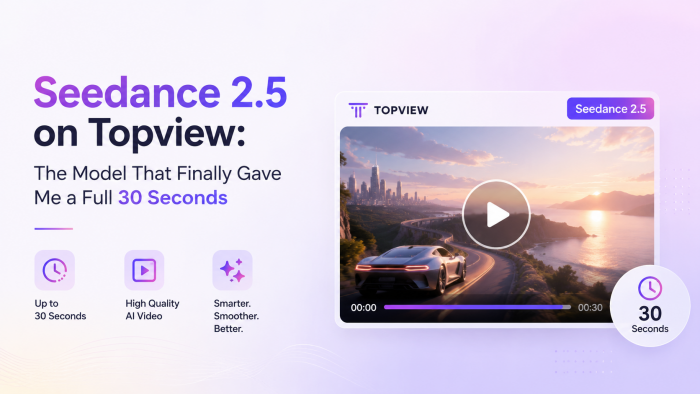
This is the model I have been testing on Topview for the past two weeks, and it fixes the one problem that broke almost every longer video I made. It generates a full 30 seconds in a single pass, with no stitching. What follows is the story of what I found, section by section, starting with the first prompt and ending with the workflow I now use daily.
What Seedance 2.5 is, and who built it
Before I get into what it did for my videos, here is the quick background. It explains why the model behaves the way it does.
Seedance 2.5 comes from ByteDance, the company behind TikTok. It sits inside their broader “Seed” family of foundation models, and the Seedance line handles video generation specifically. Version 2.5 is the follow-up to Seedance 2.0, which already had a strong reputation for motion quality. ByteDance sits on one of the largest video libraries on the planet, so their models tend to understand pacing and visual coherence in a way that shows up in the final output.
What makes 2.5 worth writing about is a set of upgrades that change how you work:
- Native 30-second clips generated in one pass, rather than the four to ten seconds most models give you.
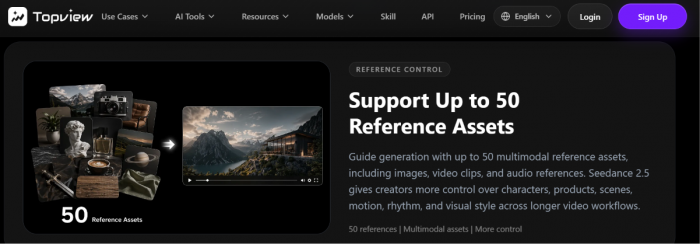
- Up to 50 reference assets in a single prompt: images, video clips, audio, or any mix.
- 4K-ready visual quality.
- Audio and video generated together, so sound lands on the same beat as the action.
- Stronger prompt adherence, so complex briefs resolve correctly more often on the first attempt.
- Local editing, where you re-render one region of a clip without rebuilding the whole thing.
I will unpack the ones that mattered most to me further down. The headline is that first bullet, so that is where I want to start.
Why 30 seconds in one shot is the whole game
Here is the thing about a 30-second clip that took me a while to appreciate.
Most AI video tools generate somewhere between four and ten seconds natively. If you want longer, you chain clips together, and every chain point is a risk. The model regenerates a character slightly differently, the light shifts, and a viewer's eye catches the seam even without naming what feels off. I lost hours cleaning up those seams, and half the time the result still looked like a slideshow of related shots.
Thirty seconds in a single pass removes the seams entirely, because there are none. The character holds from the first frame to the last by design.
That length also matches how real short-form video is built. A product ad needs an opening hook, then a moment where the product does its thing, then a closing frame that carries the call to action. A social skit needs a setup and a payoff. Thirty seconds is enough room for a complete idea, which is why I stopped thinking of these as clips and started treating them as finished pieces.
One example from my own work. I made a 30-second skincare ad that opens on the bottle, moves through a few lifestyle beats, then lands on a clean end card. Under my old workflow that was four separate generations plus an afternoon of editing. With Seedance 2.5 on Topview it was one prompt and one export.
I will show you the exact steps I used later, but first, the feature that surprised me more than the length did.
The features that earned their place
Fifty references in a single prompt
The length got me in the door. The reference system is why I stayed.
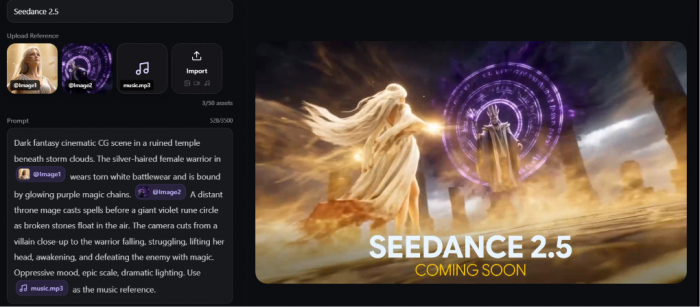
Seedance 2.5 accepts up to 50 reference assets in one prompt. You can hand it a product photo, a character image, a clip whose camera motion you want to borrow, and an audio track for rhythm, all at once. The model reads them together and weighs them against your text. That is harder than it sounds, because it has to understand how a still image relates to a motion reference and how both relate to the words you wrote.
In practice, my characters keep the same face across a whole video. My product keeps its exact design, and the color palette holds. I am directing the output with real material instead of hoping a text prompt lands.
Sound and picture, generated together
Most tools I have used generate the visuals, then leave you to add audio afterward. Seedance 2.5 produces both in the same pass. Footsteps, ambient room tone, a door closing, the timing of a music hit, all of it lands with the on-screen action instead of drifting a half-second off.
For a talking avatar or a product demo with a voiceover, this cut my post-production time roughly in half. Less syncing, fewer do-overs.
Fixing one corner without rebuilding the clip
This is the feature I did not know I needed.
Say your 30-second clip is perfect except for a wrong product label in one shot. Older models made you regenerate the whole thing and hope the rest came back the same. Seedance 2.5 lets you describe a change to one region, and it re-renders only that area while the rest stays put. I have fixed a face, swapped a background element, then corrected a label this way, each time keeping everything else intact.
One more capability deserves its own section, because it opens a workflow most AI video articles skip.
From a grey Blender model to a finished shot
If you work in 3D, this section is for you.
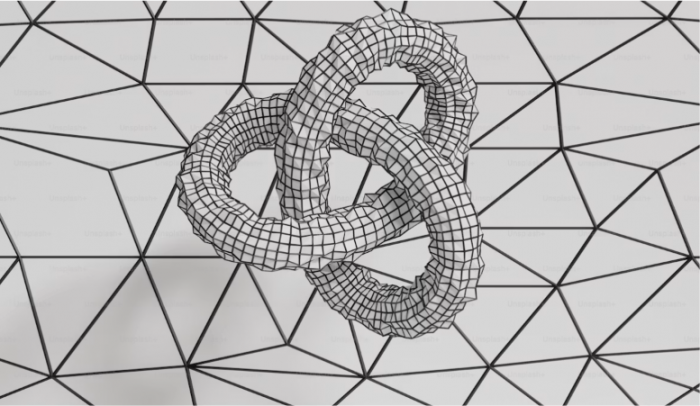
Seedance 2.5 was trained with extra data for “white model” inputs, which is the grey, untextured geometry you see in a Blender or CAD viewport before materials get added. You can take a plain grey render out of Blender, feed it in as a reference, and let the model dress it with lighting, texture, motion, and shadow. The shape and staging you built in 3D carry through. The finish comes from the model.
That changes the math for anyone doing product visualization. I have a friend who models furniture in Blender. His old process was model, texture, light, and render inside Blender, which ran to days per piece for a moving shot. Now he blocks the geometry, exports a grey turntable, and hands it to Seedance 2.5 to finish as a 30-second product video.
The same trick works for character and scene layout. Block a rough 3D scene, use it to lock camera position and spatial arrangement, then let the model handle the cinematic pass. You get the control of a 3D workflow at the speed of generation.
If you have never opened Blender, none of this is a barrier, because the text-and-image workflow from the last section still does the job. For the 3D crowd, this is the bridge that was missing.
With the capabilities covered, the obvious question is how 2.5 compares to what came before, and to the other big models.
Seedance 2.5 versus Seedance 2.0
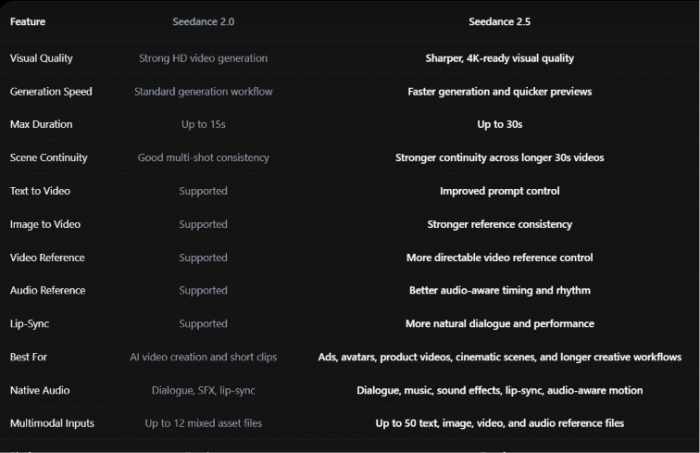
I used Seedance 2.0 plenty, so the upgrade was easy to feel. The table below lays out what changed.
| Feature | Seedance 2.0 | Seedance 2.5 |
|---|---|---|
| Max duration | Up to 15 seconds | Up to 30 seconds |
| Reference inputs | Up to 12 mixed assets | Up to 50 assets |
| Visual quality | Strong HD | 4K-ready |
| Generation speed | Standard | Faster previews |
| Scene continuity | Good across short clips | Stronger across 30 seconds |
| Native audio | Dialogue, SFX, lip-sync | Adds music and audio-aware motion |
| Local editing | Limited | Region-level re-rendering |
Two rows matter more than the rest for me. The jump from 15 to 30 seconds is the headline, for the reasons I already covered, and the reference jump from 12 assets to 50 is the quieter win. It is the difference between suggesting a look and directing one.
Everything else stacks on top of those two. Sharper output, faster previews, richer audio, cleaner in-frame text, all good to have, though I would have switched for the first two rows alone.
The more interesting comparison is against the other models people ask me about.
How it stacks up against Sora 2, Veo, Kling, and Runway
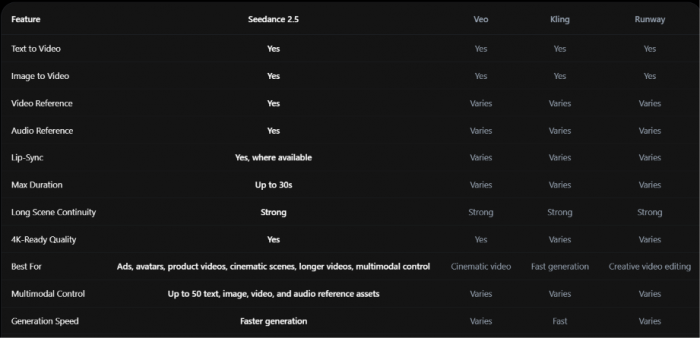
I get asked how Seedance 2.5 holds up against Sora 2, Veo, Kling, and Runway. Honest answer: they are all capable, and the right pick depends on what you are making.
Here is how I think about it. Sora and Veo are known for polished, cinematic output. Kling is quick. Runway is strong for creative editing.
Seedance 2.5's edge is a combination the others do not all offer at once. It produces the longest native single clip on this list, at 30 seconds. It takes up to 50 multimodal references, which is more directable than a prompt-only flow. And it generates audio and video in one pass, so you are not adding sound afterward.
If your work depends on longer, controlled sequences with consistent subjects, that combination is hard to match. If you want a five-second beauty shot and nothing else, any of these will do it, and speed or house style might decide it for you.
I am not going to pretend one model wins every category, because it does not. For the longer, reference-heavy videos I make, Seedance 2.5 is the one I reach for, which brings me to who it actually fits.
Who Seedance 2.5 is for
Over two weeks I pushed Seedance 2.5 into a few different jobs. Some fit better than others.
Product and ecommerce videos were the strongest match. I animated a static product photo into a 30-second video for a Shopify page, with close-ups and a lifestyle scene, without booking a shoot. Fashion and beauty content performed just as well, which tracks with what Topview reports about actual usage. Model showcases and beauty routines sit near the top.
Avatar-led explainers were the second big win. A presenter, a script, a clean studio, and 30 seconds is enough to walk through a feature properly. The dialogue flow felt natural, and the lip-sync held.
Here is a prompt I used for a product ad, if you want a starting point:
"A 30-second cinematic ad for a matte ceramic coffee mug. Open on a slow push-in across a sunlit kitchen counter as steam rises from the mug. Cut to a hand lifting it, then a wide shot of a quiet morning scene. Warm light, shallow depth of field, gentle camera motion, clean space for a logo at the end. 16:9."
Cinematic and short-form storytelling worked for concept trailers and story tests, where holding a shot across a full scene sells the idea. Social creators get the broad, replayable formats that travel well: trend hooks, pet clips, POV skits, quick comedy beats.
One group I want to call out is the upload-first crowd. A real share of people would rather hand the tool their footage and let it run than write a long prompt, and Seedance 2.5 rewards that, because the reference system does the heavy lifting when your words are sparse.
Knowing it fit my work was one thing. Running it on Topview is where the last piece clicked, so let me walk through that.
Running Seedance 2.5 on Topview
Everything I described runs in the browser on Topview, with no install. The flow is short.
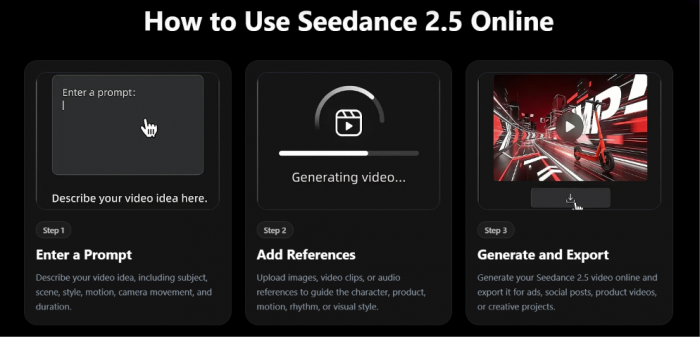
Step one, I write the prompt. Subject, scene, motion, camera direction, and the final use case all go in, and the more specific I am about camera movement and pacing, the closer the first result lands.
Step two, I add references. This is where product photos, a character still, a motion clip, or an audio track go in, up to that 50-asset ceiling.
Step three, I generate and export. A preview comes back, I check it for subject accuracy and motion quality, and if something is off I either regenerate with tighter instructions or use the region-editing trick from earlier to patch one spot. Then I export an MP4 with the audio already synced.
The part that changed how I work is scope. Seedance 2.5 is available across every tool on Topview, not walled off in a single generator. The same model powers the AI Video Generator, the product-ad and UGC tools, the avatar workflows, and the rest of the toolset. I can start a product video in one tool and an avatar explainer in another, and both run the same engine underneath.
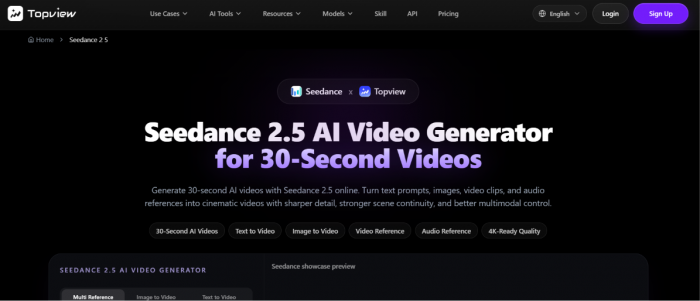
You can see the full setup, the example gallery, the model specs, and the prompt samples on the Seedance 2.5 page.
There is a reason I switched now rather than waiting, and it comes down to the current offer.
30 days of unlimited generation, plus 80% off
Testing a model is cheap. Committing to one usually is not, because generation costs stack up fast when you are making 30-second clips at volume.
Right now Topview is running 30 days of unlimited Seedance 2.5 generation. Thirty days, no per-clip counter, on a model built for longer and heavier output. For anyone producing a batch of ads or testing a dozen creative angles, unlimited is the setting you want. I ran more generations in my first week than I would normally allow myself in a month.
On top of that, there is an 80% off promotion on the plans. Combined with the unlimited window, the math for a working creator gets simple. The cost of trying every idea drops close to zero for a month, which is exactly when you learn what a new model can do.
Because Seedance 2.5 runs across the whole Topview toolset, as covered in the last section, that unlimited access is not confined to one generator. It applies wherever you are working on the platform.
If you have been waiting for a reason to test a 30-second model properly, this is it. You can start on the Seedance 2.5 AI Video Generator.

One more thing worth watching
I have been running Seedance 2.5 mostly through Topview's generators so far. The next step is bigger.
Topview Canvas and Topview Drama Studio will both be supported by Seedance 2.5, which moves the 30-second engine into the agent-driven canvas and the micro-drama workspace. For anyone building multi-shot stories or serialized short dramas, that is the pairing to keep an eye on.
I started this with a wall that broke every long video I tried to make. Two weeks later the wall is gone, and the 30 seconds it handed back is the most useful thing to reach my workflow this year. What I build with the extra room is the fun part.
The Bottom Line
So, is Seedance 2.5 worth your time? For the work I do, the answer was clear inside the first week.
If you make product videos, cinematic scenes, avatar explainers, or anything that has to hold together for longer than a few seconds, this is the model to beat right now. The 30-second single pass does the heavy lifting, and the reference control keeps your characters and products on-model while it does. That pairing is what moved me off my old workflow for good.
If your job only ever calls for a quick five-second shot, you can sit this one out. A lighter model will cover you, and the extra room here goes to waste.
For everyone in the first camp, the current unlimited window is the cheapest chance you will get to find out where your own ceiling is. I would spend it while it lasts.