

Table of Content
Core Difference
Zapier operates on a linear automation model, where each workflow (Zap) follows a fixed sequence of triggers → actions. Even with multi-step Zaps, execution remains sequential, which means handling branching logic requires “Paths” (only available in higher tiers) and increases task consumption. (https://zapier.com/)
Make uses a visual scenario builder, where workflows are structured as modular nodes connected through routers. This allows parallel execution paths, conditional branching, and looping without additional pricing tiers. The execution model differs fundamentally: Zapier charges per task (each action = 1 task), while Make charges per operation (each module execution = 1 operation), which behaves differently in multi-step workflows. (https://www.make.com/en)
Pricing Reality
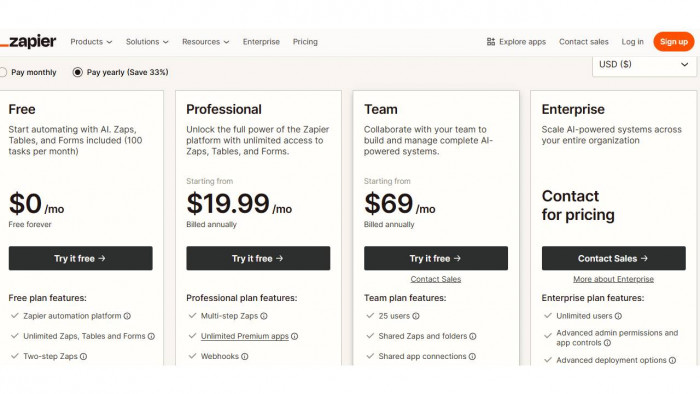
Zapier’s pricing scales directly with task usage. The free tier offers 100 tasks/month, while the Starter plan (~$19.99/month) includes 750 tasks, and the Professional plan (~$49/month) offers 2,000 tasks. A 5-step workflow triggered 500 times consumes 2,500 tasks, pushing users beyond the Professional tier quickly.
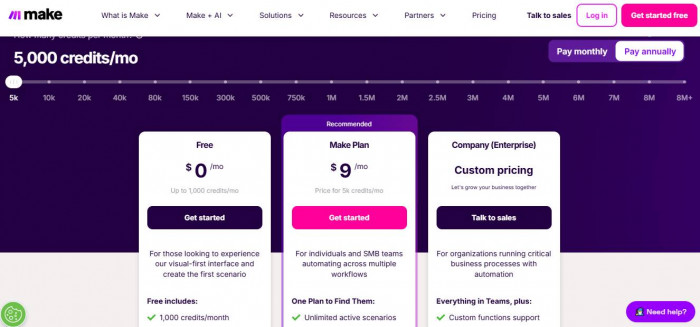
Make’s pricing starts with 1,000 operations/month (free), while the Core plan (~$9–$10/month) includes 10,000 operations, and Pro (~$16/month) expands further. The key difference is execution efficiency. A similar 5-step workflow may consume 5 operations per run, but Make allows conditional routing and filtering, reducing unnecessary executions and lowering total cost.
The cost divergence becomes visible in real workflows:
- Zapier multiplies the cost per action
- Make allows filtering, reducing operations before execution
Feature Comparison
| Feature | Zapier | Make |
| Workflow structure | Linear multi-step Zaps | Visual modular scenarios |
| Branching logic | Limited (Paths, paid) | Unlimited routers |
| Iteration / loops | Limited | Native iterators & loops |
| Data handling | Basic field mapping | Advanced data transformation |
| Integration ecosystem | 6,000+ apps | ~1,500+ apps |
Workflow Depth Analysis
Zapier handles straight-line automations efficiently. A typical workflow like “form submission → send email → add to CRM” executes reliably, but introducing conditional logic such as lead scoring or region-based routing requires Paths, which increases both complexity and task usage. For example, splitting leads into 3 categories results in 3 separate paths consuming tasks independently.
Make approaches the same workflow using routers and filters, allowing multiple conditions to exist within a single scenario. A lead routing workflow can branch into multiple CRM pipelines without duplicating execution steps. This reduces redundant operations and keeps workflows centralized.
In data-heavy workflows, such as syncing e-commerce orders with inventory + CRM + analytics tools, Zapier processes each step sequentially, consuming tasks per action. Make allows data aggregation and transformation within modules, meaning fewer external calls and reduced operation count.
Cost vs Scale
| Monthly Usage | Zapier Cost | Make Cost |
| 1,000 tasks / ops | ~$19.99 | Free–$9 |
| 5,000 tasks / ops | ~$49–$99 | ~$10 |
| 10,000+ usage | $99–$199+ | ~$16–$29 |
At higher volumes, Zapier’s per-task model compounds cost linearly, while Make’s operation-based model remains relatively flat due to execution control via filters and routers.
Automation Capability Comparison
| Capability | Zapier | Make |
| AI features | Built-in AI actions (premium tiers) | API-based AI integration |
| Scheduling intervals | 1–15 min (plan-based) | 1 min (lower tiers) |
| Webhooks | Available (premium) | Native + flexible |
| Error handling | Basic retry logic | Advanced error routes |
| Data transformation | Limited formatting tools | Built-in functions + parsing |
Real-World Tradeoffs
Zapier performs better in environments where workflows are standardized and repetitive. For example, a SaaS team pushing leads from Webflow to HubSpot and Slack can deploy a Zap in minutes, and even at $49/month, the predictability of execution justifies the cost.
Make becomes more efficient when workflows involve branching logic or data processing. In a marketing automation scenario where leads are filtered by region, enriched via APIs, and routed to different CRMs, Make reduces execution overhead by avoiding unnecessary operations, keeping costs closer to $10–$16/month instead of scaling linearly.
The tradeoff becomes clear: Zapier simplifies deployment but charges for every step, while Make requires structured setup but reduces execution waste.
Use-Case Decision
1. Beginners → Zapier
Linear workflows with minimal configuration reduce setup time, and 100–750 tasks/month covers basic automation needs
2. Advanced users → Make
Visual routing, iterators, and data transformation allow building multi-layer workflows without duplicating execution steps
3. High-volume automation → Make
At 10,000+ operations/month, Make stays under ~$20–$30, while Zapier scales past $100 due to per-task pricing
Final Verdict
1. Best for simplicity: Zapier
Linear execution and structured integrations reduce setup friction for basic workflows
2. Best for power users: Make
Visual scenarios, routers, and data handling enable complex automation without workflow duplication
3. Best for scaling: Make
Operation-based pricing combined with execution control keeps costs predictable at high volumes