


Table of Content
- Reverse video search
- How it differs from reverse image search
- The most reliable methods people use
- 1) Extract frames and reverse image search them
- 2) Use specialized tools and platforms built for verification
- 3) Manual investigation that often beats tools
- A practical step-by-step walkthrough with a realistic example
- Step 1: Save the best quality version you can
- Step 2: Extract key frames
- Step 3: Reverse image search each frame
- Step 4: Follow the oldest credible match
- Step 5: Validate the location with visual clues
- Step 6: Confirm “first upload” versus “first you can find”
- Limitations, accuracy issues, and common mistakes
- Why reverse video search fails sometimes
- Common mistakes people make
- Comparison of popular tools used for reverse video search
- Practical tips for journalists, creators, and fact-checkers
- For journalists
- For creators protecting their work
- For fact-checkers
- Why reverse video search matters more than ever
You are scrolling and a short video pops up everywhere: WhatsApp groups, Instagram Reels, X, TikTok. The caption claims something dramatic, like “happening right now” or “caught on CCTV.” You want to know three things fast:
● Who posted it first
● When and where it was filmed
● Whether the caption is telling the truth
That is exactly what reverse video search is for.
Reverse video search
Reverse video search is the process of tracing a video back to its earliest known upload or original source by using visual clues, audio clues, metadata, and platform search behavior.
How it differs from reverse image search
Reverse image search works because an image is one frame. A video is thousands of frames plus audio, compression artifacts, re-uploads, edits, and crop variations.
So reverse video search is usually a combination of:
● Pulling key frames from the video and reverse searching those images
● Using video-specific databases or “in-video” search tools
● Doing investigative work: audio, captions, usernames, comments, timestamps, and locations
Think of reverse image search as a single-key lookup. Reverse video search is more like detective work with multiple clues.
The most reliable methods people use
1) Extract frames and reverse image search them
This is the most effective approach for most people because it is simple and works across platforms.
What you do
1. Grab 3 to 10 frames from different moments in the video
2. Reverse image search each frame
3. Compare results and look for older uploads
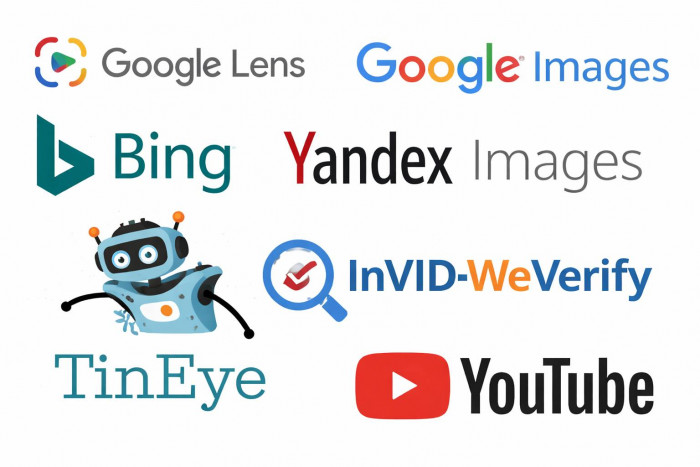
Where to reverse search frames
1. Google Images and Google Lens
2. Bing Visual Search
3. Yandex Images (often strong for older web copies)
4. TinEye (good for image matches, but not always great with video frames)
Tips to make frames searchable
1. Use frames that show unique background objects, signs, faces, buildings, logos
2. Avoid motion blur, black frames, and subtitle-heavy frames
3. Try both a clean frame and a cropped “focus” version (for example, only the building or only the person)
2) Use specialized tools and platforms built for verification
Some tools are designed for journalists, investigators, and researchers. They help you extract frames quickly, scan platforms, or compare near-duplicate uploads.
These tools usually help with:
1. Frame extraction at intervals
2. Side-by-side comparisons
3. Finding older copies in archives or search results
4. Breaking down key visual clues faster
3) Manual investigation that often beats tools
Sometimes the fastest path is not a tool. It is pattern recognition.
What to check immediately
1. Watermarks (TikTok handle, Reels username, YouTube channel name)
2. Subtitles style (common templates can hint at creator tools)
3. Language and accent
4. Street signs, license plates, uniforms, local brands
5. Weather, time of day, shadows, season clues
Metadata (when available)
If you have the original file (not a screen recording), metadata can sometimes reveal:
1. Creation date
2. Device type
3. GPS location (rare these days, often stripped)
Audio search
1. If the video has a distinct voice line, quote, or slogan, search that text
2. If it has music, use Shazam or other music ID tools
3. If it has a unique ambient sound (sirens, announcements), search keywords + location guesses
Platform-native searching
Often the original is easiest to find by searching inside platforms:
1. Search the watermark handle on TikTok or Instagram
2. Search the exact caption phrase in quotes on Google
3. Search a unique visual description on X or YouTube (example: “blue truck hits gate CCTV”)
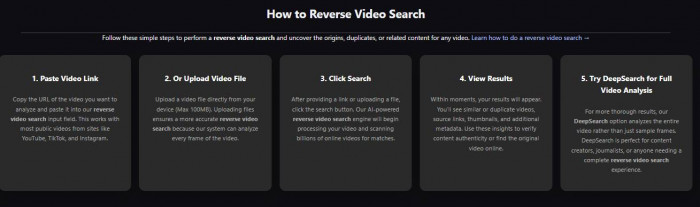
A practical step-by-step walkthrough with a realistic example
Let’s say you see a viral clip on Instagram: a short video shows a train passing close to a crowded platform, and the caption says “India, today.”
You want the origin.
Step 1: Save the best quality version you can
● If possible, open the clip on the original platform instead of a re-upload
● Avoid downloading screen recordings if you can, they destroy searchability
Step 2: Extract key frames
Pick frames from:
● The first second (often shows the widest view)
● The moment with the clearest platform sign or train number
● Any frame showing a landmark, station board, language script, uniform badge
Quick ways
● Take screenshots manually while pausing
● Use a frame extraction tool to grab frames every 1 to 2 seconds
Aim for 5 frames minimum.
Step 3: Reverse image search each frame
Start with Google Lens, then try Yandex for broader matches.
As you search, you are looking for:
● Older uploads
● Different captions
● Longer versions of the same clip
● Uploads with location details in comments
Step 4: Follow the oldest credible match
You might find:
● A YouTube upload from two years ago titled “Close call at station in Bangladesh”
● A TikTok upload with the same visuals but different language
● A news clip with a logo overlay
Click through and compare:
● Same camera angle
● Same crowd clothing
● Same platform markings
● Same timing of the train horn
Step 5: Validate the location with visual clues
Open the oldest upload and pause to confirm:
● Station signage language
● Architecture style
● Train livery colors and numbering style
● Any visible ads or local brand boards
If you see a station name, Google it and compare images of that station.
Step 6: Confirm “first upload” versus “first you can find”
The goal is not perfection, it is confidence.
A good verification conclusion looks like:
● “The earliest traceable upload I found is from X date on Y platform, posted by Z account.”
● “Multiple re-uploads appear later with changed captions.”
● “Visual clues match location A, not location B.”
Limitations, accuracy issues, and common mistakes
Why reverse video search fails sometimes
1. The clip is brand new, no older copies exist yet
2. Heavy edits: crop, mirror, color filters, stickers, subtitles
3. Low resolution or motion blur
4. Private group uploads (WhatsApp, Telegram) that search engines cannot index
5. The original was deleted or shadowbanned
Common mistakes people make
1. Searching only one frame
2. Searching only Google and stopping
3. Trusting the first result without comparing frames
4. Ignoring mirrored videos (many viral reuploads are flipped horizontally)
5. Assuming “oldest search result” equals “original source”
6. Believing captions without checking location markers
Comparison of popular tools used for reverse video search
| Tool / Method | What it does best | Strengths | Weaknesses |
| Google Lens / Google Images | Finds visually similar frames across the web | Fast, huge index, strong for mainstream sources | Can miss older regional uploads or heavily edited copies |
| Bing Visual Search | Alternate visual index | Good secondary confirmation | Often fewer matches than Google for niche videos |
| Yandex Images | Finds older copies and regional reposts | Surprisingly good for duplicates and older web footprints | Results quality varies by region and topic |
| TinEye | Tracks where an image appeared | Useful for image provenance when frames are clean | Not great for low-res frames or short-form repost ecosystems |
| InVID-WeVerify (plugin) | Frame extraction and verification workflow | Built for journalists, speeds up analysis | Still relies on external search engines for matches |
| YouTube search + filters | Finds longer originals of clips | Great for locating full videos and upload dates | Many reuploads, upload date is not always the filming date |
| TikTok watermark handle search | Finds creator or earliest viral post | Very effective when watermark exists | Watermark often removed or replaced |
| Audio recognition (Shazam, lyric search) | Identifies songs or reused audio | Can lead to the original creator trend | Fails with custom audio, noisy clips, or speech-heavy videos |
Practical tips for journalists, creators, and fact-checkers
For journalists
1. Save evidence: keep links, screenshots of captions, and timestamps
2. Archive pages when possible (viral posts get deleted)
3. Look for the longer version on YouTube or Facebook, short clips often come from long videos
4. Separate “upload date” from “event date” in your reporting
For creators protecting their work
1. Add subtle branding inside the frame, not only as a watermark
2. Post the full version on a stable channel (YouTube works well)
3. Keep project files and originals so you can prove ownership if needed
For fact-checkers
1. Always run at least two independent checks (example: frame search + platform search)
2. Beware of recycled footage during breaking news
3. Compare weather, season, and clothing against the claimed date and location
4. When in doubt, phrase conclusions carefully: “earliest known upload found,” not “definitive origin”
Why reverse video search matters more than ever

Video feels convincing. That is why misinformation loves it. A clip can be real but used in the wrong context, wrong place, wrong year, or with a caption designed to provoke anger.
Reverse video search helps you do something simple but powerful:
1. Slow the spread
2. Restore context
3. Identify the true source
4. Protect creators from theft
5. Reduce manipulation during major events
In a world where videos travel faster than explanations, knowing how to trace a clip back to its origin is not just useful. It is a modern literacy skill.