

Table of Content
- Two Tools, Two Different Starting Points
- A Quick Reality Check Before Going Deeper
- When You Are Creating Social Media Videos
- When You Are Turning a Blog Post Into a Video
- When You Are Making Marketing Content
- When You Are Creating YouTube Videos
- Looking at Capabilities More Closely
- What Pricing Actually Tells You
- The Real Difference Is Not Features, It Is Philosophy
- Where Each Tool Starts to Feel Limiting
- What This Means for Different Types of Users
- Where This Space Is Moving
There is a reason tools like InVideo and Pictory exist in the first place, and it has very little to do with “AI video creation” as a concept.
It comes down to time and friction.
If you have ever tried to create a video manually, even a simple one, you know how quickly things slow down. You start with an idea, then you search for footage, align scenes, adjust timing, add text, tweak transitions, fix audio. What should take minutes turns into hours. And if you are doing this regularly, for social media, marketing, or YouTube, it becomes a bottleneck.
That is the real problem these tools are solving.
Not creativity. Not editing. Just removing the effort between having content and turning it into a video.
But InVideo and Pictory approach that problem in completely different ways. And that difference only becomes obvious when you actually try to use them.
Two Tools, Two Different Starting Points
The first time I used InVideo, it felt like opening a simplified video editor. There were templates everywhere. You could pick a format, drop in text, adjust scenes, swap media, and build something that felt customized.
Pictory felt very different. (Pictory)
Instead of starting with a blank canvas or template, it starts with content. A script, a blog post, or even a long video. It reads it, breaks it down, and turns it into a sequence of scenes automatically.
That difference sounds small, but it changes everything.
One tool asks, “What do you want to create?”
The other asks, “What do you already have?”
A Quick Reality Check Before Going Deeper
| Aspect | InVideo | Pictory |
| Core strength | Creative control | Automation and summarization |
| Best use case | Designing videos from scratch | Converting content into videos |
| Ease of use | Medium | Very easy |
| Automation level | Moderate | High |
This table highlights the core split.
InVideo gives you control. Pictory removes effort.
Neither is better in isolation. It depends on what you are trying to do.
When You Are Creating Social Media Videos
This is where most people start.
Short videos for Instagram, ads, reels, or quick promotional clips.
InVideo feels more natural here. You can pick a template, adjust colors, replace visuals, tweak text placement, and build something that feels designed rather than generated.
Pictory can do this too, but it often feels like you are working backward. It generates something first, then you adjust it.
That difference shows up in the final output. InVideo videos tend to feel more intentional. Pictory videos feel more efficient.
If you care about how the video looks, InVideo has an edge. If you care about how fast you can produce it, Pictory wins.

When You Are Turning a Blog Post Into a Video
This is where Pictory becomes hard to ignore.
You paste a blog post, and it automatically breaks it into scenes, extracts key points, adds visuals, and generates a video structure.
InVideo does not really compete here. You would have to manually rebuild the content into scenes, which defeats the purpose of automation.
Pictory feels like it understands content structure better.
It does not just convert text into visuals. It interprets it.
That said, the results are not always perfect. Sometimes the scene selection feels generic. Sometimes the pacing is slightly off. But it still saves a significant amount of time.
This is one of the clearest differences between the two tools.
When You Are Making Marketing Content
Marketing sits somewhere in between.
You need speed, but you also need control.
InVideo works well when you want to align visuals with brand identity. You can control fonts, colors, layout, and pacing more precisely. (InVideo)
Pictory works better when you already have content, like a script or a webinar, and want to quickly turn it into multiple pieces.
InVideo feels like building a campaign asset.
Pictory feels like scaling content.
When You Are Creating YouTube Videos
Longer content introduces a different challenge.
Consistency and storytelling matter more.
Pictory has an interesting advantage here. It can take long videos or scripts and break them into digestible segments. This makes it useful for repurposing YouTube content into shorter clips.
InVideo, on the other hand, gives you more control over pacing and visual storytelling. If you want to build a YouTube video intentionally, scene by scene, it is the better tool.
But it also requires more effort.
This is a recurring pattern. InVideo rewards effort. Pictory reduces it.
Looking at Capabilities More Closely
| Feature | InVideo | Pictory |
| Templates | 5000+ | 3000+ |
| Stock assets | 8M+ | 3M+ |
| Blog to video | No | Yes |
| Script to video | Yes | Yes |
| Voiceover automation | Moderate | Strong |
| Editing control | High | Low to moderate |
This table reveals something subtle.
InVideo has more assets and templates, which makes it stronger for customization. Pictory has smarter automation, which makes it stronger for content transformation.
It is not about which one has more features. It is about what those features are trying to do.
What Pricing Actually Tells You
| Plan Type | InVideo | Pictory |
| Free Plan | Yes (limited, watermarked exports, basic AI access) | No (only free trial with limited videos) |
| Entry Plan | ~$25/month (Plus plan, lower on annual billing) | $25/month (Starter plan) |
| Mid Tier | ~$48/month (Max plan) | ~$59/month (Professional plan) |
| High Tier | ~$96–120/month (Generative/Premium) | $199/month (Team plan) |
| Enterprise | Custom pricing | Custom pricing |
Pricing reflects philosophy.
InVideo lowers the barrier. You can start for free, experiment, and gradually scale.

Pictory positions itself differently. It assumes you are using it for serious content workflows, so the pricing is higher, but the automation features are more advanced.
For beginners or casual creators, InVideo feels more accessible.
For content-heavy workflows, Pictory justifies its cost better.

A Simple Visual Comparison
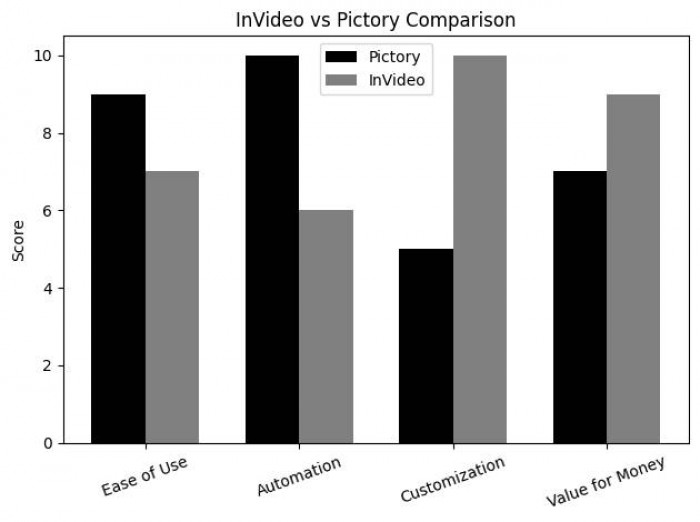
The pattern is consistent.
Pictory dominates automation.
InVideo dominates control.
Everything else sits somewhere in between.
The Real Difference Is Not Features, It Is Philosophy
After spending time with both tools, the biggest difference is not what they can do, but how they think about video creation.
InVideo assumes you want to design something. It gives you tools, templates, and flexibility. You shape the video.
Pictory assumes you want to convert something. It takes your content and turns it into video with minimal effort.
This is a fundamental split.
One tool gives control.
The other removes effort.
And you cannot optimize for both at the same time.
Where Each Tool Starts to Feel Limiting
InVideo, despite its flexibility, can feel time-consuming if you are producing videos regularly. You still have to make decisions. You still have to adjust scenes. It is faster than traditional editing, but not effortless.
Pictory, despite its automation, can feel generic if you rely on it too much. The outputs can start to look similar, especially if you do not intervene.
Both tools have ceilings.
InVideo’s ceiling is time.
Pictory’s ceiling is creativity.
What This Means for Different Types of Users
- Creator who enjoys shaping visuals, experimenting with layouts, and building videos intentionally, InVideo feels more satisfying.
- Someone who produces a lot of content and wants to turn it into video quickly, Pictory feels more practical.
- Running a content-driven business, Pictory scales better.
- Building a brand with a specific visual identity, InVideo gives you more control.
The choice is not about which tool is better.
It is about how you work.
Where This Space Is Moving
AI video tools are evolving quickly, but they are still solving two separate problems.
One is automation. The other is creativity.
Right now, tools like Pictory are pushing automation forward. Tools like InVideo are trying to preserve creative control while simplifying the process.
The gap between those two is where the next generation of tools will likely emerge.
Tools that do not just generate videos or help you edit them, but understand what kind of video should be created in the first place.
Until then, choosing between InVideo and Pictory is less about features and more about mindset.
Do you want to build your videos, or do you want them built for you?