


Table of Content
- What These Templates Are Really Trying to Solve
- First Use Experience: Less Setup, Faster Momentum
- How Flexible the Templates Actually Are
- What this means in practice:
- Where the Templates Work Best
- The Learning Curve Is Minimal, but Not Zero
- How They Compare to Generic Template Packs
- Limitations Worth Noticing
- How Editors Tend to Use Them Long Term
- Final Perspective
The first time you open an EditProTips template, the reaction is usually subtle rather than dramatic. There is no overwhelming setup, no loud promise of instant virality. What stands out instead is restraint. The templates feel designed for people who already understand editing pain points and simply want fewer decisions to make before starting.
This matters because most editors are not struggling with creativity. They are struggling with time, consistency, and repetition. EditProTips templates quietly aim at those friction points rather than trying to replace the editor’s judgment.
What These Templates Are Really Trying to Solve
At their core, EditProTips templates are not about flashy visuals. They are about structure and decision reduction.
In real editing workflows, time is rarely lost on the main creative idea. It is lost in small, repetitive choices that add up across projects:
1. Deciding where captions should sit and how much screen space they should occupy
2. Rebuilding the same animation rhythm again and again instead of refining it
3. Matching pacing across multiple videos so they feel like part of the same series
4. Maintaining visual consistency across platforms without rethinking layout each time
These decisions are not difficult, but they are mentally expensive when repeated daily.
The templates act like scaffolding rather than finished buildings. They give shape early in the process so editors are not staring at a blank timeline. You still make creative choices, but you make them on top of an existing structure instead of from zero.
This becomes especially noticeable when working on batches of content. When the structure stays consistent, momentum stays intact, and energy goes into refinement rather than reconstruction.
First Use Experience: Less Setup, Faster Momentum
Using an EditProTips template for the first time feels more like opening a partially completed project than starting from a blank timeline. The basic structure is already in place, which changes how you approach the edit from the first minute.
Most templates quietly answer early-stage questions that usually slow editors down:
1. Font hierarchy is already defined, so text feels readable without trial and error
2. Transition timing is pre-balanced, avoiding overuse or awkward pauses
3. Safe text zones for vertical formats are respected, reducing platform-specific fixes later
4. Visual balance between footage and overlays is handled, keeping screens from feeling crowded
Because these choices are resolved upfront, the initial editing phase moves faster and with less friction. You are not testing multiple directions. You are adjusting an existing one to fit your content.
For editors working under tight deadlines or creators posting daily, this shift matters. Less time is spent finding a starting point, and more time goes into polishing pacing, clarity, and message, which is where edits actually improve.
How Flexible the Templates Actually Are
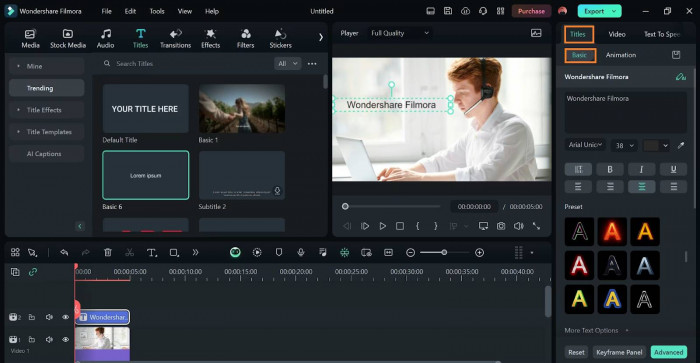
One concern many editors have with templates is rigidity. Once applied, they often feel difficult to reshape without breaking the design. EditProTips avoids that problem by keeping the design logic simple instead of overengineered.
What this means in practice:
1. Elements are modular, not locked
Individual components can be moved, resized, or removed without affecting the rest of the layout.
2. Text and motion layers are easy to remove or replace
You can strip the template down to its essentials or swap in your own text and animations without fighting the structure.
3. Color choices do not clash when adjusted
The base palette is neutral enough that changing brand colors does not create visual imbalance.
4. Animations are subtle enough to survive customization
Motion feels supportive rather than dominant, so timing and style changes still look intentional.
Instead of forcing a signature style, the templates adapt to the editor’s existing aesthetic. This flexibility makes them usable across different clients, formats, or channels without the work starting to feel repetitive or templated.
Where the Templates Work Best
EditProTips templates perform best in workflows where consistency matters more than constant visual experimentation. They are designed to support repeatable formats rather than one-off creative reinvention.
They shine most when used for:
1. Short-form social content
Short-form videos demand clarity and speed. EditProTips templates help establish a clear visual rhythm quickly, so viewers are not confused by layout or pacing. The structure keeps attention focused on the message rather than the presentation. This is especially useful when attention spans are limited and competition is high.
2. Educational or explainer videos
These formats benefit from visual consistency and predictable structure. The templates help organize information so ideas feel progressive rather than scattered. Viewers can focus on understanding the content instead of decoding the layout. This makes learning-oriented videos feel calmer and more intentional.
3. YouTube Shorts and Reels
Vertical platforms introduce strict layout constraints that often require repeated adjustments. EditProTips templates already respect safe zones and spacing, reducing rework. This allows editors to publish faster without worrying about text being cut off or visuals feeling cramped.
4. Branded series with recurring formats
When content follows a series format, visual familiarity builds trust and recognition. The templates provide a repeatable framework that stays consistent while allowing content to change. Over time, this consistency strengthens brand identity without demanding constant redesign.
5. Content repurposing across platforms
Repurposing works best when the original structure is flexible. These templates make it easier to adapt one piece of content into multiple formats without rebuilding everything. Editors spend less time restructuring and more time refining for each platform’s audience.
The Learning Curve Is Minimal, but Not Zero
EditProTips templates are built for editors who already understand the basics of their editing software. They are not meant to teach how timelines, layers, or keyframes work. Instead, they assume that foundation is already in place and focus on making those familiar actions faster and more consistent.
Most users can start using the templates effectively within one or two real projects. The structure is intuitive enough that experimentation is limited, and results appear quickly. That said, editors who are new to layer-based workflows or motion elements may need a short adjustment period to understand how everything is organized and connected.
Once that adjustment happens, the templates fade into the background of the workflow. They stop feeling like tools you are actively thinking about and start behaving like quiet infrastructure. When a template disappears into the process rather than demanding attention, it usually indicates thoughtful and functional design.
How They Compare to Generic Template Packs
| Feature / Platform | EditProTips Templates | Envato Elements | Motion Array | Storyblocks |
| Core focus | Structured editing templates optimized for workflow | Large all-in-one library including video templates, stock, graphics | Extensive templates + stock media + plugins | Stock video and template assets with simple editing tools |
| Design depth | Built for consistent reuse and adaptability | Huge variety but varies in style and quality | Professional templates + audio/footage ecosystem | Templates mixed with stock but less focused on depth |
| Ease of customization | High — modular and easy to adjust | Moderate — templates vary widely in complexity | Moderate — lots of options but can be complex | Easy for simpler edits, limited for deep customization |
| Best for | Repeat workflows, consistent brand formats | Agencies, designers needing lots of assets | Creators needing templates + stock + collaboration tools | Quick access to stock footage with basic templates |
| Library size | Template set designed for editing efficiency | Tens of millions of digital assets including video templates | Millions of assets including templates, footage, plugins | Millions of clips, sound, and basic templates |
| Subscription model | Focused on template sets | Unlimited downloads with subscription | Unlimited downloads with subscription | Unlimited downloads with subscription |
| Workflow integration | Works inside editing timelines with minimal setup | Works with multiple software but broader asset types | Includes plugins for workflow and review tools | Good for quick stock usage, less workflow depth |
| Learning curve | Low once basics are known | Varies by template complexity | Can be steeper due to larger toolset | Low for basic assets, limited for advanced edits |
Limitations Worth Noticing
No template system is perfect, and EditProTips has boundaries.
Some limitations that become visible over time:
1. Less variety if you rely on templates exclusively
Templates are designed around consistent structure, which means visual diversity can narrow over time. If every project starts from the same foundation, outputs may begin to resemble each other. This is more noticeable in high-volume publishing schedules. Variety usually comes from how the editor adapts the template, not from the template itself.
2. Creative fatigue if the same structure is reused too often
Repetition can quietly dull both the editor’s enthusiasm and the audience’s attention. Even well-designed layouts lose impact when seen too frequently. Without occasional structural changes, the workflow can start feeling mechanical rather than creative. Rotation or modification becomes important over long-term use.
3. Not ideal for high-end cinematic storytelling
Cinematic projects often require custom pacing, unconventional transitions, and highly expressive visual language. Templates prioritize efficiency and clarity, which can limit creative freedom in these contexts. For projects driven by mood and experimentation, starting from scratch often makes more sense. Templates are better suited for clarity than spectacle.
4. Requires intentional customization to avoid sameness
Templates work best when treated as starting points rather than final designs. Without adjustments to timing, typography, or layout, content can feel templated quickly. Editors who invest a small amount of customization usually avoid this issue. Intentional changes keep the structure useful without becoming repetitive.
These are not failures. They are natural trade-offs that come with any tool designed to prioritize speed, consistency, and reduced decision fatigue over unlimited creative freedom.
How Editors Tend to Use Them Long Term
Interestingly, long-term users rarely stick to templates exactly as provided.
Over time, editors tend to:
1. Modify timing to match personal pacing preferences
2. Replace default typography with brand fonts
3. Strip out effects they do not need
4. Build personal variations based on the original structure
At that point, EditProTips templates stop being templates and start becoming workflow foundations.
Final Perspective
EditProTips templates are not shortcuts. They are accelerators.
They reward editors who already know what they want to say and simply need a faster, cleaner way to say it visually. Used thoughtfully, they reduce friction without flattening creativity.
That balance is harder to achieve than it looks. And it is why these templates quietly fit into real workflows instead of just looking good in previews.