

Table of Content
- What Cutout.Pro is mainly used for
- Main AI Tools Available on Cutout.pro
- The Background Removal Tool
- Image Enhancer and Photo Quality Improvement
- Photo Restoration for Old Pictures
- Video Background Removal
- Creative AI Tools
- How Cutout.pro Works
- Who Benefits Most from Cutout.pro
- Situations Where Cutout.pro Is Especially Helpful
- Pros vs Limitations
- Pricing: Free Tools vs Paid Plans
- Is Cutout.pro Safe to use?
- Alternatives to Cutout.pro
- The Practical Bottom Line
Online image editing has become much easier in recent years. Tasks that once required advanced software and design skills can now be done automatically using AI tools. One platform that focuses on this type of automation is Cutout.pro. The platform is designed to help people edit photos and videos quickly without learning complicated design software.
Instead of manually selecting objects, adjusting layers, or applying complex filters, Cutout.pro uses artificial intelligence to analyze images and perform edits automatically. Users can upload a photo, select a tool, and download the result within seconds.
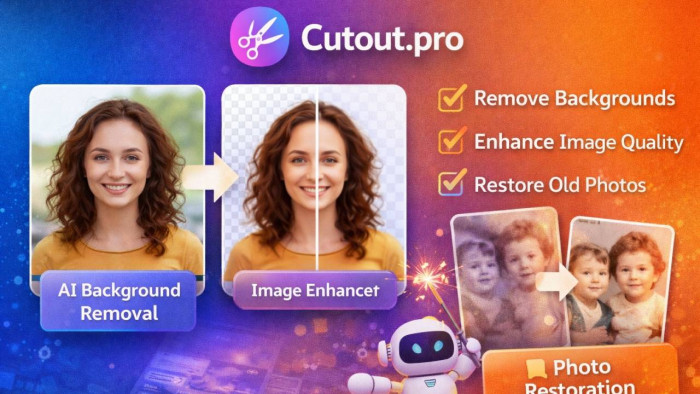
The platform is commonly used for removing backgrounds, improving photo quality, restoring old images, and even generating AI artwork. Because it works directly in a browser, people do not need to install software or have professional editing experience to use it.
What Cutout.Pro is mainly used for
Cutout.pro is an AI-powered visual editing platform that focuses on automating image and video editing tasks. Its main purpose is to simplify common design processes that normally take time when done manually.
People typically use the platform for tasks such as preparing product photos, creating social media graphics, or improving old images. Instead of editing each detail manually, the AI detects subjects and processes the image automatically.
Some of the most common uses include:
1. removing image backgrounds
2. enhancing photo resolution
3. restoring old or damaged photos
4. generating AI artwork
5. removing video backgrounds
6. creating passport-style photos
Because the platform performs most edits automatically, it is often used by people who want quick results rather than advanced customization.
Main AI Tools Available on Cutout.pro
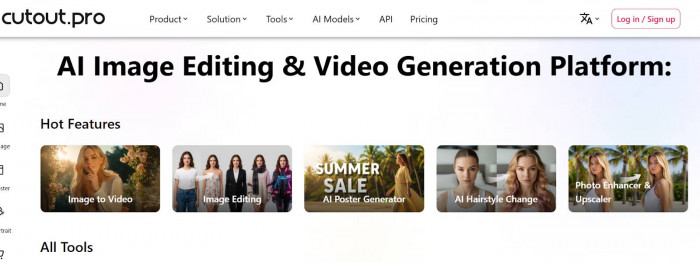
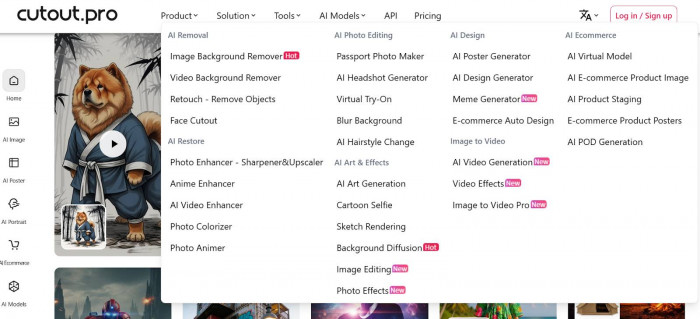
Cutout.pro includes several tools designed for different editing tasks. Each one uses artificial intelligence to simplify the editing process.
| Feature | What It Does |
| Background Remover | Automatically removes backgrounds from images |
| Image Enhancer | Improves image quality and resolution |
| Photo Restoration | Repairs old or damaged photos |
| AI Art Generator | Creates artwork from text or image prompts |
| Video Background Removal | Removes backgrounds from video clips |
| Passport Photo Maker | Creates photos that match ID size requirements |
| Object Removal | Removes unwanted objects from images |
| Cartoon Generator | Converts photos into cartoon-style images |
Most of these tools work through the same process: upload a file, let the AI process it, and download the result.
The Background Removal Tool
One of the most widely used features on the platform is the AI background remover. This tool automatically detects the main subject in a photo and removes everything behind it.
Many people use this feature when they need images with transparent backgrounds. For example, online sellers often require product images with clean backgrounds for marketplaces and online stores.
Instead of manually outlining objects, the AI analyzes the image and separates the subject from the background automatically. The result can then be downloaded as a transparent PNG file.
This type of automation saves time, especially for people who need to edit large numbers of images.
Image Enhancer and Photo Quality Improvement
Another commonly used feature is the AI image enhancer. This tool improves the quality of images by increasing resolution and sharpening details.
Low-quality photos can sometimes appear blurry or pixelated. The image enhancer analyzes the photo and attempts to improve its clarity by adjusting details such as edges, textures, and color balance.
The enhancer is often used for:
1. improving old smartphone photos
2. enlarging small images
3. preparing images for presentations
4. enhancing photos used in marketing materials
While the tool can improve many images, the results depend on the original image quality.
Photo Restoration for Old Pictures
Cutout.pro also provides tools designed to restore old or damaged photographs. These tools analyze the image and attempt to repair visual damage caused by aging.
Old photos often suffer from problems such as fading, scratches, and blur. AI restoration tools can reduce these effects and improve image clarity.
This feature is commonly used by people who want to digitally restore family photographs. The process usually requires only uploading the image and allowing the AI system to analyze it.
Although restoration results vary depending on the condition of the original image, the tool can often improve the appearance of older photos.
Video Background Removal
In addition to image editing, Cutout.pro also includes a video background removal tool. This feature allows users to remove the background from video clips and replace it with a new background.
Traditionally, background removal in video required green screen equipment. AI-based tools attempt to achieve similar results without special equipment by detecting the subject automatically.
The tool can be used for:
1. social media videos
2. online presentations
3. YouTube content
4. marketing videos
While the results can be useful for simple projects, advanced video editing software still provides more precise control.
Creative AI Tools
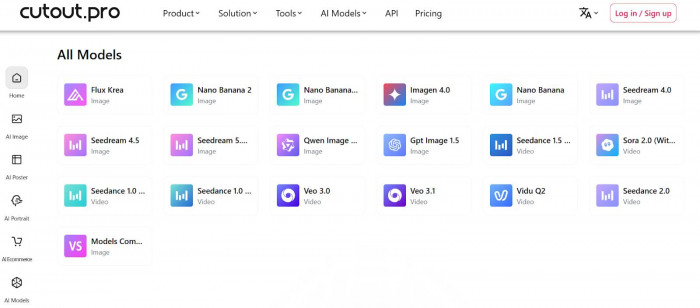
Cutout.pro also offers several creative tools designed for visual experimentation.
These tools allow users to transform images into artistic styles or generate AI-created artwork. For example, users can convert photos into cartoon illustrations or stylized portraits.
Creative features include:
1. AI art generation
2. cartoon-style photo effects
3. image stylization tools
These tools are often used for social media content, profile pictures, and creative design projects.
How Cutout.pro Works
One of the main reasons people choose Cutout.pro is its simple workflow. Most tools follow a similar process that is easy for beginners to understand.
Step 1: Upload a File
Users begin by uploading an image or video file to the platform. Most common image formats such as JPG and PNG are supported.
Step 2: Select an AI Tool
After uploading the file, users choose the editing tool they want to use, such as background removal or image enhancement.
Step 3: Automatic AI Processing
The AI analyzes the image and performs the requested edit automatically. This step usually takes only a few seconds.
Step 4: Preview the Result
Once processing is complete, users can preview the edited version before downloading it.
Step 5: Download the File
The final image or video can then be downloaded in the available format or resolution.
This process makes the platform accessible to beginners who may have never used professional editing software.
Who Benefits Most from Cutout.pro
Cutout.pro is designed for a wide range of users, especially those who need quick image editing.
Several types of users commonly benefit from the platform.
| User Type | How They Use the Platform |
| Designers | Quickly isolate objects for graphics |
| Online Sellers | Create product photos with clean backgrounds |
| Marketers | Prepare visuals for advertisements |
| Content Creators | Design thumbnails and social media images |
| Casual Users | Improve personal photos |
Because the platform automates editing tasks, it allows people with little design experience to create professional-looking visuals.
Situations Where Cutout.pro Is Especially Helpful
Cutout.pro is particularly useful when users need to edit images quickly without spending time learning complex software.
For example, many e-commerce sellers need product images with white or transparent backgrounds. Creating these images manually can take time, but AI background removal can complete the task almost instantly.
The platform is also helpful for social media creators who need visuals for posts, advertisements, and thumbnails. Instead of editing images manually, they can generate edited versions quickly.
Another common use case is photo restoration. People who want to improve old family photos can upload them to the platform and let the AI attempt to repair damage and improve clarity.
These situations show why AI editing tools are becoming increasingly popular.
Pros vs Limitations
Although Cutout.pro offers several useful tools, it also has certain limitations.
| Pros | Limitations |
| Very easy for beginners | Complex images may confuse AI |
| Fast automatic editing | Limited manual control |
| Multiple tools in one platform | Free downloads may have lower resolution |
| Useful for product photos | Video editing features are basic |
| No software installation required | Some tools require credits |
For many everyday tasks, the advantages of speed and simplicity outweigh the limitations.
Pricing: Free Tools vs Paid Plans
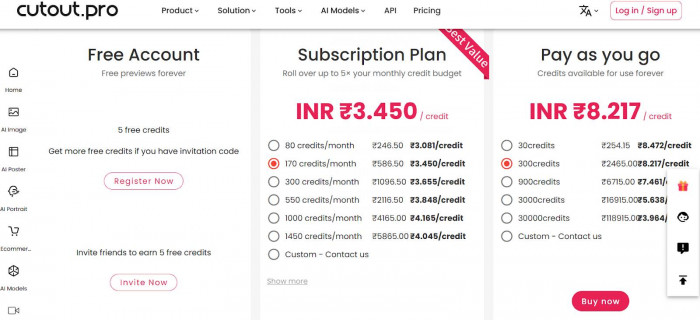
Cutout.pro offers both free and paid access to its tools. The free version allows users to test many features but often limits download quality or the number of edits.
The platform generally uses a credit-based system. Each AI operation consumes a certain number of credits.
| Plan Type | What Users Get |
| Free Access | Limited editing and lower-resolution downloads |
| Credit Packages | Pay credits for individual AI edits |
| Paid Plans | Higher resolution and faster processing |
| Business Plans | API access for automation |
This pricing model allows occasional users to test the platform while businesses can purchase credits for larger projects.
Is Cutout.pro Safe to use?
Many users want to know whether online editing platforms are safe. Cutout.pro operates using HTTPS encryption, which means data transferred between users and the platform is protected.
The platform is widely used by creators and businesses, which suggests that it functions reliably for common editing tasks. However, as with any online service, users should avoid uploading sensitive or confidential images unless they trust the platform’s policies.
For most everyday editing needs, the platform appears to operate similarly to other AI-based editing tools available online.
Alternatives to Cutout.pro
Several other tools offer similar AI editing features. People sometimes compare these platforms depending on the specific editing task.
| Tool | Main Focus |
| Remove.bg | Background removal |
| Canva | Graphic design with AI tools |
| PhotoRoom | E-commerce product photos |
| Fotor | AI photo enhancement |
| Adobe Express | Creative image editing |
Each platform has slightly different features, so users often choose based on their workflow.
The Practical Bottom Line
Cutout.pro focuses on making visual editing simple and fast. Instead of requiring professional design skills, the platform uses AI to automate tasks such as background removal, image enhancement, and photo restoration.
The platform works particularly well for online sellers, marketers, content creators, and casual users who need quick visual edits. While it does not replace professional editing software, it provides a convenient solution for many everyday design tasks.
For users who want quick results without learning complex tools, Cutout.pro offers an accessible way to edit images and videos directly from a web browser.